
Agentsurf Browser Control Runtime
FreeNot checkedLocal MCP server and Chrome browser control runtime that lets AI agents use your existing browser session.

About
Local MCP server and Chrome browser control runtime that lets AI agents use your existing browser session.
README
中文 | English
本项目已在 LINUX DO 社区发布。
AgentSurf 让你正在使用的 AI Agent 直接操作你的本机 Chrome 或 Edge。可以把它理解为 ChatGPT 浏览器插件的通用版本:不绑定某个模型或客户端,任何支持 MCP 的 Agent 都可以接入。
它复用你当前的登录态和标签页,支持读取页面、点击、输入、滚动、截图、文件上传和 iframe 等常见操作。你不需要换浏览器,也不需要重新登录。Chrome 和 Edge 可以同时安装,各自使用独立端口和配置。
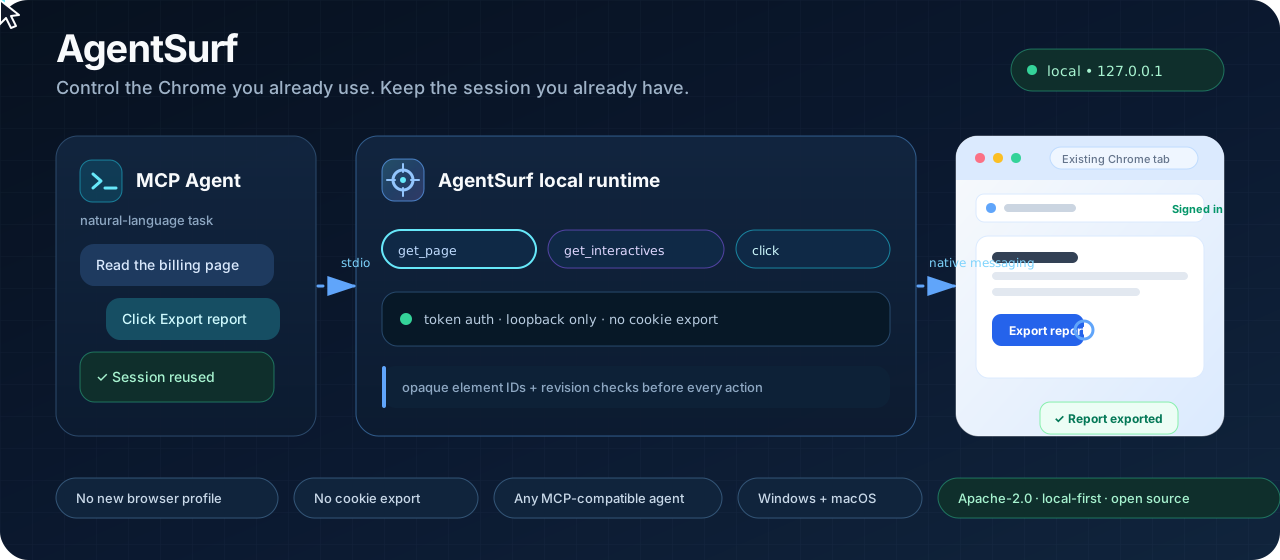
已在 Codex、Command Code agent 和 pi agent 实测,均可正常接入和操作。Windows 与 macOS 均已真机验证;首次接入通常需要 5–10 分钟。
实测场景
- Pinterest:在已登录的 Pinterest 中上传图片、填写 Pin 信息,并在发布前停下来等待确认。
- 禅道:读取你有权限访问的任务,汇总待办、负责人和优先级;修改任务前仍需确认。
- Google Trends:切换关键词、地区和日期范围,读取趋势页面并整理关键变化。
快速开始
把本 README 交给能操作电脑的 Agent,让它带你完成安装;也可以按下面的步骤手动操作。
请选择你的部署模式:
模式 适用场景 说明与入口 💻 本地部署 (默认) Claude Desktop、Cursor、Codex 等本机 Agent 查看下方本地步骤 👇(0 网络依赖、断网可用) ☁️ 云端远程部署 云端 Agent、远程 MCP 客户端、Notion AI、工作流等 跳转远程网关指南 ↗(反向连接网关,本地 0 终端)
💻 本地部署 (默认)
1. 准备环境
| 需要 | 要求与检查方式 |
|---|---|
| Node.js | 20+,终端执行 node -v |
| Git | 终端执行 git --version |
| Chrome 或 Edge | 116+,Chrome 打开 chrome://version,Edge 打开 edge://version |
不需要管理员权限,也不会修改你 Chrome 里已有的登录态和设置。
2. 安装
- 克隆仓库并进入项目目录:
git clone https://github.com/ztao0916/agentsurf-browser-control-runtime.git
cd agentsurf-browser-control-runtime
- 执行安装向导:
npm run setup
默认不改变原有行为:只安装 Chrome,继续使用 agentsurf、根目录 config.json 和原有启动器。同时使用 Chrome 和 Edge 时执行:
npm run setup -- --browser all
已有的 agentsurf 配置不需要删除,仍会连接 Chrome;新增的 agentsurf-chrome 和 agentsurf-edge 用于显式选择目标浏览器。
| MCP 名称 | 目标 | 使用场景 |
|---|---|---|
agentsurf |
Chrome | 默认安装和旧配置,保持兼容 |
agentsurf-chrome |
Chrome | 多浏览器模式下的显式 Chrome |
agentsurf-edge |
Edge | 多浏览器模式下的显式 Edge |
向导会自动完成依赖安装、构建和 Native Host 注册,并提示你分别操作要使用的浏览器:
- 在 Chrome 打开
chrome://extensions,在 Edge 打开edge://extensions,开启开发者模式; - 点击“加载已解压的扩展程序”,选择项目里的
dist/; - 复制每个浏览器中 AgentSurf 卡片显示的扩展 ID,粘贴回终端;
- 保存终端最后打印的 MCP 配置 JSON。
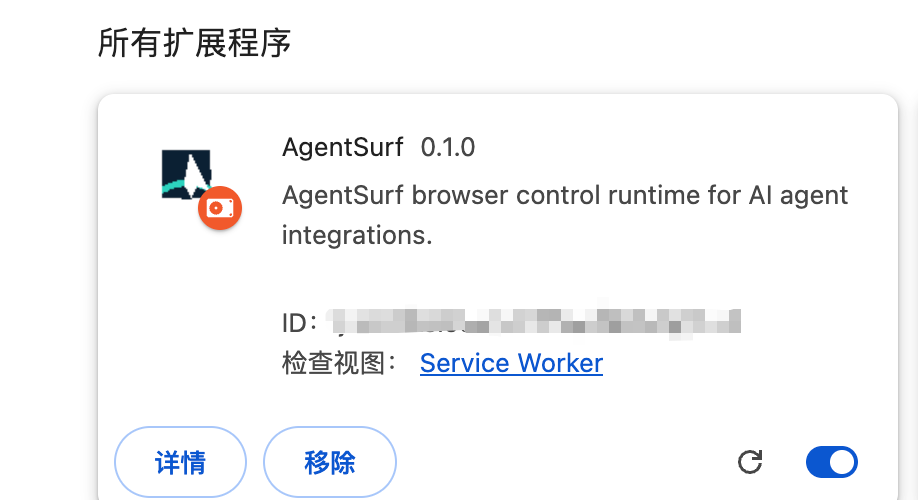
图中 ID 就是安装向导需要填写的 AgentSurf 扩展 ID。
3. 检查扩展连接
- 回到每个浏览器的扩展页面,点 AgentSurf 卡片上的 重新加载;
- 点击浏览器工具栏里的 AgentSurf 图标;
- 确认扩展面板中 「本地直连」 或 「云端网关」 处于开启生效状态(默认本地直连开启)。
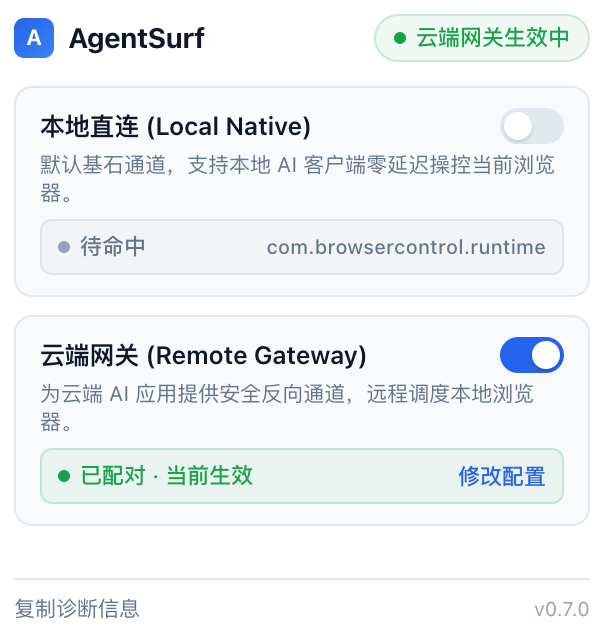
4. 接入你的 Agent(MCP 配置)
安装脚本最后会打印一段 MCP 配置,核心是启动器的绝对路径。选择下面任意一种方式接入:
方式 A:通过 CC Switch
- 打开 CC Switch,点击顶部的 MCP;
- 点击右上角 +,选择 自定义;
- 服务器 ID 填
agentsurf-chrome或agentsurf-edge,传输类型选stdio,把安装脚本打印的对应command路径填入 命令; - 保存后,打开对应 Agent 的同步开关(如 Claude、Codex、Gemini);
- 重启对应 Agent。
如果 CC Switch 的同步列表里没有你正在用的 Agent,使用方式 B。
方式 B:交给 AI Agent 自动配置
把安装脚本的完整输出发给正在使用的 Agent,然后直接说:
请把这段 MCP 配置加入你当前使用的 Agent,名称使用配置中的 key,完成后告诉我如何重启和验证。
完成后重启 Agent。
npm run setup 会为本次安装的每个浏览器分别打印 MCP 配置。把完整输出加入你的 Agent 即可。同时安装 Chrome 和 Edge 时,结构如下:
{
  "mcpServers": {
    "agentsurf-chrome": {
      "command": "<Chrome 启动器绝对路径>"
    },
    "agentsurf-edge": {
      "command": "<Edge 启动器绝对路径>"
    }
  }
}
☁️ 云端远程部署 (适配各类云端 Agent 与不同环境)
如果你需要让运行在云端服务器、SaaS 平台或私有环境中的 AI 智能体(如自定义云端 Agent、Dify、Coze、Notion AI、远程自动化流水线等)安全调度你本地的真实 Chrome / Edge 浏览器,推荐使用 远程网关模式:
- 多环境通用适配:提供标准 Streamed HTTP MCP 接口,可无缝接入任意支持 MCP 协议的云端应用与智能体;
- 本地 0 终端门槛:本地电脑无需常驻命令行、无需 SSH 隧道或申请公网 IP,在扩展面板即可一键连接;
- 服务永久在线:云端常驻轻量反向网关,跨网络、跨设备、支持自动断线重连;
- 一键交给 AI 部署:文档内附完整的服务端部署 Prompt,复制发给任何 AI 编程工具即可自动完成服务器配置;
- 详细部署与配置指南请参阅独立文档:👉 云端远程网关部署与多环境接入指南 (docs/remote-gateway.md)。
同时使用多个浏览器
浏览器由 MCP Server 名称选择,不是在 browser.* 工具参数里填写浏览器名称。
- 旧的
agentsurf和显式的agentsurf-chrome都操作 Chrome; agentsurf-edge操作 Edge;- 两个浏览器拥有独立的标签页、页面 revision 和会话,不要把 Chrome 的
tab_id或element_id传给 Edge; browser.reset_sessions也只清理当前 MCP Server 对应的浏览器。
在支持选择 MCP Server 的 Agent 中,可以直接用自然语言指定目标:
用 agentsurf 打开 https://example.com,并告诉我 Chrome 中的页面标题。
用 agentsurf-edge 打开 https://example.com,并告诉我 Edge 中的页面标题。
如果 Agent 会把工具名前缀写成 Server 名称,则分别选择 agentsurf / agentsurf-chrome 和 agentsurf-edge 下的 browser_list_tabs、browser_open 等工具。不要连续把同一组标签页操作切换给不同 Server;每个 Server 只会看到自己浏览器中的标签页。
使用与检查
在对话里直接对 Agent 说:
打开 https://example.com,告诉我页面标题。
如果它能打开网页并返回标题,就说明 AgentSurf 已经可以正常使用了。之后你可以继续让它读取、点击、输入、截图或完成其他浏览器操作。
截图时看到“Chrome 正在被调试”或“AgentSurf 已开始调试此浏览器”属于正常现象。
首次使用建议先操作普通网页。请先以只读方式使用;提交、保存、删除、发布、上传、发送消息等操作前由你确认。不要把密码、验证码、Cookie 或 Token 发给 Agent。
本项目采用 Apache License 2.0。
Install Agentsurf Browser Control Runtime in Claude Desktop, Claude Code & Cursor
unyly install agentsurf-browser-control-runtimeInstalls into Claude Desktop, Claude Code, Cursor & VS Code — handles npx, uvx and build-from-source repos for you.
First time? Get the CLI: curl -fsSL https://unyly.org/install | sh
Or configure manually
Run in your terminal:
claude mcp add agentsurf-browser-control-runtime -- npx -y github:ztao0916/agentsurf-browser-control-runtimeStep-by-step: how to install Agentsurf Browser Control Runtime
FAQ
Is Agentsurf Browser Control Runtime MCP free?
Yes, Agentsurf Browser Control Runtime MCP is free — one-click install via Unyly at no cost.
Does Agentsurf Browser Control Runtime need an API key?
No, Agentsurf Browser Control Runtime runs without API keys or environment variables.
Is Agentsurf Browser Control Runtime hosted or self-hosted?
Self-hosted: the server runs locally on your machine via the install command above.
How do I install Agentsurf Browser Control Runtime in Claude Desktop, Claude Code or Cursor?
Open Agentsurf Browser Control Runtime on unyly.org, pick your client tab (Claude Desktop, Claude Code, Cursor) and press Install — the config is generated automatically, no JSON editing.
Related MCPs
Playwright
Browser automation, scraping, screenshots
 by Microsoft
Puppeteer
Browser automation and web scraping.
 by modelcontextprotocol
Garmin Connect
An MCP server for Garmin Connect that provides access to fitness activities, health statistics, and sleep data by routing requests through a headless browser to
 by etweisberg
Higgsfield Unlimited
MCP server for Higgsfield AI that enables unlimited-mode image, video, audio generation, uploads, and job management via multiple parallel accounts, using brows
 by nukIeer
opentabs-dev/opentabs
Plugin-based server and Chrome extension that gives AI agents access to web apps through your authenticated browser session, with a plugin SDK.
 by opentabs-dev
hlydecker/ucsc-genome-mcp
Interact with the UCSC Genome Browser API to find genomes, chromosomes and more.
 by hlydecker
34892002/bilibili-mcp-js
Search Bilibili content, with LangChain integration examples.
 by 34892002
achiya-automation/safari-mcp
Native Safari browser automation without a Chrome dependency.
 by achiya-automation
agent-infra/mcp-server-browser
Browser automation using Puppeteer, supporting local and remote browser connections.
 by bytedance
aparajithn/agent-scraper-mcp
Web scraping: clean content extraction, CSS-selector scraping, Playwright screenshots, link and metadata extraction, and Google search.
 by aparajithn
Compare Agentsurf Browser Control Runtime with
Not sure what to pick?
Find your stack in 60 seconds
Author?
Embed badge for your README
Browse similar
All browse MCPs