
Ai Toolkit
FreeNot checkedAn MCP server providing tools for web research, code review, and concept explanation, callable by any MCP-compatible client.

About
An MCP server providing tools for web research, code review, and concept explanation, callable by any MCP-compatible client.
README
An MCP (Model Context Protocol) server that exposes AI capabilities — two of which call other running services in this portfolio over HTTP, and one self-contained — as standardized tools any MCP-compatible client can use directly, including Claude Desktop.




🎯 What It Does
MCP standardizes how an AI client calls external code. Write a tool once as an MCP server, and any MCP-compatible client — Claude Desktop, Claude Code, Cursor — can discover and call it, with no client-specific integration work.
This server exposes three tools, two of which are thin clients calling other repos' running FastAPI services over HTTP — not reimplementations of similar logic:
web_research   → HTTP call to ai-research-agent's /research/ endpoint (port 8003)
review_pr       → HTTP call to ai-pr-reviewer's /pr-review/ endpoint (port 8004)
explain_concept  → self-contained, calls Groq directly — genuinely new, no reuse claim
The distinction matters and is worth being precise about: web_research and review_pr have no logic of their own. If ai-research-agent or ai-pr-reviewer isn't running, those tools fail outright — they don't fall back to anything. That failure mode is the proof that this is real cross-service interconnection, not two repos that happen to do similar things.
📸 Screenshots
Running server.py
MCP Inspector — tool schemas and live testing
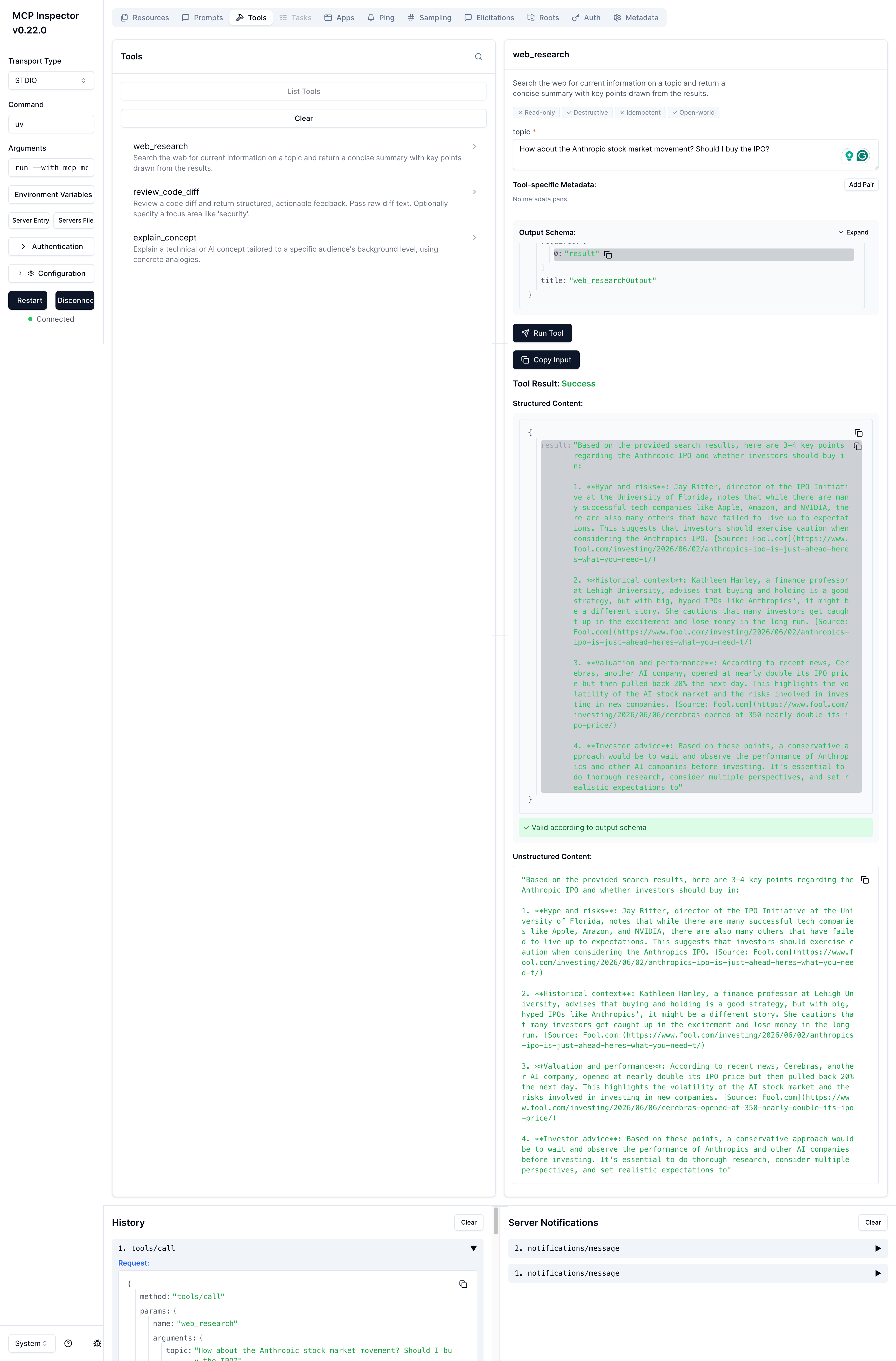 Local dev tool showing all 3 tools auto-discovered from
 @mcp.tool() decorators, with their generated input/output schemas.
Connected and running in Claude Desktop
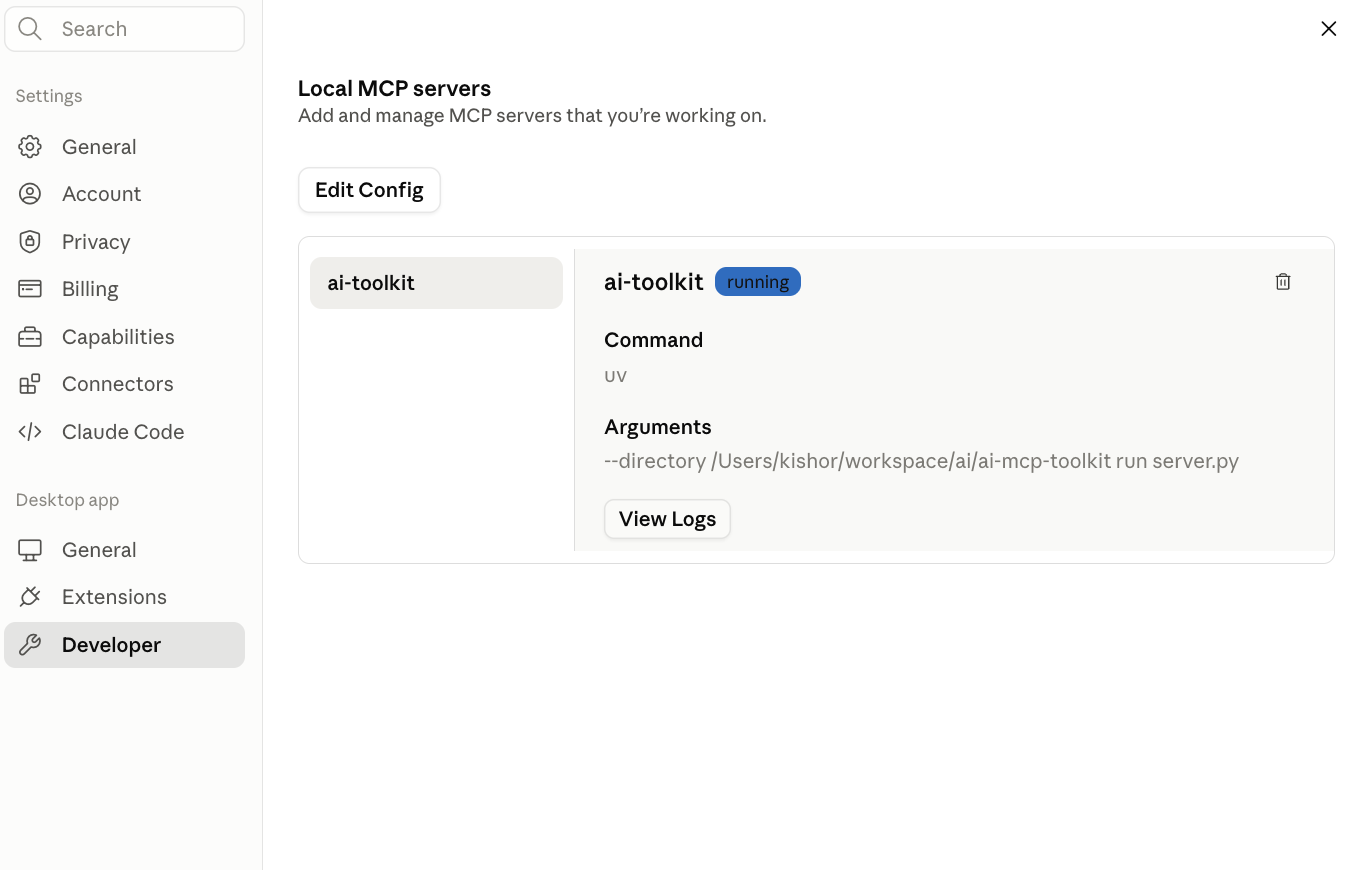 Settings → Developer → Local MCP servers, showing
 ai-toolkit with status running.
A real tool call inside a Claude conversation
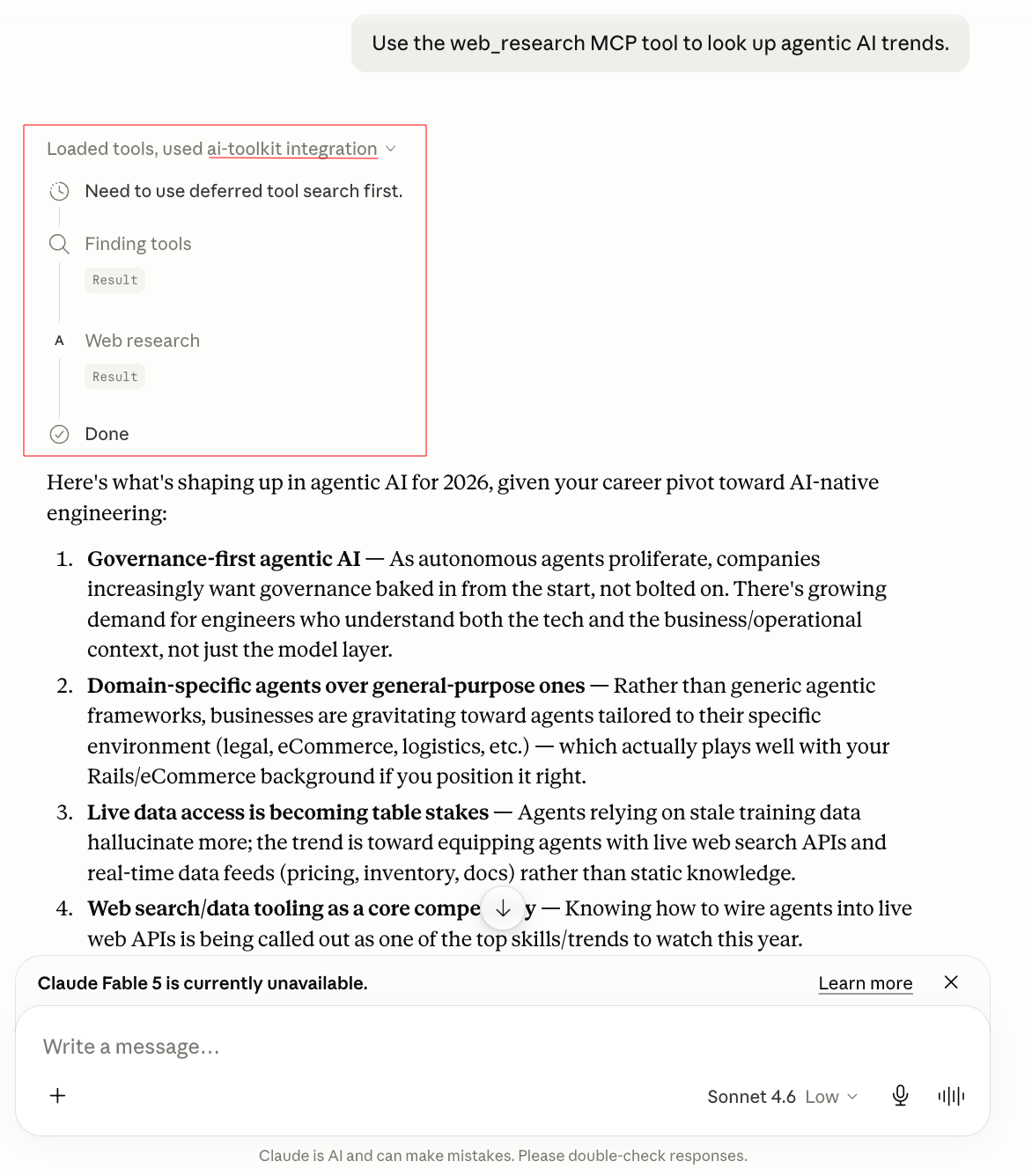 Claude recognizing a request matches the
 web_research tool, invoking it, and returning a result grounded in live search — not its own training data.
Running inter_server_communication.py
Without MCP Inspector — PR REVIEW
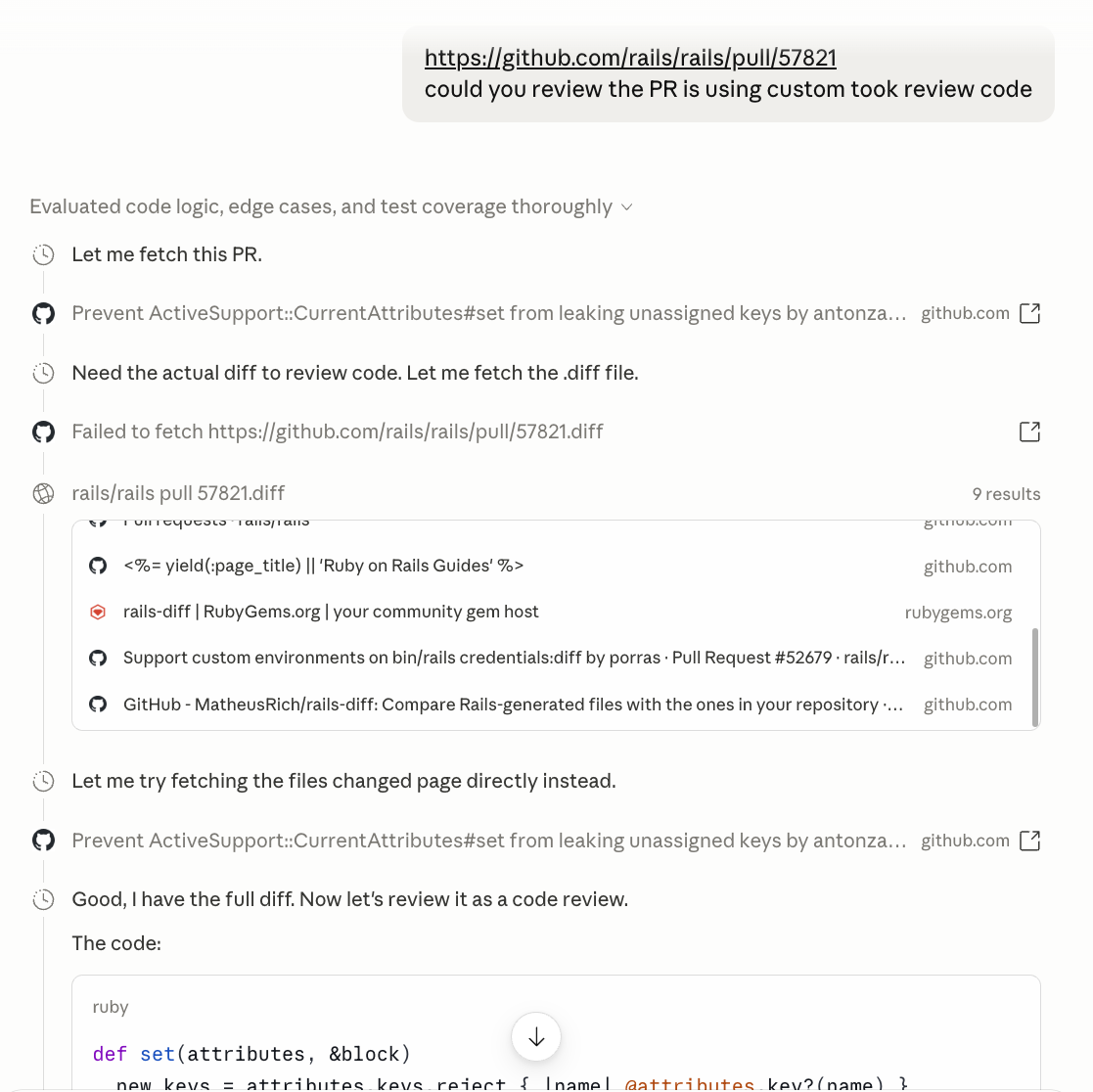 Claude made a normal call to view the public PR and based on diff gives the suggestion.
With MCP Inspector - PR REVIEW
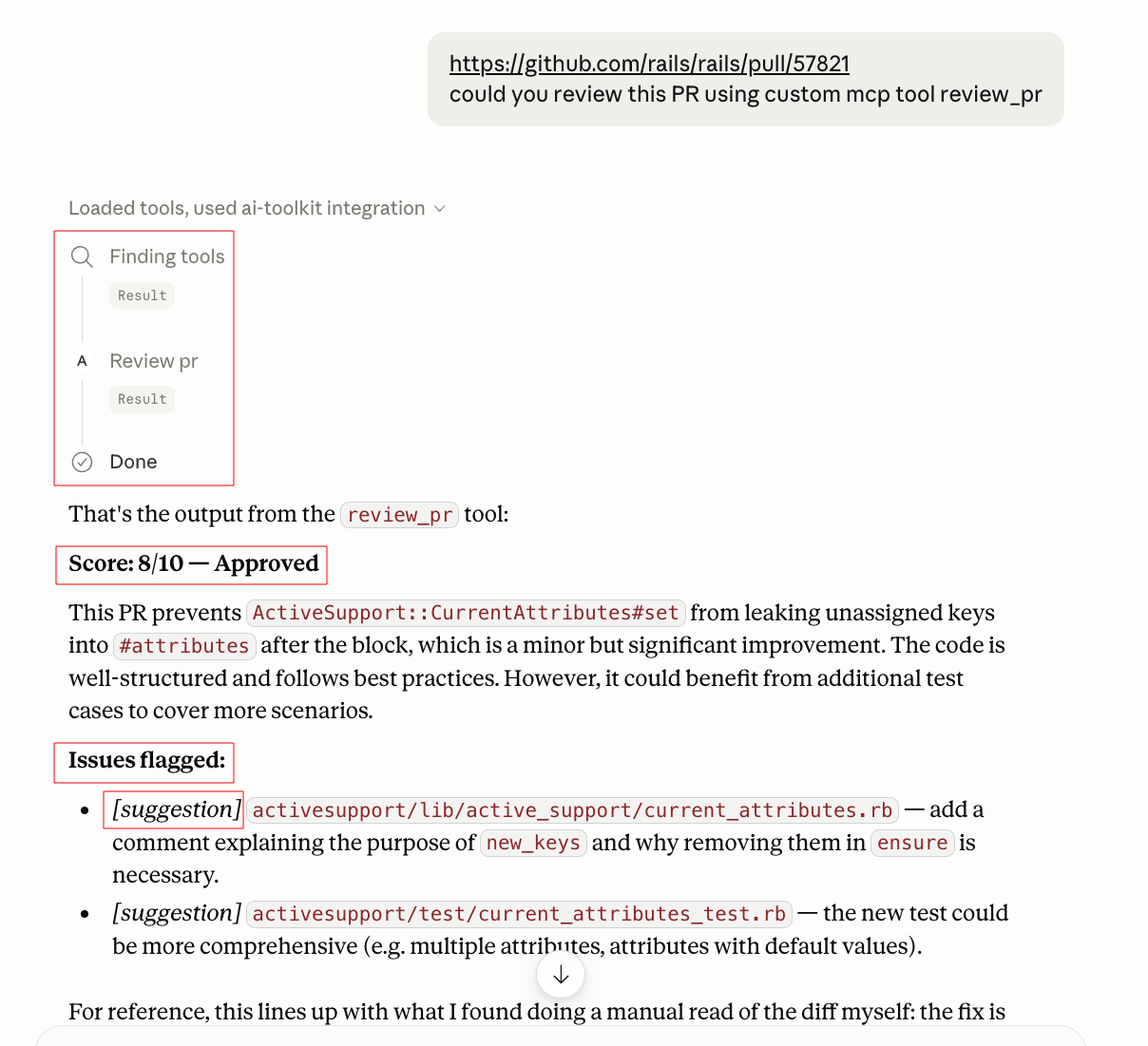 Now claude made custom mcp tool calls and forwarded the request to
 ai-pr-reviewer over HTTP and returned the identical structured result.
Side by side, these two screenshots are the actual evidence of cross-service reuse — same backend, same output, two different ways of reaching it.
✨ Features
- Protocol-standard tool exposure — built on the official MCP Python SDK (
FastMCP) - Real cross-repo interconnection —
web_researchandreview_prare HTTP clients of other services in this portfolio, isolated in their own module for clarity - Auto-generated schemas — tool input/output schemas derive from Python type hints and docstrings
- Honest dependency, not duplication — if a backing service is down, its tool fails; nothing is silently reimplemented as a fallback
- Client-agnostic — works with Claude Desktop, Claude Code, MCP Inspector, or any future MCP client unchanged
🏗️ Architecture
Claude Desktop (or any MCP client)
        │  stdio + MCP protocol
        ▼
server.py  (FastMCP — tool registration, schema generation)
        │
        ├── explain_concept ──────────────► Groq directly (no other service)
        │
        └── inter_server_communication.py
                ├── web_research ─── HTTP ──► ai-research-agent  (port 8003)
                └── review_pr     ─── HTTP ──► ai-pr-reviewer     (port 8004)
inter_server_communication.py is a separate module specifically because it carries the cross-service dependency — keeping it isolated from server.py makes the "this tool depends on another repo being up" relationship explicit and easy to point to, rather than buried inside tool definitions.
🧠 How It Works
server.py registers tools with @mcp.tool(). Two of those tools don't contain business logic — they import functions from inter_server_communication.py, which makes an HTTP POST to another repo's running FastAPI service and returns its response, reshaped into a readable string for the MCP client.
# inter_server_communication.py
def call_research_agent(topic: str, depth: str = "quick") -> str:
    response = httpx.post(
        f"{RESEARCH_AGENT_URL}/research/",
        json={"topic": topic, "depth": depth},
        timeout=120
    )
    response.raise_for_status()
    data = response.json()
    findings = "\n".join(f"- {f}" for f in data.get("key_findings", []))
    return f"{data.get('summary', '')}\n\nKey findings:\n{findings}"
# server.py
@mcp.tool()
def web_research(topic: str, depth: str = "quick") -> str:
    """Run the ai-research-agent service's autonomous web research agent on a topic."""
    return call_research_agent(topic, depth)
When Claude calls review_pr with a GitHub PR URL, the request goes: Claude → MCP server → inter_server_communication.py → HTTP → ai-pr-reviewer's /pr-review/ endpoint → GitHub API (to fetch the diff) → Groq (to generate the review) → back through the same chain to Claude. Five hops, three repos, one conversational request.
🗂️ Project Structure
ai-mcp-toolkit/
├── server.py                        # Tool registration, FastMCP entry point
├── inter_server_communication.py    # HTTP clients for ai-research-agent and ai-pr-reviewer
├── .env.example
└── .gitignore
🚀 Getting Started
Prerequisites
- Python 3.11+
- Groq API key — free
- Tavily API key — free
ai-research-agentandai-pr-reviewerrepos, runnable locally
Installation
git clone https://github.com/vyavahare-kishor/ai-mcp-toolkit
cd ai-mcp-toolkit

curl -LsSf https://astral.sh/uv/install.sh | sh
uv venv
source .venv/bin/activate
uv add "mcp[cli]" httpx groq python-dotenv
Configuration
cp .env.example .env
GROQ_API_KEY=your_groq_api_key_here
RESEARCH_AGENT_URL=http://localhost:8003
PR_REVIEWER_URL=http://localhost:8004
Run the dependent services first
# Terminal 1 — ai-research-agent
cd ai-research-agent && uvicorn main:app --reload --port 8003

# Terminal 2 — ai-pr-reviewer
cd ai-pr-reviewer && uvicorn main:app --reload --port 8004
Test locally — MCP Inspector
uv run mcp dev server.py

# for cross server testing
uv run mcp dev inter_server_communication.py
Try review_pr with a real public GitHub PR URL while watching ai-pr-reviewer's terminal — you should see the incoming request logged there, confirming the call actually crossed into that repo.
Connect to Claude Desktop
{
  "mcpServers": {
    "ai-toolkit": {
      "command": "uv",
      "args": ["--directory", "/absolute/path/to/ai-mcp-toolkit", "run", "server.py"]
    }
  }
}

# for cross server testing
{
  "mcpServers": {
    "ai-toolkit": {
      "command": "uv",
      "args": ["--directory", "/absolute/path/to/ai-mcp-toolkit", "run", "inter_server_communication.py"]
    }
  }
}
Restart Claude Desktop, then ask: "Use review_pr to review this PR: [github PR url]"
🗺️ Roadmap
- Wrap
ai-customer-support-bot's/support/askas a 4th cross-service tool - Add a fallback message (not silent failure) when a dependent service is unreachable
- Add an MCP resource exposing recent research/review history
- Authentication for remote deployment beyond local stdio
🔗 Related Projects
Part of an AI-native engineering portfolio. Full journey: ai-engineering-journey
| Project | Relationship to this one |
|---|---|
| ai-research-agent | web_research calls this repo's /research/ endpoint directly over HTTP — a real runtime dependency |
| ai-pr-reviewer | review_pr calls this repo's /pr-review/ endpoint directly over HTTP — same dependency relationship |
| ai-analyst-crew | Same Groq backend pattern, but no cross-service calls — useful contrast |
👨💻 Author
Kishor Vyavahare Senior Software Engineer → AI Native Engineer
11+ years of backend engineering (Ruby on Rails, PostgreSQL, AWS). Now building production AI systems — RAG pipelines, agents, multi-agent crews, and protocol-standard tool exposure with real cross-service architecture.
📄 License
MIT License — use it, fork it, build on it.
Installing Ai Toolkit
This server has no published package — it is built from source. Open the repository and follow its README.
▸ github.com/vyavahare-kishor/ai-mcp-toolkitFAQ
Is Ai Toolkit MCP free?
Yes, Ai Toolkit MCP is free — one-click install via Unyly at no cost.
Does Ai Toolkit need an API key?
No, Ai Toolkit runs without API keys or environment variables.
Is Ai Toolkit hosted or self-hosted?
A hosted option is available: Unyly runs the server in the cloud, no local setup required.
How do I install Ai Toolkit in Claude Desktop, Claude Code or Cursor?
Open Ai Toolkit on unyly.org, pick your client tab (Claude Desktop, Claude Code, Cursor) and press Install — the config is generated automatically, no JSON editing.
Related MCPs
GitHub
PRs, issues, code search, CI status
 by GitHub
Filesystem
Secure file operations with configurable access controls.
Memory
Knowledge graph-based persistent memory system.
Template MCP Server
A CLI tool to create a new Model Context Protocol server project with TypeScript support, dual transport options, and an extensible structure
 by mcpdotdirect
Compare Ai Toolkit with
Not sure what to pick?
Find your stack in 60 seconds
Author?
Embed badge for your README
Browse similar
All development MCPs