
Aimonitor
FreeNot checkedMulti-account Claude Code usage monitor & silent account switcher, plus a Slack/ClickUp MCP server — macOS menu bar + CLI. Local-first, no telemetry.

About
Multi-account Claude Code usage monitor & silent account switcher, plus a Slack/ClickUp MCP server — macOS menu bar + CLI. Local-first, no telemetry.
README
aimonitor
Multi-account Claude Code usage monitor & silent account switcher for macOS & Linux.
CI License: MIT Latest release
English | 简体中文 | 繁體中文 | Tiếng Việt
Features
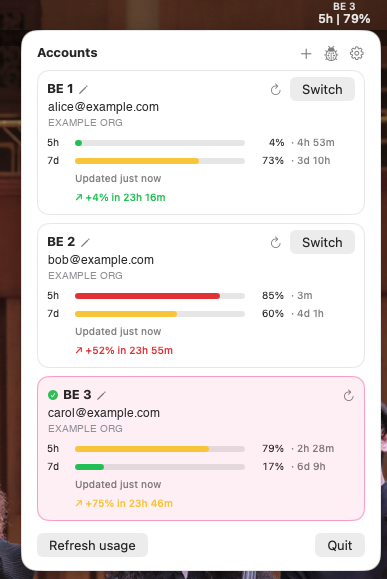
- 🔍 Live 5h + 7d usage bars per account — polled from Anthropic's
/api/oauth/usage(no tokens consumed), with a trend line (↗ +21% in 45m). - 🔀 Silent switching —
aimonitor switch <label>refreshes the OAuth token and swaps the live credential. Noclaude /login, no terminal hop. - 🤖 Auto-swap at the 5h or 7d threshold (default 80 %) — picks the account with the most overall headroom, skips exhausted/rate-limited ones, and rescues immediately if the active account hits 100 %. Running
claudesessions follow automatically. - 🔔 Threshold notifications as an account nears its limit (when auto-swap is off).
- 💾 Export / import settings, or migrate accounts to another machine — credentials optional and passphrase-encrypted (Argon2id + AES-256-GCM).
- 🔌 MCP server — Slack, ClickUp & Sentry tools for Claude Code over stdio, with per-service read-only mode.
- 🔐 OS-keyring storage (macOS Keychain, Linux libsecret). SQLite holds references; tokens never leave the keyring. No telemetry.
Install
# macOS (Sonoma 14+) — one command: taps, trusts, installs, clears Gatekeeper
curl -fsSL https://raw.githubusercontent.com/japananh/aimonitor/main/packaging/macos/install.sh | bash

# Linux (Ubuntu 22.04+) — CLI only
curl -fsSL https://raw.githubusercontent.com/japananh/aimonitor/main/packaging/linux/install.sh | sh

# Any platform, CLI only
go install github.com/japananh/aimonitor/cmd/aimonitor@latest
Prefer Homebrew directly?
brew trust japananh/tap && brew install --cask japananh/tap/aimonitor, then clear Gatekeeper on first launch:xattr -dr com.apple.quarantine /Applications/AIMonitor.app(or right-click → Open). The one-line installer above does both for you. See docs/unsigned-app.md.
Upgrade
brew upgrade --cask aimonitor   # macOS
aimonitor update check          # CLI: is a newer release out?
aimonitor update install        # CLI: upgrade in the background
⚠️ macOS:
brew upgrade --caskre-quarantines the app. Each upgrade lays down a fresh unsigned.app, so if it won't open afterward, re-clear Gatekeeper withxattr -dr com.apple.quarantine /Applications/AIMonitor.app(re-running the one-line installer does it for you). This is expected — not a broken install, so don't reinstall or--purge. The CLI keeps working regardless.
The menu-bar app also checks GitHub on launch and offers the update under Preferences → Check for updates. Pre-releases are never auto-served — brew upgrade keeps you on the latest stable.
Quick start
aimonitor add --adopt-current --label personal   # register your current Claude login
aimonitor add --label work                        # add another (drives claude /login, polls keychain)
aimonitor switch work                             # switch silently
aimonitor list                                    # live 5h / 7d usage per account
aimonitor doctor                                  # health check
Already on another switcher? aimonitor import pulls its accounts in one step. Auto-swap is on by default at 80 % — nothing else to configure for the common case.
Configuration
aimonitor config set auto_swap.enabled true        # default true
aimonitor config set auto_swap.threshold_pct 80    # 5h threshold
aimonitor config set auto_swap.threshold_7d_pct 80 # 7d threshold
aimonitor config set autostart true                # daemon at login
Back up or move to another machine:
aimonitor config export --out backup.json                                          # settings only (no secrets)
AIMONITOR_PASSPHRASE=… aimonitor config export --include-tokens --out full.json     # + encrypted credentials
AIMONITOR_PASSPHRASE=… aimonitor config import full.json                            # restore elsewhere
--include-tokens bundles your logins encrypted under the passphrase — restoring it means claude works on the other machine without re-login, so treat that file like a password. Same actions live in Preferences → Backup.
All config keys
| Key | Default | Description |
|---|---|---|
auto_swap.enabled |
true |
Master toggle for auto-swap |
auto_swap.threshold_pct |
80 |
5h utilization (%) to auto-swap |
auto_swap.threshold_7d_pct |
80 |
7d utilization (%) to auto-swap |
auto_swap.grace_sec |
60 |
Delay between the "pending" notification and the swap (0 = immediate) |
notify.enabled |
true |
Warn as the active account nears its limit (only when auto-swap is off) |
notify.warn_pct / notify.crit_pct |
80 / 95 |
Warning / critical notification levels |
daily_summary.enabled |
true |
Once-a-day notification recapping yesterday's token usage across accounts |
auto_update.enabled |
true |
Check GitHub for releases on launch (never auto-installs) |
autostart |
false |
Start the daemon at login |
mcp.slack.enabled / mcp.clickup.enabled / mcp.sentry.enabled |
true |
Expose that service's MCP tools |
mcp.slack.read_only / mcp.clickup.read_only / mcp.sentry.read_only |
false |
Hide the service's write tools |
mcp.sentry.org |
(empty) | Sentry organization slug the tools query |
mcp.sentry.base_url |
https://sentry.io |
Sentry API host (set to your self-hosted host) |
mcp.disabled_tools |
(empty) | Comma-separated tool names to hide |
How it works
The daemon polls /api/oauth/usage (~5 min ± jitter, no tokens consumed). When the active account crosses its 5h or 7d threshold, it picks the account with the most overall headroom, refreshes that account's OAuth token (POST .../v1/oauth/token), and writes it to the live Keychain slot. Running and new claude sessions adopt the new account — no /login, no restart.
See docs/architecture.md and docs/thresholds.md for the full picture.
MCP server (Slack, ClickUp & Sentry for Claude Code)
One stdio process serving Slack, ClickUp & Sentry tools — no extra runtimes.
aimonitor mcp connect slack     # store a Slack user token (xoxp-…)
aimonitor mcp connect clickup   # store a ClickUp token (pk_…)
aimonitor mcp connect sentry    # store a Sentry auth token (set mcp.sentry.org first)
aimonitor mcp register          # add the server to Claude Code
- Slack: post to channels/threads (mrkdwn, code blocks), upload files (from a local path or inline text), search, history, permalinks, react to a message (acknowledge it without posting a reply), and read attachments — including images, returned as viewable pixels (or saved to a local path).
- ClickUp: workspace hierarchy, tasks, comments, attachments both ways — upload from a local path/inline text and read them back, images included — Docs (read & write).
- Sentry: triage digests (projects, issue search, detail), root-cause (latest event stacktrace, tag/value distributions), and actions (resolve/ignore/assign, comment). Org-scoped and self-hosted-aware (
mcp.sentry.org,mcp.sentry.base_url). - Safety: Claude Code's per-tool prompts are the approval layer; per-service Enabled / Read-only switches and a per-tool disable list refine it. Tokens are verified live, then stored in the OS keyring — never in SQLite or logs.
Slack token scopes. The Slack token is a user token (
xoxp-…). Grant these User Token Scopes on your Slack app (api.slack.com → OAuth & Permissions), reinstall, then connect — a missing one surfaces asslack: missing scope "…"on the affected tool:search:read,users:read,users:read.email,channels:history,groups:history,im:history,mpim:history,channels:read,groups:read,im:read,mpim:read,chat:write,files:read,files:write,reactions:write.
Sentry token scopes. A Sentry auth token (User Auth Token, or an Internal Integration). Set
mcp.sentry.org— andmcp.sentry.base_urlfor self-hosted — beforeconnect. Scopes:org:read,project:read,event:readfor the read/triage tools; addevent:write+member:readto resolve/assign/comment;event:adminto delete comments.
Privacy & security
- No telemetry, no phone-home. OAuth tokens live only in the OS keyring; SQLite holds references. Token bytes are never logged.
- Outbound traffic is limited to:
GET /api/oauth/usage(introspection, no tokens consumed),POST /v1/oauth/token(silent token refresh), and the GitHub release check. Nothing about you is sent.
See docs/security.md for the threat model.
Troubleshooting
aimonitor doctor # health check: config, SQLite, keyring, accounts
- "Daemon not running" / usage looks stale. Start or restart the background daemon with
aimonitor config set autostart true, or click Start daemon in the popover — it registers a LaunchAgent that relaunches at login. - App won't open — "damaged", "can't be opened", or "unidentified developer" (macOS Gatekeeper on the unsigned app). Happens on first launch and after every
brew upgrade/reinstall — each lays down a fresh unsigned.app. Clear the quarantine flag, then reopen:xattr -dr com.apple.quarantine /Applications/AIMonitor.app. This is not a broken install, so don't uninstall oraimonitor uninstall --purgeto "reset" it —--purgewipes your saved account logins. The CLI (aimonitor …) is unaffected. Details: docs/unsigned-app.md. - Logs. The daemon writes to
~/Library/Logs/aimonitor/aimonitor.daemon.log(INFO/WARN/ERROR — never token bytes); background upgrades log toupdate.logbeside it. - Recent switches.
aimonitor logprints the switch audit trail.
Uninstall
# Remove the app + daemon, KEEP your saved accounts
brew uninstall --cask aimonitor

# Full wipe — ALSO deletes every account login aimonitor saved in your Keychain.
# Purge runs first: it needs the binary still installed to reach the stashes.
aimonitor uninstall --purge && brew uninstall --cask aimonitor
🔴
--purgeis destructive and irreversible. It permanently deletes aimonitor's saved copies of all your accounts (theaimonitor-<uuid>Keychain stashes) — you'll have toaimonitor addand complete/loginfor every account again. Plainbrew uninstall --cask aimonitor(no--purge) keeps them all.App won't open? That's Gatekeeper, not a broken install — don't
--purgeto "reset" it. Run thexattrfix in Troubleshooting instead.
--purge never touches Claude's own Claude Code-credentials slot, so the account you're currently signed into keeps working in claude with no re-login — only aimonitor's saved copies of your other accounts are dropped (and those you must re-add).
Build from source
Requires Go 1.25+. Pure Go (CGO_ENABLED=0 works on macOS; keychain access shells out to /usr/bin/security).
make build              # CLI binary
make test               # unit tests
make widget             # AIMonitor.app (macOS; needs the Swift toolchain)
make release-snapshot   # goreleaser dry-run
To try a dev build of the app, run it against your dev CLI:
make widget
AIMONITOR_SKIP_GUARD=1 AIMONITOR_BIN=$PWD/bin/aimonitor build/AIMonitor.app/Contents/MacOS/AIMonitor
make dev-clean          # when done
The dev bundle shares the installed app's bundle id, so LaunchServices keeps it registered after the folder is gone and Spotlight shows two "AIMonitor" apps. make dev-clean quits dev bundles, deletes build/AIMonitor.app and unregisters every AIMonitor.app path except /Applications.
License
Installing Aimonitor
This server has no published package — it is built from source. Open the repository and follow its README.
▸ github.com/japananh/aimonitorFAQ
Is Aimonitor MCP free?
Yes, Aimonitor MCP is free — one-click install via Unyly at no cost.
Does Aimonitor need an API key?
No, Aimonitor runs without API keys or environment variables.
Is Aimonitor hosted or self-hosted?
Self-hosted: the server runs locally on your machine via the install command above.
How do I install Aimonitor in Claude Desktop, Claude Code or Cursor?
Open Aimonitor on unyly.org, pick your client tab (Claude Desktop, Claude Code, Cursor) and press Install — the config is generated automatically, no JSON editing.
Related MCPs
Gmail
Read, send and search emails from Claude
 by Google
Slack
Send, search and summarize Slack messages
 by Slack
Runbear
No-code MCP client for team chat platforms, such as Slack, Microsoft Teams, and Discord.
Discord Server
A community discord server dedicated to MCP by [Frank Fiegel](https://github.com/punkpeye)
Klavis AI
Open Source MCP Infra. Hosted MCP servers and MCP clients on Slack and Discord.
Work90210/APIFold
Turn any REST API into a hosted MCP server, with ready-made public servers for GitHub, Stripe, Slack, OpenAI, Notion and more.
 by Work90210
arikusi/deepseek-mcp-server
DeepSeek AI chat and reasoning with multi-turn sessions, function calling, thinking mode and cost tracking.
 by arikusi
hashgraph-online/hashnet-mcp-js
Discover, register and chat with AI agents on the Hashgraph network via the Registry Broker.
 by hashgraph-online
profullstack/mcp-server
Developer utilities: SEO optimization, document conversion, domain lookup, email validation, QR codes, weather data, social media posting and security scanning.
 by profullstack
WayStation-ai/mcp
Connect MCP hosts to apps such as Notion, Slack, Monday and Airtable.
 by waystation-ai
Compare Aimonitor with
Not sure what to pick?
Find your stack in 60 seconds
Author?
Embed badge for your README
Browse similar
All communication MCPs