
Alpaca Guard
FreeNot checkedAlpaca trading API with a hard daily USD cap enforced server-side. Paper trading by default — live trading blocked until you explicitly opt in.

About
Alpaca trading API with a hard daily USD cap enforced server-side. Paper trading by default — live trading blocked until you explicitly opt in.
README
🍋 LemonCake
The billing, budget & identity layer for software for agents. Private Beta · Open core
Monetize any MCP/API in minutes, and let AI agents pay for it safely — each agent gets a spend-capped identity (budget, usage, pause/revoke). Buyers pay by card; no crypto wallet. First 3,000 calls free (lifetime). Then 3% only when your API earns.
License: MIT (SDK) Open core MCP Compatible x402 native npm: agent-payment-mcp FSA-confirmed Glama score
🚀 Get started · 💲 Pricing · 📚 Docs · 🌐 Live
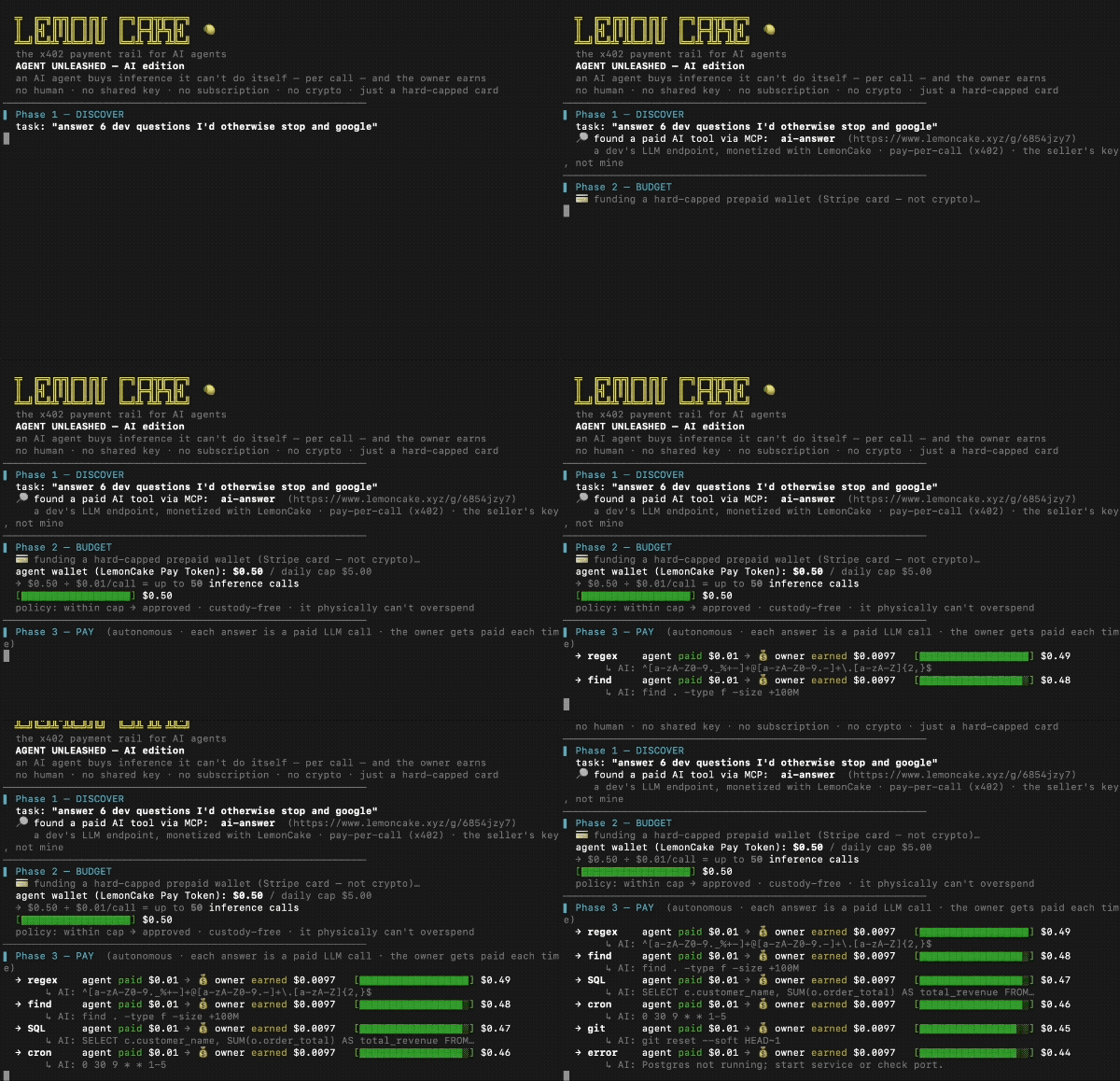
☝️ A real AI agent buys API calls by itself ($0.01 each), stops at its cap, and the API owner earns — no human, no crypto. · demo source
🚀 Get started
Monetizing an MCP/API? Start here — one command:
npx create-lemon-mcp my-paid-mcp     # a paid MCP server, running in sandbox now
# then add a Seller Key in /app and set LEMONCAKE_SELLER_KEY → it charges for real (no code change)
Pick your path:
| I want to… | Do this |
|---|---|
| Monetize my MCP/API (sellers) | npx create-lemon-mcp → add a Seller Key in /app to go live |
| Add billing to a server I already have | @lemon-cake/mcp-sdk — wrap a tool with lc.charge(), or route through the gateway (no code) |
| Let an agent pay for paid APIs (buyers) | npx -y agent-payment-mcp — 8 free demo tools, no signup |
Buyer-side MCP — try in 30 seconds
npx -y agent-payment-mcp
{ "mcpServers": { "lemon": { "command": "npx", "args": ["-y", "agent-payment-mcp"] } } }
Ask your agent to run list_demos / call_demo. To call paid APIs, set LC_PAY_TOKEN (get one at lemoncake.xyz/app).
What is LemonCake?
LemonCake is an x402 payment rail for monetizing MCP servers and HTTP APIs. Sellers register an endpoint and set a price per call. Buyers prepay by card and receive a spend-capped Pay Token. Agents call the gateway with that token, and LemonCake verifies, meters, forwards, and records usage.
sequenceDiagram
    participant A as 🤖 AI Agent
    participant G as 🍋 LemonCake Gateway
    participant API as Your API
    A->>G: POST /g/:id (no token)
    G-->>A: 402 + accepts[] (price, mintUrl)
    A->>G: mint Pay Token (off-session, capped)
    A->>G: Bearer :jwt
    G->>API: forward (upstream key hidden)
    API-->>A: 200 + result
    Note over A,G: budget exhausted → 402 → agent self-funds → continues
Sellers register any HTTP API and set a price per call. Buyers / agents prepay with a card → Pay Token issued automatically → agent calls the API within budget. Budget exhausted → 402 challenge → agent self-funds → continues. No humans.
🧱 Open core
| Layer | Status | Where |
|---|---|---|
Buyer-side MCP (agent-payment-mcp) |
✅ MIT | npm, src |
Seller SDK (@lemon-cake/mcp-sdk) |
✅ MIT | npm, src |
| Starter templates | ✅ MIT | examples/ |
| Docs site | ✅ Public | lemoncake.xyz/docs |
| Gateway + billing engine | 🔒 Hosted | lemoncake.xyz |
| Dashboard (analytics, usage ledger) | 🔒 Hosted | lemoncake.xyz/app |
💳 How payment works
For buyers (human or agent)
- Open a buy link (
lemoncake.xyz/buy/<shortId>) - Pay with a card → Pay Token (JWT) issued automatically
- Pass
Authorization: Bearer <token>to the gateway - Gateway verifies, meters, forwards to the real API
- Budget exhausted → 402 challenge returned with payment instructions
For agents (fully autonomous)
- Issue a Buyer Key (
bk_...) at /app → Pay Tokens pane - Save a card once at /agent/fund
- Agent calls
POST /api/lc/agent/tokens(Bearer bk_) → off-session card charge → JWT - Agent uses JWT to call gateway — hard-capped, no human in the loop
// MCP config for agent with pre-issued Pay Token
{
  "mcpServers": {
    "lemon": {
      "command": "npx",
      "args": ["-y", "agent-payment-mcp"],
      "env": {
        "LC_PAY_TOKEN": "<jwt from Pay Token>"
      }
    }
  }
}
🏗 Publish your API on LemonCake (sellers)
Monetize any HTTP API or MCP server:
- Sign in at lemoncake.xyz/app
- Add API — paste your URL, set price per call (e.g.
$0.01) - Share the buy link, or issue a Seller Key (
sk_live_…) to charge from your own server - You keep 97%. LemonCake takes 3% (Stripe Connect Direct Charge). Never holds funds.
Scaffold a paid MCP in one command — sandbox by default, production with one env var:
npx create-lemon-mcp my-paid-mcp     # demo runs with no key
# then: set LEMONCAKE_SELLER_KEY=sk_live_… → it charges for real (no code change)
Add billing to any tool with the SDK (@lemon-cake/mcp-sdk v1, no crypto):
import { createLemonCakeSDK } from "@lemon-cake/mcp-sdk";

const lc = createLemonCakeSDK();   // reads LEMONCAKE_SELLER_KEY (demo without it)

server.tool("my_premium_tool", "desc", { q: z.string() },
  lc.charge({ price: 0.01 })(async ({ q }) => {
    return { content: [{ type: "text", text: "result" }] };
  }),
);
lc.charge wraps the handler: preflight (reserve) → run → settle (confirm on success, refund on failure). Or route existing traffic through https://lemoncake.xyz/g/<shortId> — no code changes required.
🪪 Agent Identity
Give each AI agent its own spend-capped identity — so a fleet can pay for APIs without a shared card or runaway cost. Built on top of Pay Tokens; no balance pool, custody-free (an agent's "budget" is just the Pay Tokens bound to it).
- Bind a Pay Token to an agent when issuing it (
agentId) → spend is attributed to that agent. - Per-agent rollup — budget, spend, calls, last-used in the dashboard.
- Kill switch —
pause/resume/revokean agent; bound tokens are rejected at the gateway instantly (AGENT_PAUSED/AGENT_REVOKED), even with budget remaining. - Server-authoritative — price is set on the endpoint; agents never carry a card or a seller key.
# manage agents (owner-authenticated)
POST /api/agents            # create  → { agent_id, ... }
POST /api/agents/:id/pause  # kill switch (also /resume, /revoke)
GET  /api/agents            # list + per-agent spend rollup
✨ Features
For agents / buyers
- ✅ x402 native — 402 challenge returns
accepts[]with price + mintUrl - ✅ Hard-capped — per-mint / daily / monthly limits, server-enforced
- ✅ Off-session top-up — agent self-funds via Buyer Key (
bk_...), no prompts - ✅ Demo Mode — 8 free tools, try without any setup
For API providers / sellers
- ✅ 5-min go-live —
npx create-lemon-mcp, orlc.charge()on any tool, or route through the gateway - ✅ Custody-free — Stripe Connect Direct Charge, 97% goes directly to seller
- ✅ Usage ledger — every call recorded, revenue visible in dashboard
- ✅ Buy link — share one URL, buyers self-serve
For agent fleets / operators
- ✅ Per-agent identity — bind Pay Tokens to an agent, attribute spend
- ✅ Per-agent kill switch — pause / resume / revoke, enforced at the gateway
- ✅ Spend rollup — budget / spent / calls per agent
- ✅ No balance pool — custody-free; budget = the agent's bound Pay Tokens
Infrastructure
- 🔧 Stripe Connect Direct Charge (no custody)
- 🔧 x402 gateway with
WWW-Authenticate: Lemoncake-Prepaid - 🔧 EN / 日本語 / Español dashboard
- 🔧 JP FSA: registration not required (confirmed 2026-06)
🏗 Architecture
┌─────────────────────────────────────────────────┐
│  Buyer / Agent                                  │
│   ↳ prepays via card OR Buyer Key (bk_...)      │
│   ↳ receives Pay Token (signed JWT)             │
└──────────────────────┬──────────────────────────┘
                       │  Authorization: Bearer <jwt>
                       ▼
┌─────────────────────────────────────────────────┐
│  LemonCake Gateway  /g/<shortId>                │
│   ↳ verify JWT signature                        │
│   ↳ check budget + calls + rate limit           │
│   ↳ decrement spend, write to ledger            │
└──────────────────────┬──────────────────────────┘
                       │  HTTPS + upstream_auth (hidden)
                       ▼
┌─────────────────────────────────────────────────┐
│  Your API / MCP server (unchanged)              │
└─────────────────────────────────────────────────┘
LemonCake is the middle box. It never holds funds — money flows Stripe → seller via Direct Charge.
🌍 Compliance
Japan FSA Fintech Support Desk (2026-06) confirmed: no registration required. Custody-free design (Stripe Connect Direct Charge, no pooled balance).
| Jurisdiction | Basis |
|---|---|
| 🇯🇵 Japan | FSA — registration not required |
| 🇺🇸 USA | FinCEN 2019 §4.5 — non-custodial software ≠ MSB |
| 🇪🇺 EU | MiCA — non-CASP |
| 🇬🇧 UK | FCA — Tech Service Provider |
| 🇸🇬 Singapore | MAS — DPT non-applicable |
| 🇨🇦 Canada | FINTRAC — non-custodial exemption |
| 🇨🇭 Switzerland | FINMA — non-financial intermediary |
🔌 Package family
| Package | What it does |
|---|---|
| agent-payment-mcp | Main entry — x402 gateway + agent payment rail |
| @lemon-cake/mcp-sdk | Seller SDK — lc.charge() / lc.protect(), fiat, no crypto |
| create-lemon-mcp | Scaffold a paid MCP server — sandbox→prod with one env var |
| xstocks-mcp | Buy tokenized US stocks on Solana |
| alpaca-guard-mcp | Alpaca paper / live trading with hard daily cap |
| tokenized-stock-mcp | Dinari dShares |
🛡 Security
- Server-side hard caps — per-mint / daily / monthly, cannot be exceeded
- Pay Token = signed JWT — HS256, verified on every gateway call
- upstream_auth never exposed — seller's real API key hidden from buyers
- RLS on all DB tables — Supabase row-level security enabled
- Stripe Connect Direct Charge — LemonCake never holds funds
Installing Alpaca Guard
This server has no published package — it is built from source. Open the repository and follow its README.
▸ github.com/evidai/agent-payment-mcpFAQ
Is Alpaca Guard MCP free?
Yes, Alpaca Guard MCP is free — one-click install via Unyly at no cost.
Does Alpaca Guard need an API key?
No, Alpaca Guard runs without API keys or environment variables.
Is Alpaca Guard hosted or self-hosted?
Self-hosted: the server runs locally on your machine via the install command above.
How do I install Alpaca Guard in Claude Desktop, Claude Code or Cursor?
Open Alpaca Guard on unyly.org, pick your client tab (Claude Desktop, Claude Code, Cursor) and press Install — the config is generated automatically, no JSON editing.
Related MCPs
GitHub
PRs, issues, code search, CI status
 by GitHub
Filesystem
Secure file operations with configurable access controls.
Memory
Knowledge graph-based persistent memory system.
Template MCP Server
A CLI tool to create a new Model Context Protocol server project with TypeScript support, dual transport options, and an extensible structure
 by mcpdotdirect
Compare Alpaca Guard with
Not sure what to pick?
Find your stack in 60 seconds
Author?
Embed badge for your README
Browse similar
All development MCPs