
Ansible Aap
FreeNot checkedEnables LLMs to discover and launch Ansible job templates on Ansible Automation Platform, monitor job status, and retrieve outputs.

About
Enables LLMs to discover and launch Ansible job templates on Ansible Automation Platform, monitor job status, and retrieve outputs.
README
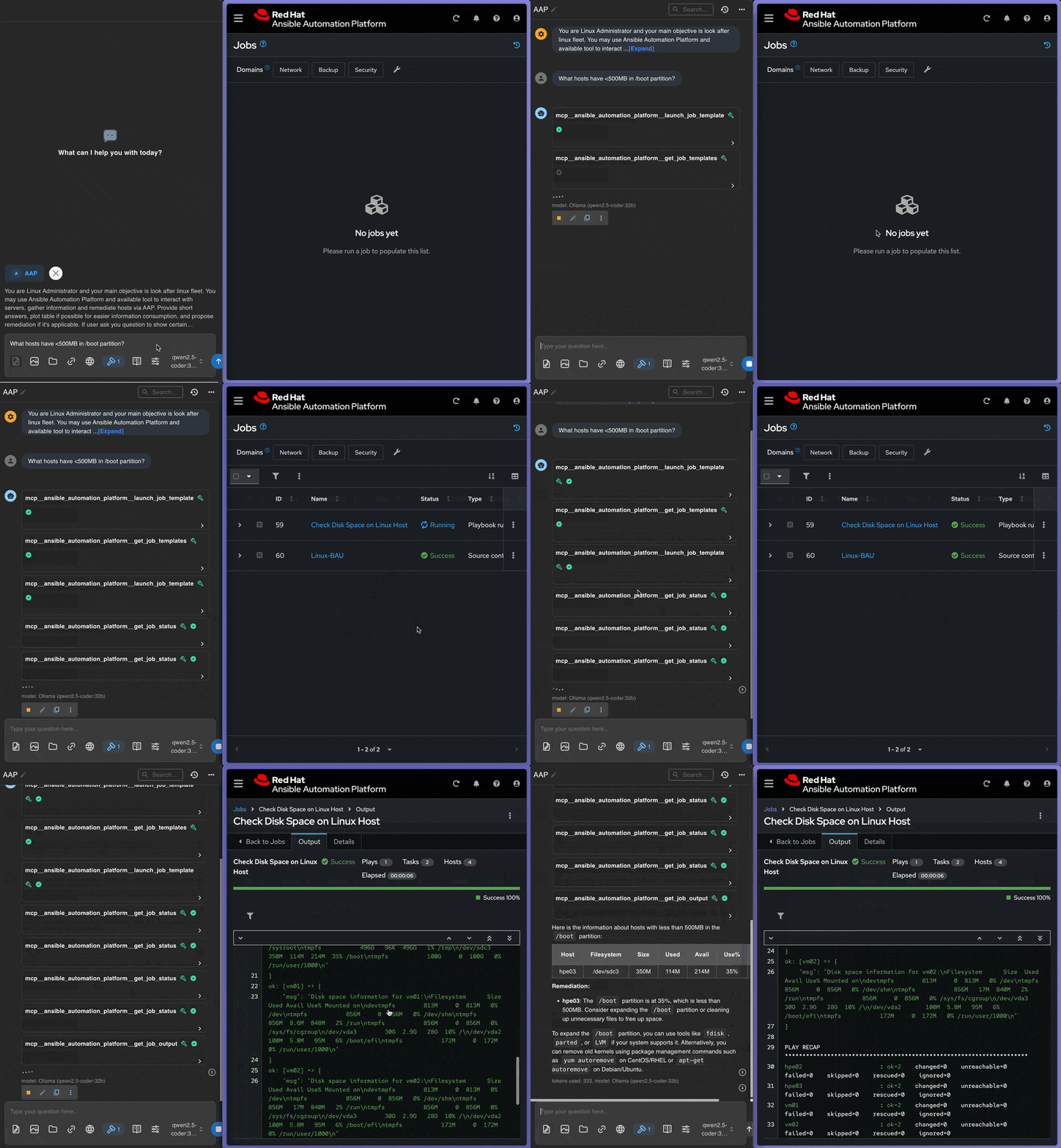
A Very basic and simple Model Context Protocol (MCP) server that provides integration with Ansible Automation Platform (AAP) via API. This server allows Large Language Models to interact with AAP to extract available templates and launch Ansible job templates with custom parameters. This is just a demo, and not a full MCP Server capabiliy, feel free to use this code as you want.
Features
- Template Discovery: Extract available job templates from configured AAP projects
- Job Launching: Launch Ansible job templates with custom extra variables and parameters
- Job Monitoring: Check job status and retrieve job outputs/logs
- Connection Testing: Verify AAP connectivity and authentication
- Error Handling: Robust error handling with retry logic and detailed error messages
Prerequisites
- Python 3.8+
- Access to an Ansible Automation Platform instance
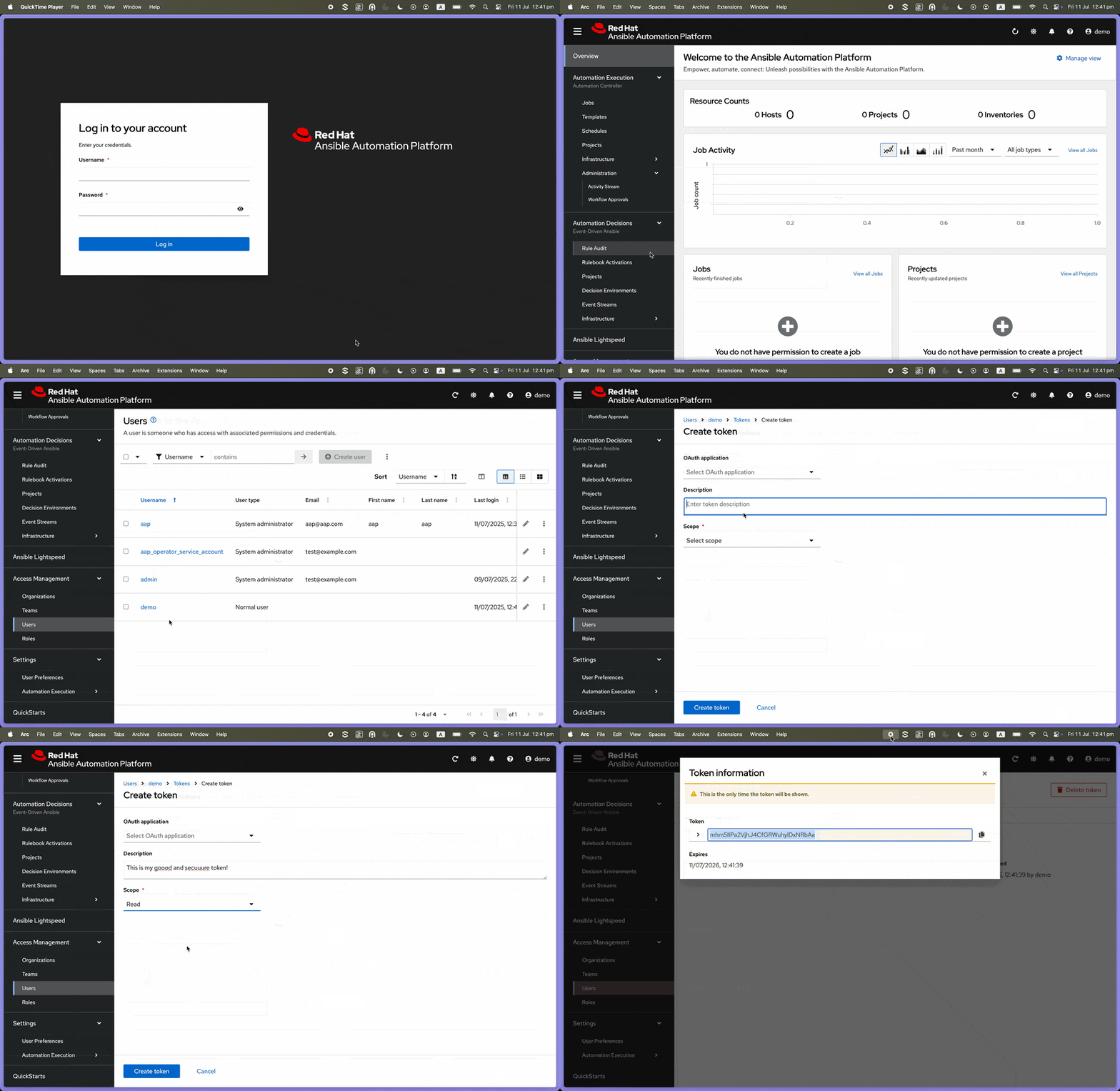
- AAP API access token with appropriate permissions
AAP Token Generation
Installation
Clone this repository
Install dependencies:
uv pip install -r requirements.txtConfigure environment variables:
cp env_example .env
# Edit .env with your AAP configuration
Configuration
Create a .env file in the project root with the following variables:
# Ansible Automation Platform Configuration
AAP_URL=https://your-aap-instance.com
AAP_TOKEN=your-access-token-here
AAP_PROJECT_ID=your-project-id
AAP_VERIFY_SSL=True

# Optional settings
AAP_TIMEOUT=30
AAP_MAX_RETRIES=3
Configuration Parameters
AAP_URL: Base URL of your AAP instance (e.g.,https://controller.example.com)AAP_TOKEN: Bearer token for API authenticationAAP_PROJECT_ID: Default project ID to extract templates fromAAP_VERIFY_SSL: Whether to verify SSL certificates (True/False)AAP_TIMEOUT: Request timeout in seconds (default: 30)AAP_MAX_RETRIES: Number of retry attempts for failed requests (default: 3)
Usage
Testing the Server
Before integrating with Claude Desktop, test your server setup:
uv run python tools/test_mcp_server.py
This will validate:
- Environment configuration
- AAP connection
- Template extraction
- MCP server functionality
Running the Server
Start the MCP server:
uv run python server.py
The server will start and listen for MCP protocol messages on stdin/stdout.
Claude Desktop Integration
Step 1: Configure Claude Desktop
Locate your Claude Desktop configuration file:
- macOS:
~/Library/Application Support/Claude/claude_desktop_config.json - Windows:
%APPDATA%\Claude\claude_desktop_config.json - Linux:
~/.config/claude/claude_desktop_config.json
- macOS:
Edit the configuration file and add the MCP server:
{
  "mcpServers": {
    "ansible-aap": {
      "command": "uv",
      "args": ["run", "python", "server.py"],
      "cwd": "<PATH TO THE PROJECT>",
      "env": {
        "AAP_URL": "https://your-aap-instance.com",
        "AAP_TOKEN": "your-access-token-here",
        "AAP_PROJECT_ID": "your-project-id",
        "AAP_VERIFY_SSL": "True",
        "AAP_TIMEOUT": "30",
        "AAP_MAX_RETRIES": "3"
      }
    }
  }
}
Important: Replace the placeholder values with your actual AAP configuration:
cwd: Use the absolute path to your MCP server directoryAAP_URL: Your AAP instance URLAAP_TOKEN: Your API access tokenAAP_PROJECT_ID: Your project ID
Step 2: Restart Claude Desktop
After saving the configuration, restart Claude Desktop completely.
Step 3: Test the Integration
Once restarted, you can test the integration by asking Claude questions like:
- "What Ansible templates are available?"
- "Show me the job templates from my AAP project"
- "Show nodes with with low disk space"
- "Check the status of job 123"
Step 4: Verify Connection
You should see Claude respond with information about your Ansible templates and be able to launch jobs. If there are issues, check:
- Claude Desktop logs for error messages
- Your AAP credentials and permissions
- Network connectivity to your AAP instance
Alternative: Using Environment File
Instead of embedding credentials in the Claude Desktop config, you can create a .env file:
{
  "mcpServers": {
    "ansible-aap": {
      "command": "uv",
      "args": ["run", "python", "server.py"],
      "cwd": "<PATH TO THE PROJECT>"
    }
  }
}
Then create a .env file in your project directory with the AAP configuration.
Available Tools
The server provides the following tools:
1. get_job_templates
Extract available job templates from the configured AAP project.
Parameters:
project_id(optional): Override the configured project ID
Example:
{
  "name": "get_job_templates",
  "arguments": {
    "project_id": "5"
  }
}
2. launch_job_template
Launch an Ansible job template with optional parameters.
Parameters:
template_id(required): ID of the job template to launchextra_vars(optional): Extra variables to pass to the job templateinventory(optional): Inventory ID to usecredentials(optional): List of credential IDs to use
Example:
{
  "name": "launch_job_template",
  "arguments": {
    "template_id": 10,
    "extra_vars": {
      "target_host": "web-server-01",
      "service_name": "nginx",
      "restart_service": true
    },
    "inventory": 2
  }
}
3. get_job_status
Get the status and details of a running or completed job.
Parameters:
job_id(required): ID of the job to check
Example:
{
  "name": "get_job_status",
  "arguments": {
    "job_id": 123
  }
}
4. get_job_output
Get the output/logs of a job.
Parameters:
job_id(required): ID of the job to get output from
Example:
{
  "name": "get_job_output",
  "arguments": {
    "job_id": 123
  }
}
5. test_aap_connection
Test the connection to Ansible Automation Platform.
Parameters: None
Example:
{
  "name": "test_aap_connection",
  "arguments": {}
}
Integration with LLM Clients
This server can be integrated with various MCP-compatible LLM clients. The server provides a standardized interface for LLMs to:
- Discover Infrastructure: Query available Ansible templates to understand what automation is available
- Execute Operations: Launch specific templates with custom parameters based on the conversation context
- Monitor Progress: Check job status and retrieve outputs to provide feedback to users
Example LLM Interaction Flow
- Discovery: LLM calls
get_job_templatesto see what automation is available - Planning: Based on user request, LLM identifies the appropriate template and parameters
- Execution: LLM calls
launch_job_templatewith the required parameters - Monitoring: LLM uses
get_job_statusandget_job_outputto track progress and provide updates
Error Handling
The server includes comprehensive error handling:
- Connection Errors: Automatic retry with exponential backoff
- Authentication Errors: Clear error messages for token/permission issues
- Validation Errors: Parameter validation with helpful error messages
- Rate Limiting: Respectful API usage with configurable timeouts
Security Considerations
- Store AAP tokens securely in environment variables
- Use HTTPS for AAP connections
- Validate SSL certificates in production (
AAP_VERIFY_SSL=True) - Limit template access through AAP project configuration
- Monitor job launches and outputs for security compliance
Installing Ansible Aap
This server has no published package — it is built from source. Open the repository and follow its README.
▸ github.com/mancubus77/mcp-server-aapFAQ
Is Ansible Aap MCP free?
Yes, Ansible Aap MCP is free — one-click install via Unyly at no cost.
Does Ansible Aap need an API key?
No, Ansible Aap runs without API keys or environment variables.
Is Ansible Aap hosted or self-hosted?
A hosted option is available: Unyly runs the server in the cloud, no local setup required.
How do I install Ansible Aap in Claude Desktop, Claude Code or Cursor?
Open Ansible Aap on unyly.org, pick your client tab (Claude Desktop, Claude Code, Cursor) and press Install — the config is generated automatically, no JSON editing.
Related MCPs
GitHub
PRs, issues, code search, CI status
 by GitHub
Filesystem
Secure file operations with configurable access controls.
Memory
Knowledge graph-based persistent memory system.
Template MCP Server
A CLI tool to create a new Model Context Protocol server project with TypeScript support, dual transport options, and an extensible structure
 by mcpdotdirect
Compare Ansible Aap with
Not sure what to pick?
Find your stack in 60 seconds
Author?
Embed badge for your README
Browse similar
All development MCPs