
Anvil
FreeNot checkedA throwaway Docker sandbox for agents to run code and shell commands safely.

About
A throwaway Docker sandbox for agents to run code and shell commands safely.
README
A throwaway Docker sandbox for agents.
Run code or shell commands in a resource-limited, network-isolated, single-use container and get back a structured result — stdout, stderr, exit_code, timed_out, duration_ms. So an agent can verify its work, reproduce a bug, or check output without ever touching the host.
Part of tools-for-agents. Zero npm dependencies — drives the docker CLI directly.
Safe by default
Every run is launched with:
--network none— no network unless you opt in (network: "on")--memory 512m --cpus 1 --pids-limit 512— bounded resources--cap-drop ALL --security-opt no-new-privileges— minimal privileges--rmephemeral container, work dir is a fresh temp mount, removed after- a hard timeout (default 30s, max 300s) that
docker kills the container - optional
secure: true→ read-only rootfs + tmpfs/tmp
CLI
node src/cli.js check                          # docker version + presets
node src/cli.js run python 'print(2**10)'      # → 1024
node src/cli.js run node 'console.log(6*7)'    # → 42
echo 'print("hi")' | node src/cli.js run python -
node src/cli.js sh 'apk info 2>/dev/null | head'
Run history (anvil serve)
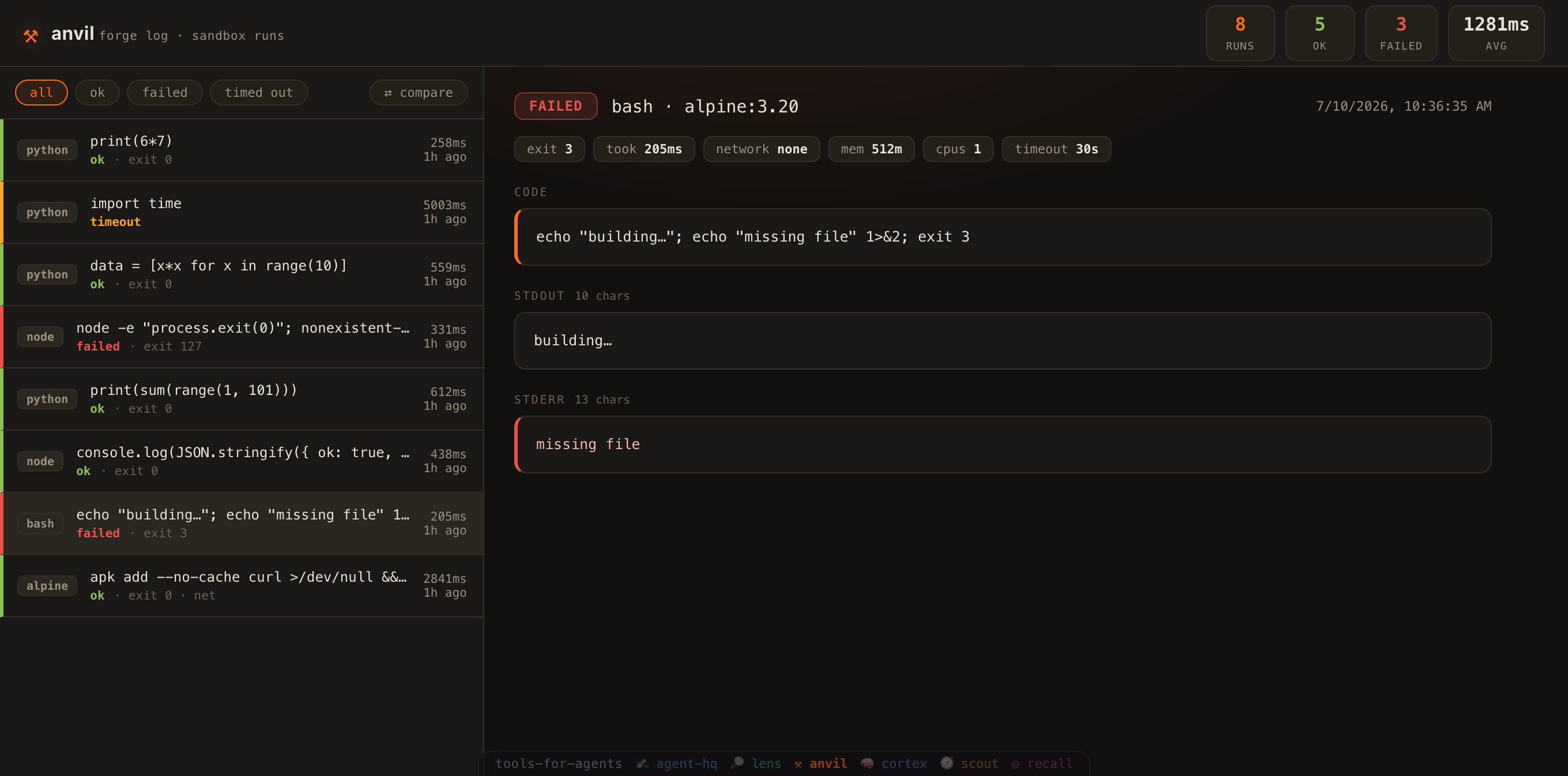
anvil is stateless by default. Set ANVIL_DB to record every run, then browse them in a dashboard:
export ANVIL_DB=./.anvil/runs.db          # opt in to the run log
node src/cli.js run python 'print(2**10)'  # …runs are now recorded
node src/cli.js serve                       # → http://localhost:7930  (--port to change)
A zero-dependency forge log of what the sandbox executed:
- Run list — every execution with its language, status (ok / failed / timed out), exit code and duration, colour-coded at a glance.
- Run detail — the exact code or command, full stdout and stderr, and the resource limits it ran under (network, memory, cpus, timeout). Each block has a one-click ⧉ copy so you can lift the code or its output straight to the clipboard.
- Compare two runs — hit ⇄ compare, pick any two runs, and see a side-by-side line diff of their code, stdout and stderr, plus every limit that changed (
took 258ms → 559ms,mem 512m → 256m). - New run — hit + new run to type a snippet (bash / node / python), execute it in a fresh sandbox right from the dashboard, and watch the result open in the detail. Runs go through the same guarded, network-off container as the CLI (⌘/Ctrl+Enter to run). Pick a resource profile in one click — 🔒 strict (network off · 256m · 0.5 cpu · 15s), ⚙ default (512m · 1 cpu · 30s), or 🌐 networked (network on · 60s) — and the sandbox's memory, CPU, timeout and network are set for you (recorded with the run).
- Run code against something —
run()has always taken{ path: content }files and written them into/workbeside your snippet (agents use it), and the form never offered it. Now + file adds fixture files — a module and its test, a parser and a sample payload — and + stdin pipes input to the process. A snippet on its own can only prove syntax; a snippet with a fixture can prove behaviour. Paths that try to climb out of the sandbox are refused before a container starts. - Run a real repo, from the browser — the new-run form used to do snippets only, so the dashboard couldn't do the thing anvil is for. Switch it to command in an image, point mount at a directory, and it runs any command in any image with your repo mounted read-only at
/repo—cd /repo && npm test— without the repo ever leaving your disk or being writable by the container (touch /repo/x→ Read-only file system). There's a read-only rootfs switch too. A mount that doesn't exist is refused in the form, before docker gets a chance to fail at you. - Watch it run — the sandbox writes as it goes, so anvil now says so as it goes: hit ▶ run and the container's stdout/stderr stream into a live console (with an elapsed timer) instead of leaving you staring at a spinner until it returns. A 30-second run no longer looks identical to a hung one. Streaming is opt-in on the API (
POST /api/exec?stream=1→ an event stream ending with the logged run), andrun({ onData })gives the same live chunks to any caller — the CLI, an agent, anything. - Re-run — hit ↻ re-run on any run to re-execute its exact code and limits in a fresh sandbox; the new run is logged and opened, so you can compare it against the original.
- Keep a run in cortex — a run is evidence: this code, in this sandbox, produced this output. Hit 🧠 → cortex and it becomes a note in your second brain — status, exit code, duration and the resource limits it ran under, the code as a fenced block, and its stdout/stderr — carrying a
#run=<id>link straight back to the run in the forge log. anvil never writes: your browser POSTs to cortex's own/api/capture(point it elsewhere withANVIL_CORTEX_URL). - Link to a run — opening a run puts it in the URL (
…/#run=<id>), so any run in the log can be linked, bookmarked or handed to someone else. - Prune the log — the forge log grows with every run, so ✕ delete drops a single noisy run and 🗑 clear empties the whole log. Both arm on the first click and only fire on the second (clicking away, or waiting, cancels), and both live behind
DELETEon the API — a strayGETcan never prune anything. - Search — a live search box filters the log by code, command, language or captured output as you type (matches highlighted, with a running
3 / 7count);Escclears it. Composes with the status filters, so you can find "thatcurlrun that failed" in a long history. - Filters + stats — narrow to failures, see ok/failed counts, average duration, and a by-language breakdown of everything the sandbox has run (
python 3 · node 1 · bash 1). - Keyboard navigation — press
j/k(or ↑/↓) to move a cursor through the run list and open each run as you go — browse the whole forge log from the keyboard without touching the mouse (it stands down while you're typing in the search box or in compare mode). - Keyboard-accessible — every control has a visible focus ring, and the run rows open with Tab + Enter (not just the mouse), with aria-labels throughout.
Logging is opt-in, fire-and-forget and fully guarded — it never slows or breaks a run. Try the demo without Docker: ANVIL_DB=./.anvil/runs.db node scripts/seed.js then anvil serve.
MCP server (for agents)
{
  "mcpServers": {
    "anvil": { "command": "node", "args": ["/abs/path/to/anvil/mcp/mcp-server.js"] }
  }
}
Tools
| Tool | Use it to… |
|---|---|
anvil_run_code |
Run a bash / node / python snippet, get structured output. |
anvil_run_command |
Run a shell command with supplied files and/or a host dir mounted read-only at /repo (e.g. run a test suite). |
anvil_check |
Docker availability + language presets. |
Example: verify a repo's syntax without copying it
{ "name": "anvil_run_command",
  "arguments": { "image": "node:22-alpine", "mount": "/path/to/repo/src",
                 "cmd": "node --check /repo/core.js && echo OK" } }
Result shape
{ "ok": true, "exit_code": 0, "timed_out": false, "duration_ms": 178,
  "image": "python:3.12-alpine", "stdout": "...", "stderr": "" }
The agent toolkit
anvil is the run safely leg of tools-for-agents — an operating system for agents.
Seven zero-dependency, MCP-native tools that form one loop:
| 🛰️ | agent-hq | coordinate — shared memory, a kanban agents claim work from, a registry, a cost ledger |
| 🔎 | lens | read code — token-budgeted retrieval — search, outlines, surgical reads |
| ⚒ | anvil | run safely — a throwaway Docker sandbox: network off, capped, timed |
| 🧠 | cortex | remember — an Obsidian-compatible second brain, wikilinked |
| 🧭 | scout | read the web — a URL becomes clean, cached, searchable markdown |
| 🎯 | recall | recall it all — one query across brain, team, reading and code |
| 👁 | iris | see — look at what you built, before you claim it works |
Reading this as an agent? /llms.txt is the map, and /tools.json hands you all 70 MCP tools — every name, every description, every install command — in one fetch, without cloning anything.
MIT licensed.
Install Anvil in Claude Desktop, Claude Code & Cursor
unyly install anvilInstalls into Claude Desktop, Claude Code, Cursor & VS Code — handles npx, uvx and build-from-source repos for you.
First time? Get the CLI: curl -fsSL https://unyly.org/install | sh
Or configure manually
Run in your terminal:
claude mcp add anvil -- npx -y @tools-for-agents/anvilFAQ
Is Anvil MCP free?
Yes, Anvil MCP is free — one-click install via Unyly at no cost.
Does Anvil need an API key?
No, Anvil runs without API keys or environment variables.
Is Anvil hosted or self-hosted?
Self-hosted: the server runs locally on your machine via the install command above.
How do I install Anvil in Claude Desktop, Claude Code or Cursor?
Open Anvil on unyly.org, pick your client tab (Claude Desktop, Claude Code, Cursor) and press Install — the config is generated automatically, no JSON editing.
Related MCPs
GitHub
PRs, issues, code search, CI status
 by GitHub
Filesystem
Secure file operations with configurable access controls.
Memory
Knowledge graph-based persistent memory system.
Template MCP Server
A CLI tool to create a new Model Context Protocol server project with TypeScript support, dual transport options, and an extensible structure
 by mcpdotdirect
Compare Anvil with
Not sure what to pick?
Find your stack in 60 seconds
Author?
Embed badge for your README
Browse similar
All development MCPs