

About
Api Football — Model Context Protocol server
README
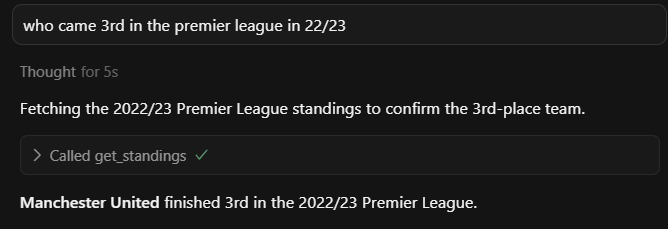
A Model Context Protocol (MCP) server that provides access to football/soccer data through the API-Football service. This creates a standardised way for language models to interact with this API, and users a way to query in natural language.
Architecture
graph TD
    LLM["`**LLM with MCP Client**
    Claude/GPT-4/etc.`"]

    subgraph Server ["`**MCP Server**
    Football Data Gateway`"]
        direction TB
        MCP["`**MCP Protocol Handler**
        Request Router & Response Manager`"]

        subgraph Functions ["`**Available Functions**`"]
            direction LR
            API1["`**get_leagues**
            Fetch league data`"]
            API2["`**get_teams**
            Fetch team data`"]
            API3["`**get_players**
            Fetch player data`"]
            API4["`**get_fixtures**
            Fetch match data`"]
        end

        MCP --> Functions
    end

    ExtAPI["`**API-Football**
    External Sports Data API`"]

    %% Main connections
    LLM <===> MCP

    %% Function connections to external API
    API1 <--> ExtAPI
    API2 <--> ExtAPI
    API3 <--> ExtAPI
    API4 <--> ExtAPI

    %% Styling with improved colors
    classDef llm fill:#4CAF50,stroke:#2E7D32,stroke-width:3px,color:#fff
    classDef mcp fill:#2196F3,stroke:#1565C0,stroke-width:2px,color:#fff
    classDef functions fill:#FF9800,stroke:#F57C00,stroke-width:2px,color:#fff
    classDef external fill:#9C27B0,stroke:#6A1B9A,stroke-width:3px,color:#fff
    classDef server fill:#E3F2FD,stroke:#1976D2,stroke-width:2px,color:#1976D2

    class LLM llm
    class MCP mcp
    class API1,API2,API3,API4 functions
    class ExtAPI external
    class Server server
1. Clone and Setup
Clone the repository:
git clone https://github.com/danknight/api-football-mcp-server.git
cd api-football-mcp-server
Install dependencies:
pip install -r requirements.txt
2. Get Your API Key and Set Environment
Create a .env file with your credentials:
API_FOOTBALL_KEY=your_api_key_here
Sign up on API-Football to get an API key.
3. Configure MCP Client
Register this server in your MCP client (e.g. Cursor, Claude for Desktop).
{
  "mcpServers": {
    "api-football": {
      "command": "python",
      "args": ["absolute/path/to/server.py"],
      "env": {
        "API_FOOTBALL_KEY": "YOUR_API_KEY"
      }
    }
  }
}
Or run directly from the command line and explore with Inspector:
python server.py
Tools
The following tools are exposed to MCP clients:
League Information
| Tool Name | Description | Parameters |
|---|---|---|
get_leagues |
Get available leagues | country (str, optional), season (int, optional) |
get_league_info |
Get detailed league information | league_id (int) |
get_countries |
Get available countries | None |
get_standings |
Get league standings | league_id (int), season (int) |
Team Information
| Tool Name | Description | Parameters |
|---|---|---|
get_teams |
Get teams in a league | league_id (int), season (int, optional) |
get_team_stats |
Get statistics for a team | team_id (int), league_id (int), season (int, optional) |
get_team_id_by_name |
Get team ID by team name | team_name (str), league_id (int, optional), season (int, optional) |
get_team_transfers |
Get transfer information for a team | team_id (int) |
Player Information
| Tool Name | Description | Parameters |
|---|---|---|
get_players |
Get players in a team | team_id (int), season (int) |
get_player_stats |
Get statistics for a player | player_id (int), season (int) |
Match/Fixture Information
| Tool Name | Description | Parameters |
|---|---|---|
get_fixtures |
Get fixtures/matches | league_id (int, optional), team_id (int, optional), season (int, optional), date (str, optional), next (int, optional), last (int, optional) |
get_fixture_stats |
Get statistics for a fixture | fixture_id (int) |
get_predictions |
Get predictions for a fixture | fixture_id (int) |
get_head_to_head |
Get head-to-head statistics between teams | team1_id (int), team2_id (int) |
Player Statistics
| Tool Name | Description | Parameters |
|---|---|---|
get_top_scorers |
Get top scorers in a league | league_id (int), season (int) |
get_top_assists |
Get top assisters in a league | league_id (int), season (int) |
Other Information
| Tool Name | Description | Parameters |
|---|---|---|
get_venue |
Get venue information | venue_id (int) |
get_injuries |
Get injury information | team_id (int), player_id (int), season (int) |
Usage Examples
Get leagues in a specific country
get_leagues(country="England")
Get teams in a specific league
get_teams(league_id=39, season=2023) # Premier League 2023
Get team statistics
get_team_stats(team_id=42, league_id=39, season=2023) # Arsenal stats
Get fixtures for a team
get_fixtures(team_id=42, next=5) # Next 5 Arsenal matches
Get top scorers in a league
get_top_scorers(league_id=39, season=2023) # Premier League top scorers
Development
Running Tests
Currently, no tests are implemented. To add tests:
- Create a
tests/directory - Add test files following the naming convention
test_*.py - Run tests with
python -m pytest
Adding New Tools
To add a new tool:
- Add a new function in
main.pydecorated with@mcp.tool() - Implement the API call using
make_api_request() - Update this README with the new tool information
- Test the tool with the MCP Inspector
Installing Api Football
This server has no published package — it is built from source. Open the repository and follow its README.
▸ github.com/dankniight/api-football-mcp-serverFAQ
Is Api Football MCP free?
Yes, Api Football MCP is free — one-click install via Unyly at no cost.
Does Api Football need an API key?
No, Api Football runs without API keys or environment variables.
Is Api Football hosted or self-hosted?
Self-hosted: the server runs locally on your machine via the install command above.
How do I install Api Football in Claude Desktop, Claude Code or Cursor?
Open Api Football on unyly.org, pick your client tab (Claude Desktop, Claude Code, Cursor) and press Install — the config is generated automatically, no JSON editing.
Related MCPs
GitHub
PRs, issues, code search, CI status
 by GitHub
Filesystem
Secure file operations with configurable access controls.
Memory
Knowledge graph-based persistent memory system.
Template MCP Server
A CLI tool to create a new Model Context Protocol server project with TypeScript support, dual transport options, and an extensible structure
 by mcpdotdirect
Compare Api Football with
Not sure what to pick?
Find your stack in 60 seconds
Author?
Embed badge for your README
Browse similar
All development MCPs