
API2MCPTools
FreeNot checkedConverts JSON API definitions into executable tools, enabling seamless integration of external APIs without modifying core server code.

About
Converts JSON API definitions into executable tools, enabling seamless integration of external APIs without modifying core server code.
README
smithery badge Model Context Protocol
A Node.js package that converts APIs to MCP (Model Context Protocol) tools.
- CherryStudio Example CherryStudio
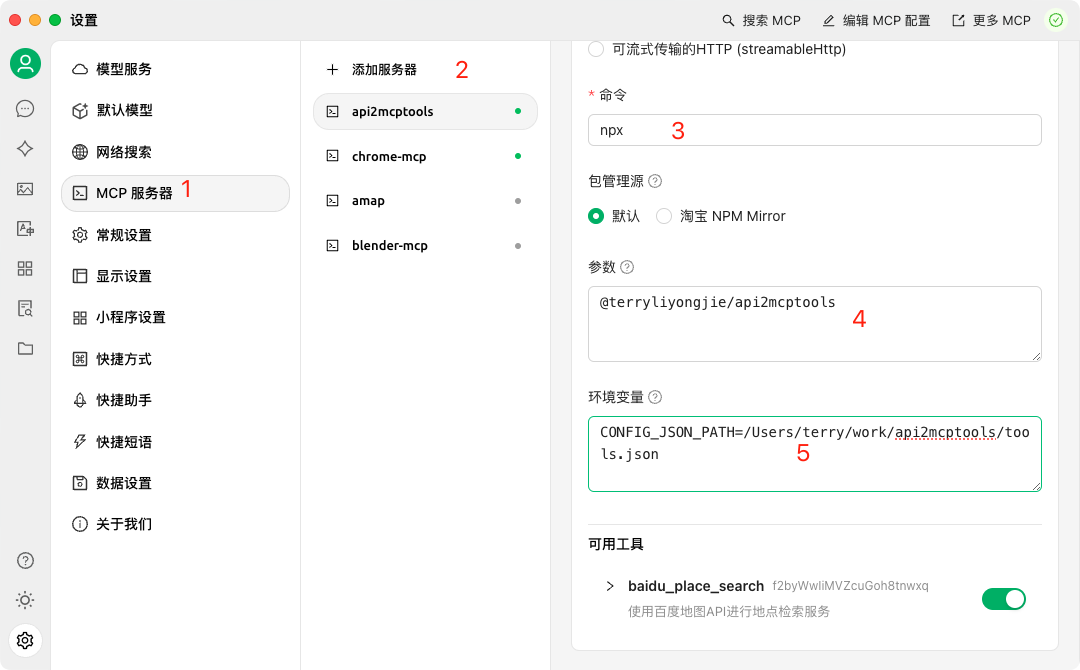
Installation
Option 1: Quick Start with npx (Recommended)
set CONFIG_JSON_PATH=example.json
npx @terryliyongjie/api2mcptools
Option 2: Traditional Installation
# Install locally in your project
npm install @terryliyongjie/mcp-tools

# Or install globally to use as a CLI tool
npm install -g @terryliyongjie/mcp-tools
Configuration
Environment Variables
# Required: Path to your configuration JSON file
CONFIG_JSON_PATH=example.json
Example configuration file (example.json):
// Single tool configuration
{
    "name": "tool_name",
    "description": "Tool description",
    "inputSchema": {
        "type": "object",
        "properties": {
            "param1": {
                "type": "string",
                "description": "Parameter description"
            }
        },
        "required": ["param1"]
    },
    "axiosConfig": {
        "url": "https://api.example.com/endpoint",
        "method": "get",
        "params": {
            "key": "your_api_key"
        }
    }
}

// Or multiple tools configuration
[
    {
        "name": "baidu_place_search",
        "description": "使用百度地图API进行地点检索服务",
        "inputSchema": {
            "type": "object",
            "properties": {
                "query": {
                    "type": "string",
                    "description": "检索关键字"
                },
                "region": {
                    "type": "string",
                    "description": "检索行政区划区域"
                }
            },
            "required": ["query", "region"]
        },
        "axiosConfig": {
            "url": "https://api.map.baidu.com/place/v2/search",
            "method": "get",
            "params": {
                "ak": "your_baidu_map_key"
            }
        }
    },
    // More tools...
]
Features
- Convert JSON APIs to MCP tools
- Easy integration with MCP ecosystem
- Support for various API types
- Command-line interface (CLI) support
Usage
As a CLI Tool
After installing globally, you can use the command directly in your terminal:
mcp-tools [options]
As a Module
// Example code coming soon
Development
# Install dependencies
npm install

# Build the project
npm run build

# Run in development mode
npm run dev

# Watch mode during development
npm run watch

# Run MCP inspector
npm run inspector
License
MIT
Install API2MCPTools in Claude Desktop, Claude Code & Cursor
unyly install api2mcptoolsInstalls into Claude Desktop, Claude Code, Cursor & VS Code — handles npx, uvx and build-from-source repos for you.
First time? Get the CLI: curl -fsSL https://unyly.org/install | sh
Or configure manually
Run in your terminal:
claude mcp add api2mcptools -- npx -y @terryliyongjie/api2mcptoolsStep-by-step: how to install API2MCPTools
FAQ
Is API2MCPTools MCP free?
Yes, API2MCPTools MCP is free — one-click install via Unyly at no cost.
Does API2MCPTools need an API key?
No, API2MCPTools runs without API keys or environment variables.
Is API2MCPTools hosted or self-hosted?
Self-hosted: the server runs locally on your machine via the install command above.
How do I install API2MCPTools in Claude Desktop, Claude Code or Cursor?
Open API2MCPTools on unyly.org, pick your client tab (Claude Desktop, Claude Code, Cursor) and press Install — the config is generated automatically, no JSON editing.
Related MCPs
GitHub
PRs, issues, code search, CI status
 by GitHub
Filesystem
Secure file operations with configurable access controls.
Memory
Knowledge graph-based persistent memory system.
Template MCP Server
A CLI tool to create a new Model Context Protocol server project with TypeScript support, dual transport options, and an extensible structure
 by mcpdotdirect
Compare API2MCPTools with
Not sure what to pick?
Find your stack in 60 seconds
Author?
Embed badge for your README
Browse similar
All development MCPs