
Appkit Bpmn Server
FreeNot checkedAn MCP server that generates, edits, and manages BPMN 2.0 diagrams from natural language descriptions, with an interactive viewer and persistent storage.

About
An MCP server that generates, edits, and manages BPMN 2.0 diagrams from natural language descriptions, with an interactive viewer and persistent storage.
README
An MCP Apps-compliant server that generates, edits, and manages BPMN 2.0 diagrams from natural language — powered by LLMs.
Describe a business process in plain text and get a valid, layouted BPMN diagram with an interactive viewer rendered inline in any MCP Apps-capable host (Claude, ChatGPT, VS Code, etc.).
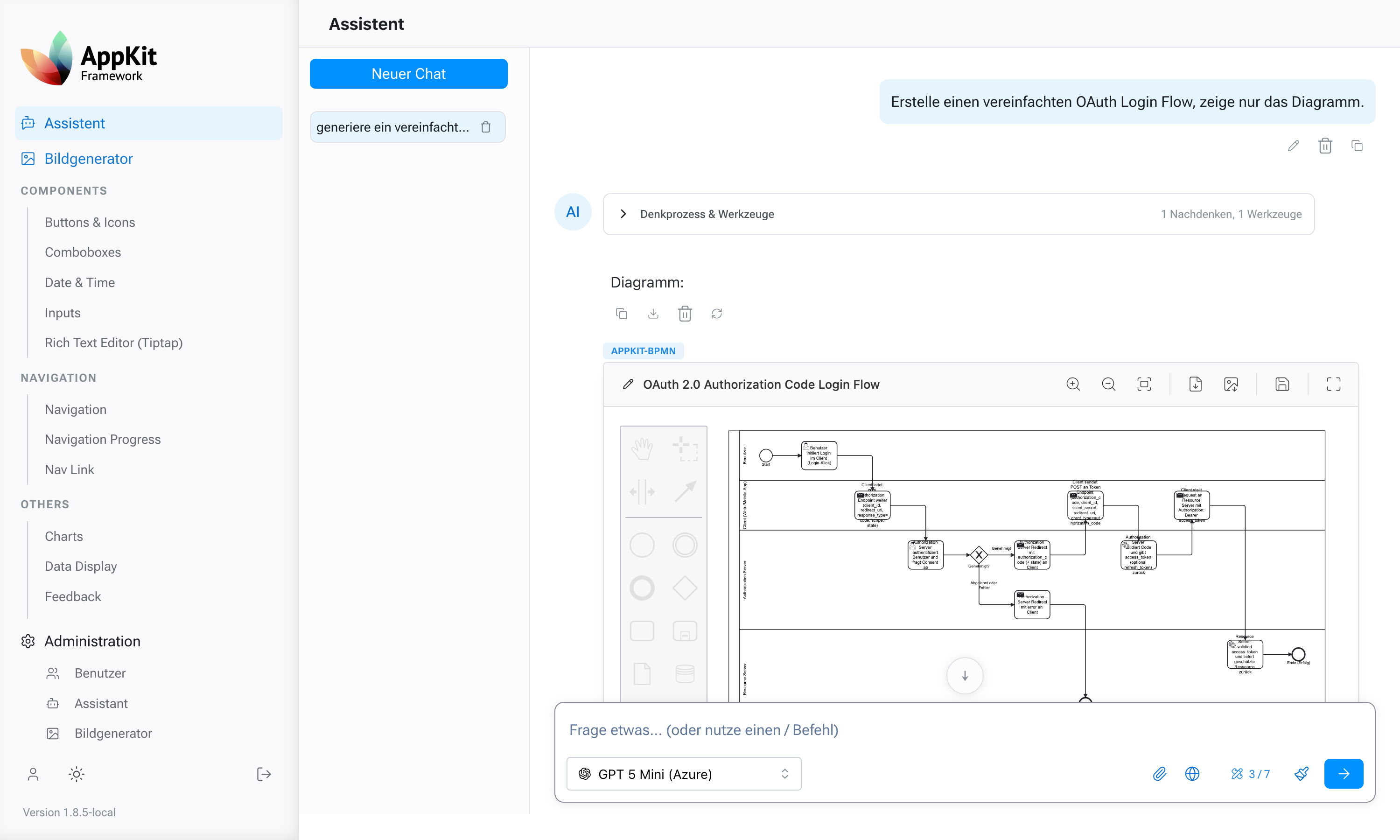
Features
- Natural language to BPMN — Generate process diagrams from text descriptions
- Interactive viewer — Built-in bpmn-js editor with zoom, pan, and editing capabilities
- Update diagrams — Modify existing diagrams via follow-up prompts without starting over
- Persistent storage — SQLite-backed diagram storage with Alembic migrations
- User assignment — Associate diagrams with specific users via
x-user-idheader or query parameter (defaults to-1) - Auto-layout — Automatic swimlane arrangement and edge routing
- Validation — Generated BPMN XML is validated before storage
- MCP Apps UI — Inline rendering in any compliant chat host
Architecture
MCP Host (Claude, ChatGPT, …)
  │
  │  MCP over HTTP (stateless)
  ▼
appkit-bpmn-server      ← this repo (configuration + startup)
  │
  ├─ appkit-mcp-bpmn    ← MCP tools, viewer, BPMN generation
  ├─ appkit-commons     ← shared config, OpenAI client, registry
  └─ SQLite database    ← diagram persistence
Prerequisites
- Python 3.14+
- uv package manager
- An OpenAI-compatible API key (Azure OpenAI or OpenAI)
Getting Started
1. Clone and install
git clone https://github.com/jenreh/appkit-bpmn-server.git
cd appkit-bpmn-server
uv sync
2. Configure environment
Create a .env file in the project root:
OPENAI_API_KEY=your-api-key
OPENAI_BASE_URL=https://your-endpoint.openai.azure.com/v1
3. Run database migrations
uv run alembic upgrade head
4. Start the server
uv run appkit_bpmn_server
The MCP endpoint will be available at http://127.0.0.1:8000/mcp.
5. Connect from an MCP client
Add the server to your MCP client configuration:
{
  "mcpServers": {
    "bpmn": {
      "url": "http://127.0.0.1:8000/mcp"
    }
  }
}
MCP Tools
| Tool | Description |
|---|---|
new_bpmn_diagram |
Generate a new BPMN diagram from a natural language description |
update_bpmn_diagram |
Modify an existing diagram using a follow-up prompt |
save_bpmn_diagram |
Save pre-built BPMN XML |
get_bpmn_xml |
Retrieve the BPMN XML for a diagram (app-only) |
save_or_update |
Persist edits made in the viewer (app-only) |
rename_bpmn_diagram |
Rename a diagram (app-only) |
Tools marked app-only are hidden from the model and callable only from the interactive viewer.
Configuration
Server settings are in configuration/config.yaml:
app:
  mcp_bpmn:
    storage_mode: database          # database, filesystem, or both
    default_model: gpt-5.3-codex    # LLM model for generation
    max_file_size_mb: 10
    diagram_types:
      - process
User Assignment
Diagrams can be associated with a specific user by sending an x-user-id value. This can be provided as:
- HTTP header:
x-user-id: 123 - Query parameter:
?x-user-id=123
If neither is provided, the user ID defaults to -1.
Project Structure
├── configuration/
│   ├── config.yaml          # Development configuration
│   ├── config.prod.yaml     # Production overrides
│   └── logging.yaml         # Logging configuration
├── alembic/                 # Database migrations
├── src/
│   └── appkit_bpmn_server/
│       └── main.py          # Server entry point
├── pyproject.toml
└── .env                     # API keys (not committed)
Installing Appkit Bpmn Server
This server has no published package — it is built from source. Open the repository and follow its README.
▸ github.com/jenreh/appkit-bpmn-serverFAQ
Is Appkit Bpmn Server MCP free?
Yes, Appkit Bpmn Server MCP is free — one-click install via Unyly at no cost.
Does Appkit Bpmn Server need an API key?
No, Appkit Bpmn Server runs without API keys or environment variables.
Is Appkit Bpmn Server hosted or self-hosted?
A hosted option is available: Unyly runs the server in the cloud, no local setup required.
How do I install Appkit Bpmn Server in Claude Desktop, Claude Code or Cursor?
Open Appkit Bpmn Server on unyly.org, pick your client tab (Claude Desktop, Claude Code, Cursor) and press Install — the config is generated automatically, no JSON editing.
Related MCPs
GitHub
PRs, issues, code search, CI status
 by GitHub
Filesystem
Secure file operations with configurable access controls.
Memory
Knowledge graph-based persistent memory system.

Unyly Deploy
Deploy sites and MCP servers to Unyly straight from your AI agent
 by Unyly
Amap Maps Mcp Server
MCP server for using the AMap Maps API
 by duxiaohui
PayMCP
Lightweight payments layer for MCP servers: turn tools into paid endpoints with a two-line decorator. [PyPI](https://pypi.org/project/paymcp/) · [npm](https://w
 by blustAI
Server For Power BI
Enables exploring Microsoft Fabric / Power BI workspaces and semantic models, and executing ad-hoc DAX queries.
 by Mitsubishi-Fuso
Gpt Image 2 Mcp
RunAPI GPT Image 2 MCP server for image generation: create tasks, poll results, and check pricing across 1 model from Claude Code, Codex, Cursor, and VS Code.
 by runapi-ai
Template MCP Server
A CLI tool to create a new Model Context Protocol server project with TypeScript support, dual transport options, and an extensible structure
 by mcpdotdirect
Supabase
Database, auth and storage
 by Supabase
Compare Appkit Bpmn Server with
Not sure what to pick?
Find your stack in 60 seconds
Author?
Embed badge for your README
Browse similar
All development MCPs