
Aranet4 Server
FreeNot checkedMCP server to manage your Aranet4 CO2 sensor, enabling scanning, data fetching, historical querying, and plotting.

About
MCP server to manage your Aranet4 CO2 sensor, enabling scanning, data fetching, historical querying, and plotting.
README
MCP server to manage your Aranet4 CO2 sensor. Built upon Aranet4-Python.
[!TIP] For the standalone python version without MCP logic, see aranet4-archiver.
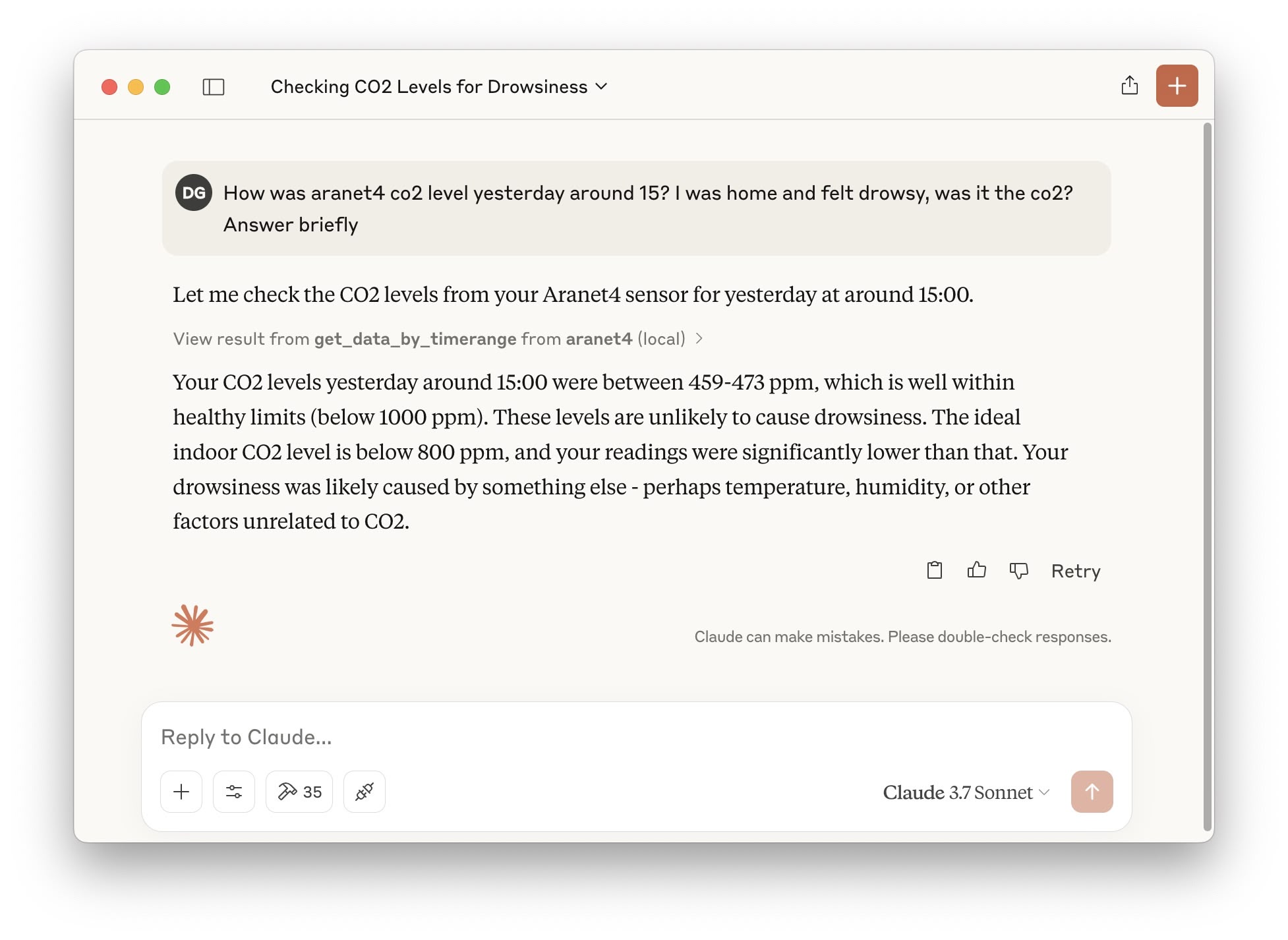
Features:
- Scan for nearby devices.
- Fetch new data from embedded device memory and save to a local sqlite db for tracking and later viewing. For automatic updates, see at the bottom.
- Ask questions about recent measurements or about a specific past date.
- [For MCP clients that support images] Ask data to be plotted to also have a nice visualization!
- Assisted configuration! 💫 After installation, just ask
init aranet4in your client to set up everything for the mcp server to work with your device.
Requirements
An Aranet4 device already paired. The device uses BLE, so it won't be shown in regular bluetooth search. On MacOS, one way is to install LightBlue from the App Store.
Installation
Clone repo:
git clone [email protected]:diegobit/aranet4-mcp-server.git`
cd aranet4-mcp-server
Prepare environment:
- Recommended (with uv): Nothing to do. The provided
pyproject.tomlhandles dependencied and virtual environments. - Alternative (with pip): install with
pip install .
- Recommended (with uv): Nothing to do. The provided
Add to MCP client configuration:
"aranet4": { "command": "{{PATH_TO_UV}}", // run `which uv` "args": [ "--directory", "{{PATH_TO_SRC}}/aranet4-mcp-server/", "run", "src/server.py" ] }- Claude Desktop MacOS config file path:
~/Library/Application Support/Claude/claude_desktop_config.json - Cursor MacOS config file path:
~/.cursor/mcp.json
- Claude Desktop MacOS config file path:
Configure:
- Recommended (AI assisted config!): start your client and ask
init aranet4to get a guided configuration. - Alternative (manual): edit file
config.yaml. You need to provide the mac address and the device name. You can get the mac address witharanetctl --scanfrom Aranet4-Python (installed with this repo dependencies).
- Recommended (AI assisted config!): start your client and ask
Dockerfile
Dockerfile is available. Remember to pass env variables or update config.yaml.
List of tools
Configuration and utils:
init_aranet4_config: assisted configuration of device.scan_devices: scan nearby bluetooth aranet4 devices.get_configuration_and_db_stats: get current config.yaml and general stats from the local sqlite3 db.set_configuration: set values in config.yaml.
To update historical data:
fetch_new_data: fetch new data from configured nearby aranet4 device and save to local db.
To query historical data:
get_recent_data: get recent data from local db. Can specify how many measurements.get_data_by_timerange: get data in specific timerange from local db. Can specify how many measurements (careful, if the range is big and the limit is low, datapoints will be skipped).For both, ask to receive a plot to have it generated and displayed.
Automatic data fetch job
If you want your local db to always be updated, you can setup a cronjob or a launch agent that fetches data automatically every few hours. In MacOS, do as follows:
- Configure absolute paths in
com.diegobit.aranet4-fetch.plist. - Install LaunchAgent:
cp com.diegobit.aranet4-fetch.plist ~/Library/LaunchAgents/
launchctl load ~/Library/LaunchAgents/com.diegobit.aranet4-fetch.plist
For other platforms, just run fetch-job.py periodically however you prefer.
Installing Aranet4 Server
This server has no published package — it is built from source. Open the repository and follow its README.
▸ github.com/diegobit/aranet4-mcp-serverFAQ
Is Aranet4 Server MCP free?
Yes, Aranet4 Server MCP is free — one-click install via Unyly at no cost.
Does Aranet4 Server need an API key?
No, Aranet4 Server runs without API keys or environment variables.
Is Aranet4 Server hosted or self-hosted?
Self-hosted: the server runs locally on your machine via the install command above.
How do I install Aranet4 Server in Claude Desktop, Claude Code or Cursor?
Open Aranet4 Server on unyly.org, pick your client tab (Claude Desktop, Claude Code, Cursor) and press Install — the config is generated automatically, no JSON editing.
Related MCPs
GitHub
PRs, issues, code search, CI status
 by GitHub
Filesystem
Secure file operations with configurable access controls.
Memory
Knowledge graph-based persistent memory system.
Template MCP Server
A CLI tool to create a new Model Context Protocol server project with TypeScript support, dual transport options, and an extensible structure
 by mcpdotdirect
Compare Aranet4 Server with
Not sure what to pick?
Find your stack in 60 seconds
Author?
Embed badge for your README
Browse similar
All development MCPs