
arnavranjan005/mcp-telemetry
FreeNot checkedSocket.IO-style telemetry for MCP servers. Instrument a tool call with a few lines of mcp-telemetry-sdk, and telemetrysubscribe streams its live progress (steps

About
Socket.IO-style telemetry for MCP servers. Instrument a tool call with a few lines of mcp-telemetry-sdk, and telemetrysubscribe streams its live progress (steps, logs, cost, done) to any connected MCP client via notifications/progress — no polling, and a job started in one session can be watched from a completely different one.
README
CI npm (sdk) npm (server) License: MIT
Socket.IO for AI agents. Instrument any MCP server's tool calls with a few lines, and any MCP client watching (Claude Code, Cursor, or your own tooling) gets live, structured progress — no polling, no context-flooding tool calls.
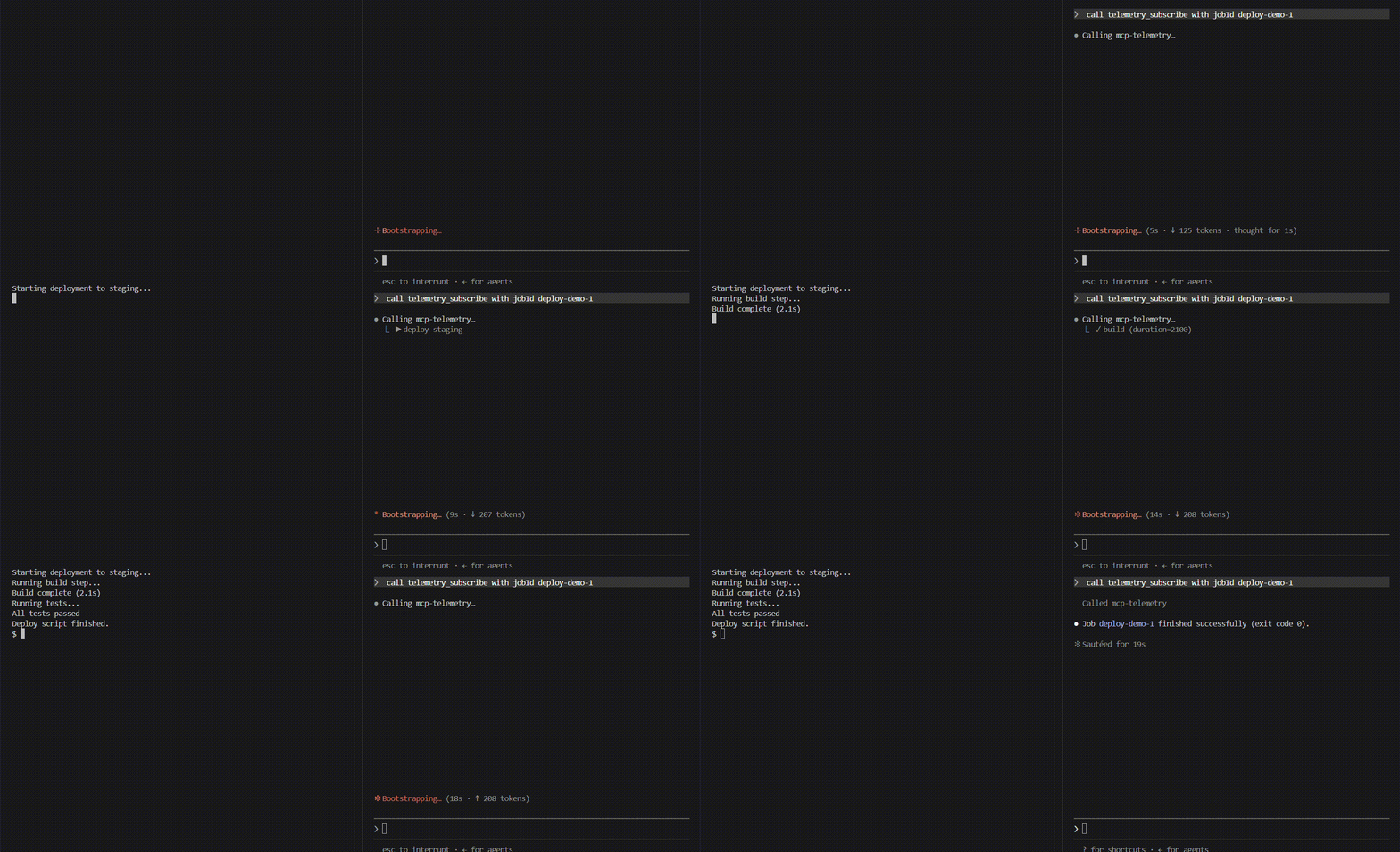
Your MCP server                    mcp-telemetry server         Agent
─────────────────                  ────────────────────         ─────
mcp-telemetry-sdk
  job.stepStart('build')
       │
       │ local socket (queued, persistent connection)
       ▼
  collector receives event
  store updates job state
       │
       │ MCP notifications/progress
       ▼
                                    telemetry_subscribe tool     Claude Code
                                    pushes event to agent   →   sees inline
                                                                 live status
Why this exists
MCP tool calls are synchronous: an agent calls a tool, waits, gets a result. For anything long-running, that leaves two bad options — block the whole call with no visibility, or have the agent poll a status tool in a loop (which floods the conversation with repeated tool calls and burns context for no new information).
MCP does have one legitimate way for a server to push updates mid-call: notifications/progress, keyed to a progressToken on the in-flight request. But every MCP server author ends up re-implementing the same plumbing — extracting the token, wiring a timer, tailing output, cleaning up on completion. mcp-telemetry is that plumbing, factored out once, plus a companion server so a job started in one session can be watched from a completely different one.
How it fits together
Two packages, one job each:
| Package | Who uses it | What it does |
|---|---|---|
| mcp-telemetry-sdk | MCP server authors | Import it, call job.start() / .stepDone() / .log() from your tool handlers. Zero runtime dependencies — it's a socket writer with a persistent, queued connection and nothing else. |
| mcp-telemetry-server | Agent users | An MCP server you register once. Exposes telemetry_subscribe (blocks and streams live progress for a job), plus telemetry_jobs/telemetry_job_status for point-in-time queries. |
These two packages are architecturally independent — the SDK never calls any MCP tool, and the server never imports your tool's code. They only ever meet at a local socket, so a producer with a broken connection can't take down anything, and a collector that's overwhelmed can't block your tool call.
Quickstart
1. Instrument your MCP server (mcp-telemetry-sdk)
npm install mcp-telemetry-sdk
import { McpServer } from "@modelcontextprotocol/sdk/server/mcp.js";
import { MCPTelemetry } from "mcp-telemetry-sdk";

const server = new McpServer({ name: "my-deploy-server", version: "1.0.0" });
const telemetry = new MCPTelemetry(); // zero config — derives a socket path from cwd

server.tool("deploy", { env: z.string() }, async ({ env }) => {
  const job = telemetry.createJob({ task: `deploy ${env}` });

  job.start();
  job.stepStart("build");
  await runBuild();
  job.stepDone("build", { duration: 2100 });

  job.stepStart("test");
  const passed = await runTests();
  if (!passed) {
    job.stepFailed("test", "3 tests failed");
    await job.done(1);
    return { content: [{ type: "text", text: "Deploy failed at test stage" }] };
  }
  job.stepDone("test");

  await job.done(0);
  return { content: [{ type: "text", text: "Deployed successfully" }] };
});
That's the entire integration. If nothing is listening on the socket, every call is a fast no-op — your server behaves identically with or without a collector running.
2. Watch it from an agent (mcp-telemetry-server)
npm install -g mcp-telemetry-server
Register it as an MCP server, alongside your instrumented one:
{
  "mcpServers": {
    "deploy": { "command": "npx", "args": ["-y", "deploy-mcp"] },
    "telemetry": { "command": "npx", "args": ["-y", "mcp-telemetry-server"] }
  }
}
Then, in your agent session:
You:   deploy to staging
Agent: calls the deploy tool, then telemetry_subscribe with the returned job id

  ▶ deploy staging
  ↻ build
  ✓ build (duration=2100)
  ↻ test
  ✓ test
  ✓ job done (exit 0)

Agent: "Deployed to staging successfully."
No polling, no separate terminal, no context-flooding tool calls — one deploy call plus one telemetry_subscribe call, regardless of how long the job runs.
API reference
mcp-telemetry-sdk
new MCPTelemetry(opts?)
Creates a telemetry client. opts.socketPath overrides the default (derived from process.cwd() via getSocketPath()). Owns one persistent, queued connection shared by every job it creates.
telemetry.createJob({ id?, task }) → JobHandle
Starts tracking a job. id defaults to an auto-incrementing job-N.
telemetry.disconnect()
Closes the underlying connection. Call on server shutdown if you want a clean teardown instead of letting it idle.
JobHandle method |
Emits | Notes |
|---|---|---|
start() |
job_start |
Call once, at the beginning of the tool handler. |
stepStart(name, meta?) |
step_start |
name is any string — 'build', 'implement', whatever fits your domain. |
stepDone(name, meta?) |
step_done |
meta is arbitrary key/value data (shown in telemetry_subscribe's live output). |
stepFailed(name, reason?) |
step_failed |
|
log(line, stream?) |
log |
stream is 'stdout' | 'stderr', optional. Rapid log lines are coalesced by the server before being pushed live — see below. |
cost(amount, meta?) |
cost |
amount in USD. |
done(exitCode?) |
job_done |
Async. This is the terminal event — nothing else may be sent after it, so it actively retries delivery for up to 1.5s instead of relying on a future send() to recover from a transient connection failure. Safe to call without await. |
getSocketPath(root?) is also exported, for advanced cases where you need to compute the same path a producer and a server will independently derive.
mcp-telemetry-server
Exposes three MCP tools:
| Tool | Behavior |
|---|---|
telemetry_subscribe({ jobId?, timeoutMs? }) |
Blocks and streams live notifications/progress for the given job (or the next job to start, if jobId is omitted) until it finishes or timeoutMs elapses (default 5 min). This is the tool your agent calls to watch a job. |
telemetry_jobs() |
Lists all jobs the server currently knows about, with status and cost. |
telemetry_job_status({ jobId }) |
Full state of one job — every step, cost, and any failure reason. |
Comparison
Three genuinely different categories of approach exist near this space — none of them solve the same problem:
| mcp-telemetry | Async job runners | Completion notifiers | OpenTelemetry MCP instrumentation | |
|---|---|---|---|---|
| Mechanism | Push (notifications/progress) |
Poll (call a status/tail tool yourself) | Push, but only at completion (webhook/sound) | Traces/metrics to an observability backend |
| Live step-by-step progress | Yes | No — you ask, it answers | No — only "it's done" | No — post-hoc analysis |
| Watch from a different session | Yes | No — tied to the session that started it | Partial (a webhook can fire anywhere) | N/A — not agent-facing |
| Who it's for | Any MCP server author + any agent | Anyone needing async shell execution specifically | Anyone wanting a completion ping | Server operators monitoring their own deployment |
Relationship to SEP-1686 (MCP Tasks): the MCP spec's own answer to this problem — Accepted into the spec (not just proposed), giving requests a durable task handle (taskId) with tasks/get polling and a progressToken valid for the task's whole lifetime. It's the eventual "correct" fix, backed by real production cases (Amazon cites healthcare data pipelines, CI/CD wrapping, and multi-agent systems in the SEP itself). The catch: it's labeled awaiting-sdk-change — the standard is settled, but client/server SDKs haven't implemented it yet, so it isn't something you can rely on today. mcp-telemetry solves the same problem now, on the current stable protocol — a working bridge you can adopt today and retire once Tasks lands in the SDKs you depend on, not a competing standard.
Design notes worth knowing before you rely on this
- The producer→server connection is a persistent, queued socket, not one connection per event. Events are flushed in order once connected; a burst that arrives before the connection finishes establishing is queued and delivered in order once it does.
- Delivery is best-effort, not guaranteed, with one exception:
done(). Every other event silently drops if the collector isn't reachable and nothing else triggers a retry — this is deliberate (telemetry should never be able to block or crash your actual tool call).done()is the one event that actively retries for a bounded window, since it's usually the last thing a job ever sends. telemetry_subscribeonly shows live-forward events — it doesn't replay history. If a job already finished before you subscribed, usetelemetry_job_statusinstead.- This is not a distributed job queue. There's no persistence across a collector restart, no cross-machine delivery, and no retry policy beyond what's described above. If you need that, you want a real message queue — this is deliberately just enough to solve "watch a local MCP tool call live," nothing more.
Development
git clone https://github.com/arnavranjan005/mcp-telemetry.git
cd mcp-telemetry
npm install
npm run build
npm test
See CONTRIBUTING.md for the full setup, monorepo layout, and PR expectations.
License
Installing arnavranjan005/mcp-telemetry
This server has no published package — it is built from source. Open the repository and follow its README.
▸ github.com/arnavranjan005/mcp-telemetryFAQ
Is arnavranjan005/mcp-telemetry MCP free?
Yes, arnavranjan005/mcp-telemetry MCP is free — one-click install via Unyly at no cost.
Does arnavranjan005/mcp-telemetry need an API key?
No, arnavranjan005/mcp-telemetry runs without API keys or environment variables.
Is arnavranjan005/mcp-telemetry hosted or self-hosted?
Self-hosted: the server runs locally on your machine via the install command above.
How do I install arnavranjan005/mcp-telemetry in Claude Desktop, Claude Code or Cursor?
Open arnavranjan005/mcp-telemetry on unyly.org, pick your client tab (Claude Desktop, Claude Code, Cursor) and press Install — the config is generated automatically, no JSON editing.
Related MCPs
GitHub
PRs, issues, code search, CI status
 by GitHub
Filesystem
Secure file operations with configurable access controls.
Memory
Knowledge graph-based persistent memory system.
Template MCP Server
A CLI tool to create a new Model Context Protocol server project with TypeScript support, dual transport options, and an extensible structure
 by mcpdotdirect
Compare arnavranjan005/mcp-telemetry with
Not sure what to pick?
Find your stack in 60 seconds
Author?
Embed badge for your README
Browse similar
All development MCPs