
Arrstack
FreeNot checkedMCP server for AI-controlled homelab media services including Sonarr, Radarr, Jellyfin, and qBittorrent.

About
MCP server for AI-controlled homelab media services including Sonarr, Radarr, Jellyfin, and qBittorrent.
README
An MCP server that gives AI assistants configurable access to homelab media and game services.
Works with Claude Desktop, Cursor, VS Code Copilot, OpenClaw, and any other MCP-compatible client.
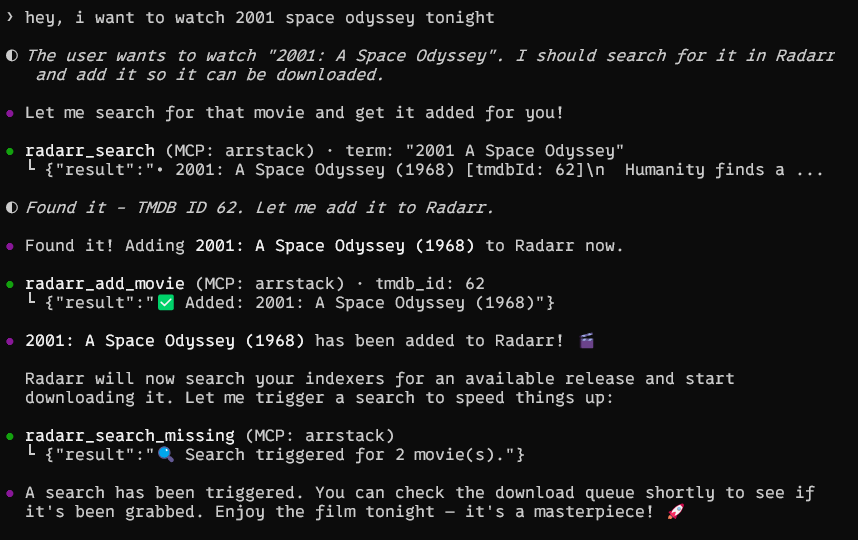
Demo
Features
| Service | Tools |
|---|---|
| Sonarr | List series, search & add shows, upcoming episodes, download queue |
| Radarr | List movies, search & add movies, download queue |
| Lidarr | List artists, search & add artists/albums, queue, missing search |
| Prowlarr | List/test indexers, search releases, health check |
| qBittorrent | List/pause/resume/delete torrents, add magnets / .torrent files / URLs, transfer stats |
| SABnzbd | Queue, history, status, pause/resume, add NZB url, speed limit |
| RDTClient | Real-Debrid downloader: list/pause/resume/delete torrents, add magnets, provider status |
| Jellyfin | List libraries, recent additions, system info |
| RomM | System info, list platforms, list/search ROMs, game details |
| GameVault | List/search PC games, game details, random game, reindex library |
| Bookshelf | List/search authors & books, queue, missing, profiles, health |
Only configure the services you use — unconfigured services are gracefully skipped.
Choose Your Services
To avoid flooding an MCP client's context with tools it does not need, the advertised tool catalog is configurable:
ENABLED_SERVICES=auto(default) advertises only services with a configured URL.- A comma-separated list such as
sonarr,radarr,rommadvertises exactly that subset. ENABLED_SERVICES=alladvertises every available tool.- Run
python server.py --list-servicesto inspect configured/enabled services. - Run
python server.py --setupfor an interactive selector that prints the resultingENABLED_SERVICESline.
Valid service names are sonarr, radarr, lidarr, prowlarr,
qbittorrent, rdtclient, sabnzbd, jellyfin, romm, gamevault, and
bookshelf. Aliases qbt, rdt, and sab are also accepted.
Quick Start
Option 1: Claude Desktop / Cursor / VS Code (stdio)
Install dependencies:
pip install "mcp[cli]>=1.9.0" httpxAdd to your MCP client config (e.g.
claude_desktop_config.json):{ "mcpServers": { "arrstack": { "command": "python", "args": ["/path/to/arrstack-mcp/server.py"], "env": { "SONARR_URL": "http://localhost:8989", "SONARR_API_KEY": "your-api-key", "RADARR_URL": "http://localhost:7878", "RADARR_API_KEY": "your-api-key", "QBT_URL": "http://localhost:8080", "QBT_USER": "admin", "QBT_PASS": "your-password", "JELLYFIN_URL": "http://localhost:8096" } } } }Restart your MCP client. Done!
Option 2: Docker (HTTP transport)
For remote setups or when running alongside your *arr stack:
git clone https://github.com/ct4nk3r/arrstack-mcp.git
cd arrstack-mcp
cp .env.example .env
# Edit .env with your service URLs and API keys
docker compose up -d
The server runs on port 8000 with Streamable HTTP transport.
Connect to OpenClaw
openclaw mcp set arrstack '{"url":"http://arrstack-mcp:8000/mcp","transport":"streamable-http"}'
Connect to other HTTP MCP clients
Point your client to http://<host>:8000/mcp using Streamable HTTP transport.
Option 3: Docker on the same network as your *arr stack
If your media services run in Docker, add arrstack-mcp to the same network:
services:
  arrstack-mcp:
    build: .
    container_name: arrstack-mcp
    ports:
      - "8000:8000"
    environment:
      - SONARR_URL=http://sonarr:8989
      - SONARR_API_KEY=your-key
      - RADARR_URL=http://radarr:7878
      - RADARR_API_KEY=your-key
      - QBT_URL=http://qbittorrent:8080
      - QBT_USER=admin
      - QBT_PASS=your-password
      - JELLYFIN_URL=http://jellyfin:8096
    networks:
      - your-media-network
Configuration
All configuration is done via environment variables:
| Variable | Required | Description |
|---|---|---|
ENABLED_SERVICES |
No | auto (default), all, or a comma-separated service subset |
SONARR_URL |
No | Sonarr base URL (e.g. http://localhost:8989) |
SONARR_API_KEY |
If Sonarr | Sonarr API key (Settings → General) |
RADARR_URL |
No | Radarr base URL (e.g. http://localhost:7878) |
RADARR_API_KEY |
If Radarr | Radarr API key (Settings → General) |
LIDARR_URL |
No | Lidarr base URL (e.g. http://localhost:8686) |
LIDARR_API_KEY |
If Lidarr | Lidarr API key (Settings → General) |
QBT_URL |
No | qBittorrent Web UI URL (e.g. http://localhost:8080) |
QBT_USER |
If qBt | qBittorrent username (default: admin) |
QBT_PASS |
If qBt | qBittorrent password |
RDT_URL |
No | RDTClient base URL (e.g. http://localhost:6500) |
RDT_USER |
If RDT login | RDTClient username (default: admin) |
RDT_PASS |
If RDT login | RDTClient password |
JELLYFIN_URL |
No | Jellyfin base URL (e.g. http://localhost:8096) |
JELLYFIN_API_KEY |
No | Jellyfin API key (optional, for authenticated endpoints) |
PROWLARR_URL |
No | Prowlarr base URL (e.g. http://localhost:9696) |
PROWLARR_API_KEY |
If Prowlarr | Prowlarr API key (Settings → General) |
ROMM_URL |
No | RomM base URL (e.g. http://localhost:8081) |
ROMM_API_TOKEN |
If RomM | RomM bearer token; alternatively use ROMM_USER and ROMM_PASS |
ROMM_USER |
If RomM basic auth | RomM username |
ROMM_PASS |
If RomM basic auth | RomM password |
GAMEVAULT_URL |
No | GameVault server URL (e.g. http://localhost:8082) |
GAMEVAULT_API_KEY |
If GameVault | GameVault API key |
MCP_ALLOWED_HOSTS |
For HTTP/SSE | Comma-separated accepted Host headers; supports wildcard ports such as arrstack-mcp:* |
LOG_LEVEL |
No | Request logging level (default: INFO; credentials are never logged) |
ARD_ENABLED |
No | Agentic Resource Discovery publishing: auto (default; on for HTTP transports), true, or false |
ARD_PUBLIC_URL |
No | Public base URL clients reach this server at (e.g. https://arrstack.example.com); advertises an absolute connection endpoint inside the card. Leave blank if the server is private. |
ARD_DOMAIN |
No | Publisher domain for the urn:air logical identifier (defaults to the host of ARD_PUBLIC_URL, else localhost) |
ARD_HOST_NAME |
No | Human-readable catalog host name (default: arrstack-mcp) |
ARD_EMBED_CARD |
No | auto (embed the server card inline only when ARD_PUBLIC_URL is unset), true (always embed — best for static hosting), or false (always reference it by URL) |
ARD_DID_WEB |
No | Opt-in did:web host identity (e.g. arrstack.example.com). Only set for a domain whose root you control and where you host a /.well-known/did.json; otherwise left off |
SAB_URL |
No | SABnzbd base URL (e.g. http://localhost:8080) |
SAB_API_KEY |
If SABnzbd | SABnzbd API key (Config → General → API Key) |
BOOKSHELF_URL |
No | Bookshelf base URL (e.g. http://localhost:8787) |
BOOKSHELF_API_KEY |
If Bookshelf | Bookshelf API key (Settings → General) |
Available Tools
Sonarr (TV Shows)
| Tool | Description |
|---|---|
sonarr_list_series |
List all series with episode counts and disk usage |
sonarr_get_series |
Get detailed info about a specific series |
sonarr_search |
Search for new shows to add |
sonarr_add_series |
Add a show by TVDB ID |
sonarr_upcoming |
Show upcoming episodes |
sonarr_queue |
Show current download queue |
Radarr (Movies)
| Tool | Description |
|---|---|
radarr_list_movies |
List all movies with download status |
radarr_get_movie |
Get detailed info about a specific movie |
radarr_search |
Search for new movies to add |
radarr_add_movie |
Add a movie by TMDB ID |
radarr_queue |
Show current download queue |
Lidarr (Music)
| Tool | Description |
|---|---|
lidarr_list_artists |
List all artists with album/track counts and disk usage |
lidarr_get_artist |
Get detailed info about a specific artist |
lidarr_search |
Search for artists to add |
lidarr_search_album |
Search for albums in metadata |
lidarr_add_artist |
Add an artist by name (requires quality + metadata profile + root folder) |
lidarr_list_quality_profiles |
List quality profiles |
lidarr_list_metadata_profiles |
List metadata profiles |
lidarr_list_root_folders |
List root folders with free space |
lidarr_queue |
Show current download queue |
lidarr_delete_queue_item |
Remove an item from the queue (optionally blocklist) |
lidarr_search_missing |
Trigger search for all missing albums |
Prowlarr (Indexers)
| Tool | Description |
|---|---|
prowlarr_list_indexers |
List all indexers with status |
prowlarr_test_indexer |
Test a specific indexer connection |
prowlarr_test_all_indexers |
Test all enabled indexers |
prowlarr_search |
Search across indexers for releases |
prowlarr_health |
Check system health warnings |
qBittorrent (Downloads)
| Tool | Description |
|---|---|
qbt_list_torrents |
List torrents with progress and speed |
qbt_torrent_details |
Get detailed torrent info |
qbt_add |
Add anything — magnet, .torrent URL, local .torrent path, or base64 — and start it |
qbt_add_magnet |
Add a magnet link (optional category / save path / paused) |
qbt_add_torrent_file |
Add a .torrent from a local path, http(s) URL, or base64 content |
qbt_pause |
Pause a torrent |
qbt_resume |
Resume a torrent |
qbt_delete |
Delete a torrent (optionally with files) |
qbt_transfer_info |
Global transfer statistics |
SABnzbd (Usenet Downloads)
| Tool | Description |
|---|---|
sab_queue |
Show the current download queue |
sab_history |
Show download history |
sab_status |
Show full server status (disk, speed, etc.) |
sab_pause |
Pause the entire queue |
sab_resume |
Resume the entire queue |
sab_pause_job |
Pause a specific queue item by NZO id |
sab_resume_job |
Resume a specific queue item by NZO id |
sab_delete_job |
Delete a queue item (optionally with files) |
sab_add_url |
Add an NZB by URL (with optional category/priority) |
sab_speed_limit |
Set the global speed limit (0..100% of configured max) |
RDTClient (Real-Debrid Downloader)
RDTClient is a Real-Debrid / AllDebrid / Premiumize download manager that exposes a qBittorrent-compatible API, so it slots into Sonarr/Radarr just like qBt.
| Tool | Description |
|---|---|
rdt_list_torrents |
List torrents with progress and speed |
rdt_torrent_details |
Get detailed torrent info |
rdt_add_magnet |
Add a magnet link to your debrid provider |
rdt_pause |
Pause one or more torrents |
rdt_resume |
Resume one or more torrents |
rdt_delete |
Delete one or more torrents (optionally with files) |
rdt_provider_status |
Show configured debrid provider (Real-Debrid / AllDebrid / etc.) |
Jellyfin (Media Server)
| Tool | Description |
|---|---|
jellyfin_libraries |
List media libraries |
jellyfin_recent |
Recently added items |
jellyfin_system_info |
Server version and system info |
RomM (ROM Library)
| Tool | Description |
|---|---|
romm_system_info |
Show version, detected platforms, and metadata sources |
romm_list_platforms |
List platforms, ROM counts, and library sizes |
romm_list_games |
List or search indexed ROMs |
romm_get_game |
Show details for one indexed ROM |
GameVault (PC Game Library)
| Tool | Description |
|---|---|
gamevault_list_games |
List or search PC games and installers |
gamevault_get_game |
Show details for one game |
gamevault_random_game |
Pick a random indexed game |
gamevault_reindex |
Scan the game-files directory for changes |
Bookshelf (Books — Hardcover-flavored Readarr fork)
Bookshelf is pennydreadful/bookshelf, a fork of Readarr that uses hardcover.app as its metadata provider. It exposes the standard Readarr v1 API, so these tools behave like the Sonarr/Radarr/Lidarr equivalents.
| Tool | Description |
|---|---|
bookshelf_health |
Version + active health-check issues |
bookshelf_list_authors |
List monitored authors with book counts and disk usage |
bookshelf_get_author |
Detailed info for an author by ID |
bookshelf_search_author |
Search Hardcover for an author |
bookshelf_search_book |
Search Hardcover for a book |
bookshelf_list_books |
List all tracked books |
bookshelf_queue |
Current download queue |
bookshelf_wanted_missing |
Books flagged as missing |
bookshelf_list_quality_profiles |
Quality profiles |
bookshelf_list_metadata_profiles |
Metadata profiles |
bookshelf_list_root_folders |
Root folders with free space |
bookshelf_search_missing |
Trigger a search for all missing books |
Transport Options
# stdio (default) — for Claude Desktop, Cursor, VS Code
python server.py

# Streamable HTTP — for Docker / remote
python server.py --transport streamable-http --port 8000

# SSE — legacy HTTP transport
python server.py --transport sse --port 8000
Agentic Resource Discovery (ARD)
arrstack-mcp implements the publisher side of Agentic Resource Discovery (spec) — an open standard for publishing and discovering AI capabilities across the web. This lets ARD registries and agents find your server and learn how to connect to it, instead of every client needing a hand-written config.
[!IMPORTANT] ARD publishes discoverable metadata only. It does not add authentication to this server or make it safe to expose to the internet — the catalog just describes what tools exist. The MCP endpoint still controls your media stack with your credentials, so keep it behind Tailscale or an authenticated proxy (see Security). Discovery is not a substitute for verifying who you connect to.
When running an HTTP transport, the server publishes two documents, generated
live from whatever ENABLED_SERVICES advertises:
| Endpoint | Description |
|---|---|
/.well-known/ai-catalog.json |
The ARD capability manifest. Advertises this server as a single application/mcp-server-card+json entry with capabilities (the enabled tool names), representativeQueries for semantic search, and a domain-anchored urn:air identifier (plus an optional did:web identity, see below). |
/.well-known/mcp-server-card.json |
The MCP server card the catalog references: every advertised tool with its inputSchema, plus the MCP endpoint and transport. |
Both are served with Content-Type: application/json. When ARD_PUBLIC_URL is
set (i.e. you've opted into public discovery), they also send
Access-Control-Allow-Origin: * so browser-based crawlers can fetch them from
any origin; on a private deployment that wildcard CORS header is omitted.
Server-side crawlers ignore CORS and work either way.
Identity & trust
The catalog entry's identifier is a domain-anchored urn:air URN — a
stable logical name (e.g. urn:air:arrstack.example.com:server:arrstack); it
does not need to resolve. A did:web host identity is opt-in: it's only
emitted when you set ARD_DID_WEB to a domain whose root you control and where
you host a DID document at
/.well-known/did.json. It is never inferred from ARD_PUBLIC_URL/ARD_DOMAIN,
so the catalog never advertises an identity that can't be verified. This
implementation does not include a cryptographic trustManifest (signing /
attestations) — that's an optional, enterprise-grade layer of the spec.
Publishing
Set
ARD_PUBLIC_URLto the URL clients reach this server at, e.g.https://arrstack.example.com. The catalog then advertises an absolute connection endpoint (override the URN namespace withARD_DOMAIN).Serve it over HTTPS on your public domain (a reverse proxy / Tailscale Funnel / Cloudflare Tunnel in front of port
8000).Check discovery works:
curl https://arrstack.example.com/.well-known/ai-catalog.json
Startup logs print the discovery URL when ARD is enabled. Set ARD_ENABLED=false
to turn the endpoints off.
Static hosting on GitHub Pages (no domain, no public server)
You don't need a custom domain or a publicly exposed MCP server to publish a
discoverable catalog — host it as a static file on GitHub Pages, anchored to the
github.io domain you already control. This repo ships a workflow
(.github/workflows/ard-pages.yml) that
regenerates the catalog from server.py on every change and deploys it, so it
never goes stale.
Setup (one-time, ~2 minutes):
Enable Pages: repo Settings → Pages → Build and deployment → Source: "GitHub Actions".
Flip the deploy gate on: repo Settings → Secrets and variables → Actions → Variables, add
ARD_PAGES_ENABLED=true. (The deploy job is skipped until you do this, so the workflow stays green beforehand — GitHub's token can't enable Pages for you, so this is an explicit opt-in.)Run it: push to
main(or Actions → Publish ARD catalog → Run workflow). The catalog goes live at:https://ct4nk3r.github.io/arrstack-mcp/.well-known/ai-catalog.jsonVerify:
curl -L https://ct4nk3r.github.io/arrstack-mcp/.well-known/ai-catalog.json
Before you complete steps 1–2, the workflow still runs and stays green: the Build ARD catalog job generates and validates the catalog, and the deploy job is simply skipped.
With no configuration, the publisher identity defaults to your Pages domain —
urn:air:ct4nk3r.github.io:server:arrstack. This matches the ARD spec's "solo
developer" examples (which use identifiers like urn:air:github.com:alice-dev:...).
GitHub Pages serves the file over HTTPS with Content-Type: application/json and
Access-Control-Allow-Origin: *, satisfying the ARD hosting requirements, and
the manifest embeds the full server card inline so it's self-contained.
[!NOTE] The default identity is the
urn:airURN only — a stable logical name, not a resolvable address. Adid:webidentity is not advertised by default, because a project Pages site (<owner>.github.io/<repo>/) can't host thedid.jsonat the<owner>.github.ioroot thatdid:webresolution expects. Only setARD_DID_WEBif you serve a DID document at that domain's root (e.g. via a<owner>.github.iouser site or a custom domain).
Optional repo variables (Settings → Secrets and variables → Actions → Variables) let you override the defaults:
| Variable | Default | Purpose |
|---|---|---|
ARD_DOMAIN |
<owner>.github.io |
urn:air publisher namespace (a logical name). Set this if you later get a custom domain. |
ARD_PUBLIC_URL |
(none) | Where your MCP server actually runs, advertised inside the card. Leave blank if it's private (e.g. Tailscale-only). |
ARD_HOST_NAME |
arrstack-mcp |
Friendly catalog host name. |
ARD_DID_WEB |
(none) | Opt-in did:web identity; only set for a domain whose root serves a /.well-known/did.json. |
Getting it indexed by registries
Hosting makes the catalog reachable; registries still have to find it. Without a custom domain you have two routes:
- Direct fetch / manual submission (works now). Any agent or registry you give the URL above can fetch and index it immediately — the spec explicitly supports bypassing search and fetching a known catalog directly. Many registries also let you submit a catalog URL for crawling.
- Automatic
.well-knowndiscovery (optional, still no purchase). Crawlers that probehttps://<domain>/.well-known/ai-catalog.jsonexpect it at a domain root. To get that for free, create a GitHub user site — a repo namedct4nk3r.github.io— and host the same files there, so the catalog sits athttps://ct4nk3r.github.io/.well-known/ai-catalog.json(root, not a subpath). Copy .github/workflows/ard-pages.yml and server.py/ard.py into that repo, or just commit the generatedai-catalog.jsonfrom the manual command below.
[!TIP] If you do get a domain later, you can either add a custom domain to this Pages site (served at
https://<your-domain>/.well-known/ai-catalog.json), or keep hosting ongithub.ioand add a DNS record on your domain:_catalog._agents.<your-domain> TXT "url=https://ct4nk3r.github.io/arrstack-mcp/.well-known/ai-catalog.json".
Generating the files manually
To host elsewhere (another repo, S3, a CDN, your own server), generate the documents yourself:
ARD_DOMAIN=ct4nk3r.github.io ARD_EMBED_CARD=true \
  python server.py --print-catalog > ai-catalog.json
ARD_DOMAIN=ct4nk3r.github.io \
  python server.py --print-server-card > mcp-server-card.json
ARD_EMBED_CARD=true makes --print-catalog embed the server card inline so the
manifest is self-contained (the default auto only embeds when ARD_PUBLIC_URL
is unset). See examples/ for sample output.
Finding Your API Keys
- Sonarr: Settings → General → API Key
- Radarr: Settings → General → API Key
- Lidarr: Settings → General → API Key
- Prowlarr: Settings → General → API Key
- qBittorrent: Settings → Web UI → Authentication
- SABnzbd: Config → General → API Key
- RDTClient: Settings → General → Authentication (or set
Authentication: Noneto allow open access on a trusted network) - Jellyfin: Dashboard → API Keys → Add
- RomM: User profile → API Tokens, or configure
ROMM_USERandROMM_PASS - GameVault: Admin panel → API Keys
- Bookshelf: Settings → General → API Key (same as Readarr)
Security
The HTTP/SSE transports listen on 0.0.0.0:8000 by default, and MCP does not
provide authentication by itself. Anyone who can reach that port can invoke
tools using the configured service credentials.
- Prefer stdio for same-machine clients.
- For remote access, restrict port
8000to Tailscale or place it behind an authenticated reverse proxy. - DNS-rebinding protection is enabled. Set
MCP_ALLOWED_HOSTSto the exact hostnames or IP addresses clients use, with optional wildcard ports:localhost:*,127.0.0.1:*,arrstack-mcp:*,100.64.0.1:*. - The Docker image runs as non-root user
appuserwith UID1000. - API keys and request headers are never logged.
License
MIT
Installing Arrstack
This server has no published package — it is built from source. Open the repository and follow its README.
▸ github.com/ct4nk3r/arrstack-mcpFAQ
Is Arrstack MCP free?
Yes, Arrstack MCP is free — one-click install via Unyly at no cost.
Does Arrstack need an API key?
No, Arrstack runs without API keys or environment variables.
Is Arrstack hosted or self-hosted?
Self-hosted: the server runs locally on your machine via the install command above.
How do I install Arrstack in Claude Desktop, Claude Code or Cursor?
Open Arrstack on unyly.org, pick your client tab (Claude Desktop, Claude Code, Cursor) and press Install — the config is generated automatically, no JSON editing.
Related MCPs
ARA
Generate images, video and audio from any AI agent — one connector.
 by ARA
Omni Video
An MCP server that transforms LLM-enabled IDEs into professional video editors by pre-processing footage into text proxies, generating motion graphics via HTML/
 by buildwithtaza
YouTube
Transcripts, channel stats, search
 by YouTube
EverArt
AI image generation using various models.
 by modelcontextprotocol
Compare Arrstack with
Not sure what to pick?
Find your stack in 60 seconds
Author?
Embed badge for your README
Browse similar
All media MCPs