
ASCII Table Server
FreeNot checkedMCP server for generating properly aligned ASCII, Unicode box-drawing, and Markdown tables, with correct width measurement for Thai, Pali, and CJK characters us

About
MCP server for generating properly aligned ASCII, Unicode box-drawing, and Markdown tables, with correct width measurement for Thai, Pali, and CJK characters using wcwidth.
README
Beautiful tables in terminal code blocks AND as polished images — with native Thai, Pali, Roman, CJK, and emoji support.
+------------+------------------+--------+----------------------+
| Pali       | Roman            | Type   | Meaning              |
+------------+------------------+--------+----------------------+
| ปฏิจจสมุปฺปาท | paṭiccasamuppāda | Dhamma | Dependent origination |
| กามจฺฉนฺท    | kāmacchanda      | Nīvaraṇa | Sensual desire       |
| อวิชฺชา      | avijjā           | Kilesa | Ignorance            |
+------------+------------------+--------+----------------------+
Thai + Roman + numbers → pixel-perfect alignment, every row.
🌐 Try it in your browser! → ASCII Table → Image Generator
Paste CSV, pick a style, export as PNG / SVG / Grid / Box / Pipe. Thai + emoji ready. No install needed.
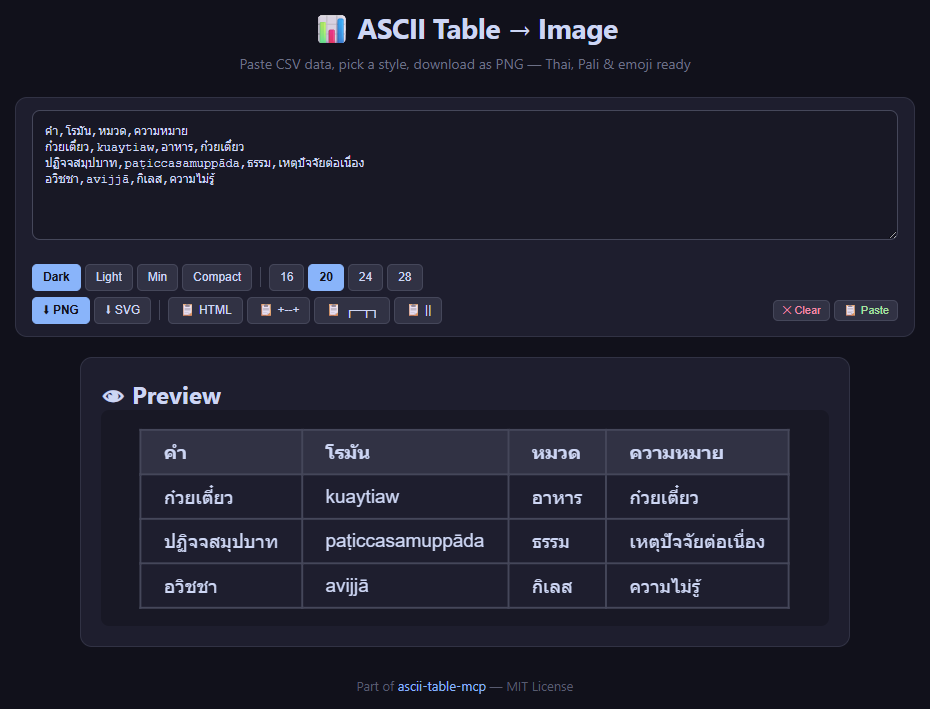
Why this exists: Most ASCII table libraries use len() in Python, which counts combining marks (like Thai tone marks, Devanagari vowel signs) as separate characters. This breaks alignment for any language with zero-width characters. This server uses wcwidth — the same library terminals use — so columns line up correctly, on every platform.
Features
- 9 table formats:
grid(+--+),box(┌─┬─┐),pipe(| | |),safe,html,png,svg+ more - 10 grid sub-styles:
mysql,separated,compact,gfm,reddit,rounded,rst,box,unicode,dots— inspired by ozh/ascii-tables - Auto-format: auto-detects numeric columns (right-align) and centers headers
- Thai / Pali / CJK / emoji: zero-width combining marks (ิ, ี, ฺ, ◌̱, etc.) align perfectly
- Safe width mode: extra padding for platforms where zero-width marks ≠ zero (Discord, browser code blocks)
- Direct PNG export: headless Playwright renders styled HTML → cropped PNG with Noto Sans Thai — perfect for Discord/Telegram
- Direct SVG export: vector SVG with embedded HTML (foreignObject) — zoomable, embeddable
- 4 polished HTML styles:
dark,light,minimal,compact - CSV / TSV / JSON input: convert from any data source
- Debug tools:
analyze_table,debug_table,validate_table_text— find and fix alignment issues
Direct PNG Export — One Step to a Gorgeous Table Image
For Discord, Telegram, Slack, or any place that can't render a proper monospace Thai table, use export_png to generate a cropped PNG directly — no browser, no manual screenshot, no crop step.
| Style | Preview | Best for |
|---|---|---|
dark |
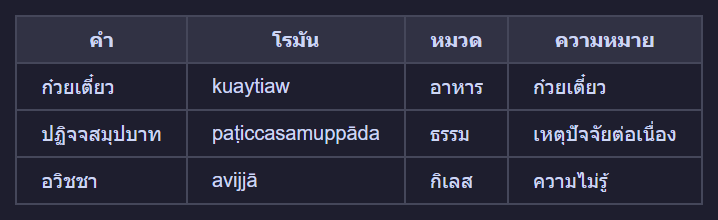 |
Discord / Telegram dark mode |
light |
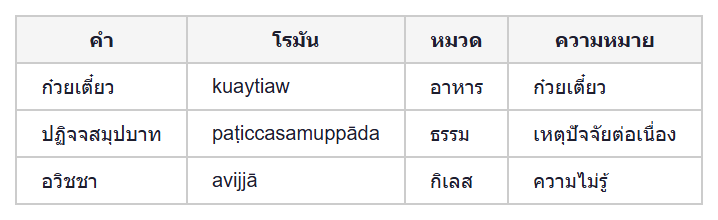 |
Documentation, PDF |
minimal |
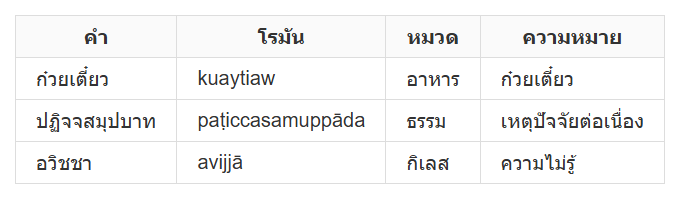 |
Blog posts, websites |
compact |
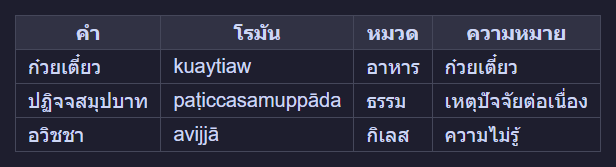 |
Dense data, narrow screens |
{
  "headers": ["Pali", "Roman", "Type", "Meaning"],
  "rows": [
    ["กมฺม", "kamma", "Noun", "action"],
    ["ญาณ", "ñāṇa", "Wisdom", "direct knowing"]
  ],
  "style": "dark"
}
Output: a .png file cropped to just the table — send it with MEDIA:<path> in Discord/Telegram.
Direct SVG Export — Vector That Scales
Use export_svg for images that need to be zoomed, embedded, or edited.
{
  "headers": ["Term", "Translation"],
  "rows": [["กมฺม", "Kamma"], ["ธมฺม", "Dhamma"]],
  "style": "dark"
}
SVG is HTML-backed (foreignObject) with Noto Sans Thai — renders sharp at any size.
Supported Formats
Quick Start
uvx (no install)
uvx --from git+https://github.com/dhammawatthumpra-coder/ascii-table-mcp ascii-table-mcp
pip install
git clone https://github.com/dhammawatthumpra-coder/ascii-table-mcp.git
cd ascii-table-mcp
pip install -e .
python -m ascii_table_mcp
Register with any MCP client
Claude Desktop:
{
  "mcpServers": {
    "ascii-table": {
      "command": "python",
      "args": ["-m", "ascii_table_mcp"]
    }
  }
}
Hermes:
hermes mcp add ascii-table --command "python -m ascii_table_mcp"
MCP Tools
make_table — The main event
| Parameter | Type | Default | Description |
|---|---|---|---|
headers |
list[str] |
— | Column headers |
rows / data |
list[list[str]] |
— | Data rows |
fmt |
str |
"grid" |
"grid", "box", "pipe", "safe", "html" |
style |
str |
"mysql" |
One of 10 grid styles or 4 HTML styles |
auto_format |
bool |
true |
Right-align numbers, center headers |
safe_width |
bool |
false |
Extra padding for Discord/browser |
Example with style="separated":
{
  "headers": ["Product", "Price", "Qty"],
  "rows": [
    ["Noodle Soup", "45", "3"],
    ["Fried Rice", "55", "2"]
  ],
  "fmt": "grid",
  "style": "separated"
}
+============+======+=======+
|  Product   | Price |  Qty  |
+============+======+=======+
+------------+------+-------+
| Noodle Soup |   45 |     3 |
+------------+------+-------+
| Fried Rice  |   55 |     2 |
+------------+------+-------+
Notice: auto_format=true right-aligns Price and Qty columns, centers headers.
make_table_from_csv
{
  "csv_text": "Name,Role,Score\nAlice,Admin,95\nBob,User,87",
  "fmt": "grid"
}
make_table_from_json
{
  "json_data": "[[\"Term\",\"Meaning\"],[\"Kamma\",\"Action\"],[\"Dhamma\",\"Truth\"]]",
  "fmt": "box"
}
export_png — Direct PNG export
Render table as cropped PNG via headless Playwright.
| Parameter | Type | Default | Description |
|---|---|---|---|
headers |
list[str] |
— | Column headers |
rows / data |
list[list[str]] |
— | Data rows |
style |
str |
\"dark\" |
\"dark\", \"light\", \"minimal\", \"compact\" |
font_size |
int |
24 |
Font size in px |
{
  "headers": ["คำบาลี", "Roman"],
  "rows": [["กมฺม", "kamma"], ["ธมฺม", "dhamma"]],
  "style": "dark"
}
→ Returns file path to cropped PNG. Send with MEDIA:<path>.
export_svg — Direct SVG export
Render table as vector SVG (foreignObject with styled HTML).
Same parameters as export_png. Returns file path to .svg.
Debug tools
debug_table— shows exact char positions with drift analysisanalyze_table— validates column alignment in+--+tablesvalidate_table_text— structural check: column count, border alternation, format detection
Thai Character Width: The Problem This Solves
Discord, browser code blocks, and some terminals don't respect Unicode zero-width combining marks.
Characters like ิ ี ื ู ฺ each take up width=1 on screen, but wcwidth says they're width=0.
len("ก๋วยเตี๋ยว")   → 10  ← Python counts combining marks
wcwidth("ก๋วยเตี๋ยว") → 7   ← Reality: only 7 visible column positions
Solution: safe_width=True
When enabled, the renderer uses len() (counts every character as width 1) instead of wcwidth, then adds padding for each combining mark:
{
  "headers": ["Name", "Price"],
  "rows": [["ก๋วยเตี๋ยว", "45"]],
  "fmt": "grid",
  "safe_width": true
}
+----------------+------+
|      Name      | Price |
+----------------+------+
| ก๋วยเตี๋ยว     |   45 |
+----------------+------+
Without safe_width (discord will misalign):
+------------+------+
|    Name    | Price |
+------------+------+
| ก๋วยเตี๋ยว |   45 |  ← column drifts right by 3 chars
+------------+------+
Future: Per-Character Width Database
wcwidth and len() are both approximations. A future plan is to build a lookup table of actual display widths for each Thai character on major platforms (Windows Discord, macOS Discord, Linux terminal) for 100% guaranteed alignment.
Grid Styles Reference
| Style | Top border | Header sep | Data sep | Bottom | Notes |
|---|---|---|---|---|---|
mysql |
+--+ |
+--+ |
+--+ |
+--+ |
default |
separated |
+==+ |
+==+ |
+--+ |
+--+ |
bold header separator |
compact |
none | --- |
none | none | frameless |
gfm |
none | |--| |
none | none | GitHub Flavored Markdown |
reddit |
none | --|-- |
none | none | Reddit tables |
rounded |
.--. |
:+: |
none | '--' |
rounded corners |
rst |
+==+ |
+--+ |
+==+ |
+==+ |
reStructuredText |
box |
┌┬┐ |
├┼┤ |
├┼┤ |
└┴┘ |
Unicode box-drawing |
unicode |
╔╦╗ |
╠╬╣ |
╠╬╣ |
╚╩╝ |
double-line |
dots |
┌┬┐ |
├┼┤ |
none | └┴┘ |
no row separators |
Format comparison
| Format | Example | Best for |
|---|---|---|
grid |
+----+----+ |
Terminal, code review, GitHub |
box / safe |
┌────┬────┐ |
Presentation, formal docs |
pipe |
| | | |
Markdown-native |
grid + safe_width |
+------+----+ |
Discord, browser (zero-width ≠ 0) |
png |
<image> |
Direct export — Discord/Telegram/chat apps |
svg |
<vector> |
Vector — zoomable, embeddable |
CLI Usage
# CSV args → grid
python -m ascii_table_mcp.generate_table --grid 'Name,Age' 'Alice,30' 'Bob,25'

# TSV pipe → grid
printf 'Name\tAge\nAlice\t30\n' | python -m ascii_table_mcp.generate_table --tsv --grid

# JSON
python -m ascii_table_mcp.generate_table --json '{"headers":["A","B"],"rows":[["1","2"]]}' --grid
+-------+-----+
| Name   | Age |
+-------+-----+
| Alice  | 30  |
| Bob    | 25  |
+-------+-----+
Architecture
ascii-table-mcp/
├── ascii_table_mcp/
│   ├── __init__.py       # MCP server entry (FastMCP) — 9 tools
│   ├── generate_table.py # Core rendering engine + HTML + PNG + SVG
│   └── thaiwidth.py      # Thai-aware display width
├── server.py             # Thin CLI wrapper
├── table_to_image.py     # HTML → screenshot helper (legacy)
├── table_screenshot.py   # HTML generator (legacy)
├── requirements.txt      # mcp + wcwidth
├── pyproject.toml         # uv/pip packaging
├── ascii-table-mcp.bat   # Windows launcher
├── LICENSE               # MIT
├── README.md             # This file (English)
├── README_TH.md          # Thai documentation
├── GUIDE_TH.md           # Thai user guide
├── GUIDE_EN.md           # English user guide
└── examples/
    ├── ex_dark.png
    ├── ex_light.png
    ├── ex_minimal.png
    └── ex_compact.png
Why wcwidth Instead of len()?
len("กมฺม")      → 4  ❌ (counts the dot-below as a character)
wcswidth("กมฺม") → 3  ✅ (dot-below is zero-width)
Using len() for table layout:
+----------+-----------+   ← border width 8
| Pali     | Roman     |   ← "กมฺม" = 4 chars → padding 4 → total 9 ❌
+----------+-----------+
Using wcwidth:
+---------+-----------+
| Pali    | Roman     |   ← "กมฺม" = width 3 → padding 5 → total 8 ✅
+---------+-----------+
Related Projects
- ozh/ascii-tables — original table style system
- dmarsters/ascii-art-mcp — decorative ASCII art
- schachmat/wego — Go terminal weather (go-runewidth)
- wcwidth — Python wcwidth implementation
License
MIT — free for personal and commercial use.
Installing ASCII Table Server
This server has no published package — it is built from source. Open the repository and follow its README.
▸ github.com/dhammawatthumpra-coder/ascii-table-mcpFAQ
Is ASCII Table Server MCP free?
Yes, ASCII Table Server MCP is free — one-click install via Unyly at no cost.
Does ASCII Table Server need an API key?
No, ASCII Table Server runs without API keys or environment variables.
Is ASCII Table Server hosted or self-hosted?
Self-hosted: the server runs locally on your machine via the install command above.
How do I install ASCII Table Server in Claude Desktop, Claude Code or Cursor?
Open ASCII Table Server on unyly.org, pick your client tab (Claude Desktop, Claude Code, Cursor) and press Install — the config is generated automatically, no JSON editing.
Related MCPs
GitHub
PRs, issues, code search, CI status
 by GitHub
Filesystem
Secure file operations with configurable access controls.
Memory
Knowledge graph-based persistent memory system.

Unyly Deploy
Deploy sites and MCP servers to Unyly straight from your AI agent
 by Unyly
Amap Maps Mcp Server
MCP server for using the AMap Maps API
 by duxiaohui
PayMCP
Lightweight payments layer for MCP servers: turn tools into paid endpoints with a two-line decorator. [PyPI](https://pypi.org/project/paymcp/) · [npm](https://w
 by blustAI
Server For Power BI
Enables exploring Microsoft Fabric / Power BI workspaces and semantic models, and executing ad-hoc DAX queries.
 by Mitsubishi-Fuso
Template MCP Server
A CLI tool to create a new Model Context Protocol server project with TypeScript support, dual transport options, and an extensible structure
 by mcpdotdirect
Supabase
Database, auth and storage
 by Supabase
Everything
Reference / test server with prompts, resources, and tools.
Compare ASCII Table Server with
Not sure what to pick?
Find your stack in 60 seconds
Author?
Embed badge for your README
Browse similar
All development MCPs