
Ast2llm Go
FreeNot checkedPowerful MCP-server that parses Go source code into AST and converts it into a clean, LLM-friendly format.

About
Powerful MCP-server that parses Go source code into AST and converts it into a clean, LLM-friendly format.
README
Go License Coverage Status Build Status
Local AST-powered context enhancement tool for LLM
Automatically injects relevant code structure into your prompts using precise Go AST analysis.
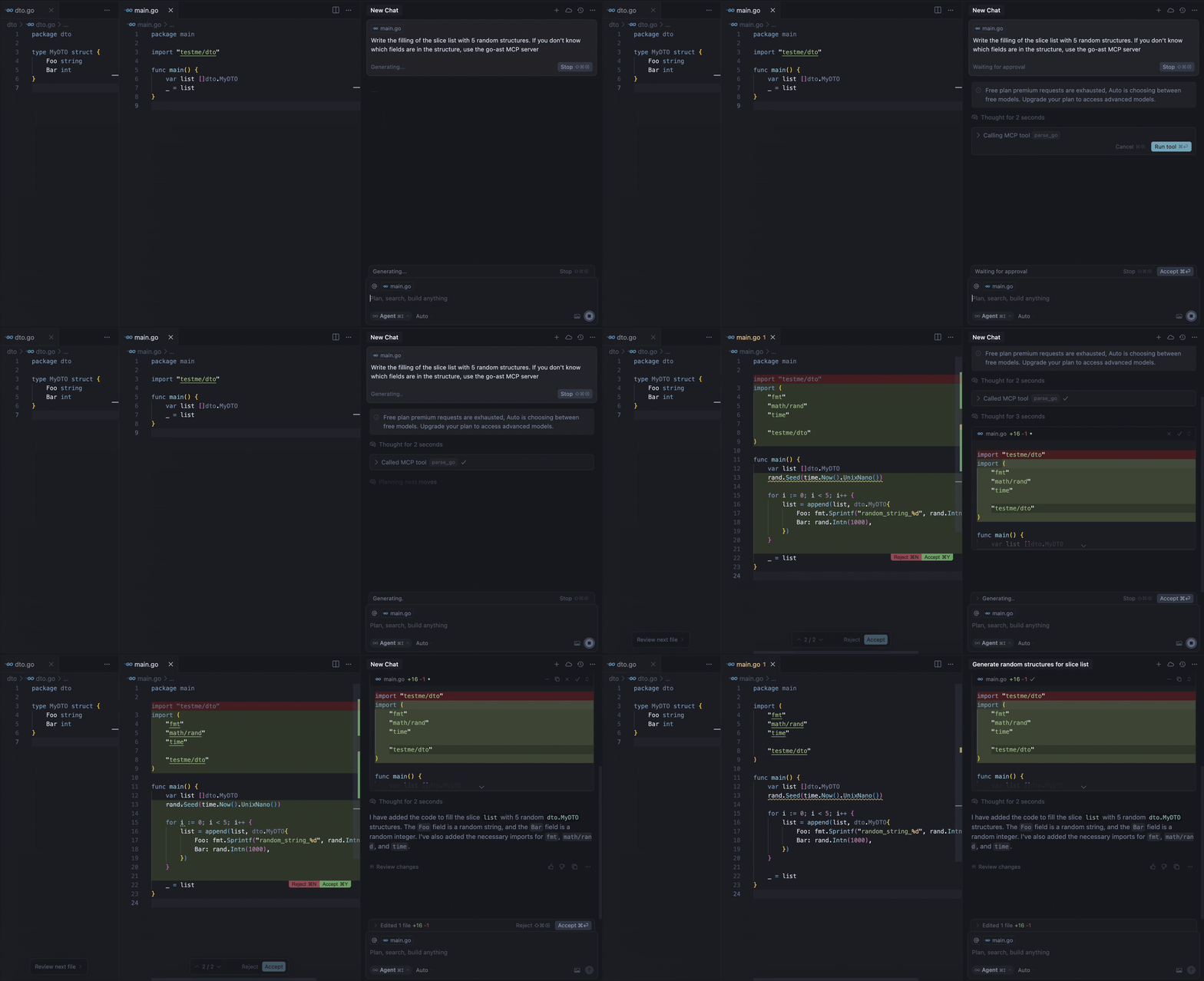
Our MCP server provides the parse-go tool that:
- Analyzes your Go project structure
- Identifies external type declarations
- Packages context for LLM prompts
- Delivers 3-5x faster context resolution than grap-based approaches
For example, the demo above shows the model calling the tool to get the missing information about the fields of the MyDTO structure. In response, the model received all the necessary information from the response:
Used Imported Structs (from this project, if available):
  Struct: testme/dto.MyDTO
    Fields:
      - Foo string
      - Bar int
Requirements
- Go 1.22 or higher (if building from source)
- Supported MCP client (Cursor, Claude, VS Code, etc.)
Installation
Binaries
To install ast2llm-go on your system, run the following command in your terminal:
curl -LsSf https://raw.githubusercontent.com/ast2llm/ast2llm-go/main/install.sh | sh
This script will automatically detect your OS and architecture, download the appropriate binary, and attempt to add it to your PATH. You can also specify an installation directory:
curl -LsSf https://raw.githubusercontent.com/ast2llm/ast2llm-go/main/install.sh | sh -s -- --install-dir /usr/local/bin
Self-Update
To update ast2llm-go to the latest version, simply re-run the installation command:
curl -LsSf https://raw.githubusercontent.com/ast2llm/ast2llm-go/main/install.sh | sh
Uninstallation
To remove ast2llm-go from your system, run the uninstallation script:
curl -LsSf https://raw.githubusercontent.com/ast2llm/ast2llm-go/main/uninstall.sh | sh
This script will remove the binary, clean up PATH modifications, and delete related configuration files. You may need to restart your shell after uninstallation.
Setup in Clients
After installation ast2llm-go, you need to restart the IDE.
Cursor
Add to your ~/.cursor/mcp.json:
{
  "mcpServers": {
    "go-ast": {
      "command": "ast2llm-go",
      "args": []
    }
  }
}
Claude Desktop
Add to claude_desktop_config.json:
{
  "mcpServers": {
    "go-ast": {
      "command": "ast2llm-go"
    }
  }
}
Visual Studio Code
Add to your VS Code MCP config:
{
  "servers": {
    "go-ast": {
      "type": "stdio",
      "command": "ast2llm-go"
    }
  }
}
Note About Current State
This MCP server is under active development and may have stability issues or incomplete functionality. We're working hard to improve it, but you might encounter:
- Occasional parsing errors
- Limited type support in current version
- Performance bottlenecks with large codebases
Found an issue?
Open a GitHub Issue to help us improve! We appreciate all bug reports and feature requests.
Roadmap
Language Support
- Support for struct types
- Support for interface types
- Support for function types
- Support for global variables
Multi-file Context
- Analyze multiple open files simultaneously
- Cross-file dependency resolution
- Context-aware import optimization
AST Representation
- Improved type hierarchy visualization
- Research optimal AST representation for LLMs. Provide different output formats tailored to various scenarios like in repomix:
- XML: For compatibility with traditional solutions akin to Repomix.
- JSON: A modern format suitable for integration with contemporary tools and environments.
- Markdown: An easily readable format ideal for quick viewing and documenting changes.
Performance
- Incremental parsing
- AST caching
- Parallel analysis
Contributing
We welcome contributions! Here's how you can help:
Report Bugs
- Open an issue with a clear description
- Include steps to reproduce
- Add relevant logs/screenshots
Suggest Features
- Open an issue with the feature request
- Explain the use case and benefits
- Include any relevant examples
Submit Pull Requests
- Fork the repository
- Create a feature branch
- Add tests for new functionality
- Ensure all tests pass
- Submit a PR with a clear description
Installing Ast2llm Go
This server has no published package — it is built from source. Open the repository and follow its README.
▸ github.com/ast2llm/ast2llm-goFAQ
Is Ast2llm Go MCP free?
Yes, Ast2llm Go MCP is free — one-click install via Unyly at no cost.
Does Ast2llm Go need an API key?
No, Ast2llm Go runs without API keys or environment variables.
Is Ast2llm Go hosted or self-hosted?
Self-hosted: the server runs locally on your machine via the install command above.
How do I install Ast2llm Go in Claude Desktop, Claude Code or Cursor?
Open Ast2llm Go on unyly.org, pick your client tab (Claude Desktop, Claude Code, Cursor) and press Install — the config is generated automatically, no JSON editing.
Related MCPs
GitHub
PRs, issues, code search, CI status
 by GitHub
Filesystem
Secure file operations with configurable access controls.
Memory
Knowledge graph-based persistent memory system.
Template MCP Server
A CLI tool to create a new Model Context Protocol server project with TypeScript support, dual transport options, and an extensible structure
 by mcpdotdirect
Compare Ast2llm Go with
Not sure what to pick?
Find your stack in 60 seconds
Author?
Embed badge for your README
Browse similar
All development MCPs