loading…
en/
Browse all
Attendance Engine
Freeattendance-engine-mcp is a Model Context Protocol server that gives AI agents deterministic, fixture-backed tools for workforce attendance and wage-and-hour com
About
attendance-engine-mcp is a Model Context Protocol server that gives AI agents deterministic, fixture-backed tools for workforce attendance and wage-and-hour compliance. Built on @attendance-engine/core — a pure-function, zero-deps, 100%-covered TypeScript engine — it lets Claude, Cursor, Windsurf, or any MCP host correctly answer the questions HR/payroll teams actually ask: did this person clock i
README
🕒 attendance-engine MCP
Wage-and-hour answers your AI agent can actually trust.
Ask Claude "Did anyone miss a meal break last Tuesday?" — and have it actually be right.
🤔 The problem
Every HR / payroll / time-tracking team eventually asks Claude (or Cursor, or Windsurf) something like:
"Rahim's punches yesterday were 09:00, 13:00, 14:00, and 18:00. Did he get his meal break under California rules?"
And the LLM does what LLMs do: it eyeballs the timestamps, mumbles something about "yes probably, his lunch looks fine," and moves on. Sometimes it's right. Sometimes it forgets that California requires the meal to start before the end of the 5th hour. Sometimes it counts a 25-minute break as compliant. Sometimes, for an overnight shift that crosses midnight, it just gives up.
You can't put that in front of an auditor. You can't ship it inside a payroll product. You can't trust it with overtime calculations that turn into back-pay liability if they're wrong.
💡 What this is
A small Model Context Protocol server that gives your AI agent deterministic, tested, fixture-backed tools for:
- Resolving a duty day from raw clock punches (overnight, breaks, OT, all of it).
- Auditing meal/rest compliance under the California rule pack (Labor Code §§ 226.7, 512; IWC wage orders), including Donohue v. AMN rebuttable-presumption signals.
- Rounding worked time without losing the exact-minute baseline (so you can prove your rounding is neutral).
- Building rotating rosters: 2-2-3, 4-on-4-off, DuPont, Pitman.
- Triaging suspicious punch streams before you trust them.
- Running a multi-day wage-and-hour audit across a whole pay period and rolling up premium hours owed, days at risk, and the flag heatmap.
The math lives in @attendance-engine/core — a pure-function, zero-deps TypeScript library with 100% test coverage. This MCP server is the thin agent surface on top.
🧠 How it actually works
flowchart LR
    A[You: "Did Rahim miss his meal break last Tuesday?"]
    B[Claude / Cursor / Windsurf]
    C[attendance-engine MCP]
    D[("@attendance-engine/core
    pure-function engine
    100% coverage")]

    A -->|prompt| B
    B -->|tool call| C
    C -->|function call| D
    D -->|"DayResult + ComplianceResult"| C
    C -->|"JSON content block"| B
    B -->|"plain-English answer with citations"| A

    classDef user fill:#0b3d91,stroke:#fff,color:#fff
    classDef host fill:#5b1ea3,stroke:#fff,color:#fff
    classDef mcp fill:#1f6f43,stroke:#fff,color:#fff
    classDef core fill:#7c4a03,stroke:#fff,color:#fff
    class A user
    class B host
    class C mcp
    class D core
Two important properties:
- Claude doesn't do the math. It picks a tool, fills the arguments, and forwards the answer. If the engine says "this was a late meal," the agent says "this was a late meal." If you re-ask the same question, you get the same answer — every time.
- Time zones are explicit, not guessed. Every timestamp carries its own offset. The engine never reads the host clock, never assumes UTC, never silently converts. DST days work because you told it the offset, not because it inferred it.
🚀 Install — pick your host
Pick the MCP host you're already using. Same one-liner everywhere:
Claude Desktop (macOS / Windows)
Edit ~/Library/Application Support/Claude/claude_desktop_config.json on macOS or %APPDATA%\Claude\claude_desktop_config.json on Windows:
{
  "mcpServers": {
    "attendance-engine": {
      "command": "npx",
      "args": ["-y", "@attendance-engine/mcp"]
    }
  }
}
Fully quit and relaunch Claude Desktop (Cmd-Q on macOS — closing the window isn't enough).
Cursor
~/.cursor/mcp.json:
{
  "mcpServers": {
    "attendance-engine": {
      "command": "npx",
      "args": ["-y", "@attendance-engine/mcp"]
    }
  }
}
Windsurf
~/.codeium/windsurf/mcp_config.json:
{
  "mcpServers": {
    "attendance-engine": {
      "command": "npx",
      "args": ["-y", "@attendance-engine/mcp"]
    }
  }
}
Any other MCP host
Launch the stdio binary directly:
npx -y @attendance-engine/mcp
The server speaks JSON-RPC over stdin/stdout — that's the whole contract.
🎬 See it in action
🖼️ Scenario cards below are publish-ready SVG mockups (render inline on GitHub, npm, LinkedIn). Real-product screenshots can replace them when you capture them — see docs/screenshots/README.md.
Scenario 1 — Did the night-shift nurse get her meal break?
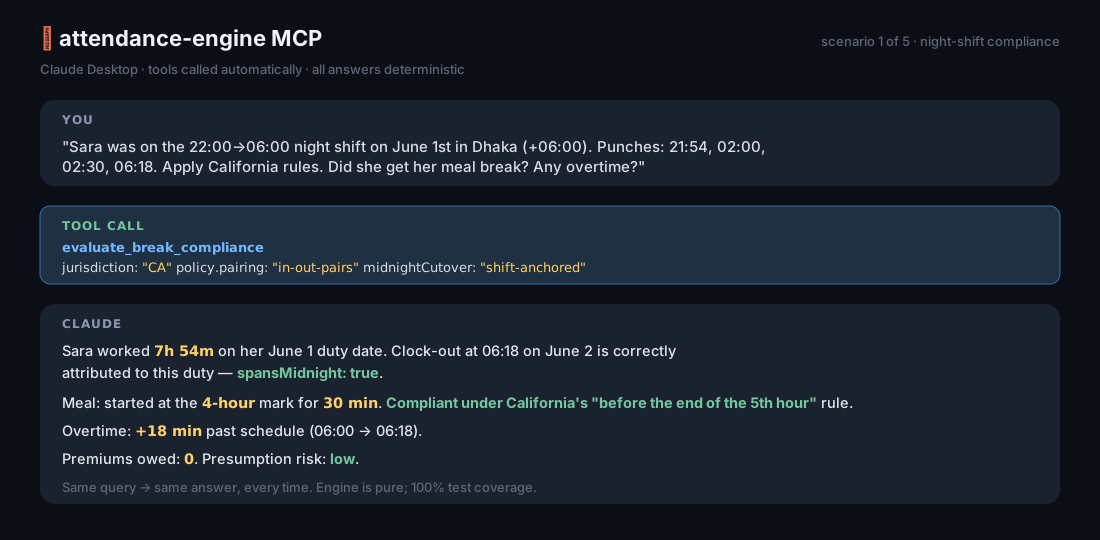
You: "Sara was on the 22:00→06:00 shift on June 1st. Punches: 21:54, 02:00, 02:30, 06:18. Apply California rules."
Claude (calls
evaluate_break_compliance): "Sara worked 7h54m on her duty date of June 1st (her clock-out fell on June 2nd but belongs to this shift). She took a 30-minute meal beginning at her 4-hour mark, which is compliant under California's mandate to start the first meal before the end of the 5th hour. Worked time spans midnight; flagged accordingly. She left 18 minutes past schedule — that 18m counts as overtime."
Scenario 2 — Find every late-meal day this month
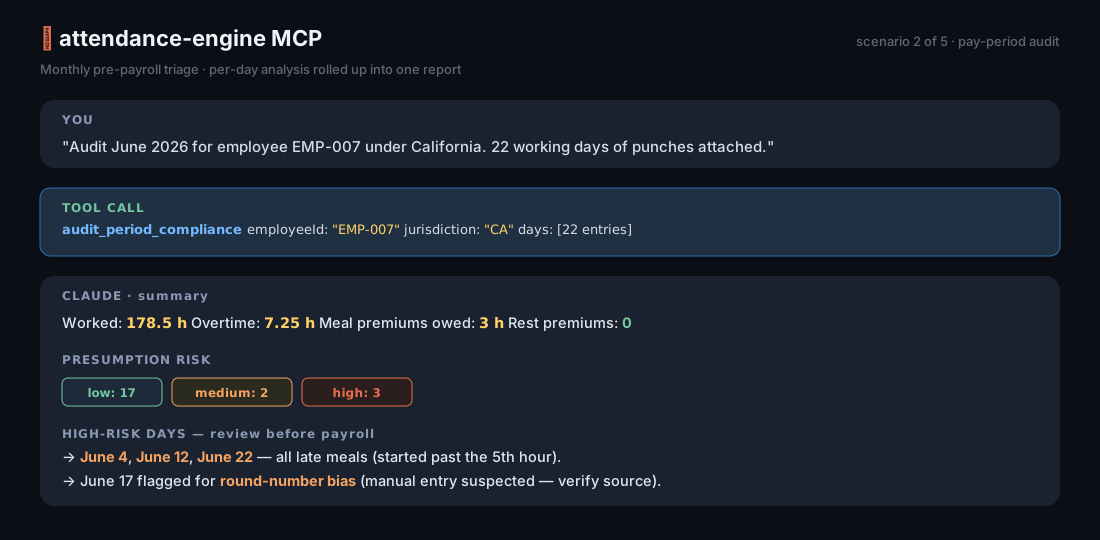
You: "Run an
audit_period_compliancefor employee EMP-007 across June 2026. Here are 30 days of punches and shifts. Use California."Claude: "3 days at high presumption risk — June 4, June 12, June 22. All three are late meals (started past the 5th hour). Total meal-period premium hours owed: 3. June 22 also drops below the 12-hour second-meal threshold. No rest-period violations detected."
Scenario 3 — Are these punches even usable?
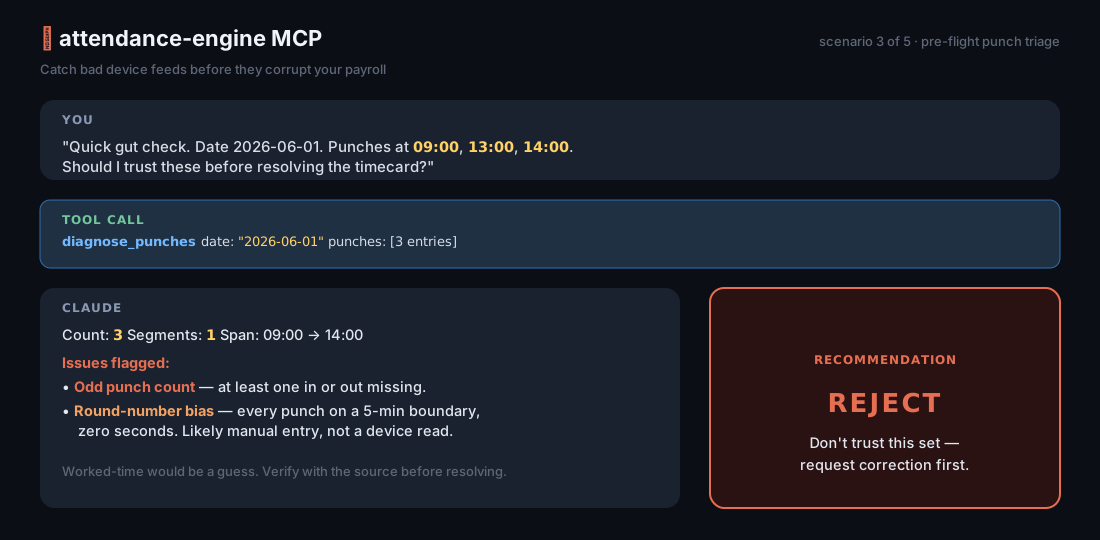
You: "I have punches 09:00, 13:00, 14:00 for June 1st. Can I trust these?"
Claude (calls
diagnose_punches): "Recommendation: reject. The punch count is odd — one in or out is missing. Without that, worked-time and overtime would be guesses. Also: every punch falls on a 5-minute boundary, which often indicates manual entry rather than a device read. Worth verifying with the source system before resolving."
Scenario 4 — Plan a 4-on-4-off roster for next month
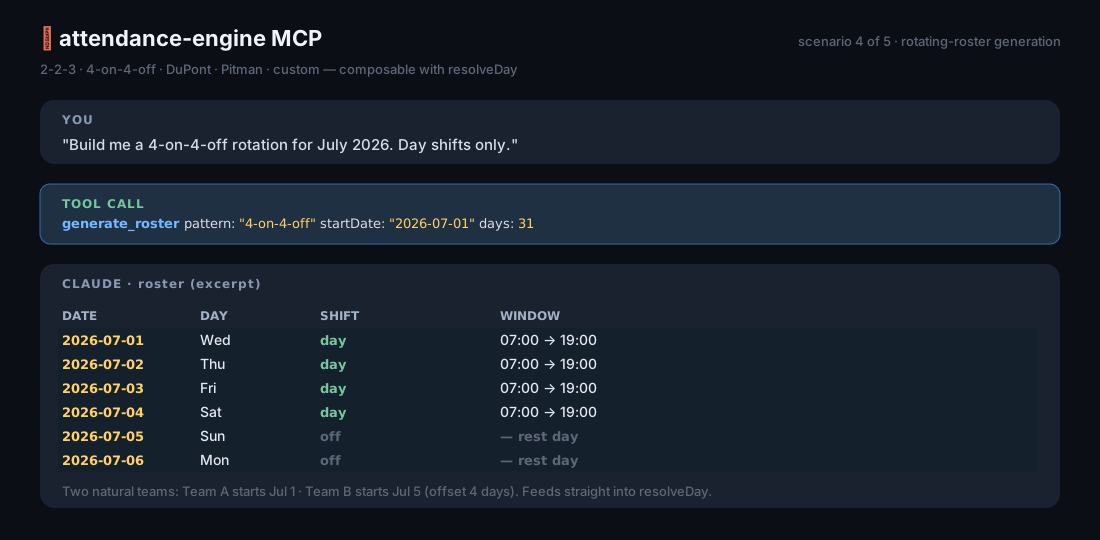
You: "Build me a 4-on-4-off roster for July 2026."
Claude (calls
generate_roster): "31 days — work days on July 1–4, 9–12, 17–20, 25–28 (12h day shifts, 07:00–19:00). Rest days fill the gaps. Want me to assign team rotations across this pattern?"
🛠️ Tools at a glance
| Tool | When you'd use it |
|---|---|
resolve_day |
"What happened on this single day? Lateness, OT, segments, flags." |
resolve_period |
"Roll up a week or a month: per-day results plus an aggregated summary." |
evaluate_break_compliance |
"Did this person get their meal/rest breaks under California law? Is any premium owed?" |
audit_period_compliance |
"Audit a whole pay period. Show me total premium hours, high-risk days, and the flag heatmap." |
apply_rounding |
"Round worked/OT minutes to a unit — and keep the exact view alongside it so I can prove neutrality." |
diagnose_punches |
"Triage this raw punch stream. Should I trust it?" |
generate_roster |
"Build a 2-2-3 / 4-on-4-off / DuPont / Pitman / custom rotation." |
list_rule_packs |
"What jurisdictions are supported?" (currently CA; more arrive in minor releases) |
📚 Resources & prompts
Resources you can paste into a chat:
| URI | What it is |
|---|---|
attendance://docs/overview |
One-pager about the engine, time-zone rules, and how the tools compose. |
attendance://docs/api |
Compact field-by-field API reference. |
attendance://rules/CA |
The California rule pack as JSON — meal/rest thresholds, waiver limits, premium caps, the citation source. |
Guided prompts (the host's / menu, or prompts/get):
analyse_timecard— walks the model through the right tool calls to analyse a single duty day.roster_planner— generates a roster and renders it as a Markdown table.
🕰️ The time-zone rule (read this once and you're fine)
Every ISO timestamp must carry its own offset:
- ✅
2026-06-01T08:57:00+06:00 - ✅
2026-06-01T08:57:00Z - ❌
2026-06-01T08:57:00(rejected — the engine won't guess)
The engine reduces everything to absolute instants on a single timeline. DST works because the offsets are explicit. The duty date and shift HH:MM are worksite local wall-clock — match them to your business calendar, not to UTC.
For days with no punches (an absence, a holiday), pass policy.tzOffsetMinutes explicitly so the engine has something to anchor the shift window to.
🤝 Embedding (advanced)
Building your own host? Skip the CLI:
import { createServer } from '@attendance-engine/mcp';
import { StdioServerTransport } from '@modelcontextprotocol/sdk/server/stdio.js';

const server = createServer({ name: 'my-hr-server', version: '1.0.0' });
await server.connect(new StdioServerTransport());
Use it for: custom HTTP/SSE adapters, Claude Agent SDK setups, test harnesses, in-house deployments where the binary needs to live inside a bigger Node process.
💪 What it's good for
- Internal HR / payroll / workforce-analytics chat assistants
- Audit-prep workflows for California employers
- Customer-support tools at HR-tech vendors who need their AI to actually be right
- Pre-payroll compliance triage ("which days need a human to review?")
- Schedule planners that need a real roster engine, not vibes
🧱 What it's not
- A leave-balance / accrual system (the engine deals in minutes, not entitlements).
- A payroll-money calculator (it gives you the hour buckets — you multiply by the rate).
- A biometric device protocol (pair it with whatever ingest layer you've got).
- A UI. There's no dashboard in here; that's a separate concern.
🌍 Compatibility
| Node | 18+ (CI runs 20 LTS) |
| MCP SDK | 1.x |
| Engine | @attendance-engine/core ≥ 0.4 (peer dep) |
| Hosts tested | Claude Desktop 1.x · Cursor · Windsurf · any stdio MCP client |
📖 More reading
- 📑 Detailed scenarios with full tool transcripts
- 🖼️ How to capture your own demo screenshots
- 📚 Engine API reference
- 🌐 Time-zone semantics
- 🏛️ California Labor Code §§ 226.7, 512
- 🏛️ Donohue v. AMN Services (Cal. 2021)
❤️ Credits
Built by Md. Arifur Rahman. Companion to @attendance-engine/core (TypeScript) and arifur9993/attendance-engine (PHP). Same author, same fixtures, same answers — in three places your stack can reach for.
License
MIT — see LICENSE.
Install Attendance Engine in Claude Desktop, Claude Code & Cursor
Run in your terminal:
claude mcp add attendance-engine -- npx FAQ
Is Attendance Engine MCP free?
Yes, Attendance Engine MCP is free — one-click install via Unyly at no cost.
Does Attendance Engine need an API key?
No, Attendance Engine runs without API keys or environment variables.
Is Attendance Engine hosted or self-hosted?
Self-hosted: the server runs locally on your machine via the install command above.
How do I install Attendance Engine in Claude Desktop, Claude Code or Cursor?
Open Attendance Engine on unyly.org, pick your client tab (Claude Desktop, Claude Code, Cursor) and press Install — the config is generated automatically, no JSON editing.


