
Auto Commit
FreeNot checkedAn mcp server that auto commits changes and creates commit message in the form of conventional commits (https://www.conventionalcommits.org/en/v1.0.0/)

About
An mcp server that auto commits changes and creates commit message in the form of conventional commits (https://www.conventionalcommits.org/en/v1.0.0/)
README
This implementation provides a Git changes analyzer that generates commit messages using OpenAI's GPT models.
Demo
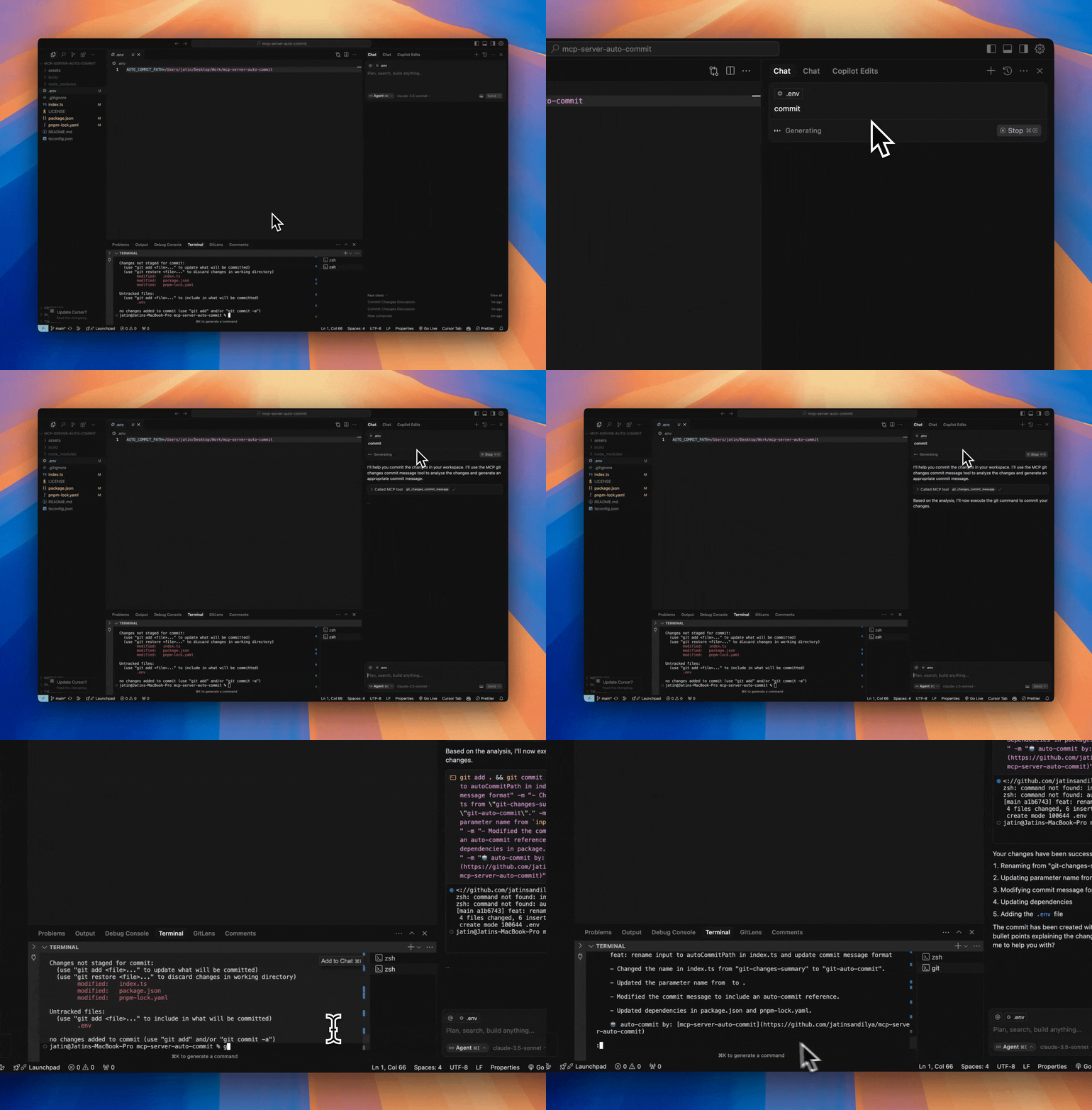
Features
- Analyzes git changes in your repository (both staged and unstaged)
- Generates conventional commit messages using GPT-4o-mini
- Provides detailed summaries of:
- 📝 Modified files
- ✨ Newly added files
- 🗑️ Deleted files
- 📄 Detailed changes (up to 10 lines per file)
- Built with @modelcontextprotocol/sdk
- Adds an auto-commit signature to each commit
Project Structure
mcp-server-auto-commit/
├── index.ts        # Main server implementation with git analysis tool
├── package.json    # Project dependencies
├── tsconfig.json   # TypeScript configuration
└── build/         # Compiled JavaScript output
Prerequisites
- Node.js installed
- OpenAI API key
- Git repository to analyze
- pnpm package manager
Getting Started
- Clone this repository:
git clone https://github.com/jatinsandilya/mcp-server-auto-commit.git
cd mcp-server-auto-commit
- Install dependencies:
pnpm install
Set up your OpenAI API key using one of these methods:
- Set as an environment variable:
OPENAI_API_KEY=your-api-key - Pass as a command line argument:
--key your-api-key - Add to a
.envfile in the project root
- Set as an environment variable:
Build the project:
pnpm run build
This will generate the /build/index.js file - your compiled MCP server script.
Using with Cursor
- Go to Cursor Settings -> MCP -> Add new MCP server
- Configure your MCP:
- Name: git-auto-commit
- Type: command
- Command:
node ABSOLUTE_PATH_TO_MCP_SERVER/build/index.js --key your-api-key(Replaceyour-api-keywith your actual OpenAI API key if not set in environment)
Using with Claude Desktop
Add the following MCP config to your Claude Desktop configuration:
{
  "mcpServers": {
    "git-auto-commit": {
      "command": "node",
      "args": ["ABSOLUTE_PATH_TO_MCP_SERVER/build/index.js", "--key", "your-api-key"]
    }
  }
}
Available Tools
git-changes-commit-message
This tool analyzes the current git changes in your repository and generates a commit message using OpenAI's GPT-4o-mini model. It provides:
- List of modified files with status indicators
- List of newly added files
- List of deleted files
- Detailed changes for each file (limited to 10 lines per file for readability)
- A generated commit message following conventional commits format
- An auto-commit signature
Usage parameters:
autoCommitPath: Optional path to analyze specific directory/file. If not provided, uses current working directory.
Development
The implementation in index.ts showcases:
- Setting up the MCP server with proper configuration
- Handling command line arguments and environment variables
- Integrating with OpenAI's API using GPT-4o-mini model
- Git operations using child processes
- Error handling and fallback mechanisms
- Detailed change analysis and formatting
To modify or extend the implementation:
- Update the server configuration in
index.ts:
const server = new McpServer({
  name: "git-auto-commit",
  version: "0.0.1",
});
The tool is defined using
server.tool()with proper parameter validation using Zod schema.Build and test your changes:
pnpm run build
Contributing
Feel free to submit issues and enhancement requests!
License
MIT
Installing Auto Commit
This server has no published package — it is built from source. Open the repository and follow its README.
▸ github.com/hypermodel-labs/mcp-server-auto-commitFAQ
Is Auto Commit MCP free?
Yes, Auto Commit MCP is free — one-click install via Unyly at no cost.
Does Auto Commit need an API key?
No, Auto Commit runs without API keys or environment variables.
Is Auto Commit hosted or self-hosted?
Self-hosted: the server runs locally on your machine via the install command above.
How do I install Auto Commit in Claude Desktop, Claude Code or Cursor?
Open Auto Commit on unyly.org, pick your client tab (Claude Desktop, Claude Code, Cursor) and press Install — the config is generated automatically, no JSON editing.
Related MCPs
Gmail
Read, send and search emails from Claude
 by Google
Slack
Send, search and summarize Slack messages
 by Slack
Runbear
No-code MCP client for team chat platforms, such as Slack, Microsoft Teams, and Discord.
Discord Server
A community discord server dedicated to MCP by [Frank Fiegel](https://github.com/punkpeye)
Compare Auto Commit with
Not sure what to pick?
Find your stack in 60 seconds
Author?
Embed badge for your README
Browse similar
All communication MCPs