
Backburner
FreeNot checkedRun long shell commands as background tasks: start them, keep working, collect the results later

About
Run long shell commands as background tasks: start them, keep working, collect the results later
README

Put your AI agent's slow work on the back burner. Keep cooking.
Background Tasks ◦ Zero Infrastructure ◦ Survives Restarts ◦ Windows & Unix
📦 PyPI • 🗂️ MCP Registry • 🐛 Issues • 📄 MIT
📢 Updates
- v0.2.1 — output with non-ASCII characters (✓, emoji, any non-English text) no longer crashes tasks on Windows.
- v0.2.0 —
exit_codeis no longer reported for cancelled/timed-out tasks (it was an artifact of the kill, not a real result); new animated demo below. - v0.1.x — first release: 5 tools, task timeouts, command allow/deny policy.
Listed on the official MCP Registry as
io.github.RohitYajee8076/backburner.
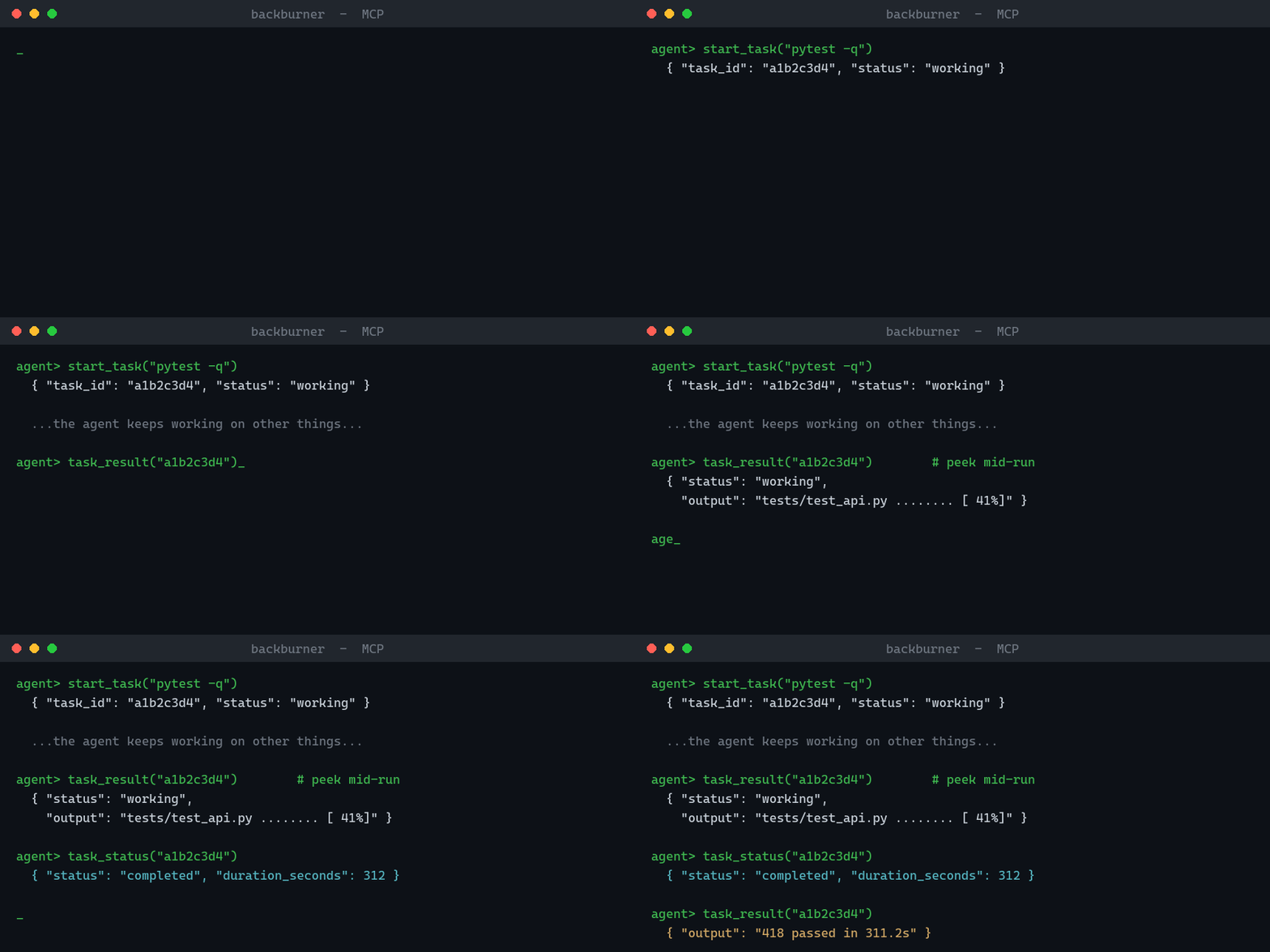
backburner is an MCP server that gives any AI assistant (Claude, and any
other MCP client) the ability to run long shell commands as background
tasks — start a test suite, a build, a scrape, a batch job — then keep
working and check back for the results, instead of sitting frozen until
it finishes.
🔥 Why
AI agents are bad at waiting. A tool call that takes 10 minutes blocks the
whole conversation — or times out and loses the work entirely. The MCP
specification is formalizing a Tasks pattern for exactly this problem
(extension finalized in the 2026-07-28 spec release); backburner brings
that workflow to every client today via plain tools, with first-class
Tasks-extension support on the roadmap.
🧰 Tools
| Tool | What it does |
|---|---|
start_task(command, cwd?, timeout_seconds?) |
Run a shell command in the background, returns a task id immediately |
task_status(task_id) |
working / completed / failed / cancelled / timed_out / interrupted |
task_result(task_id, tail_lines?) |
Captured output — works mid-run too, so you can peek at progress |
cancel_task(task_id) |
Kill the task and its whole process tree |
list_tasks(limit?) |
Recent tasks, newest first |
✨ Features
Survives restarts — tasks are tracked in SQLite under
~/.backburner/; output is captured to per-task log files. If the server dies mid-task, orphaned tasks are honestly markedinterrupted, never silently lost.Real cancellation — kills the full process tree (worker processes included), on Windows and Unix.
Peek at live progress —
task_resulton a running task returns the output so far.Timeouts — pass
timeout_secondsand a runaway task is killed and honestly markedtimed_outinstead of hanging forever.Command policy — restrict what the AI may run with environment variables (regexes, comma-separated; deny always wins):
BACKBURNER_ALLOW="^pytest,^npm (test|run build)"   # only these may run
BACKBURNER_DENY="rm -rf,shutdown,format"           # these never run
Zero infrastructure — stdlib only (SQLite, subprocess, threads). No Redis, no Celery, no Docker.
Tested — a pytest suite covers the full job lifecycle: completion, failure, cancellation, timeouts, crash recovery, and the command policy.
🚀 Install
pip install backburner-mcp
Claude Code
claude mcp add backburner -- python -m backburner.server
Claude Desktop / other clients
{
  "mcpServers": {
    "backburner": {
      "command": "python",
      "args": ["-m", "backburner.server"]
    }
  }
}
🔒 Security note
backburner executes the shell commands the AI sends it, with your user's
permissions. That is its job — but treat it like giving your agent a
terminal. Run it only with clients whose tool-use you review/approve,
prefer permission modes that require confirmation for start_task, and
use BACKBURNER_ALLOW / BACKBURNER_DENY to scope what may run.
🗺️ Roadmap
- Task timeouts and max-runtime limits
- Allowlist/denylist for commands
- PyPI release —
pip install backburner-mcp - Listed on the official MCP Registry
- MCP Tasks extension support (spec 2026-07-28) — native
tasks/get,tasks/cancelalongside the plain tools - Local web dashboard — watch tasks live in the browser
- Structured progress reporting (parse % / step markers from output)
📄 License
MIT
Install Backburner in Claude Desktop, Claude Code & Cursor
unyly install backburnerInstalls into Claude Desktop, Claude Code, Cursor & VS Code — handles npx, uvx and build-from-source repos for you.
First time? Get the CLI: curl -fsSL https://unyly.org/install | sh
Or configure manually
Run in your terminal:
claude mcp add backburner -- uvx backburner-mcpFAQ
Is Backburner MCP free?
Yes, Backburner MCP is free — one-click install via Unyly at no cost.
Does Backburner need an API key?
No, Backburner runs without API keys or environment variables.
Is Backburner hosted or self-hosted?
Self-hosted: the server runs locally on your machine via the install command above.
How do I install Backburner in Claude Desktop, Claude Code or Cursor?
Open Backburner on unyly.org, pick your client tab (Claude Desktop, Claude Code, Cursor) and press Install — the config is generated automatically, no JSON editing.
Related MCPs
GitHub
PRs, issues, code search, CI status
 by GitHub
Filesystem
Secure file operations with configurable access controls.
Memory
Knowledge graph-based persistent memory system.
Template MCP Server
A CLI tool to create a new Model Context Protocol server project with TypeScript support, dual transport options, and an extensible structure
 by mcpdotdirect
Compare Backburner with
Not sure what to pick?
Find your stack in 60 seconds
Author?
Embed badge for your README
Browse similar
All development MCPs