
Bank
FreeNot checkedUnified banking integration across EnableBanking, Teller, Plaid, Tink, and mock providers for account management, transactions, and spending analysis.

About
Unified banking integration across EnableBanking, Teller, Plaid, Tink, and mock providers for account management, transactions, and spending analysis.
README

Give your AI assistant secure, read-only access to your bank accounts.
npm version License: MIT CI Node.js TypeScript
Most people manage their finances by logging into bank portals, downloading CSVs, and building spreadsheets. bank-mcp eliminates that friction by letting your AI assistant query your bank accounts directly — balances, transactions, spending breakdowns — through natural conversation. It connects to real bank APIs via the Model Context Protocol so any MCP-compatible client (Claude Code, Claude Desktop, and others) can understand your finances.
- 5 providers, 15,000+ institutions — US and European banks covered
- Read-only by design — no write access, no transfers, no modifications
- Works with any MCP client — Claude Code, Claude Desktop, Cursor, and more
- Pluggable architecture — add your own provider in under 100 lines
Table of Contents
- Supported Providers
- Quick Start
- Client Setup
- Available Tools
- Screenshots
- Architecture
- Provider Setup Guides
- Caching
- Multiple Connections
- Security
- Adding a New Provider
- Troubleshooting
- Development
- Contributing
- License
Supported Providers
| Provider | Region | Institutions | Auth Method | Setup Difficulty |
|---|---|---|---|---|
| Enable Banking | Europe | 2,000+ | RSA key + session | Medium |
| Teller | US | 7,000+ | mTLS certificate | Medium |
| Plaid | US / CA / EU | 12,000+ | Client ID + secret | Easy |
| Tink | Europe | 3,400+ | OAuth2 token | Easy |
| Mock | Demo | — | None | Instant |
US Banks
Supported through Plaid and Teller — covering the top 20 US institutions and thousands more:
JPMorgan Chase · Bank of America · Wells Fargo · Citibank · Capital One · U.S. Bank · PNC · Truist · Goldman Sachs · TD Bank · Citizens · Fifth Third · M&T Bank · Huntington · KeyBank · Ally · Regions · BMO · American Express · USAA
European Banks
Supported through Enable Banking and Tink — covering major banks across the EU and UK:
HSBC · BNP Paribas · Deutsche Bank · ING · Crédit Agricole · Santander · Société Générale · UniCredit · Intesa Sanpaolo · Barclays · Lloyds · BBVA · CaixaBank · Commerzbank · Rabobank · ABN AMRO · Swedbank · Handelsbanken · Nordea · PKO Bank Polski
Quick Start
1. Run the setup wizard
npx @bank-mcp/server init
The interactive wizard walks you through everything — provider selection, credentials, bank authorization, and account verification — all with a polished terminal UI:
┌  bank-mcp — Connect your bank account
│
◇  Choose your banking provider
│  Plaid / Teller / Tink / Enable Banking
│
◇  Environment
│  Sandbox / Development / Production
│
◇  Found 3 account(s) ─────────────────────────╮
│    ****1591 (Bank of America Platinum Card)   │
│    ****3588 (Bank of America My Checking)     │
│    ****2450 (Bank of America Essential Savings)│
├───────────────────────────────────────────────╯
│
└  Setup complete!
2. Add to your MCP client
At the end of setup, the wizard asks which MCP client you use and shows the exact configuration:
- Claude Code — one command:
claude mcp add bank -- npx @bank-mcp/server - Cursor — add to
.cursor/mcp.json - Windsurf — add to
~/.codeium/windsurf/mcp_config.json - Gemini CLI — add to
~/.gemini/settings.json - Codex CLI — add to
~/.codex/config.json
Using a different tool? See Client Setup for all supported clients including Claude Desktop, VS Code, and Zed.
3. Try it
Ask your AI assistant about your finances in natural language:
"What's my checking account balance?"
"Show my spending by category this month"
"Find all Amazon purchases over $50"
"Compare my spending this month vs last month"
Demo Mode
Don't have bank credentials yet? Start with realistic fake data:
npx @bank-mcp/server --mock
This launches with a mock provider that generates deterministic sample accounts and transactions — perfect for testing your setup or building on top of bank-mcp before connecting real accounts.
Client Setup
bank-mcp works with any MCP-compatible client. Pick your tool below.
Claude Code
Add to .mcp.json in your project root (or ~/.claude/.mcp.json for all projects):
{
  "mcpServers": {
    "bank": {
      "command": "npx",
      "args": ["@bank-mcp/server"]
    }
  }
}
Or add via the CLI:
claude mcp add bank -- npx @bank-mcp/server
Claude Desktop
Add to your claude_desktop_config.json:
{
  "mcpServers": {
    "bank": {
      "command": "npx",
      "args": ["@bank-mcp/server"]
    }
  }
}
Config file location:
- macOS:
~/Library/Application Support/Claude/claude_desktop_config.json - Windows:
%APPDATA%\Claude\claude_desktop_config.json
Cursor
Add to .cursor/mcp.json in your project root (or ~/.cursor/mcp.json globally):
{
  "mcpServers": {
    "bank": {
      "command": "npx",
      "args": ["@bank-mcp/server"]
    }
  }
}
VS Code (Copilot)
Add to .vscode/mcp.json in your workspace:
{
  "servers": {
    "bank": {
      "type": "stdio",
      "command": "npx",
      "args": ["@bank-mcp/server"]
    }
  }
}
Windsurf
Add to ~/.codeium/windsurf/mcp_config.json:
{
  "mcpServers": {
    "bank": {
      "command": "npx",
      "args": ["@bank-mcp/server"]
    }
  }
}
OpenAI Codex CLI
Add to ~/.codex/config.toml (or .codex/config.toml in your project):
[mcp_servers.bank]
command = "npx"
args = ["@bank-mcp/server"]
Or add via the CLI:
codex mcp add bank -- npx @bank-mcp/server
Gemini CLI
Add to ~/.gemini/settings.json (or .gemini/settings.json in your project):
{
  "mcpServers": {
    "bank": {
      "command": "npx",
      "args": ["@bank-mcp/server"]
    }
  }
}
Zed
Add to your Zed settings.json:
{
  "context_servers": {
    "bank": {
      "command": {
        "path": "npx",
        "args": ["@bank-mcp/server"]
      }
    }
  }
}
Don't see your tool? bank-mcp uses standard MCP stdio transport. Any client that supports MCP stdio servers can connect using
npx @bank-mcp/serveras the command.
Available Tools
| Tool | Description | Key Parameters |
|---|---|---|
list_accounts |
List all bank accounts across connections | connectionId? |
list_transactions |
Fetch transactions with filtering | accountId, from?, to?, minAmount?, maxAmount? |
search_transactions |
Full-text search on descriptions and merchants | query, accountId?, from?, to? |
get_balance |
Current and available balances | accountId, connectionId? |
spending_summary |
Expenses grouped by merchant or category | accountId, from?, to?, groupBy? |
Screenshots
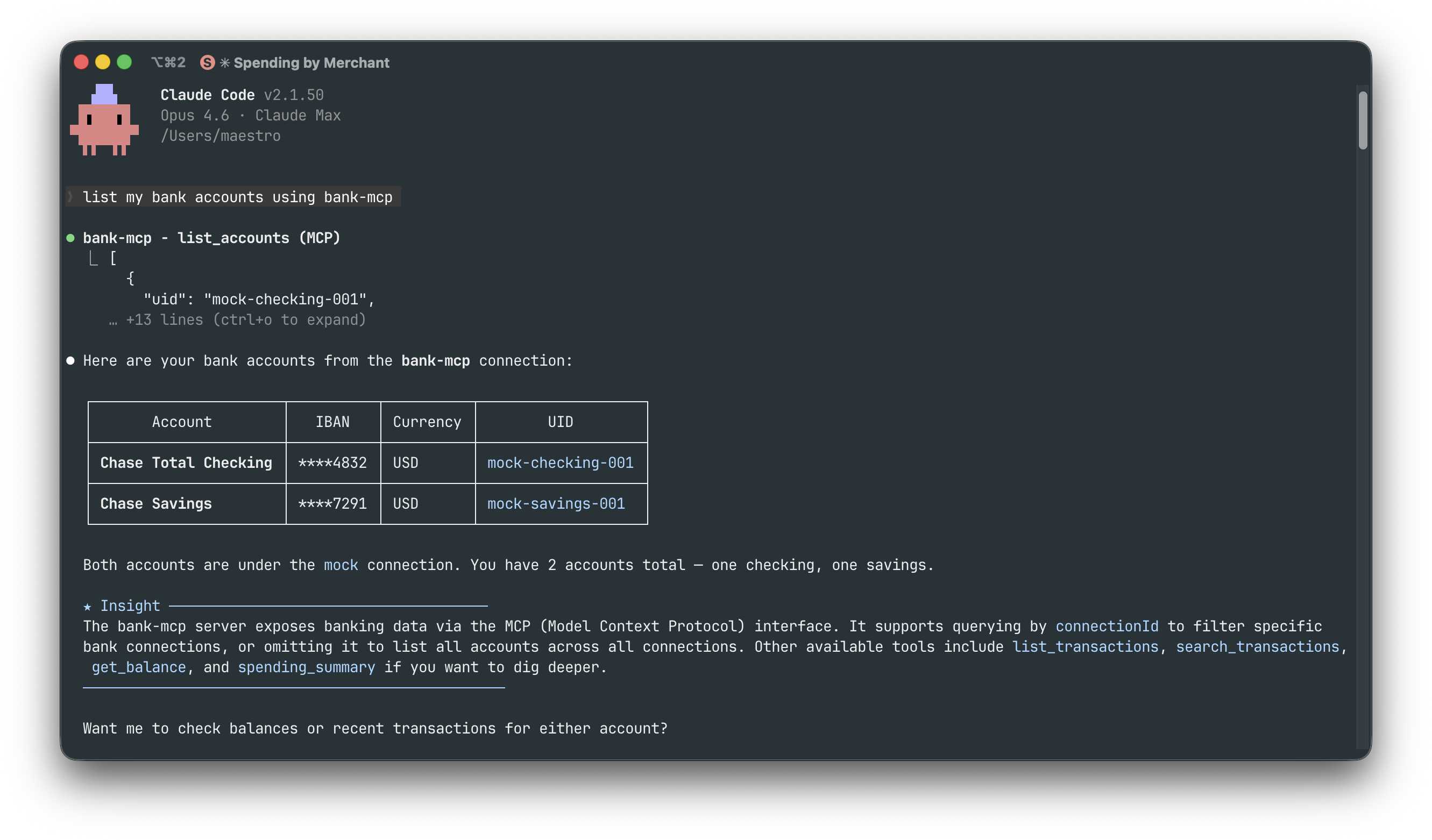
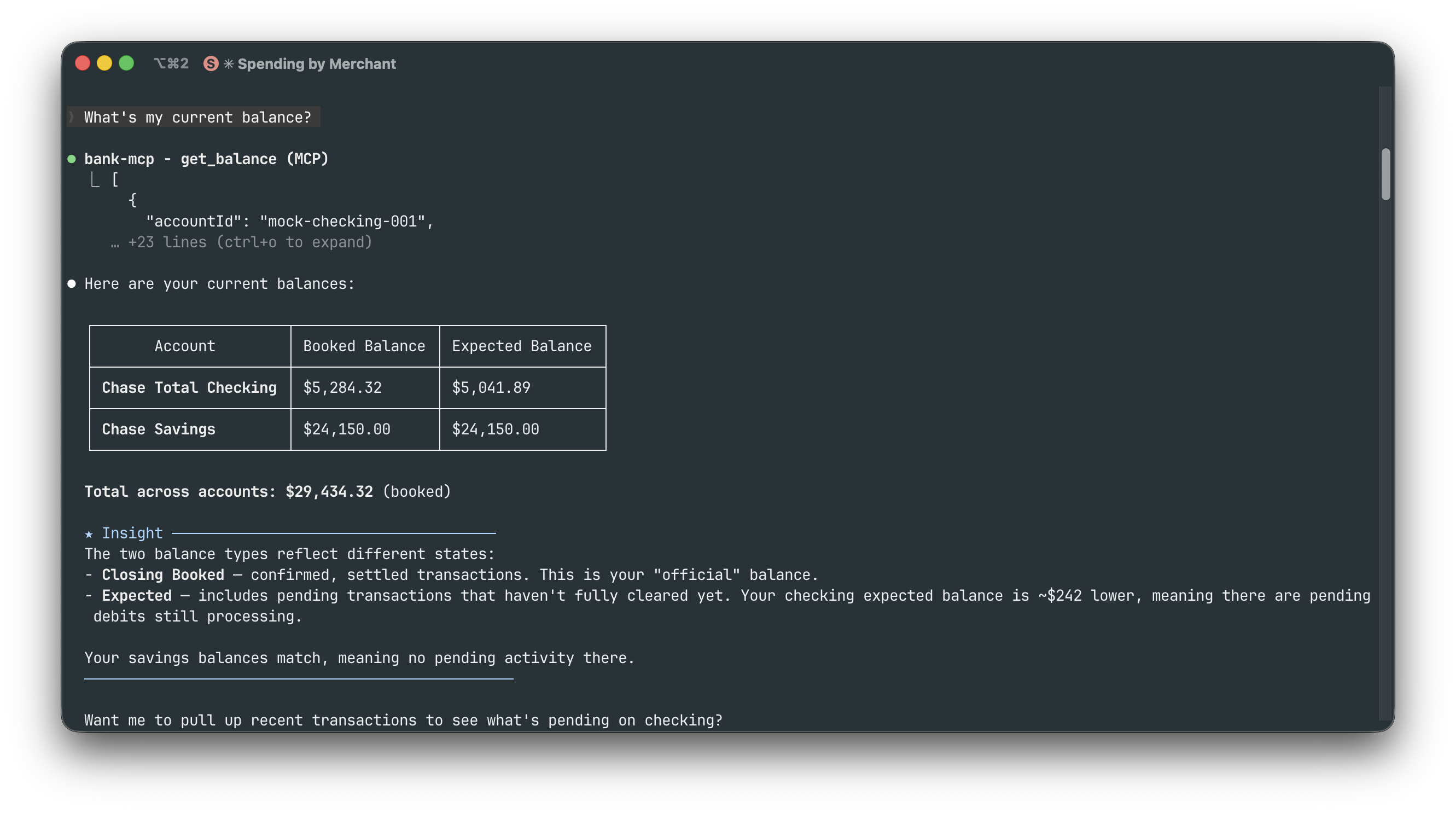
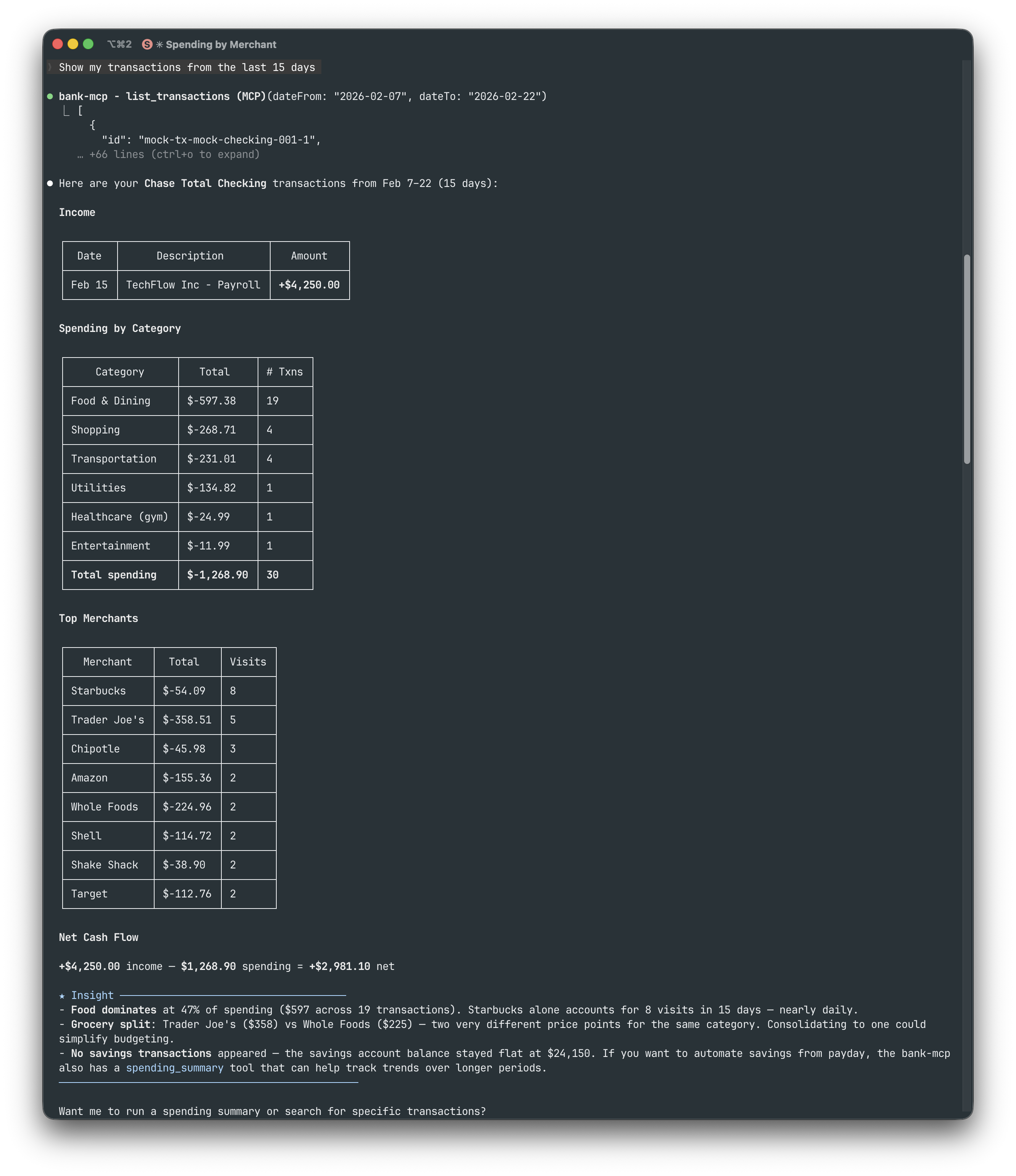
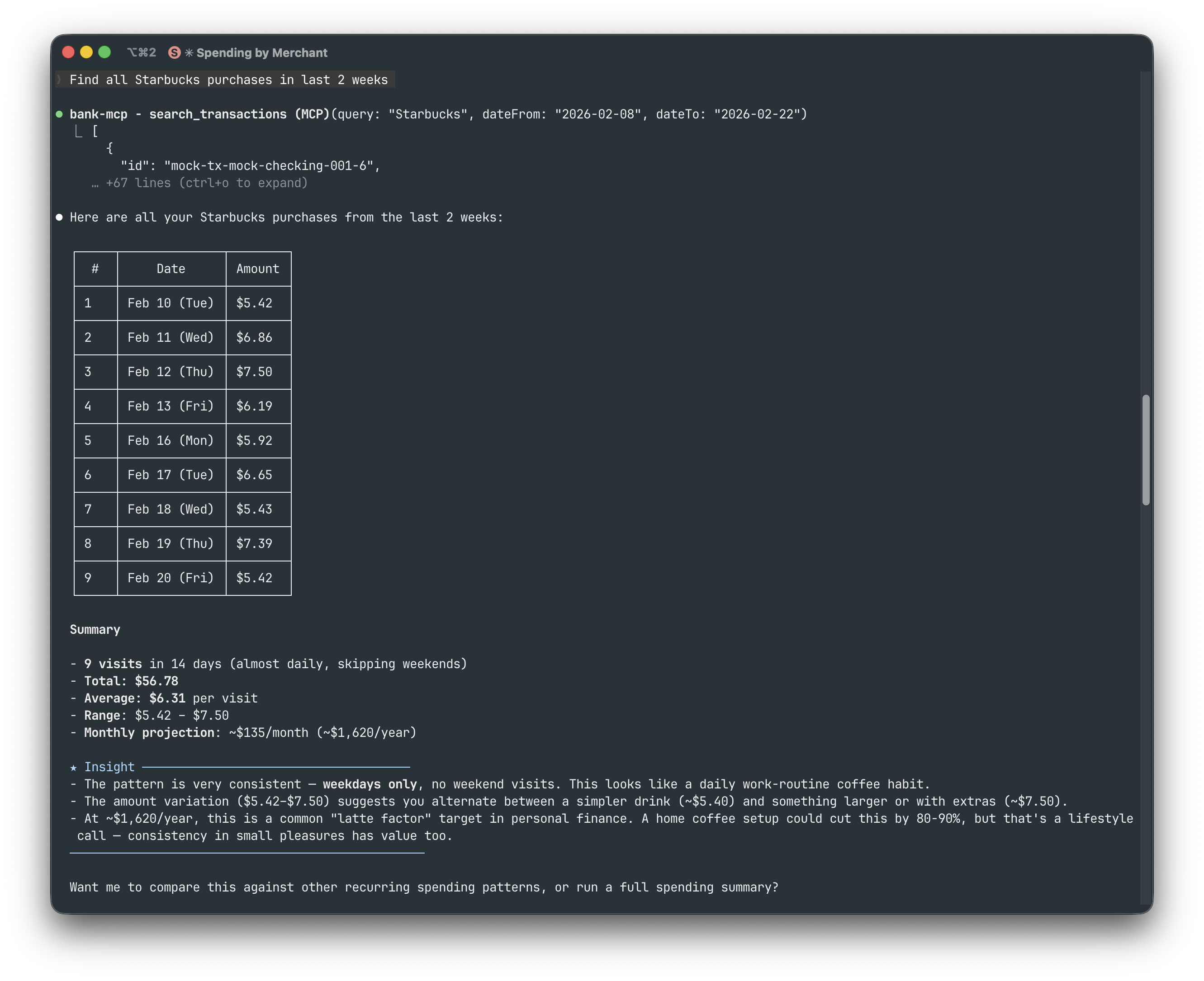
All examples below use Claude Code with the mock provider (npx @bank-mcp/server --mock).
Listing accounts — "List my bank accounts"
Checking balances — "What's my current balance?"
Transaction history — "Show my transactions from the last 15 days"
Searching transactions — "Find all Starbucks purchases in last 2 weeks"
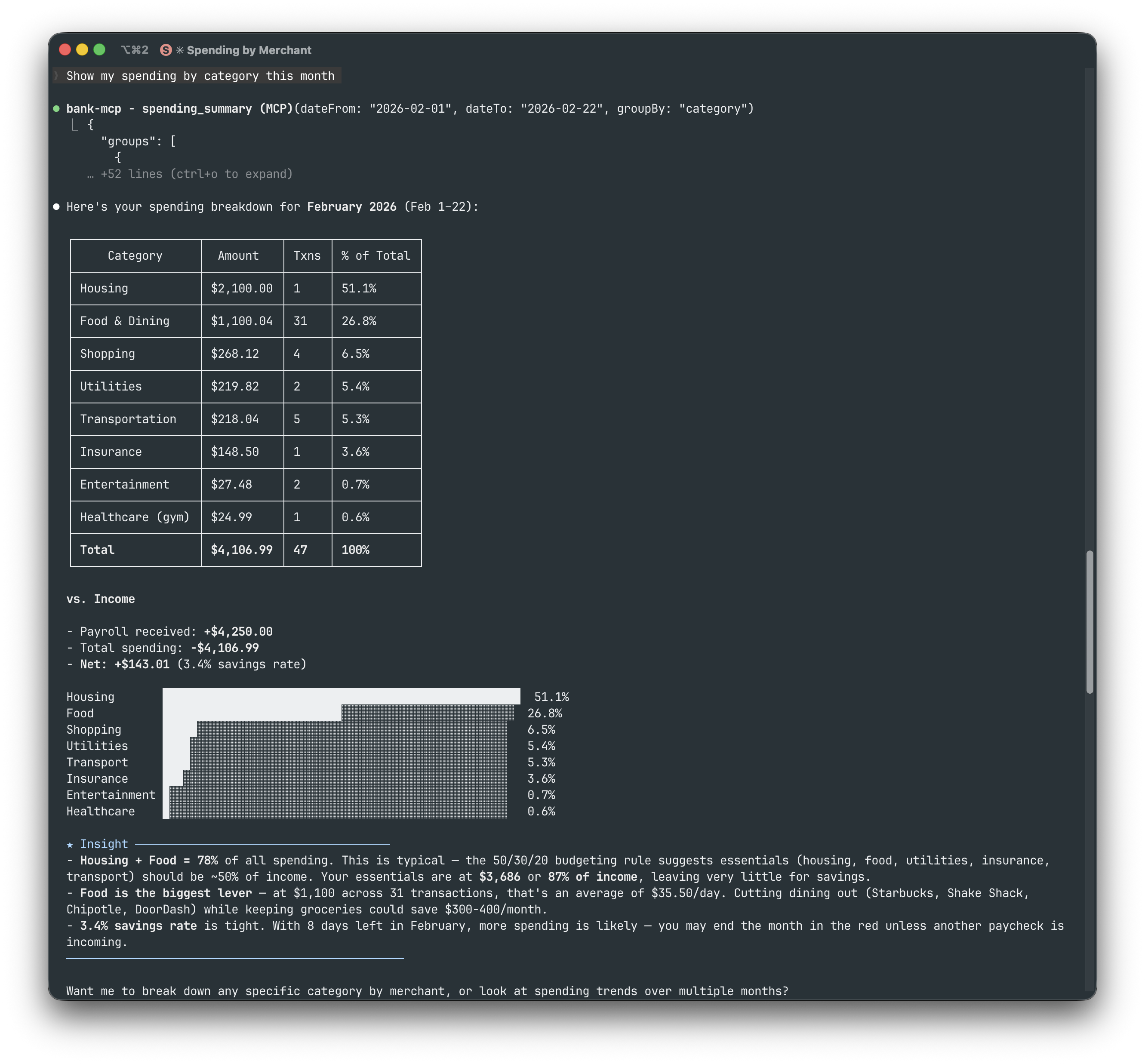
Spending by category — "Show my spending by category this month"
More examples (merchant analysis, subscriptions, grocery comparison, financial overview)
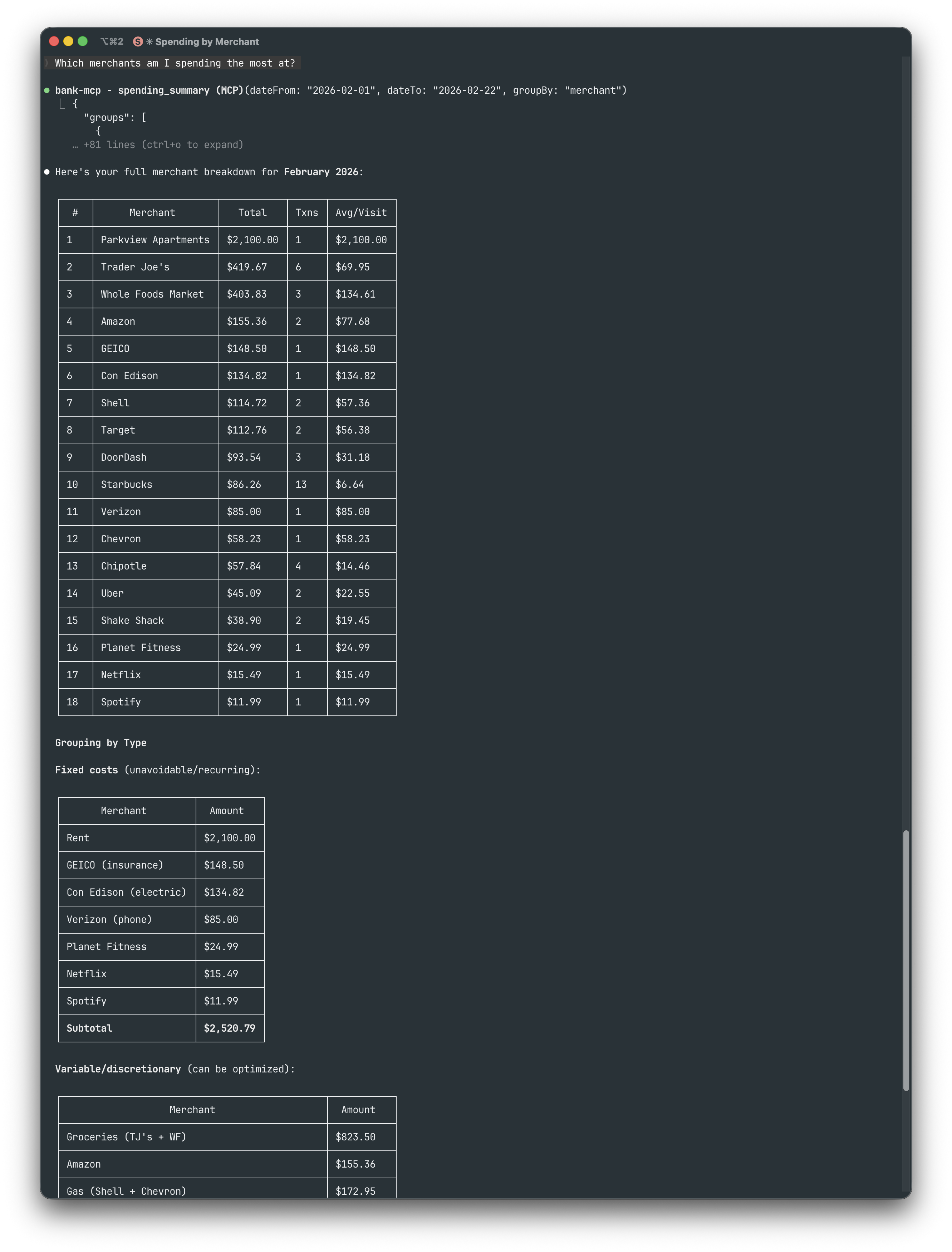
Top merchants — "Which merchants am I spending the most at?"
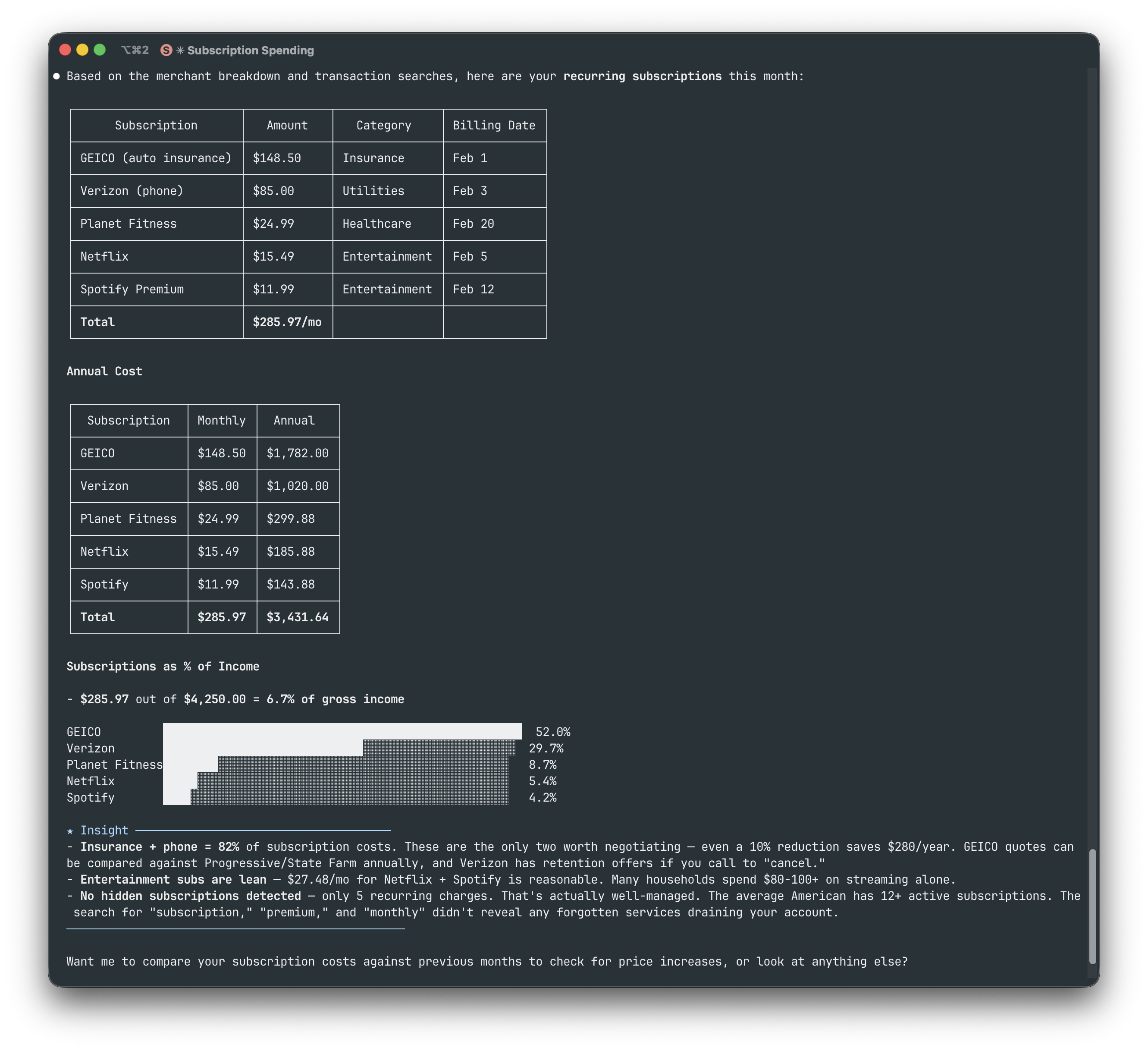
Subscription tracking — "Show my recurring subscriptions"
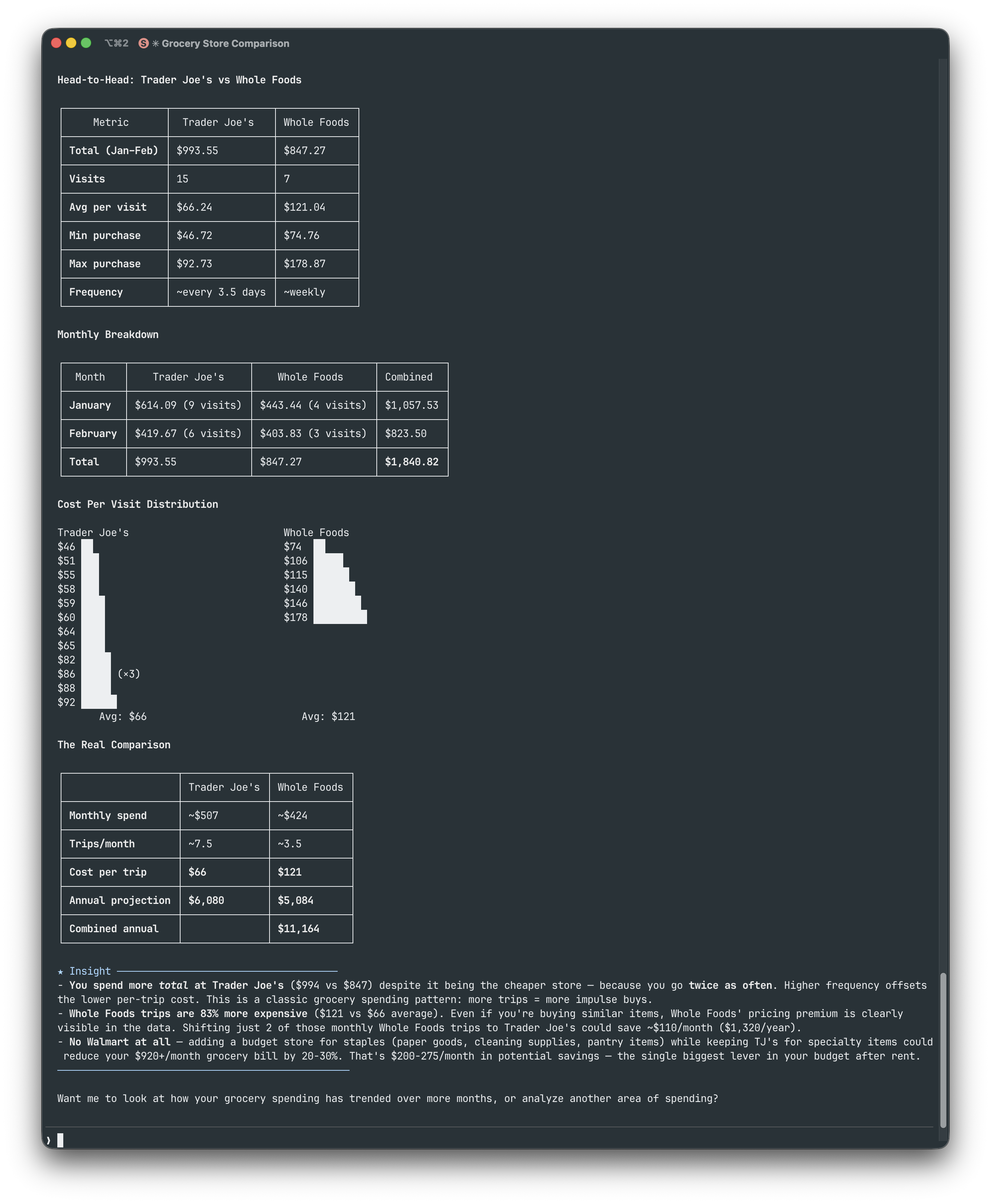
Grocery comparison — "Compare Trader Joe's vs Whole Foods spending"
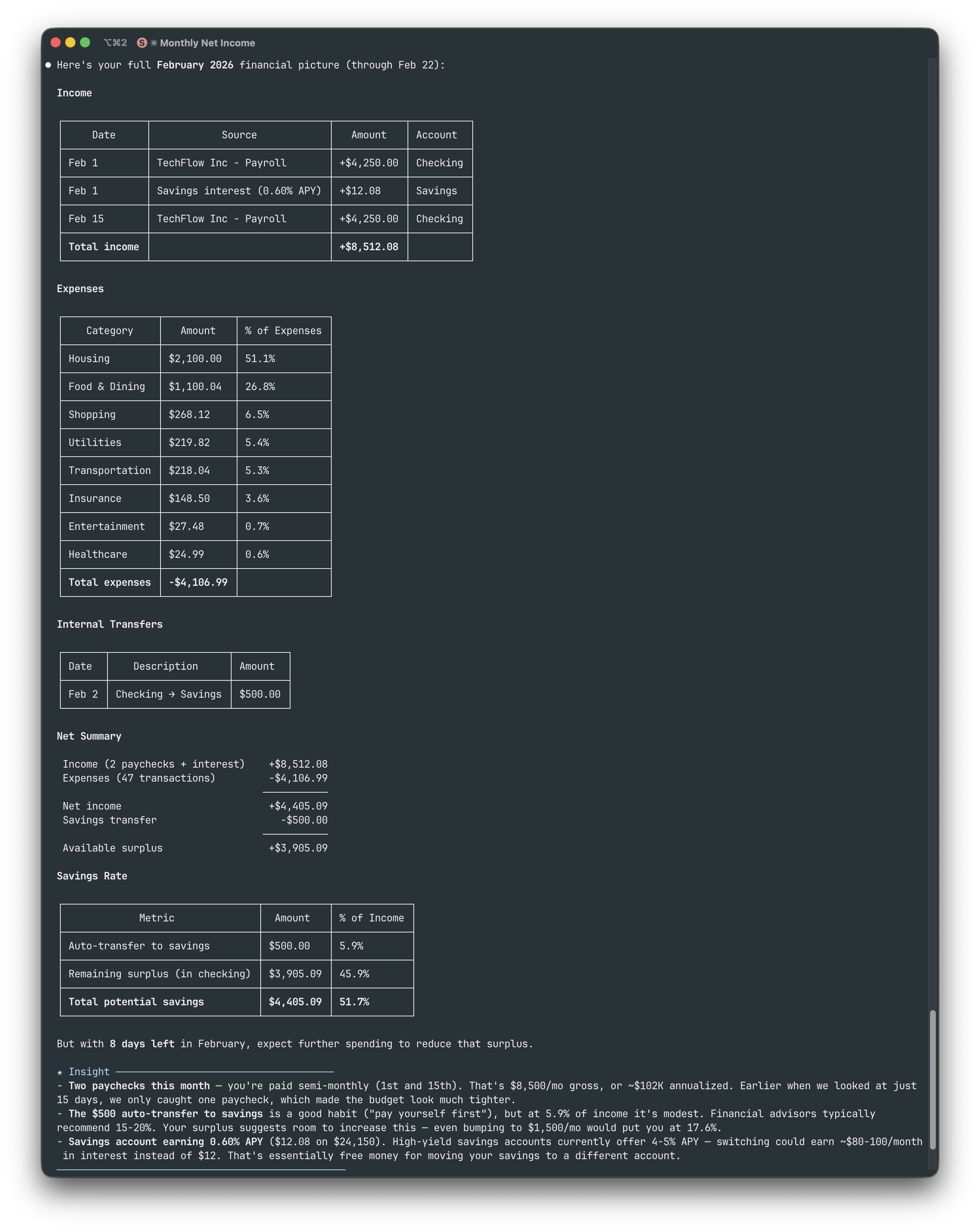
Full financial picture — "Give me my full February financial picture"
Architecture

File Structure
~/.bank-mcp/
  config.json          # Connections & credentials (permissions: 600)
  keys/                # RSA keys and certificates

src/
  providers/
    base.ts            # Abstract BankProvider class
    registry.ts        # Provider registration
    enable-banking/    # PSD2 via Enable Banking API
    teller/            # US banks via mTLS
    plaid/             # US/CA/EU via Plaid API
    tink/              # EU Open Banking via Tink API
    mock/              # Deterministic fake data
  tools/               # MCP tool implementations
  utils/
    cache.ts           # In-memory TTL cache
    http.ts            # Fetch with timeout + retry
Provider Interface
Every provider extends the same abstract class, making it straightforward to add new integrations:
abstract class BankProvider {
  abstract listAccounts(config): Promise<BankAccount[]>;
  abstract listTransactions(config, accountId, filter?): Promise<Transaction[]>;
  abstract getBalance(config, accountId): Promise<Balance[]>;
  abstract getConfigSchema(): ConfigField[];
}
Provider Setup Guides
Enable Banking (PSD2)
What you need:
- An Enable Banking account with a registered app
- Your RSA private key (
.pemfile, downloaded when you created the app)
npx @bank-mcp/server init
# Select: Enable Banking → enter App ID + key path
# Pick your country → select your bank
# Log in at your bank → paste the redirect URL
# → Session created, accounts verified!
Tip: The wizard handles the entire OAuth flow — redirect URI setup, bank selection, and session creation. Sessions expire after 90 days (PSD2 regulation); re-run
initto refresh.
Teller (US Banks)
What you need:
- A Teller developer account
- Your Application ID (from the Teller dashboard)
npx @bank-mcp/server init
# Select: Teller → enter Application ID
# Pick environment (sandbox for testing)
# → Teller Connect opens in your browser
# → Link your bank, token captured automatically!
Tip: Start with sandbox — no certificates needed, instant test data. For development/production, the wizard prompts for mTLS certificate paths. Free tier supports up to 100 live connections.
Plaid (US/CA/EU)
What you need:
- A Plaid developer account (free signup)
- Your Client ID and Secret (from the Plaid dashboard)
npx @bank-mcp/server init
# Select: Plaid → enter client ID + secret
# Pick environment (sandbox for testing)
# → Sandbox: token created automatically!
# → Dev/Prod: paste an existing access token
Tip: Start with sandbox — the wizard auto-creates a test token, no browser needed. Plaid provides the richest transaction categorization — 104 sub-categories with confidence scores — ideal for LLM-driven spending analysis.
Tink (EU Open Banking)
What you need:
- A Tink developer account (free for testing)
- Your Client ID and Client Secret (from the Tink Console)
npx @bank-mcp/server init
# Select: Tink → enter Client ID + Secret
# Pick your market (country)
# → Tink Link opens in your browser
# → Connect your bank, paste redirect URL
Tip: Tink covers 3,400+ banks across Europe. For sandbox, use Demo Bank with test credentials (shown in the wizard). Transactions include PFM categories with merchant enrichment.
Caching
All data is cached in-memory (no disk persistence — cache dies with the process):
| Data | TTL | Why |
|---|---|---|
| Account list | 1 hour | Accounts rarely change; minimizes API calls |
| Transactions | 15 minutes | Balances new transactions vs freshness |
| Balances | 5 minutes | Most time-sensitive; users expect current data |
Cache is per-connection and per-account. Restarting the server clears all caches.
Multiple Connections
Configure as many bank connections as you need — even across different providers:
{
  "connections": [
    { "id": "ing-main", "provider": "enable-banking", "..." : "..." },
    { "id": "chase-checking", "provider": "plaid", "..." : "..." },
    { "id": "revolut", "provider": "tink", "..." : "..." }
  ]
}
All tools accept an optional connectionId parameter to target a specific connection. When omitted, every connection is queried and results are merged — so "show all my balances" works across banks automatically.
Security
Design Principles
bank-mcp handles sensitive financial credentials. Its security posture is built on minimizing attack surface:
- Read-only by design — the
BankProviderinterface exposes only read methods (listAccounts,listTransactions,getBalance). There are no write methods — no transfers, no account modifications, no payment initiation. This is enforced at the type level, not by convention. - No network listener — bank-mcp runs as a stdio process (stdin/stdout), not an HTTP server. There is no open port, no attack surface from the network.
- Minimal dependencies — only 4 runtime dependencies (
@modelcontextprotocol/sdk,@clack/prompts,jsonwebtoken,zod). Fewer dependencies means fewer supply chain risks. - Open source — every line is auditable. No obfuscated code, no compiled blobs, no telemetry.
Credential Storage
- Config file at
~/.bank-mcp/config.jsonis created with600permissions (owner read/write only) - RSA keys and certificates are stored in
~/.bank-mcp/keys/with the same restrictive permissions - Credentials are never logged — the server sanitizes config objects before any debug output
- No credential caching beyond the process lifetime — when the server stops, credentials exist only on disk
Data Flow
Your Bank's API ← HTTPS → bank-mcp (local process) ← stdio → MCP Client (local)
- Transaction data flows directly from your bank's API to your local MCP client
- Nothing is stored remotely — no cloud relay, no proxy server, no intermediate storage
- No telemetry — zero analytics, no crash reports, no usage tracking, no phone-home
- In-memory cache is per-process and dies when the server stops
What Your MCP Client Sees
The MCP client (Claude, Cursor, etc.) receives structured tool results containing:
- Account names, types, and balances
- Transaction descriptions, amounts, dates, and categories
- Spending summaries
The LLM processes this in its context window. Be aware that cloud-hosted LLMs send your conversation (including tool results) to their servers. If this is a concern, use a local model or review your provider's data retention policy.
Recommendations
- Rotate tokens — if your banking provider supports token rotation, enable it
- Use sandbox first — test your setup with mock data or Plaid sandbox before connecting live accounts
- Review permissions — ensure
~/.bank-mcp/is not world-readable (ls -la ~/.bank-mcp/) - Scope access — if your provider supports it, request the minimum scopes needed (read-only account and transaction access)
Reporting Vulnerabilities
If you discover a security issue, please email the maintainer directly rather than opening a public issue. See CONTRIBUTING.md for contact details.
Adding a New Provider
The pluggable architecture makes it straightforward to add support for additional banking APIs:
- Create your provider at
src/providers/your-provider/index.ts - Extend
BankProvider— implementlistAccounts,listTransactions,getBalance, andgetConfigSchema - Register it in
src/providers/registry.ts - Add an init flow at
src/init/flows/your-provider.ts— interactive setup using@clack/prompts
See src/providers/enable-banking/ as a reference implementation. The mock provider at src/providers/mock/ is also useful for understanding the expected data shapes.
Troubleshooting
npx is running an old version
npx caches packages. Force the latest:
npx @bank-mcp/server@latest
"Permission denied" reading config
The config file should be readable by your user:
ls -la ~/.bank-mcp/config.json
# Should show: -rw------- (600)
# Fix: chmod 600 ~/.bank-mcp/config.json
"Session expired" (Enable Banking)
PSD2 sessions expire after 90 days. Re-run the init wizard:
npx @bank-mcp/server init
# Select your existing Enable Banking connection to update the session
Tools not showing up in your MCP client
- Verify the server starts:
npx @bank-mcp/server --mock(should output MCP protocol on stdout) - Check your config file path matches your client's expected location
- Restart your MCP client after adding the config
- Check your client's MCP logs for connection errors
"ETLS" or certificate errors (Teller)
Teller requires mTLS. Verify your certificate files:
ls -la ~/.bank-mcp/keys/teller/
# Should contain: certificate.pem, private_key.pem
# Both should be chmod 600
Development
git clone https://github.com/elcukro/bank-mcp.git
cd bank-mcp
npm install
npm test          # Run tests (vitest)
npm run build     # Compile TypeScript
npm run dev       # Watch mode (recompile on change)
npm run lint      # ESLint
Contributing
Contributions are welcome! Please see CONTRIBUTING.md for guidelines.
If you're adding a new provider, open an issue first to discuss the approach — we want to make sure the integration fits the project's architecture.
License
MIT — use it however you want.
Built for the Model Context Protocol ecosystem
Install Bank in Claude Desktop, Claude Code & Cursor
unyly install bankInstalls into Claude Desktop, Claude Code, Cursor & VS Code — handles npx, uvx and build-from-source repos for you.
First time? Get the CLI: curl -fsSL https://unyly.org/install | sh
Or configure manually
Run in your terminal:
claude mcp add bank -- npx -y @bank-mcp/serverStep-by-step: how to install Bank
FAQ
Is Bank MCP free?
Yes, Bank MCP is free — one-click install via Unyly at no cost.
Does Bank need an API key?
No, Bank runs without API keys or environment variables.
Is Bank hosted or self-hosted?
Self-hosted: the server runs locally on your machine via the install command above.
How do I install Bank in Claude Desktop, Claude Code or Cursor?
Open Bank on unyly.org, pick your client tab (Claude Desktop, Claude Code, Cursor) and press Install — the config is generated automatically, no JSON editing.
Related MCPs
GitHub
PRs, issues, code search, CI status
 by GitHub
Filesystem
Secure file operations with configurable access controls.
Memory
Knowledge graph-based persistent memory system.
Template MCP Server
A CLI tool to create a new Model Context Protocol server project with TypeScript support, dual transport options, and an extensible structure
 by mcpdotdirect
Compare Bank with
Not sure what to pick?
Find your stack in 60 seconds
Author?
Embed badge for your README
Browse similar
All development MCPs