
Baron Recipes
БесплатноПоддерживаетсяBaron recipe engine: run declarative YAML workflows over Baron primitives, deterministically.

Описание
Baron recipe engine: run declarative YAML workflows over Baron primitives, deterministically.
README

Baron
Let your coding agent write to your work tracker — and keep the same flow when you change trackers. Baron is an open-source layer that turns issues, branches, PRs, CI runs, and deployments into one normalized contract, so your agent never learns a vendor's API, states, or column names.
Docs and site: baron.zanaat.dev
The problem
AI coding agents bake one vendor's API and one team's process into prompts. The moment your issues live in Azure DevOps but your code is on GitHub, or your board columns aren't literally "To Do / Done", or you switch trackers next quarter — the prompts break, and the agent falls back to raw, vendor-specific tools. You've hardcoded vendor lock-in into the way you work.
What Baron does
Plenty of tools let an agent read your tracker. Baron is about the other direction: writing — creating work items, moving them, cutting branches, opening and merging PRs — which is where an agent does damage when it guesses a vendor's state machine wrong.
The agent speaks one abstract vocabulary in terms of roles (backlog → ready → in_progress → in_review → done; blocking is an orthogonal flag, so a blocked item keeps the role the work is
actually in), and Baron translates to each provider's real API, states, and
quirks. You confirm that mapping once, at baron init, and it is committed to your repo as
configuration — not re-guessed by the model on every call.
Each port binds to a provider independently, so issues on Azure DevOps, scm on GitHub, and
notify on Slack is a normal setup rather than a special case.
What it looks like
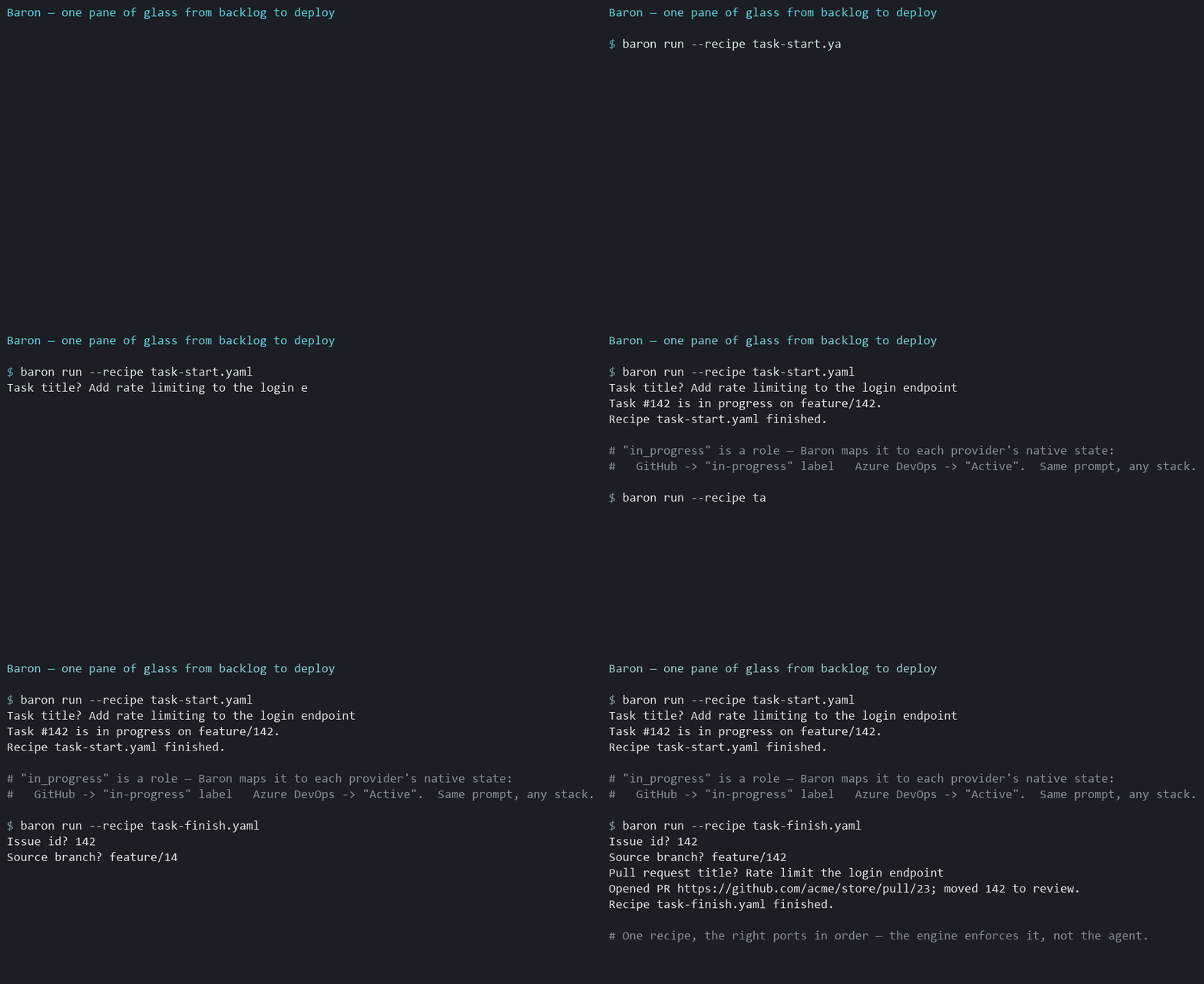
You:  Start work on STORE-142.

Baron  ▸ runs the task-start recipe as a single call:
  ✓ Loaded STORE-142 "Add rate limiting to the login endpoint"  (type role: task)
  ✓ Checked it: not done, has a canonical branch, not assigned to someone else
  ✓ Branched feature/STORE-142 from the repo's default branch
  ✓ Moved STORE-142 → in_progress, assigned to you
  ✓ Commented on the item: "Started work — on branch feature/STORE-142."
That same prompt on Azure DevOps sets the work item state to Active; on GitHub it applies an
in-progress label — because in_progress is a role, not a vendor state.
The checks matter as much as the actions: if the item is already done, belongs to someone else, or is a container that should never be branched, the run stops before anything is created. The branch name is derived by Baron from the item's type role, so every agent and every recipe derives the same name for the same item instead of inventing one.
Why it's different
- Capability ports, not "a tracker."
issues/scm/ci/deploy/notify, each bound to a provider independently — so a consumer mixes providers rather than betting on one vendor spanning everything. - Normalize, don't raw-proxy. New capabilities become first-class normalized ports; a clearly labeled provider-native escape hatch is the explicit last resort, never the default path.
- Capability gaps are never silent. When a provider lacks something (say, native issue hierarchy), Baron either emulates it (e.g. labels), degrades with a warning, or errors loudly — decided by policy, never swallowed.
- Workflows are recipes, not prompts. Multi-step flows (
task-start,task-finish,task-land,ship) are declarative YAML executed as a single call, with guards that stop a run before it mutates anything. The order lives in the recipe rather than being improvised per run.
The first of those is the one worth reading about rather than being told: You can't set a status in Jira walks through why a work tracker cannot be normalized by mapping four states onto everything — Jira refuses to set a status at all and makes you discover the permitted transitions first, Linear's workflow states belong to a team rather than the workspace, GitHub has no hierarchy to map. It is the argument this design answers.
Quick start
Published to npm — no clone, no build. From inside your project:
# 1. Configure — one command. Auto-detects owner/repo from your git remote, offers to sign you in
#    through your browser (or paste a token instead), writes .baron/credentials (gitignored) +
#    .baron/policy.json (issues + scm bound).
npx -y @zanaat/baron-cli@latest init --provider github      # or: --provider azure-devops

# 2. Check the policy against the live provider (drift → exit 1)
npx -y @zanaat/baron-cli@latest doctor

# 3. Run a workflow recipe
npx -y @zanaat/baron-cli@latest run --recipe task-start          # by name; or pass a path
On GitHub, step 1 opens the approval page and you confirm a short code — no permission list to read,
no boxes to tick, no token to paste. Pasting a fine-grained token is still offered, because it is a
narrower credential than any OAuth scope and an install that wants the tighter one should not have to
fight the friendlier path to get it. Either way baron doctor verifies what the credential can
actually do before you start work.
Or drive it from an agent — install the Claude Code plugin (MCP server + workflow skills in one):
/plugin marketplace add zanaat-dev/baron
/plugin install baron@baron
See Getting started for the full walkthrough. Contributing to Baron
itself? Run from source with pnpm baron … — see CONTRIBUTING.
Or wire the MCP server into your agent and call the tools directly across every port —
baron_issue_write op=create, baron_scm_write op=pr_create, baron_ci_read op=runs, baron_deploy_read op=deployments,
baron_notify_send, plus baron_recipe_run for whole workflows. In Claude Code, the plugin also
ships per-recipe skills (/baron:task-start, /baron:ship). See docs/mcp.md.
The server is listed in the official MCP Registry as io.github.zanaat-dev/baron, and runs as a
container for anyone who would rather not have Node on the host — see
docs/mcp.md.
New to it? The Azure DevOps setup walkthrough is copy-paste from
scratch (PAT scopes, init → doctor → MCP, troubleshooting).
Providers
| Provider | Ports |
|---|---|
| Azure DevOps | issues · scm · ci · deploy |
| GitHub | issues · scm · ci · deploy |
| Jira | issues |
| Linear | issues |
| Slack | notify |
GitLab is on the roadmap — adding a provider never changes how the agent talks to Baron, which is the whole point. Until it lands, that name describes intent, not support.
Documentation
| Guide | What it covers |
|---|---|
| Getting started | Install, prerequisites, first init → doctor → run. |
| Setup walkthrough — Azure DevOps | From-scratch, copy-paste setup on Azure DevOps + Claude Code. |
| Setup walkthrough — Linear | From-scratch setup on Linear: per-team scoped states, branches from GitHub. |
| Setup walkthrough — Jira | From-scratch setup on Jira Cloud: workflow-gated transitions and transition screens. |
| Concepts | Ports, roles, capability gaps, the knowledge loop — the mental model. |
| Configuration | .baron/policy.json, role/type/gap maps, credentials. |
| CLI | baron init / doctor / run reference. |
| Recipes | Writing YAML recipes: ask / do / message, interpolation, the op table. |
| MCP server & plugin | The MCP tools and the Claude Code plugin. |
| Trying it with Claude Code | Hands-on: wire the MCP server to a real project + a verification checklist. |
| Providers | Which provider supports which port and capability. |
| Demo script | Ready-to-record 60-second demo (Claude Code or CLI). |
The full design decision record is in ARCHITECTURE.md; the contributor working contract is CLAUDE.md, contribution terms are in CONTRIBUTING.md, and the publish playbook is RELEASING.md.
Status
v1 is built end-to-end: the issues, scm, ci, and deploy ports across Azure DevOps and
GitHub plus notify via Slack, the config engine (baron init / doctor), a multi-port MCP
server, the YAML recipe engine + baron run, the knowledge loop, and a Claude Code plugin. Every
adapter passes a network-free conformance suite; the Azure DevOps ports are additionally
live-validated against a real project.
Baron now also runs this repository — its issues, branches, and pull requests move through its own GitHub adapter. That is a working proof, not adoption: Baron is young and has not yet been put through a stack it did not grow up on. If you run it against yours, the resulting bug report is the most useful thing you could send. What is planned next, and what is deliberately out of scope, is in ROADMAP.md.
License
Open-core. The core, the adapters (Azure DevOps, GitHub, Linear, Slack), the recipes, and the CLI/MCP server are licensed under Apache-2.0. Future commercial-tier features (SSO, secret-manager integrations, multi-team governance, audit) will ship under a separate commercial license — see ARCHITECTURE.md decision #20.
Установить Baron Recipes в Claude Desktop, Claude Code, Cursor
unyly install baron-recipesСтавит в Claude Desktop, Claude Code, Cursor и VS Code — сам разбирается с npx, uvx и сборкой из исходников.
Впервые? Поставь CLI: curl -fsSL https://unyly.org/install | sh
Или настроить вручную
Выполни в терминале:
claude mcp add baron-recipes -- npx -y @lonca/baron-recipesПошаговые гайды: как установить Baron Recipes
FAQ
Baron Recipes MCP бесплатный?
Да, Baron Recipes MCP бесплатный — установка в пару кликов через Unyly без оплаты.
Нужен ли API-ключ для Baron Recipes?
Нет, Baron Recipes работает без API-ключей и переменных окружения.
Baron Recipes — hosted или self-hosted?
Self-hosted: сервер запускается локально на твоей машине командой из раздела установки.
Как установить Baron Recipes в Claude Desktop, Claude Code или Cursor?
Открой Baron Recipes на unyly.org, выбери вкладку своего клиента (Claude Desktop, Claude Code, Cursor) и нажми Install — конфиг сгенерируется автоматически, без правки JSON.
Изменения
Версии и запрашиваемые доступы со временем.
- Новая версия опубликована
- Новая версия опубликована
- Новая версия опубликована
- Новая версия опубликована
- Новая версия опубликована
- Новая версия опубликована
- Новая версия опубликована
- Новая версия опубликована
Похожие MCP
GitHub
PRs, issues, code search, CI status
 автор: GitHub
Filesystem
Secure file operations with configurable access controls.
Memory
Knowledge graph-based persistent memory system.

Unyly Deploy
Deploy sites and MCP servers to Unyly straight from your AI agent
 автор: Unyly
Amap Maps Mcp Server
MCP server for using the AMap Maps API
 автор: duxiaohui
PayMCP
Lightweight payments layer for MCP servers: turn tools into paid endpoints with a two-line decorator. [PyPI](https://pypi.org/project/paymcp/) · [npm](https://w
 автор: blustAI
Server For Power BI
Enables exploring Microsoft Fabric / Power BI workspaces and semantic models, and executing ad-hoc DAX queries.
 автор: Mitsubishi-Fuso
Gpt Image 2 Mcp
RunAPI GPT Image 2 MCP server for image generation: create tasks, poll results, and check pricing across 1 model from Claude Code, Codex, Cursor, and VS Code.
 автор: runapi-ai
Template MCP Server
A CLI tool to create a new Model Context Protocol server project with TypeScript support, dual transport options, and an extensible structure
 автор: mcpdotdirect
Supabase
Database, auth and storage
 автор: Supabase
Compare Baron Recipes with
Не уверен что выбрать?
Найди свой стек за 60 секунд
Автор?
Embed-бейдж для README
Похожее
Все в категории development