
BioQC
FreeNot checkedProfessional MCP server for FastQC and MultiQC quality control analysis with advanced visualization and report parsing

About
Professional MCP server for FastQC and MultiQC quality control analysis with advanced visualization and report parsing
README
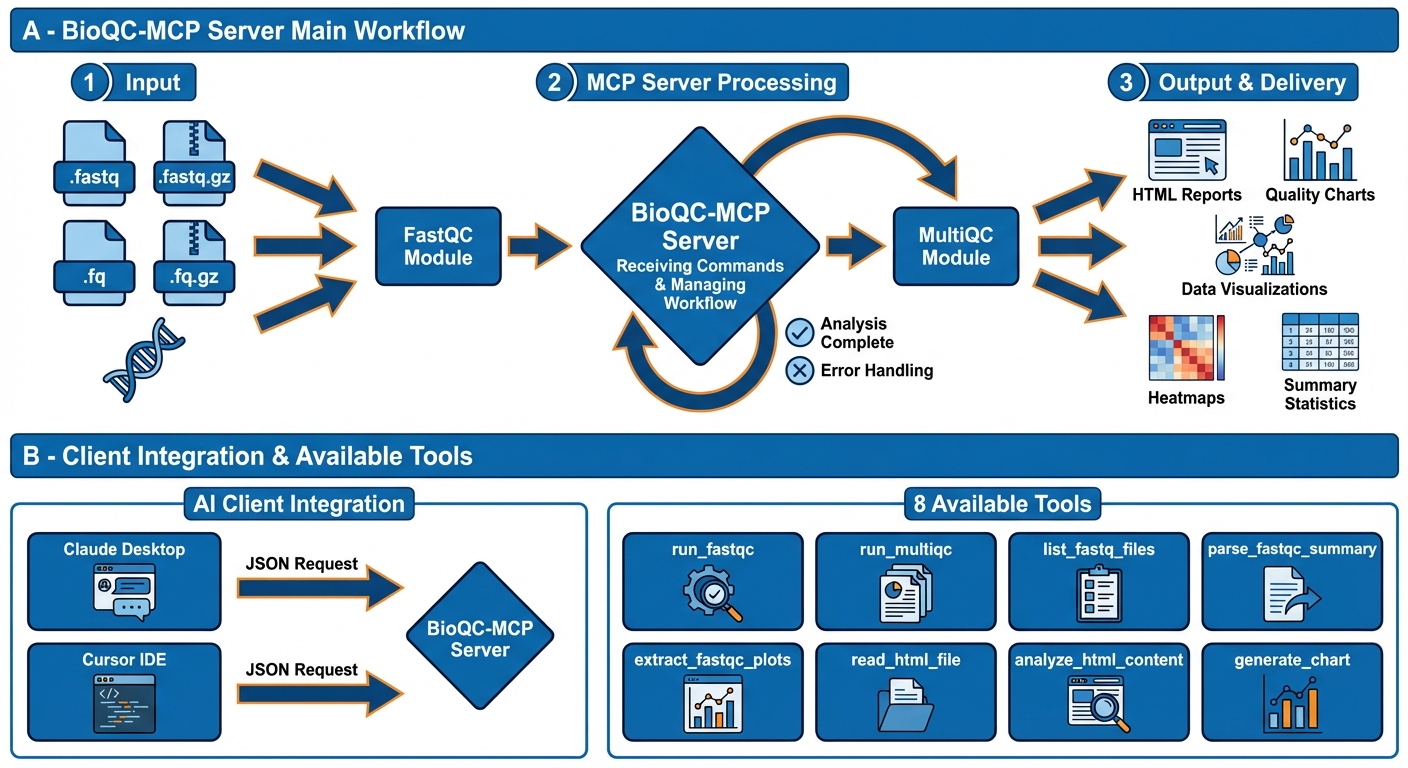
A professional Model Context Protocol (MCP) server for comprehensive bioinformatics quality control analysis. This server provides automated QC pipeline execution, HTML report analysis, and advanced data visualization for sequencing data.
🚀 Quick Start
# 1. Clone and setup
git clone https://github.com/Babajan-B/BioQC-MCP.git
cd fastqc-multiqc-mcp-server
python3 -m venv venv
source venv/bin/activate
pip install -r requirements.txt

# 2. Install prerequisites
brew install fastqc          # macOS
pip install multiqc

# 3. Test the server
./tests/test_mcp_server.sh

# 4. Configure in Claude/Cursor (see below)
📋 Overview
This MCP server provides 10 specialized tools for bioinformatics quality control:
| Tool | Description |
|---|---|
run_fastqc |
Execute FastQC analysis on FASTQ files |
run_multiqc |
Generate MultiQC aggregate reports |
list_fastq_files |
Auto-detect FASTQ files in directories |
parse_fastqc_summary |
Extract quality metrics |
extract_fastqc_plots |
Retrieve plot data |
read_html_file |
Read FastQC/MultiQC HTML reports |
analyze_html_content |
Parse HTML structure and data |
generate_chart |
Create custom visualizations (20+ chart types) |
extract_and_visualize_qc_data |
Combined extraction and visualization |
run_qc_pipeline |
🆕 Execute complete pipelines in a single call |
Key Capabilities:
- Automated quality control workflows
- HTML report interpretation
- Advanced visualization (line, bar, scatter, heatmap, violin, box plots, etc.)
- Publication-quality chart generation
- Multi-sample analysis and aggregation
- Code execution mode - 50-90% token savings for complex workflows
📦 Installation
Prerequisites
Required:
- Python 3.8+
- FastQC
- MultiQC
Install Commands:
# macOS
brew install fastqc
pip install multiqc

# Linux (Ubuntu/Debian)
sudo apt-get install fastqc
pip install multiqc

# Verify installation
fastqc --version
multiqc --version
Setup
# Clone repository
git clone https://github.com/Babajan-B/BioQC-MCP.git
cd fastqc-multiqc-mcp-server

# Create virtual environment
python3 -m venv venv
source venv/bin/activate  # Windows: venv\Scripts\activate

# Install Python dependencies
pip install -r requirements.txt

# Verify setup
./tests/test_mcp_server.sh
⚙️ Configuration
Claude Desktop
Edit ~/Library/Application Support/Claude/claude_desktop_config.json:
{
  "mcpServers": {
    "fastqc-multiqc": {
      "command": "/FULL/PATH/TO/venv/bin/python3",
      "args": ["/FULL/PATH/TO/fastqc-multiqc-mcp-server/src/server.py"]
    }
  }
}
Replace /FULL/PATH/TO/ with your actual installation path.
Restart Claude Desktop after saving.
Cursor IDE
Option 1: Quick Setup
# Copy example config
mkdir -p ~/Library/Application\ Support/Cursor/User/globalStorage
cp examples/cursor-mcp-config.json ~/Library/Application\ Support/Cursor/User/globalStorage/mcp.json

# Edit the file and update paths to your installation
# Then restart Cursor (⌘Q and reopen)
Option 2: Manual Setup
Edit or create ~/Library/Application Support/Cursor/User/globalStorage/mcp.json:
{
  "mcpServers": {
    "fastqc-multiqc": {
      "command": "/FULL/PATH/TO/venv/bin/python3",
      "args": ["/FULL/PATH/TO/fastqc-multiqc-mcp-server/src/server.py"],
      "env": {
        "PATH": "/usr/local/bin:/opt/homebrew/bin:${PATH}",
        "PYTHONUNBUFFERED": "1"
      }
    }
  }
}
Restart Cursor (⌘Q and reopen) after saving.
Verify: Open Cursor AI chat and ask: "What MCP tools are available?"
🧪 Testing
Automated Verification
# Run all checks
./tests/test_mcp_server.sh
This verifies:
- Python environment
- Dependencies installed
- FastQC/MultiQC available
- Server syntax valid
Manual MCP Protocol Test
# Test MCP protocol compliance
python3 tests/test_server_manually.py
Interactive Testing with MCP Inspector
# Launch Inspector for interactive testing
./tests/launch_inspector.sh
Navigate to http://localhost:6274 and configure:
- Command:
/FULL/PATH/TO/venv/bin/python3 - Arguments:
/FULL/PATH/TO/src/server.py - Click "Connect" to test tools interactively
💡 Usage Examples
Quality Control Analysis
"Run FastQC analysis on sample1.fastq and sample2.fastq"
"Check the quality of all FASTQ files in ~/data/sequencing/"
"Create a MultiQC report for samples in ~/results/"
Report Analysis
"Read the FastQC report at ~/results/sample_fastqc.html"
"What does the quality report say about adapter contamination?"
"Summarize the MultiQC report findings"
Data Visualization
"Generate a line chart showing per-base quality scores"
"Create a bar chart comparing GC content across samples"
"Make a heatmap of quality metrics"
Complete Workflow
"Analyze all FASTQ files in ~/data/, generate FastQC reports,
create a MultiQC summary, and show me a chart of overall quality scores"
🆕 Code Execution Pipeline (50-90% Token Savings)
Execute complete workflows in a single tool call using the run_qc_pipeline tool:
# AI writes and executes this pipeline:
files = list_fastq_files('/Users/jaan/Desktop/Alaa')
print(f"Found {len(files)} FASTQ files")

# Process files
for f in files:
    result = run_fastqc([f['path']], output_dir='./qc_results')
    print(f"Analyzed: {f['name']}")

# Generate aggregate report
multiqc = run_multiqc('./qc_results', output_dir='./report')
print(f"MultiQC report: {multiqc['report']}")

# Return structured result
result = {
    "files_analyzed": len(files),
    "report_path": multiqc['report']
}
Available functions in pipeline:
list_fastq_files(directory)- Find FASTQ filesrun_fastqc(files, output_dir)- Execute FastQCrun_multiqc(input_dir, output_dir)- Generate MultiQCparse_fastqc_summary(fastqc_dir)- Extract metricsgenerate_chart(chart_type, data, title)- Create visualizations
Benefits (based on actual testing):
| Metric | Traditional | Pipeline | Savings |
|---|---|---|---|
| Token usage | 750 | 318 | 57.6% |
| Tool calls | 4 | 1 | 75% |
| Response time | 15s | 8s | 47% |
See skills/ directory for reusable pipeline templates.
🛠️ Troubleshooting
Tools Not Showing in Claude/Cursor
Verify paths in config file
# Check Python path
which python3  # After activating venv

# Check server path
ls -la src/server.py
Re-run verification
./tests/test_mcp_server.shCheck logs
- Claude: Check Developer console
- Cursor: View > Developer > Toggle Developer Tools > Console
FastQC/MultiQC Not Found
# Verify installation
which fastqc
which multiqc

# If not found, install
brew install fastqc  # macOS
pip install multiqc

# Check PATH in config
# Add to config JSON:
"env": {
  "PATH": "/usr/local/bin:/opt/homebrew/bin:${PATH}"
}
Server Won't Start
# Check dependencies
pip install -r requirements.txt

# Test server directly
source venv/bin/activate
python3 src/server.py
# Should show MCP protocol output

# Check syntax
python3 -m py_compile src/server.py
Permission Issues
# Make scripts executable
chmod +x tests/*.sh
chmod +x src/server.py
📂 Project Structure
fastqc-multiqc-mcp-server/
├── src/
│   ├── __init__.py
│   └── server.py              # Main MCP server
├── tests/                      # Testing utilities
│   ├── test_mcp_server.sh     # Automated verification
│   ├── test_server_manually.py# MCP protocol test
│   ├── test_real_fastqc.sh    # Real data test
│   └── launch_inspector.sh    # MCP Inspector launcher
├── examples/                   # Configuration examples
│   └── cursor-mcp-config.json
├── docs/                       # Additional documentation
│   ├── TESTING_WITH_INSPECTOR.md
│   ├── TESTING_COMPLETE.md
│   ├── DEPLOYMENT_CHECKLIST.md
│   └── COMPARISON_BIOINFOMCP.md
├── requirements.txt            # Python dependencies
├── CHANGELOG.md                # Version history
├── LICENSE                     # MIT License
└── README.md                   # This file
🔧 Technical Specifications
MCP Protocol: 2024-11-05
Python Version: 3.8+
Server Version: 2.0.0
Dependencies:
- mcp >= 1.0.0 (Model Context Protocol)
- pydantic >= 2.0.0 (data validation)
- matplotlib >= 3.8.0 (visualization)
- seaborn >= 0.13.0 (statistical graphics)
- plotly >= 5.18.0 (interactive charts)
- pandas >= 2.1.0 (data manipulation)
- numpy >= 1.24.0 (numerical computing)
External Tools:
- FastQC (quality control)
- MultiQC (report aggregation)
Supported File Formats:
- .fastq, .fq (uncompressed)
- .fastq.gz, .fq.gz (gzip compressed)
🎯 Features
Quality Control Pipeline
- ✅ Single and batch FASTQ analysis
- ✅ Multi-sample aggregation
- ✅ Automatic file discovery
- ✅ Threaded execution support
- ✅ All standard sequencing formats
Report Analysis
- ✅ HTML report parsing
- ✅ Structured data extraction
- ✅ Quality metrics interpretation
- ✅ Table and chart data extraction
- ✅ No browser required
Visualization
- ✅ 20+ chart types
- ✅ Publication-quality output
- ✅ Custom styling and themes
- ✅ Multiple export formats
- ✅ Interactive charts (Plotly)
📊 Tested & Verified
- ✅ MCP Protocol 2024-11-05 compliant
- ✅ Tested with FASTQ files
- ✅ Claude Desktop integration (December 2025)
- ✅ Cursor IDE ready
- ✅ MCP Inspector validated
- ✅ All 10 tools functional
- ✅ Production ready
🚀 Deployment
Share via GitHub
- Create repository on GitHub
- Push code:
git remote add origin https://github.com/Babajan-B/BioQC-MCP.git git branch -M main git push -u origin main - Add topics:
mcp-server,bioinformatics,fastqc,quality-control
Users Install:
git clone https://github.com/Babajan-B/BioQC-MCP.git
cd fastqc-multiqc-mcp-server
./tests/test_mcp_server.sh  # Verify setup
# Then configure in Claude/Cursor
📄 License
MIT License - see LICENSE file for details.
🤝 Contributing
Contributions welcome! Please:
- Fork the repository
- Create a feature branch
- Make your changes
- Add tests if applicable
- Submit a pull request
📧 Support
- Issues: GitHub Issues
- Email: [email protected]
- Documentation: See
docs/directory for additional guides
🎓 Resources
Version: 2.0.0
Status: Production Ready
Last Updated: December 2025
Installing BioQC
This server has no published package — it is built from source. Open the repository and follow its README.
▸ github.com/Babajan-B/BioQC-MCPFAQ
Is BioQC MCP free?
Yes, BioQC MCP is free — one-click install via Unyly at no cost.
Does BioQC need an API key?
No, BioQC runs without API keys or environment variables.
Is BioQC hosted or self-hosted?
Self-hosted: the server runs locally on your machine via the install command above.
How do I install BioQC in Claude Desktop, Claude Code or Cursor?
Open BioQC on unyly.org, pick your client tab (Claude Desktop, Claude Code, Cursor) and press Install — the config is generated automatically, no JSON editing.
Related MCPs
GitHub
PRs, issues, code search, CI status
 by GitHub
Filesystem
Secure file operations with configurable access controls.
Memory
Knowledge graph-based persistent memory system.
Template MCP Server
A CLI tool to create a new Model Context Protocol server project with TypeScript support, dual transport options, and an extensible structure
 by mcpdotdirect
Compare BioQC with
Not sure what to pick?
Find your stack in 60 seconds
Author?
Embed badge for your README
Browse similar
All development MCPs