
Btp Sap Odata To
FreeNot checkedBTP CloudFoundry Node.js MCP server for SAP OData services integration

About
BTP CloudFoundry Node.js MCP server for SAP OData services integration
README
🎯 Project Goal
Transform your SAP S/4HANA or ECC system into a conversational AI interface by exposing all OData services as dynamic MCP tools. This enables natural language interactions with your ERP data:
- "Show me 10 banks" → Automatically queries the Bank entity with $top=10
- "Update bank with ID 1 to have street number 5" → Executes PATCH operation on Bank entity
- "Create a new customer with name John Doe" → Performs POST to Customer entity
- "List all purchase orders from this week" → Applies $filter for date range on PurchaseOrder entity
🏗️ Architecture Overview - 3-Level Progressive Discovery
graph TB
    A[AI Agent/LLM] --> B[MCP Client]
    B --> C[SAP MCP Server]
    C --> D[SAP BTP Destination]
    D --> E[SAP System]

    C --> F[Level 1: Lightweight Discovery]
    F --> G[Minimal Service/Entity List]
    C --> H[Level 2: Full Metadata]
    H --> I[Complete Entity Schemas]
    C --> J[Level 3: CRUD Execution]
    J --> K[Authenticated Operations]

    style A fill:#e1f5fe
    style C fill:#f3e5f5
    style E fill:#e8f5e8
    style F fill:#fff3e0
    style H fill:#e8eaf6
    style J fill:#e0f2f1
Core Components:
- 🔍 Level 1 - Discovery: Lightweight search returning minimal service/entity lists (token-optimized)
- 📋 Level 2 - Metadata: Full schema details on-demand for selected entities
- ⚡ Level 3 - Execution: Authenticated CRUD operations using metadata from Level 2
- 🔌 MCP Protocol Layer: Full compliance with MCP 2025-06-18 specification
- 🌐 HTTP Transport: Session-based Streamable HTTP for web applications
- 🔐 BTP Integration: Seamless authentication via SAP BTP Destination service
3-Level Approach Benefits:
- Token Efficient: Level 1 returns 90% less data than full schemas
- Progressive Detail: Fetch full schemas only when needed
- Better LLM Experience: Smaller responses, clearer workflow
- Reduced Context: From 200+ tools down to just 3
✨ Key Features
🎨 Natural Language to OData
- Smart Query Translation: Converts natural language to proper OData queries
- Context-Aware Operations: Understands entity relationships and constraints
- Parameter Inference: Automatically maps user intent to tool parameters
🔄 Dynamic CRUD Operations
- Read Operations: Entity sets with filtering, sorting, pagination
- Create Operations: New entity creation with validation
- Update Operations: Partial and full entity updates
- Delete Operations: Safe entity deletion with confirmation
🚀 Production-Ready
- Session Management: Automatic session creation and cleanup
- Error Handling: Comprehensive error handling with user-friendly messages
- Logging: Detailed logging for debugging and monitoring
- Security: DNS rebinding protection, CORS, Helmet security
📊 Real-Time Metadata
- Service Catalog: Live discovery of available services
- Entity Schemas: Dynamic schema generation from OData metadata
- Capability Detection: Automatic detection of CRUD capabilities per entity
🏛️ System Architecture
┌─────────────────────┐    ┌───────────────────────────┐    ┌─────────────────────┐
│                     │    │                           │    │                     │
│   🤖 AI Agent       │    │   🖥️  SAP MCP Server     │    │   🏢 SAP            │
│   - Claude          │◄──►│   - Service Discovery     │◄──►│   - OData Services  │
│   - GPT-4           │    │   - CRUD Tool Registry    │    │   - Business Logic  │
│   - Local LLMs      │    │   - Session Management    │    │   - Master Data     │
│                     │    │   - BTP Authentication    │    │                     │
└─────────────────────┘    └───────────────────────────┘    └─────────────────────┘
                                           │
                                           ▼
                           ┌───────────────────────────┐
                           │                           │
                           │   ☁️  SAP BTP Platform    │
                           │   - Destination Service   │
                           │   - Connectivity Service  │
                           │   - XSUAA Security        │
                           │                           │
                           └───────────────────────────┘
🎯 Use Cases
📈 Business Intelligence Queries
User: "Show me top 10 customers by revenue this quarter"
→ Tool: r-CustomerService-Customer
→ Parameters: $filter, $orderby, $top
📝 Data Maintenance
User: "Update supplier ABC123 to have status 'Active'"
→ Tool: u-SupplierService-Supplier
→ Parameters: SupplierId="ABC123", Status="Active"
📊 Analytical Insights
User: "How many open purchase orders are there?"
→ Tool: r-PurchaseOrderService-PurchaseOrder
→ Parameters: $filter=Status eq 'Open'&$count=true
🔧 System Administration
User: "List all inactive users in the system"
→ Tool: r-UserService-User
→ Parameters: $filter=Status eq 'Inactive'
🛠️ Installation & Setup
Prerequisites
- Node.js 18.x or higher
- SAP S/4HANA or ECC system with OData services enabled
- SAP BTP account with Destination and Connectivity services
- TypeScript knowledge for customization
🚀 Usage Examples
Natural Language Queries
The MCP server automatically translates these natural language commands to the appropriate tool calls:
| Natural Language | Generated Tool Call | OData Query |
|---|---|---|
| "Show me 10 banks" | r-BankService-Bank |
GET /BankSet?$top=10 |
| "Find banks in Germany" | r-BankService-Bank |
GET /BankSet?$filter=Country eq 'DE' |
| "Update bank 123 name to ABC Corp" | u-BankService-Bank |
PATCH /BankSet('123') |
| "Create a new customer John Doe" | c-CustomerService-Customer |
POST /CustomerSet |
| "Delete order 456" | d-OrderService-Order |
DELETE /OrderSet('456') |
📋 Available Tools - 3-Level Architecture
The server exposes 3 progressive discovery tools instead of hundreds of individual CRUD tools:
Level 1: discover-sap-data
Purpose: Lightweight search for services and entities
Returns: Minimal data (serviceId, serviceName, entityName, entityCount)
Usage:
// Search for customer entities
discover-sap-data({ query: "customer" })

// Get all available services
discover-sap-data({ query: "" })

// Search in specific category
discover-sap-data({ query: "sales", category: "sales" })
Fallback: If no matches found, returns ALL services with entity lists
Level 2: get-entity-metadata
Purpose: Get complete schema for a specific entity
Returns: Full schema with properties, types, keys, capabilities
Usage:
// Get full schema for Customer entity
get-entity-metadata({
  serviceId: "API_BUSINESS_PARTNER",
  entityName: "Customer"
})
Output: All properties, types, nullable flags, maxLength, keys, capabilities
Level 3: execute-sap-operation
Purpose: Perform authenticated CRUD operations
Operations: read, read-single, create, update, delete
Usage:
// Read customers
execute-sap-operation({
  serviceId: "API_BUSINESS_PARTNER",
  entityName: "Customer",
  operation: "read",
  filterString: "CustomerName eq 'ACME'"
})

// Update customer
execute-sap-operation({
  serviceId: "API_BUSINESS_PARTNER",
  entityName: "Customer",
  operation: "update",
  parameters: { CustomerID: "123", CustomerName: "New Name" }
})
Workflow Example
1. discover-sap-data → "customer"
   ↓ Returns: List of customer-related entities

2. get-entity-metadata → "API_BUSINESS_PARTNER", "Customer"
   ↓ Returns: Full schema with all properties

3. execute-sap-operation → read/create/update/delete
   ✓ Executes operation with proper parameters
Protocol Version: 2025-06-18
Supported Capabilities:
- ✅ Tools with
listChangednotifications - ✅ Resources with
listChangednotifications - ✅ Logging with level control
- ✅ Session Management for HTTP transport
- ✅ Error Handling with proper error codes
Transport Support
- ✅ Streamable HTTP (recommended)
- ✅ Stdio for command line usage
- ✅ Session-based with automatic cleanup
- ✅ DNS Rebinding Protection
🔒 Security & Authentication
SAP BTP Integration
- Uses BTP Destination service for S/4HANA or ECC authentication
- Supports Principal Propagation and OAuth2
- Automatic token refresh and session management
- Secure credential storage in BTP
HTTP Security
- Helmet.js security headers
- CORS protection with configurable origins
- DNS rebinding attack prevention
- Request rate limiting (configurable)
Session Security
- Automatic session expiration (24h default)
- Secure session ID generation
- Session cleanup on server restart
- Memory leak prevention
📚 API Reference
Health Check
GET /health
{
  "status": "healthy",
  "activeSessions": 3,
  "discoveredServices": 25,
  "version": "2.0.0"
}
Server Info
GET /mcp
{
  "name": "btp-sap-odata-to-mcp-server",
  "protocol": { "version": "2025-06-18" },
  "capabilities": { "tools": {}, "resources": {} },
  "features": ["Dynamic service discovery", "CRUD operations"],
  "activeSessions": 3
}
Documentation
GET /docs
{
  "title": "SAP MCP Server API",
  "endpoints": {...},
  "mcpCapabilities": {...},
  "usage": {...}
}
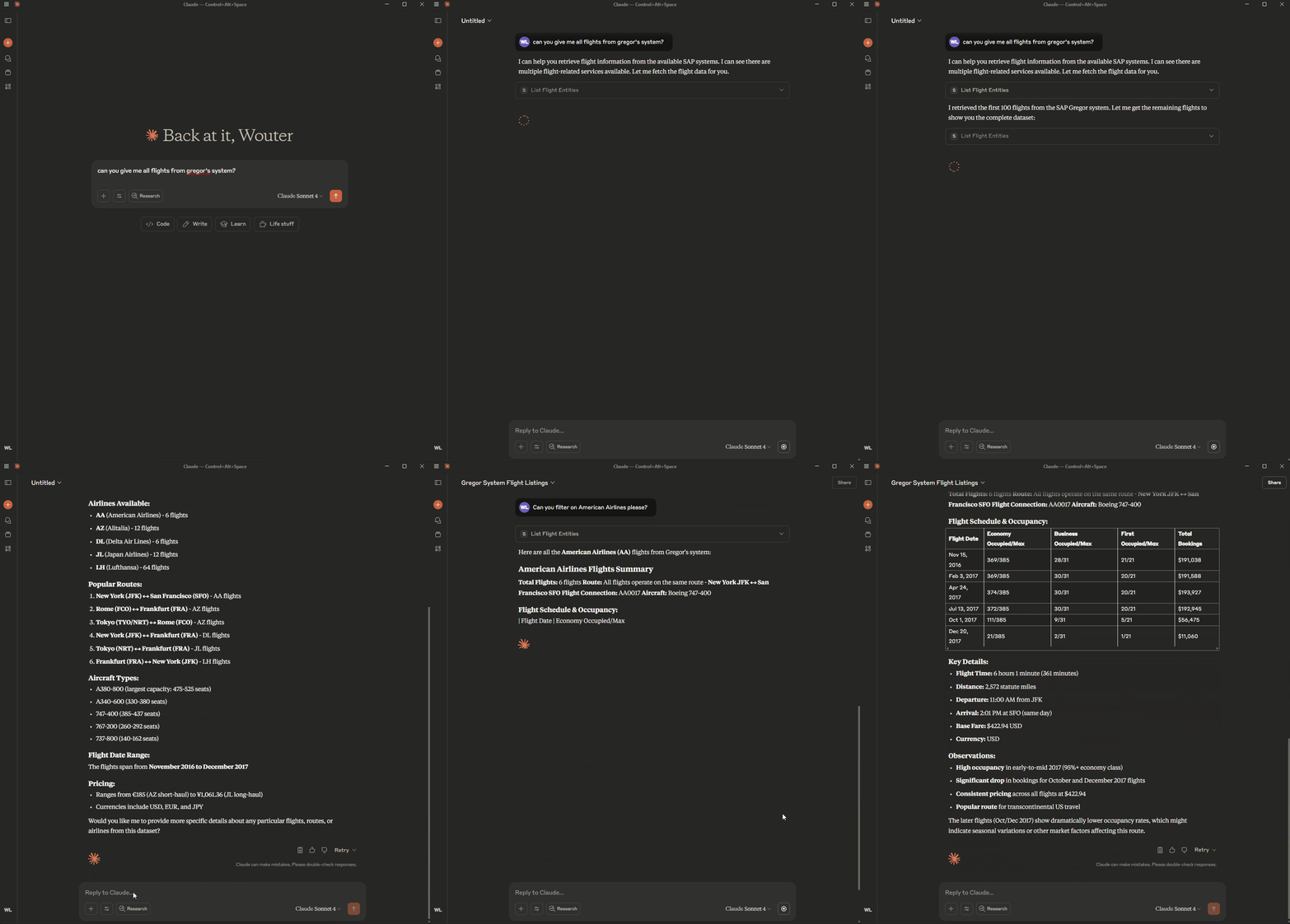
🎬 Demo
See the MCP server in action:
⚙️ Environment Variable: Disable ReadEntity Tool Registration
To disable registration of the ReadEntity tool for all entities in all services, set the following in your .env file:
DISABLE_READ_ENTITY_TOOL=true
This will prevent registration of the ReadEntity tool for all entities and services.
⚡ Quick Start
- For local development and testing, see LOCAL_RUN.md
- For deployment to SAP BTP, see DEPLOYMENT.md
Installing Btp Sap Odata To
This server has no published package — it is built from source. Open the repository and follow its README.
▸ github.com/lemaiwo/btp-sap-odata-to-mcp-serverFAQ
Is Btp Sap Odata To MCP free?
Yes, Btp Sap Odata To MCP is free — one-click install via Unyly at no cost.
Does Btp Sap Odata To need an API key?
No, Btp Sap Odata To runs without API keys or environment variables.
Is Btp Sap Odata To hosted or self-hosted?
Self-hosted: the server runs locally on your machine via the install command above.
How do I install Btp Sap Odata To in Claude Desktop, Claude Code or Cursor?
Open Btp Sap Odata To on unyly.org, pick your client tab (Claude Desktop, Claude Code, Cursor) and press Install — the config is generated automatically, no JSON editing.
Related MCPs
GitHub
PRs, issues, code search, CI status
 by GitHub
Filesystem
Secure file operations with configurable access controls.
Memory
Knowledge graph-based persistent memory system.
Template MCP Server
A CLI tool to create a new Model Context Protocol server project with TypeScript support, dual transport options, and an extensible structure
 by mcpdotdirect
Compare Btp Sap Odata To with
Not sure what to pick?
Find your stack in 60 seconds
Author?
Embed badge for your README
Browse similar
All development MCPs