
Bundler Gem Explorer
FreeNot checkedProvides detailed information about Ruby gem dependencies in a project's Gemfile, including versions, descriptions, installation paths, documentation locations,

About
Provides detailed information about Ruby gem dependencies in a project's Gemfile, including versions, descriptions, installation paths, documentation locations, and source code files.
README
A Model Context Protocol (MCP) server enabling AI agents to query information about dependencies in a Ruby project's Gemfile. Built with fast-mcp.
Installation
Install the gem and add to the application's Gemfile by executing:
bundle add bundler_mcp --group=development
Usage
- Generate the binstub:
bundle binstubs bundler_mcp
- Configure your client to execute the binstub. Here are examples that work for Claude and Cursor:
Basic Example (mcp.json)
{
  "mcpServers": {
    "bundler-mcp": {
      "command": "/Users/mike/my_project/bin/bundler_mcp"
    }
  }
}
Example with logging and explicit Gemfile
{
  "mcpServers": {
    "bundler-mcp": {
      "command": "/Users/mike/my_project/bin/bundler_mcp",

      "env": {
        "BUNDLER_MCP_LOG_FILE": "/Users/mike/my_project/log/mcp.log",
        "BUNDLE_GEMFILE": "/Users/mike/my_project/subdir/Gemfile"
      }
    }
  }
}
Documentation
Available Tools
The server provides two tools for AI agents:
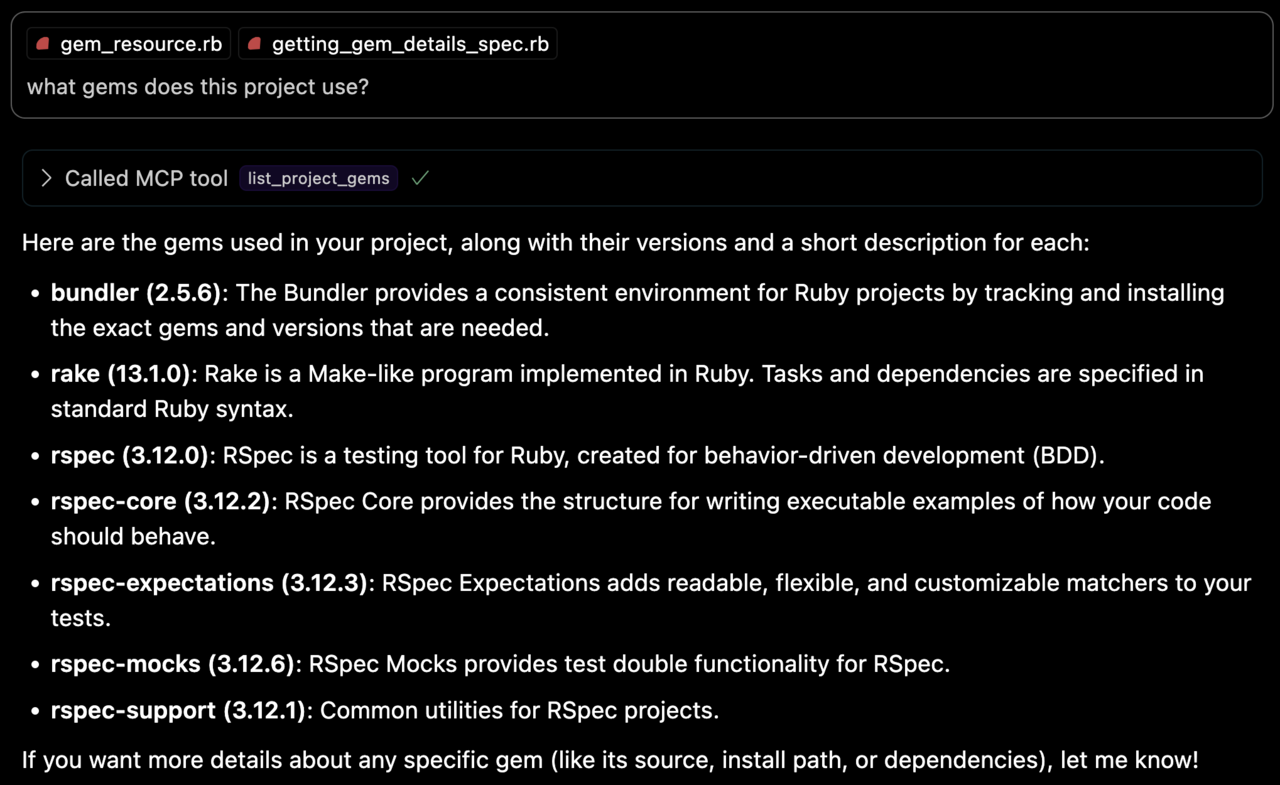
list_project_gems
Lists all bundled Ruby gems with their:
- Versions
- Descriptions
- Installation paths
- Top-level documentation locations (e.g.
READMEandCHANGELOG)
get_gem_details
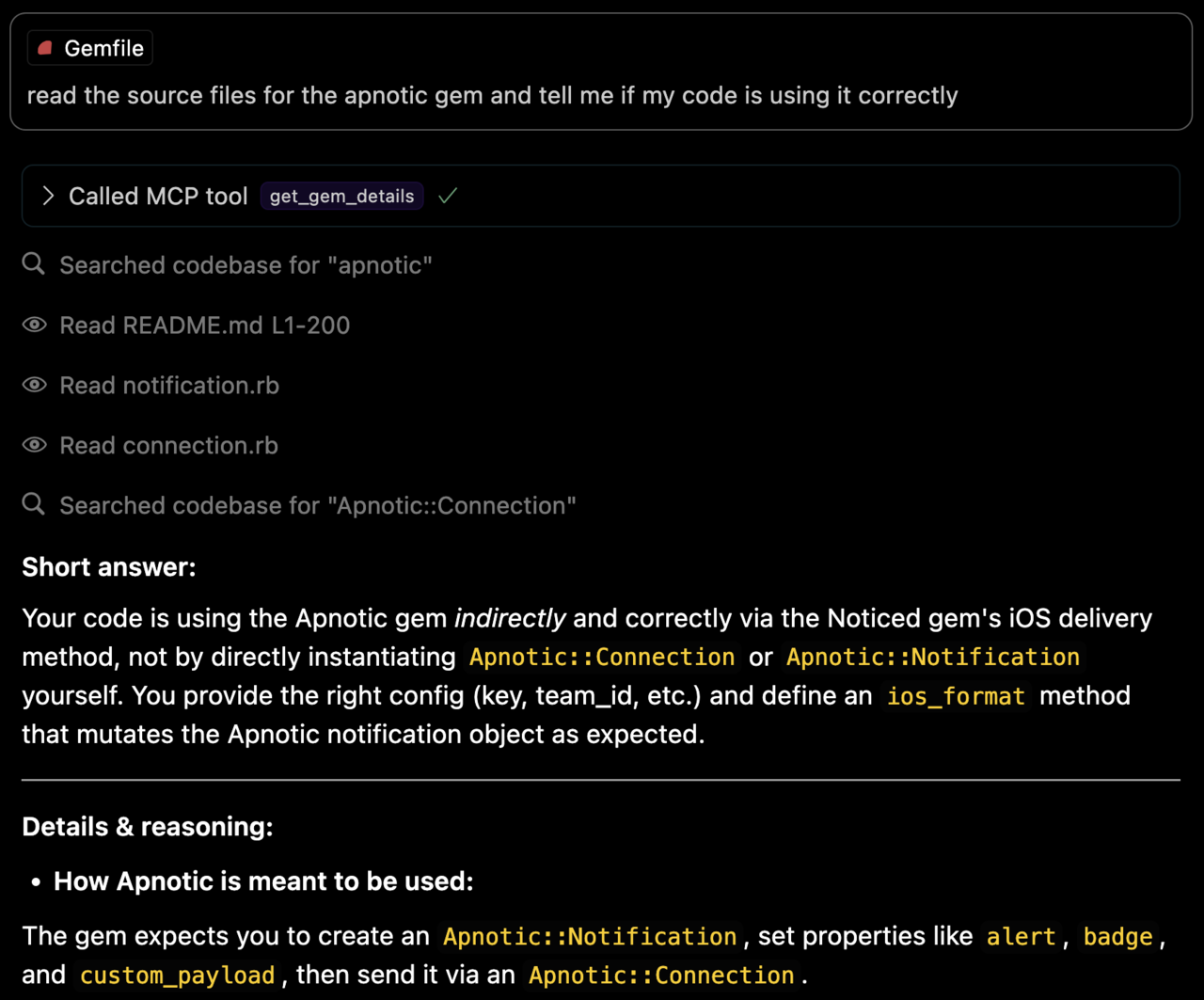
Retrieves detailed information about a specific gem, including:
- Version
- Description
- Installation path
- Top-level documentation locations
- Source code file locations
Environment Variables
BUNDLE_GEMFILE: Used by Bundler to locate your Gemfile. If you use the binstub method described in the Usage section, this is usually not needed.BUNDLER_MCP_LOG_FILE: Path to log file. Useful for troubleshooting (defaults to no logging)
Development
After checking out the repo, run bin/setup to install dependencies and bundle exec rspec to run the tests. You can also run bin/console for an interactive prompt that will allow you to experiment.
Testing with the MCP Inspector
You can test the server directly using the MCP inspector:
# Basic usage
npx @modelcontextprotocol/inspector ./bin/bundler_mcp

# With logging enabled
BUNDLER_MCP_LOG_FILE=/tmp/log/mcp.log npx @modelcontextprotocol/inspector ./bin/bundler_mcp

# With custom Gemfile
BUNDLE_GEMFILE=./other/Gemfile npx @modelcontextprotocol/inspector ./bin/bundler_mcp
Release Process
To install this gem onto your local machine, run bundle exec rake install. To release a new version:
- Update the version number in
version.rb - Run
bundle exec rake release
This will:
- Create a git tag for the version
- Push git commits and the created tag
- Push the
.gemfile to rubygems.org
Contributing
Bug reports and pull requests are welcome on GitHub at https://github.com/subelsky/bundler_mcp.
License
Open source under the terms of the MIT License.
Author
Installing Bundler Gem Explorer
This server has no published package — it is built from source. Open the repository and follow its README.
▸ github.com/subelsky/bundler_mcpFAQ
Is Bundler Gem Explorer MCP free?
Yes, Bundler Gem Explorer MCP is free — one-click install via Unyly at no cost.
Does Bundler Gem Explorer need an API key?
No, Bundler Gem Explorer runs without API keys or environment variables.
Is Bundler Gem Explorer hosted or self-hosted?
Self-hosted: the server runs locally on your machine via the install command above.
How do I install Bundler Gem Explorer in Claude Desktop, Claude Code or Cursor?
Open Bundler Gem Explorer on unyly.org, pick your client tab (Claude Desktop, Claude Code, Cursor) and press Install — the config is generated automatically, no JSON editing.
Related MCPs
GitHub
PRs, issues, code search, CI status
 by GitHub
Filesystem
Secure file operations with configurable access controls.
Memory
Knowledge graph-based persistent memory system.
Template MCP Server
A CLI tool to create a new Model Context Protocol server project with TypeScript support, dual transport options, and an extensible structure
 by mcpdotdirect
Compare Bundler Gem Explorer with
Not sure what to pick?
Find your stack in 60 seconds
Author?
Embed badge for your README
Browse similar
All development MCPs