
Business Mcp Servers
FreeNot checkedA collection of production-ready MCP (Model Context Protocol) server examples built with FastMCP, designed to teach you how to create servers that solve real bu

About
A collection of production-ready MCP (Model Context Protocol) server examples built with FastMCP, designed to teach you how to create servers that solve real business problems. Created by hamishfromatech
README
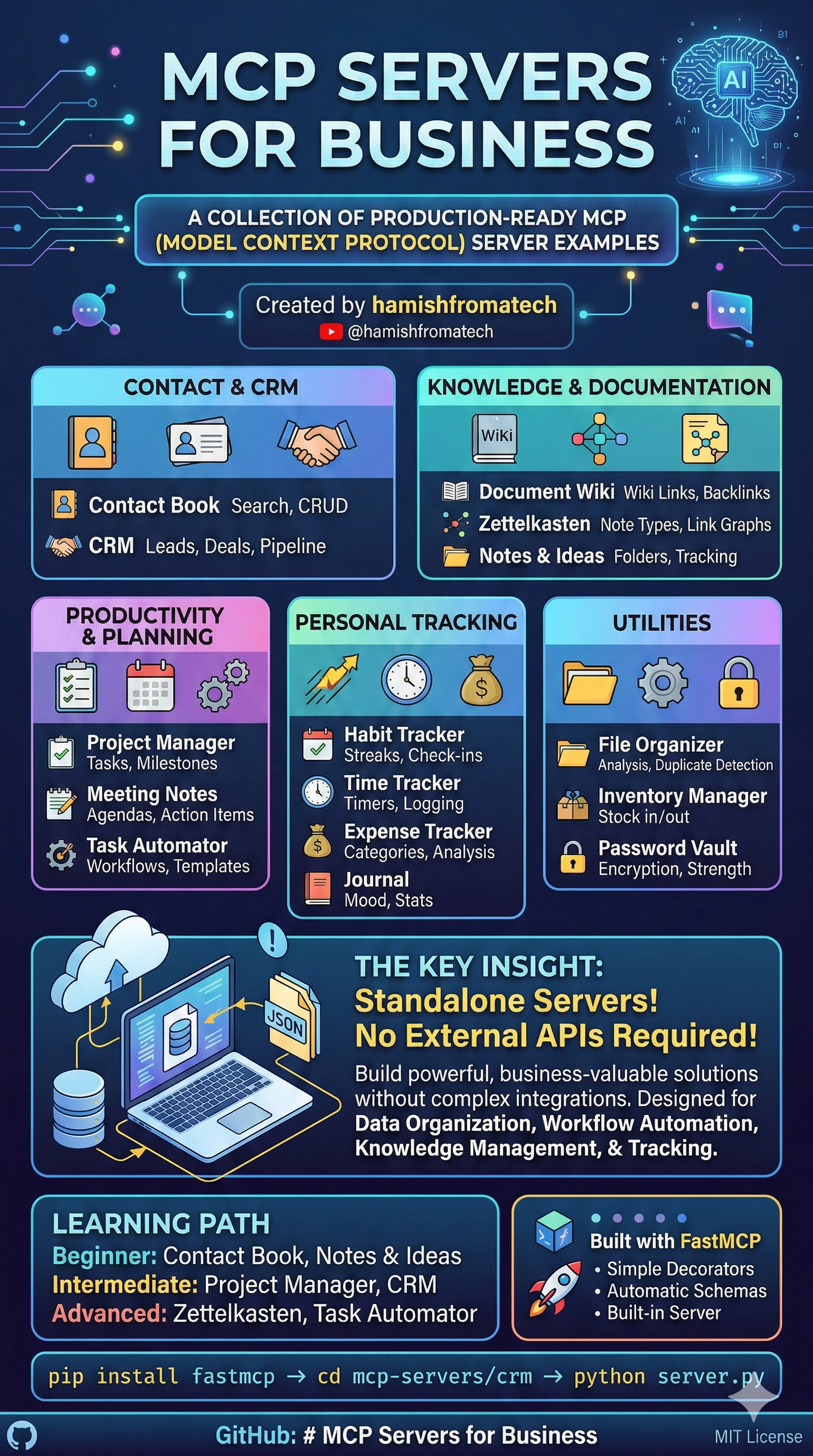
A collection of production-ready MCP (Model Context Protocol) server examples built with FastMCP, designed to teach you how to create servers that solve real business problems.
Created by hamishfromatech - YouTube

What This Repository Is
This repository contains 22 fully-functional MCP servers that demonstrate patterns, tools, and resources you can use as reference when building your own MCP servers. Each server is self-contained, well-documented, and showcases different aspects of the MCP protocol.
The key insight: These servers don't need to connect to any external applications or services. They're designed to work standalone, proving that you can build powerful, business-valuable MCP servers without complex integrations.
Why This Matters
Many MCP tutorials focus on connecting to external APIs (Slack, GitHub, Google, etc.). But real business value often comes from:
- Data organization - Structuring information for AI to query
- Workflow automation - Creating repeatable processes
- Knowledge management - Building searchable systems
- Tracking & analytics - Monitoring habits, time, expenses
This repository proves that MCP servers can deliver all of this without a single external API key.
Servers Overview
Contact & CRM
| Server | Description | Key Features | Data File |
|---|---|---|---|
| Contact Book | Manage contacts with search and organization | CRUD operations, search | contacts.json |
| CRM | Customer relationship management | Leads, deals, pipeline tracking, interactions | crm.json |
Knowledge & Documentation
| Server | Description | Key Features | Data File |
|---|---|---|---|
| Document Wiki | Wiki with bi-directional linking | Wiki links [[title]], categories, tags, backlinks |
wiki.json |
| Zettelkasten | Slip-box note-taking system | Note types, link graphs, hub detection, orphan finding | zettelkasten.json |
| Notes & Ideas | Quick capture and organization | Folders, pinning, archiving, idea tracking | notes.json |
Productivity & Planning
| Server | Description | Key Features | Data File |
|---|---|---|---|
| Career Manager | Complete career management system | Resume builder, job applications, interview practice, skills inventory, networking | ~/.career-manager/*.json |
| Project Manager | Projects, tasks, milestones, teams | Task hierarchy, assignments, progress tracking | projects.json |
| Kanban | Kanban board with visual interface | Web UI, CLI tools, task management, board statistics, drag-and-drop ready | kanban_data.json |
| Meeting Notes | Meetings, agendas, action items | Attendees, notes, action item tracking | meetings.json |
| Task Automator | Workflows and templates | Triggers, template rendering, quick actions | automator.json |
Personal Tracking
| Server | Description | Key Features | Data File |
|---|---|---|---|
| Habit Tracker | Daily habit tracking with streaks | Check-ins, streaks, leaderboards, weekly overviews | habits.json |
| Time Tracker | Time tracking with timers | Start/stop timer, manual logging, billable rates | time.json |
| Expense Tracker | Expense and budget management | Categories, budgets, spending analysis | expenses.json |
| Journal | Personal journal entries | Mood tracking, tags, calendar view, writing stats | journal.json |
Utilities
| Server | Description | Key Features | Data File |
|---|---|---|---|
| File Organizer | Organize and categorize files | File analysis, duplicate detection, organization rules | organizer.json |
| Inventory Manager | Stock and product management | Stock in/out, transfers, low-stock alerts | inventory.json |
| Password Vault | Secure credential storage | Encryption, password generation, strength checking | vault.json |
Developer Tools
| Server | Description | Key Features | Data File |
|---|---|---|---|
| Skills Server | Expose Claude Code skills as MCP resources | Skill discovery, dynamic loading, resource URIs | None (reads filesystem) |
| Code Reviewer | Code review management | Review sessions, issue tracking, code standards | code_reviewer.json |
| Design Audit | Web design auditing | UI/UX issues, design systems, accessibility checks | design_audit.json |
| Tech Debt Tracker | Technical debt management | Debt tracking, refactoring tasks, quality metrics | tech_debt.json |
Quick Start
Each server is standalone and can be run independently:
# Install FastMCP
pip install fastmcp

# Navigate to any server
cd mcp-servers/contact-book

# Run the server
python server.py
Data Persistence: Each server automatically creates a data/ directory on first use. All your data is stored in JSON files and persists across server restarts. You can find your data at mcp-servers/<server-name>/data/<server-name>.json.
Key Concepts Demonstrated
1. Tools
Every server exposes tools that AI assistants can call:
@mcp.tool
def create_contact(name: str, email: str = None) -> dict:
    """Create a new contact."""
    # Implementation
2. Resources
Resources provide read-only data access:
@mcp.resource("contacts://all")
def get_all_contacts() -> str:
    """Resource providing all contacts as formatted list."""
    return formatted_contact_list
3. Persistent Storage
All servers feature JSON-based persistent storage - data survives server restarts:
# Data persistence setup
DATA_DIR = Path(__file__).parent / "data"
DATA_FILE = DATA_DIR / "contacts.json"

def _load_data() -> dict:
    if DATA_FILE.exists():
        with open(DATA_FILE, "r", encoding="utf-8") as f:
            return json.load(f)
    return {"contacts": {}, "next_id": 1}

def _save_data(data: dict) -> None:
    DATA_DIR.mkdir(parents=True, exist_ok=True)
    with open(DATA_FILE, "w", encoding="utf-8") as f:
        json.dump(data, f, indent=2, default=str)
Each server stores its data in a dedicated data/ directory:
- Automatic loading - Data loads on server startup
- Auto-save - Changes persist immediately after each operation
- Portable - JSON files can be backed up, migrated, or inspected easily
- No external dependencies - Uses only Python's built-in
jsonmodule
Backing up your data: Simply copy the data/ folder from any server. To reset a server, delete its data/ folder.
4. Type Safety
All tools use proper type hints for better AI understanding:
def create_task(
    title: str,
    priority: str = "medium",  # low, medium, high, urgent
    due_date: Optional[str] = None
) -> dict:
5. Enums for Controlled Values
Status values and categories use Enums:
class TaskStatus(str, Enum):
    TODO = "todo"
    IN_PROGRESS = "in_progress"
    DONE = "done"
Architecture Patterns
CRUD Pattern
Most servers follow a consistent CRUD pattern:
create_*- Create new recordsget_*- Retrieve by IDlist_*- List with filtersupdate_*- Modify recordsdelete_*- Remove recordssearch_*- Full-text search
Analytics Pattern
Many servers include analytics tools:
get_*_summary- Aggregated statisticsget_*_history- Historical dataget_*_stats- Overall metrics
Linking Pattern
Knowledge systems use bi-directional linking:
- Track outgoing links in content
- Calculate backlinks
- Find paths between notes
- Identify hub and orphan notes
Project Structure
mcp-servers/
├── career-manager/
│   ├── server.py              # Career management with 70+ tools
│   ├── README.md              # Server-specific documentation
│   └── pyproject.toml         # Package configuration
├── contact-book/
│   ├── server.py              # Main server implementation
│   ├── README.md              # Server-specific documentation
│   └── data/                  # Persistent storage (auto-created)
│       └── contacts.json      # Contact data
├── crm/
│   ├── server.py
│   └── data/
│       └── crm.json           # Leads, deals, customers, interactions
├── document-wiki/
│   ├── server.py
│   └── data/
│       └── wiki.json          # Documents, categories
├── expense-tracker/
│   ├── server.py
│   └── data/
│       └── expenses.json      # Expenses, budgets, categories
├── file-organizer/
│   ├── server.py
│   └── data/
│       └── organizer.json     # Rules, file registry
├── habit-tracker/
│   ├── server.py
│   └── data/
│       └── habits.json        # Habits, check-ins
├── inventory-manager/
│   ├── server.py
│   └── data/
│       └── inventory.json     # Products, stock, movements
├── kanban-mcp/
│   ├── kanban_server.py
│   ├── models.py
│   ├── storage.py
│   ├── cli.py
│   └── kanban_data.json       # Boards, tasks, columns
├── journal/
│   ├── server.py
│   └── data/
│       └── journal.json       # Entries, tags
├── meeting-notes/
│   ├── server.py
│   └── data/
│       └── meetings.json      # Meetings, action items
├── notes-ideas/
│   ├── server.py
│   └── data/
│       └── notes.json         # Notes, folders
├── password-vault/
│   ├── server.py
│   └── data/
│       └── vault.json         # Encrypted credentials
├── project-manager/
│   ├── server.py
│   └── data/
│       └── projects.json      # Projects, tasks, milestones
├── task-automator/
│   ├── server.py
│   └── data/
│       └── automator.json     # Workflows, templates
├── time-tracker/
│   ├── server.py
│   └── data/
│       └── time.json          # Time entries, projects
├── zettelkasten/
│   ├── server.py
│   └── data/
│       └── zettelkasten.json  # Notes, links, tags
├── skills-server/
│   └── server.py              # No persistence (reads from filesystem)
├── code-reviewer/
│   ├── server.py
│   ├── README.md
│   └── data/
│       └── code_reviewer.json # Reviews, issues, standards
├── design-audit/
│   ├── server.py
│   ├── README.md
│   └── data/
│       └── design_audit.json  # Audits, issues, design systems
└── tech-debt-tracker/
    ├── server.py
    ├── README.md
    └── data/
        └── tech_debt.json     # Debt items, tasks, metrics
Learning Path
Beginner: Start with these simple, focused servers:
- Contact Book - Basic CRUD operations
- Notes & Ideas - Simple note management
- Habit Tracker - Daily tracking patterns
Intermediate: These introduce more complex relationships:
- Project Manager - Hierarchical tasks, team management
- CRM - Multi-entity relationships (leads, deals, customers)
- Meeting Notes - Agendas, attendees, action items
- Kanban - Web UI, CLI tools, board management
Advanced: Sophisticated patterns and algorithms:
- Zettelkasten - Link graphs, pathfinding, hub detection
- Document Wiki - Wiki link parsing, backlinks
- Task Automator - Workflows, triggers, template rendering
- Skills Server - File system scanning, resource templates, dynamic resource generation
- Career Manager - Resume generation, job application tracking, interview practice, skill gap analysis
- Code Reviewer - Review sessions, issue tracking with categories/severity, code standards
- Design Audit - Design systems, accessibility compliance, WCAG tracking
- Tech Debt Tracker - Interest tracking, snapshots, quality metrics
Why FastMCP?
All servers use FastMCP because it provides:
- Simple decorators -
@mcp.tooland@mcp.resource - Automatic schema generation - Type hints become JSON schemas
- Built-in server - No boilerplate code needed
- Development mode - Hot reload during development
Contributing
This is an educational repository. Feel free to:
- Use these servers as starting points for your own projects
- Suggest improvements or new server ideas
- Report issues or documentation gaps
Data Management
Backup
Simply copy the data/ directory from any server:
cp -r mcp-servers/contact-book/data/ backup/contact-book/
Migration
Data files are plain JSON - you can:
- Edit them directly with any text editor
- Import/export to other systems
- Version control your data with git
Reset
To reset a server's data, delete its JSON file:
rm mcp-servers/contact-book/data/contacts.json
The server will start fresh on next run.
License
MIT License - Use these examples freely for learning and building your own MCP servers.
Learn more about MCP and AI development: YouTube - Hamish from a Tech
Feedback & Community
Found this MCP server genuinely useful? I'd love to hear from you.
- Email: [email protected]
- Join our free Open Source AI Builders Club on Skool: https://www.skool.com/open-source-ai-builders-club/about?ref=da946a67c5c646e991b96ea9ce7ad9e4
Installing Business Mcp Servers
This server has no published package — it is built from source. Open the repository and follow its README.
▸ github.com/hamishfromatech/business-mcp-serversFAQ
Is Business Mcp Servers MCP free?
Yes, Business Mcp Servers MCP is free — one-click install via Unyly at no cost.
Does Business Mcp Servers need an API key?
No, Business Mcp Servers runs without API keys or environment variables.
Is Business Mcp Servers hosted or self-hosted?
Self-hosted: the server runs locally on your machine via the install command above.
How do I install Business Mcp Servers in Claude Desktop, Claude Code or Cursor?
Open Business Mcp Servers on unyly.org, pick your client tab (Claude Desktop, Claude Code, Cursor) and press Install — the config is generated automatically, no JSON editing.
Related MCPs
GitHub
PRs, issues, code search, CI status
 by GitHub
Filesystem
Secure file operations with configurable access controls.
Memory
Knowledge graph-based persistent memory system.
Template MCP Server
A CLI tool to create a new Model Context Protocol server project with TypeScript support, dual transport options, and an extensible structure
 by mcpdotdirect
Compare Business Mcp Servers with
Not sure what to pick?
Find your stack in 60 seconds
Author?
Embed badge for your README
Browse similar
All development MCPs