
Cardiovascular Disease
FreeNot checkedMCP server for calculating a patient's 10-year ASCVD risk using the Pooled Cohort Equations. Enables LLMs to compute cardiovascular risk scores based on patient

About
MCP server for calculating a patient's 10-year ASCVD risk using the Pooled Cohort Equations. Enables LLMs to compute cardiovascular risk scores based on patient demographics and clinical factors.
README
An open source repository containing a CVD risk model predictor and an external MCP server for use in Darena Health (MeldRx)
CVD Risk Model
Utilizes the risk model from Oracle Health's ascvd-risk-calculator which is based off of the Pooled Cohort Equations and lifetime risk prediction tools. This calculator follows the 2013 ACC/AHA Guideline on the Treatment of Blood Cholesterol to Reduce Atherosclerotic Cardiovascular Risk in Adults.
This tool is intended for those with an assumed LDL - Cholesterol < 190 mg/dL, and the following are a number of factors required to calculate an estimated ASCVD risk:
- Sex
- Age
- Race
- Total Cholesterol
- HDL - Cholesterol
- Systolic Blood Pressure
- Diabetes status
- Current Smoking status
- Treatment for Hypertension status
The risk scores calculated by this tool and any recommendations provided are intended to inform, and should not supersede any findings or opinions by a care provider.
The file associated with the model calculation is located in mcp-tools/calculate-cvd-risk-tool
10-year ASCVD Risk
The 10-year risk estimate provided by this application is primarily applicable towards African-American and non-Hispanic white men and women between the ages of 40 and 79 years. Other ethnic groups will have their score calculated with the same equation for non-Hispanic white men and women, though the score estimated may underestimate or overestimate the risk for these persons.
MCP server
This custom MCP server is based off of Darena Health's default Community MCP Repository
File structure
- MCP tools (context functions for LLM): /mcp-tools
- FHIR server wrapper for context: fhir-utilities.ts
Running Locally
- Install NPM and install/update Node
- Run
npm installto install all dependencies onto the project - Run
npm startto start the server on port 5000 of localhost
Running on Docker
Running on Docker
Install and open Docker Desktop
In terminal, run this to create a docker image and run the container
docker-compose up --build
Creating a web-facing API endpoint
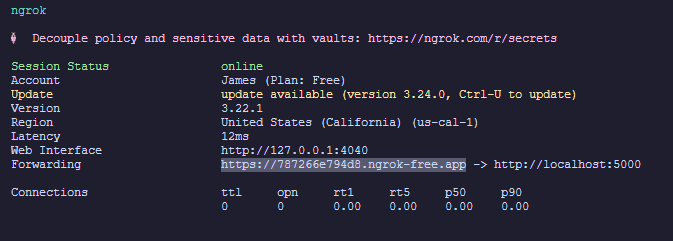
For local development, use ngrok for creating a quick endpoint for your local MCP server.
Install ngrok and create an auth token by making an account
In your terminal, run
ngrok http 5000Copy the ngrok forwarded URL (highlighted below)
In MeldRx, navigate to your
workspace -> AI -> MCP Serversand clickAdd External MCP ServerInput the fields as outlined below and click
TestandSave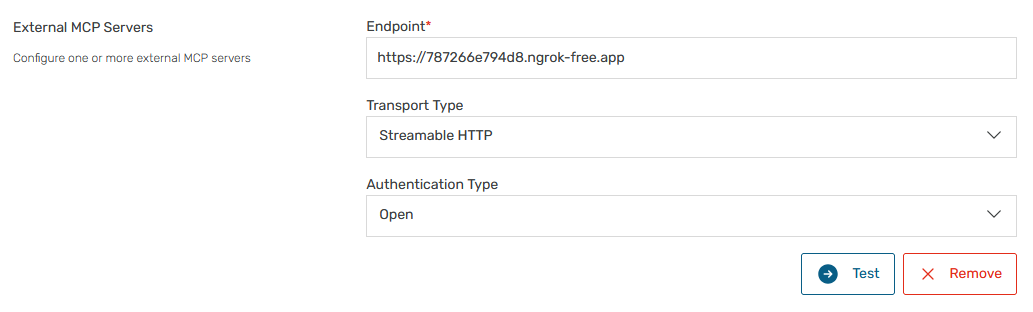
Installing Cardiovascular Disease
This server has no published package — it is built from source. Open the repository and follow its README.
▸ github.com/jamesvdinh/cardiovascular-disease-mcpFAQ
Is Cardiovascular Disease MCP free?
Yes, Cardiovascular Disease MCP is free — one-click install via Unyly at no cost.
Does Cardiovascular Disease need an API key?
No, Cardiovascular Disease runs without API keys or environment variables.
Is Cardiovascular Disease hosted or self-hosted?
A hosted option is available: Unyly runs the server in the cloud, no local setup required.
How do I install Cardiovascular Disease in Claude Desktop, Claude Code or Cursor?
Open Cardiovascular Disease on unyly.org, pick your client tab (Claude Desktop, Claude Code, Cursor) and press Install — the config is generated automatically, no JSON editing.
Related MCPs
GitHub
PRs, issues, code search, CI status
 by GitHub
Filesystem
Secure file operations with configurable access controls.
Memory
Knowledge graph-based persistent memory system.
Template MCP Server
A CLI tool to create a new Model Context Protocol server project with TypeScript support, dual transport options, and an extensible structure
 by mcpdotdirect
Compare Cardiovascular Disease with
Not sure what to pick?
Find your stack in 60 seconds
Author?
Embed badge for your README
Browse similar
All development MCPs