

About
MCP server for casting YouTube/media to Chromecast/DLNA via catt
README
tests License: MIT Python 3.10+
MCP server for casting YouTube videos and media to Chromecast/DLNA devices via catt.
Exposes 15 tools covering YouTube casting, playback control, dual-screen sync, and device discovery.
Demo
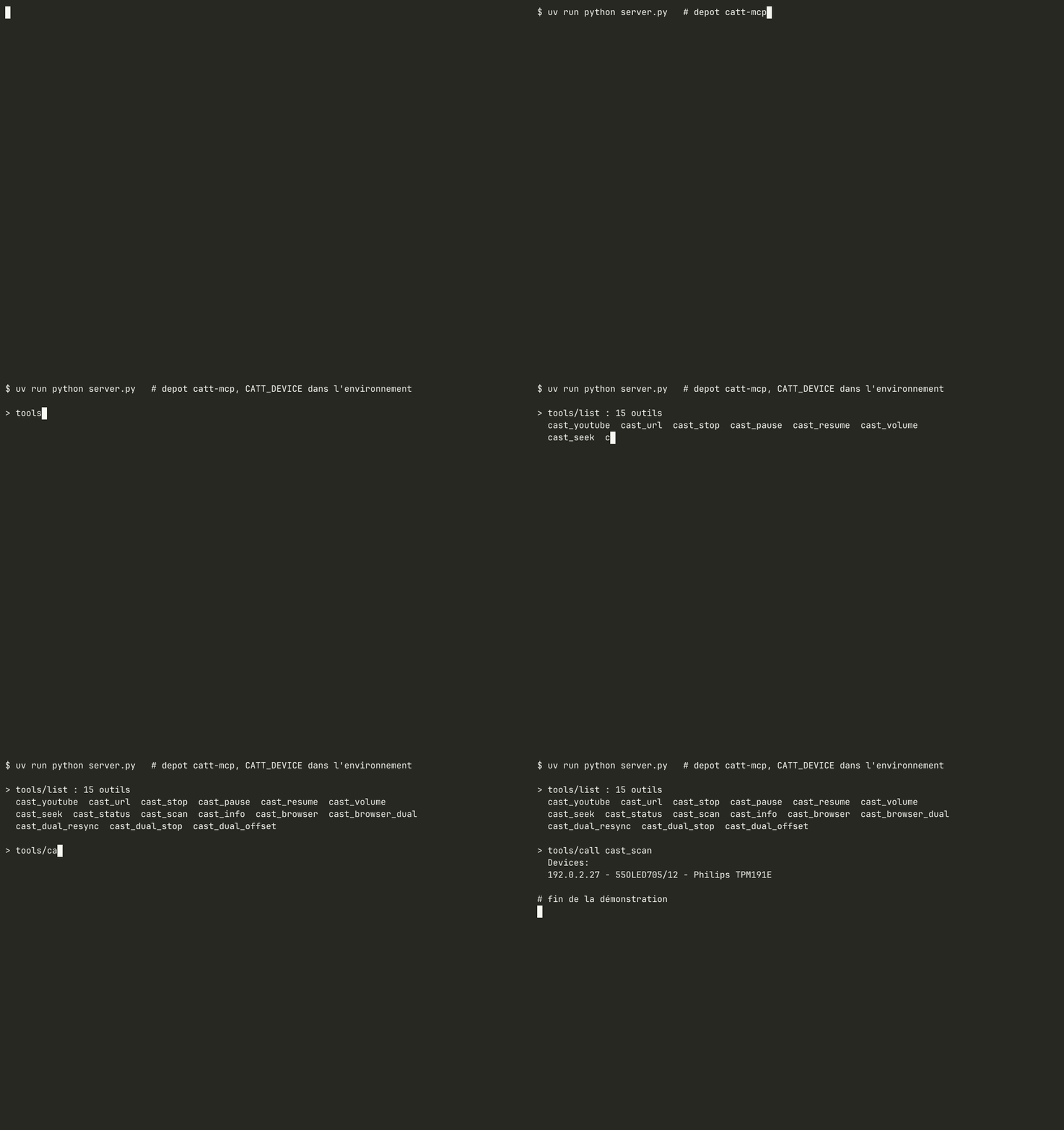
Recorded on the real network with docs/demo/record.sh: a minimal MCP client (docs/demo/mcp_demo.py) starts the server over stdio with CATT_DEVICE in the environment, lists the tools and calls cast_scan (read-only). Private IP addresses are replaced with documentation addresses.
Tools
| Outil | Rôle |
|---|---|
cast_youtube |
Caste une video YouTube sur la TV (URL ou ID de video) |
cast_url |
Caste une URL quelconque (video, audio, stream) sur la TV |
cast_stop |
Arrete le cast en cours sur la TV |
cast_pause |
Met en pause le cast en cours |
cast_resume |
Reprend la lecture du cast |
cast_volume |
Regle le volume du cast (0-100) |
cast_seek |
Avance ou recule dans la video |
cast_status |
Retourne le statut du cast en cours |
cast_scan |
Scanne les devices Chromecast/DLNA disponibles sur le reseau |
cast_info |
Retourne les infos detaillees du media en cours |
cast_browser |
Caste la video de l'onglet actif de Firefox sur la TV (YouTube, Twitch, etc.) |
cast_browser_dual |
Lance la video sur PC (Firefox) ET TV simultanement avec synchronisation (pour LightBeat) |
cast_dual_resync |
Resynchronise PC et TV en relancant la TV a la position Firefox |
cast_dual_stop |
Arrete le dual cast et le watcher de synchronisation |
cast_dual_offset |
Ajuste le decalage TV (positif=TV en avance, negatif=TV en retard) |
YouTube ID extraction
_extract_video_id (URL watch?v=, youtu.be/, shorts/ or a bare 11-character ID, anything else rejected before it reaches catt/ADB) is deliberately duplicated in pylips-mcp (youtube_video, TV app with Premium account). Both servers stay installable on their own; each one tests its copy with the same table of cases (tests/test_youtube_id.py). Decision recorded on 2026-09-20.
Requirements
- Python 3.10+
- catt:
pip install catt - yt-dlp:
pip install yt-dlp - A Chromecast or DLNA-compatible device on the same network
lz4(optional, for cache compression):pip install lz4
Dual cast (Linux + Hyprland)
cast_browser, cast_browser_dual, cast_dual_resync, cast_dual_stop and
cast_dual_offset drive Firefox from the running desktop session. They are
advertised only when the required binaries are present:
- Hyprland with
hyprctlinPATH playerctlfor MPRIS playback control- Firefox holding the video to mirror
lz4(Python) to read Firefox's session cache
Without them the server starts normally and simply does not expose these five tools, instead of failing when they are called.
Installation en une ligne
uvx catt-mcp # depuis PyPI ; avant publication : uvx --from git+https://github.com/amineutron/catt-mcp catt-mcp
Configuration Claude Desktop / Claude Code (mcpServers) :
{ "catt": { "command": "uvx", "args": ["catt-mcp"], "env": { "CATT_DEVICE": "Living Room TV" } } }
Setup
1. Install dependencies
pip install mcp catt yt-dlp
2. Discover your device
catt scan
Note the device name (e.g. 55OLED705/12, Living Room TV).
3. Configure
Copy config.example.yaml to config.yaml:
catt:
  device: "55OLED705/12"   # Name from catt scan
4. Run
python server.py
Or with environment variable:
CATT_DEVICE="55OLED705/12" python server.py
The dual-screen tools (dual_cast, dual_resync, dual_offset) drive the TV through
ADB and need its IP address. Set it with TV_HOST (or tv.host in config.yaml),
for example TV_HOST="192.0.2.10"; the built-in default is only a placeholder.
Claude Desktop Configuration
{
  "mcpServers": {
    "catt": {
      "command": "python3",
      "args": ["/path/to/catt-mcp/server.py"],
      "env": {
        "CATT_DEVICE": "55OLED705/12"
      }
    }
  }
}
License
MIT
Part of the Lyra ecosystem
| Dépôt | Rôle |
|---|---|
| lyra | assistant DevOps vocal, local par défaut (AGPL-3.0) |
| fedora-agents | MCP : machines virtuelles KVM et sauvegardes |
| mcp-tracking | MCP + API + tableau de bord des tâches longues |
| neutroncore | hub PWA du homelab |
| hue-mcp | MCP Philips Hue (fork de ThomasRohde/hue-mcp) |
| pylips-mcp | MCP TV Philips |
| denon-mcp | MCP ampli Denon |
| catt-mcp | MCP Chromecast et DLNA |
Install Catt in Claude Desktop, Claude Code & Cursor
unyly install cattInstalls into Claude Desktop, Claude Code, Cursor & VS Code — handles npx, uvx and build-from-source repos for you.
First time? Get the CLI: curl -fsSL https://unyly.org/install | sh
Or configure manually
Run in your terminal:
claude mcp add catt -- uvx catt-mcpStep-by-step: how to install Catt
FAQ
Is Catt MCP free?
Yes, Catt MCP is free — one-click install via Unyly at no cost.
Does Catt need an API key?
No, Catt runs without API keys or environment variables.
Is Catt hosted or self-hosted?
Self-hosted: the server runs locally on your machine via the install command above.
How do I install Catt in Claude Desktop, Claude Code or Cursor?
Open Catt on unyly.org, pick your client tab (Claude Desktop, Claude Code, Cursor) and press Install — the config is generated automatically, no JSON editing.
Related MCPs
ARA
Generate images, video and audio from any AI agent — one connector.
 by ARA
Omni Video
An MCP server that transforms LLM-enabled IDEs into professional video editors by pre-processing footage into text proxies, generating motion graphics via HTML/
 by buildwithtaza
YouTube
Transcripts, channel stats, search
 by YouTube
EverArt
AI image generation using various models.
 by modelcontextprotocol
gpu-bridge/mcp-server
Unified GPU inference API with 30 AI services (LLM, image gen, video, TTS, whisper, embeddings, reranking, OCR) as MCP tools. Pay-per-use via x402 USDC or API k
 by gpu-bridge
hamflx/imagen3-mcp
A powerful image generation tool using Google's Imagen 3.0 API through MCP. Generate high-quality images from text prompts with advanced photography, artistic,
 by hamflx
merterbak/Grok-MCP
MCP server for xAI's [Grok API](https://docs.x.ai/docs/overview) with agentic tool calling, image generation, vision, and file support.
 by merterbak
SureScaleAI/openai-gpt-image-mcp
OpenAI GPT image generation/editing MCP server.
 by SureScaleAI
YangLiangwei/PersonalizationMCP
Comprehensive personal data aggregation MCP server with Steam, YouTube, Bilibili, Spotify, Reddit and other platforms integrations. Features OAuth2 authenticati
 by YangLiangwei
AceDataCloud/MCPFlux
Flux AI image generation and editing (Black Forest Labs) via Ace Data Cloud API.
 by AceDataCloud
Compare Catt with
Not sure what to pick?
Find your stack in 60 seconds
Author?
Embed badge for your README
Browse similar
All media MCPs