
Ccbookmark
FreeNot checkedBookmark, resume, and export Claude Code conversations — CLI + MCP + web UI

About
Bookmark, resume, and export Claude Code conversations — CLI + MCP + web UI
README
Bookmark, resume, and export your Claude Code conversations.
Claude Code keeps every session on disk, but there's no good way to curate the
ones that matter: bookmark them, tag them, keep them past the 30‑day cleanup,
jump back into one by id, or seed a conversation into a different project.
ccbookmark does exactly that — from the terminal, from a web UI, or from inside
Claude Code itself via MCP.

Why
Claude Code already does a lot natively — --resume, --continue, /rewind,
forking, and a plain‑text /export. What it doesn't do:
| Gap | ccbookmark |
|---|---|
| Resume is scoped to the project it started in | Export a conversation into any other project and resume it there |
| Transcripts are auto‑deleted after ~30 days | Bookmark the ones you care about into a durable library |
| No way to curate / tag / search your own picks | A SQLite‑indexed library with extracted summaries, tags, and search |
| History tooling is read‑only viewers | A save → list → restore/export workflow over CLI + MCP + web |
There are plenty of JSONL viewers and "search my history" MCP servers. The thing that's genuinely rare — and what this tool is built around — is a curated, resumable library you can move between projects.
How it works
Claude Code stores each session as a JSONL file:
~/.claude/projects/<encoded-cwd>/<session-id>.jsonl
where <encoded-cwd> is the absolute working directory with every / and .
replaced by -. claude --resume <session-id> finds a session by reading that
file from the project dir derived from the cwd. The JSONL holds the full history:
user/assistant turns, embedded file contents, cwd, gitBranch, version,
an ai-title, and any compaction summaries.
ccbookmark reads those files, copies the ones you bookmark into its own library,
and indexes their metadata:
~/.ccbookmark/                 # override with CCBOOKMARK_HOME
  archive/<session-id>.jsonl   # verbatim copy (preserves embedded files)
  index.db                     # SQLite metadata + extracted summaries
| Command | What it does |
|---|---|
| save | Parse a live session, copy its JSONL into the library, index metadata + an extracted summary (ai-title + compaction summary + first prompt). No API key needed. |
| list | Browse bookmarks (newest first); filter by text / tag. |
| show | Title, summary, cwd, branch, message & token counts, touched files. |
| restore | Copy the JSONL back to its project dir so claude --resume <id> works again. |
| export | Copy a bookmark into a different project, re‑pathing its cwd. |
| delete | Remove from the library (optionally purge the archived JSONL). |
Install
Requires uv and Python 3.11+.
git clone https://github.com/kiliancm94/ccbookmark.git
cd ccbookmark
uv sync --extra dev
Quick start
# Bookmark the most recent session in the current project (or pass --id / --cwd)
uv run ccbookmark save --tag work
uv run ccbookmark save --id <session-id> --tag research

uv run ccbookmark list --query parser
uv run ccbookmark show <session-id>

# Make a bookmark resumable again, then run the printed command
uv run ccbookmark restore <session-id>

# Copy a conversation into another project (fresh id avoids collisions);
# embedded file paths under the old cwd are re-pathed too (--no-rewrite-paths to skip)
uv run ccbookmark export <session-id> /path/to/other/repo --new-id

# Delete one, or bulk-delete by tag / text query
uv run ccbookmark delete <session-id> --purge
uv run ccbookmark delete --tag scratch --purge
Optional: richer summaries via the Claude API
Summaries are extracted from the JSONL by default (no key, no cost). To rewrite a summary with the Claude API instead, install the extra and set a key:
uv sync --extra summary           # adds the `anthropic` dependency
export ANTHROPIC_API_KEY=sk-ant-...
uv run ccbookmark save --regenerate
# model defaults to claude-opus-4-8; override with CCBOOKMARK_SUMMARY_MODEL
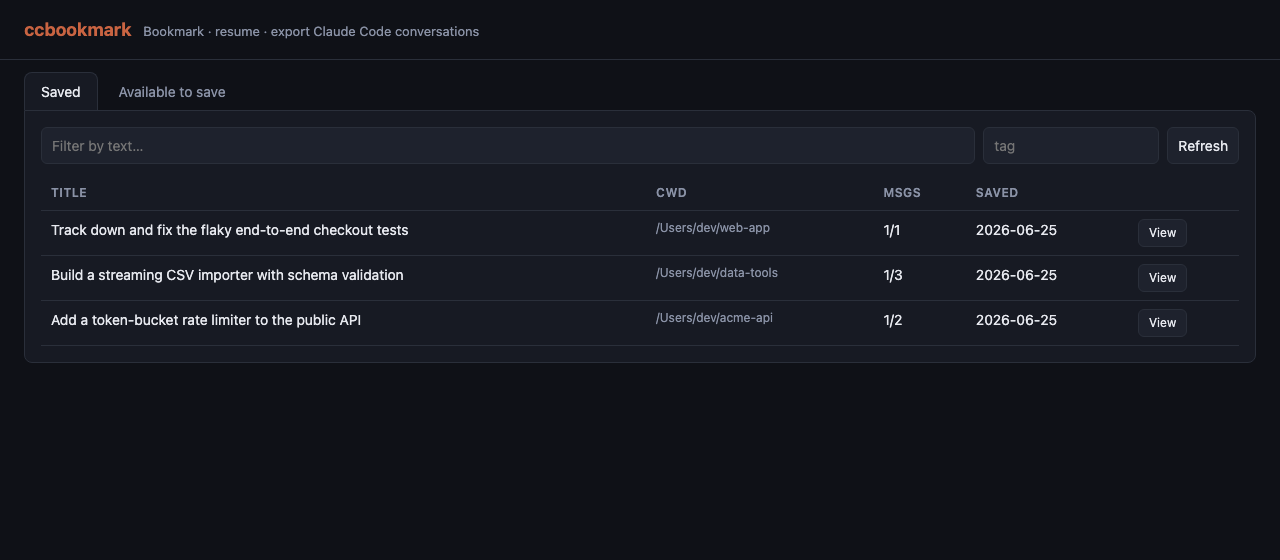
Web UI
uv run ccbookmark-web # http://127.0.0.1:8765
A single‑page UI (no build step) with two tabs:
- Saved — browse/search your bookmarks; click a row for a detail drawer with
the summary, files, and metadata, plus Restore, Export to project…, and
Delete. Restore/Export show the exact
claude --resumecommand (click to copy). - Available to save — lists live Claude Code sessions (across all projects, or
filtered by
cwd) with one‑click Save.
Override the bind address with CCBOOKMARK_HOST / CCBOOKMARK_PORT.
Use it from inside Claude Code (MCP)
Register the MCP server, then ask Claude things like "bookmark this conversation" or "list my bookmarked conversations":
# run from your clone of this repo
claude mcp add --scope user ccbookmark -- uv run --directory "$(pwd)" ccbookmark-mcp
Tools exposed: save_conversation, list_saved, show_conversation,
restore_conversation, export_conversation, delete_saved.
An MCP server can't reliably know the current session id, so
save_conversationdefaults to the most recently modified session in the givencwd. Pass an explicitsession_idto be certain.
Architecture
cli.py / mcp_server.py / web.py   thin interfaces (CLI · MCP · FastAPI + static UI)
            |
          core.py            save / list / list_live / show / restore / export / delete
           /    \
      store.py   parser.py   SQLite index   |   stream-parse JSONL -> SessionMeta
            \    /
           paths.py          path<->project-dir encoding, locate session files
All three interfaces are thin wrappers over one engine (core.py), so they stay
in lockstep.
How it compares
| Tool | Bookmark/curate | Resume | Export to other project | Web UI | MCP server |
|---|---|---|---|---|---|
| ccbookmark | ✅ | ✅ | ✅ | ✅ | ✅ |
Claude Code (native --resume//export) |
– | ✅ (same project) | – | – | – |
| claude-session-restore | – | ✅ | – | – | ✅ |
| claude-vault | ✅ | – | – | – | – |
| claude-code-viewer | – | ✅ | – | ✅ | – |
Resume‑by‑id, viewers, and history‑search MCP servers are well covered elsewhere;
the curated, cross‑project‑exportable library over CLI + MCP + web is what
ccbookmark adds.
Notes / limitations
- Restore only copies the JSONL back if it's missing; it never overwrites a live session.
- Export rewrites the top‑level
cwd(andsessionIdwith--new-id) and, by default, any embedded file path under the original cwd — so file references follow the conversation to the new project. Pass--no-rewrite-pathsto keep the original absolute paths. Content that merely mentions a path (not a path value) is left untouched.
Development
uv run pytest
uv run ruff check . && uv run ruff format --check .
uv run pyright
License
MIT © Kilian Cañizares Mata
Installing Ccbookmark
This server has no published package — it is built from source. Open the repository and follow its README.
▸ github.com/kiliancm94/ccbookmarkFAQ
Is Ccbookmark MCP free?
Yes, Ccbookmark MCP is free — one-click install via Unyly at no cost.
Does Ccbookmark need an API key?
No, Ccbookmark runs without API keys or environment variables.
Is Ccbookmark hosted or self-hosted?
Self-hosted: the server runs locally on your machine via the install command above.
How do I install Ccbookmark in Claude Desktop, Claude Code or Cursor?
Open Ccbookmark on unyly.org, pick your client tab (Claude Desktop, Claude Code, Cursor) and press Install — the config is generated automatically, no JSON editing.
Related MCPs
GitHub
PRs, issues, code search, CI status
 by GitHub
Filesystem
Secure file operations with configurable access controls.
Memory
Knowledge graph-based persistent memory system.
Template MCP Server
A CLI tool to create a new Model Context Protocol server project with TypeScript support, dual transport options, and an extensible structure
 by mcpdotdirect
Amap Maps Mcp Server
MCP server for using the AMap Maps API
 by duxiaohui
Supabase
Database, auth and storage
 by Supabase
Everything
Reference / test server with prompts, resources, and tools.
Git
Tools to read, search, and manipulate Git repositories.
Sequential Thinking
Dynamic and reflective problem-solving through thought sequences.
Time
Time and timezone conversion capabilities.
Compare Ccbookmark with
Not sure what to pick?
Find your stack in 60 seconds
Author?
Embed badge for your README
Browse similar
All development MCPs