
Cco
FreeNot checkedReal-time audit and approval system for Claude Code tool calls, enabling monitoring and control of AI agent actions with a web dashboard.

About
Real-time audit and approval system for Claude Code tool calls, enabling monitoring and control of AI agent actions with a web dashboard.
README
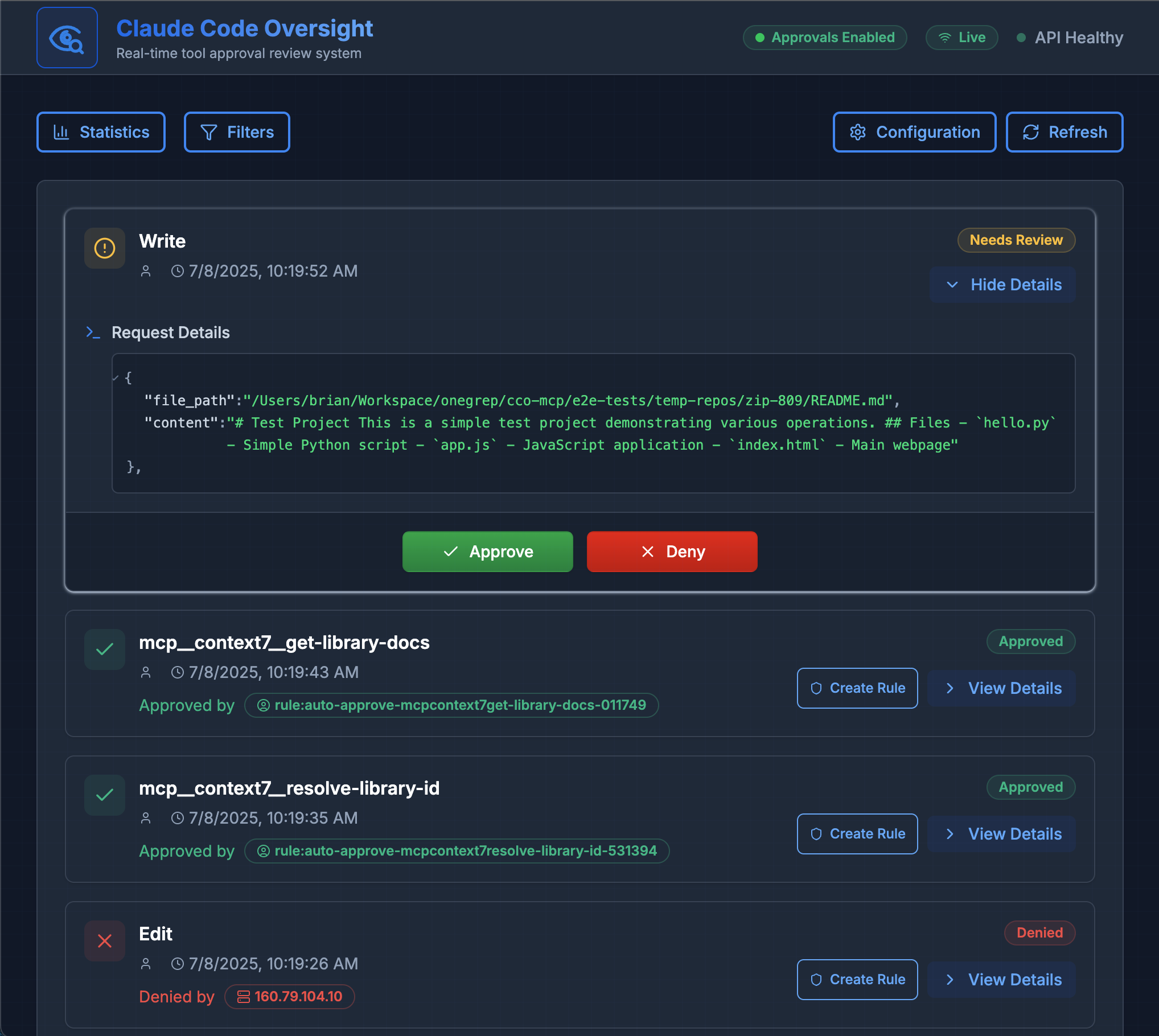
Real-time audit and approval system for Claude Code tool calls. Get instant visibility and control over AI agent actions with a sleek web dashboard.
Overview
CCO-MCP provides a security layer between Claude Code and your system, enabling you to monitor and control AI tool calls in real-time. It acts as a firewall for AI actions, allowing you to review sensitive operations before they execute while auto-approving safe ones based on configurable rules. This let's you scale to many more non-interactive Claude Code instances running in the background without incurring "tab-switching fatigue".
Get Started
Clone and run with Docker Compose
git clone https://github.com/onegrep/cco-mcp.git
cd cco-mcp
docker-compose up
Configure Claude Code
Install CCO-MCP at the user scope:
claude mcp add -s user -t http cco-mcp http://localhost:8660/mcp
This will add the following to your Claude Code config:
{
  "mcpServers": {
    "cco-mcp": {
      "type": "http",
      "url": "http://localhost:8660/mcp"
    }
  }
}
For self-hosted deployments, replace http://localhost:8660/mcp with your deployment URL.
Visit http://localhost:8660 to access the dashboard.
Enable Approval Prompts
To use CCO-MCP for approval prompts, run Claude Code in non-interactive mode with the appropriate Permission Prompt Tool flag:
claude code -p "your prompt here" --permission-prompt-tool mcp__cco-mcp__approval_prompt
This enables Claude to request approval through CCO-MCP before executing sensitive operations without using the "dangerously skip permissions" option.
Main Features
🛡️ Smart Approval Rules
Create rules to auto-approve safe operations (like file reads) while requiring manual approval for sensitive ones (like running bash commands).
📊 Real-Time Dashboard
Monitor all tool calls as they happen with live updates via Server-Sent Events.
🔍 Detailed Audit Logs
Every tool call is logged with full context including agent identity, parameters, and approval status.
Configuration Options
All configuration can be managed through the web interface at http://localhost:8660/config.
Default Action and Timeouts
- Default Action: Choose whether unmatched requests are automatically approved or require manual review
- Auto-Deny Timeout: Set how long to wait for manual approval before automatically denying (default: 5 minutes)
- Entry TTL: Configure how long audit log entries are retained (default: 24 hours)
Approval Rules
Rules use a priority system (lower numbers = higher priority) to determine actions:
- Tool Matching: Match specific tools (built-in like Read/Write or MCP server tools)
- Agent Matching: Create rules for specific agent identities
- Pattern Matching: Use wildcards for flexible rule creation
- Actions: Set rules to auto-approve or auto-deny matching requests
Environment Variables
PORT- Server port (default: 8660)CCO_CONFIG_PATH- Config file location (default: ~/.cco-mcp/config.json)
Development
Project Structure
cco-mcp/
├── src/              # TypeScript backend
│   ├── audit/        # Core audit service
│   ├── routes/       # REST API endpoints
│   └── server.ts     # MCP server
├── ui/               # React frontend
│   └── src/
│       ├── components/
│       └── pages/
└── dist/             # Build output
Design Principles
- Simplicity first - Enabling core use-case of approving background agents
- Real-time by default - SSE for instant updates
- Type safety - Full TypeScript coverage
- User-friendly - Intuitive UI with helpful defaults
Local Development
# Install required tools
just brew

# Setup project dependencies
just setup

# Run both backend and UI
just dev-all

# Run tests
just test

# Format code
just format

# Build everything
just build-all
Contributing
We welcome contributions! Please see our Contributing Guide for details.
License
MIT License - Copyright 2025 OneGrep, Inc.
Acknowledgments
Built for use with Claude Code and the Model Context Protocol by Anthropic.
Installing Cco
This server has no published package — it is built from source. Open the repository and follow its README.
▸ github.com/toolprint/cco-mcpFAQ
Is Cco MCP free?
Yes, Cco MCP is free — one-click install via Unyly at no cost.
Does Cco need an API key?
No, Cco runs without API keys or environment variables.
Is Cco hosted or self-hosted?
Self-hosted: the server runs locally on your machine via the install command above.
How do I install Cco in Claude Desktop, Claude Code or Cursor?
Open Cco on unyly.org, pick your client tab (Claude Desktop, Claude Code, Cursor) and press Install — the config is generated automatically, no JSON editing.
Related MCPs
GitHub
PRs, issues, code search, CI status
 by GitHub
Filesystem
Secure file operations with configurable access controls.
Memory
Knowledge graph-based persistent memory system.
Template MCP Server
A CLI tool to create a new Model Context Protocol server project with TypeScript support, dual transport options, and an extensible structure
 by mcpdotdirect
Compare Cco with
Not sure what to pick?
Find your stack in 60 seconds
Author?
Embed badge for your README
Browse similar
All development MCPs