
Claude Code IDE For Sublime Text
FreeNot checkedEnables Sublime Text to integrate with Claude Code via the IDE protocol, providing in-editor diff review, selection context sharing, and @-mentions through a lo

About
Enables Sublime Text to integrate with Claude Code via the IDE protocol, providing in-editor diff review, selection context sharing, and @-mentions through a local WebSocket/MCP server.
README
English | 日本語
Native Claude Code IDE integration for Sublime Text 4 — in-editor diff review (accept/reject), live selection sharing, and @-mentions, speaking the same WebSocket/MCP protocol as the official VS Code and JetBrains extensions.
Unofficial community plugin — not affiliated with or endorsed by Anthropic. "Claude" and "Claude Code" are trademarks of Anthropic, PBC.
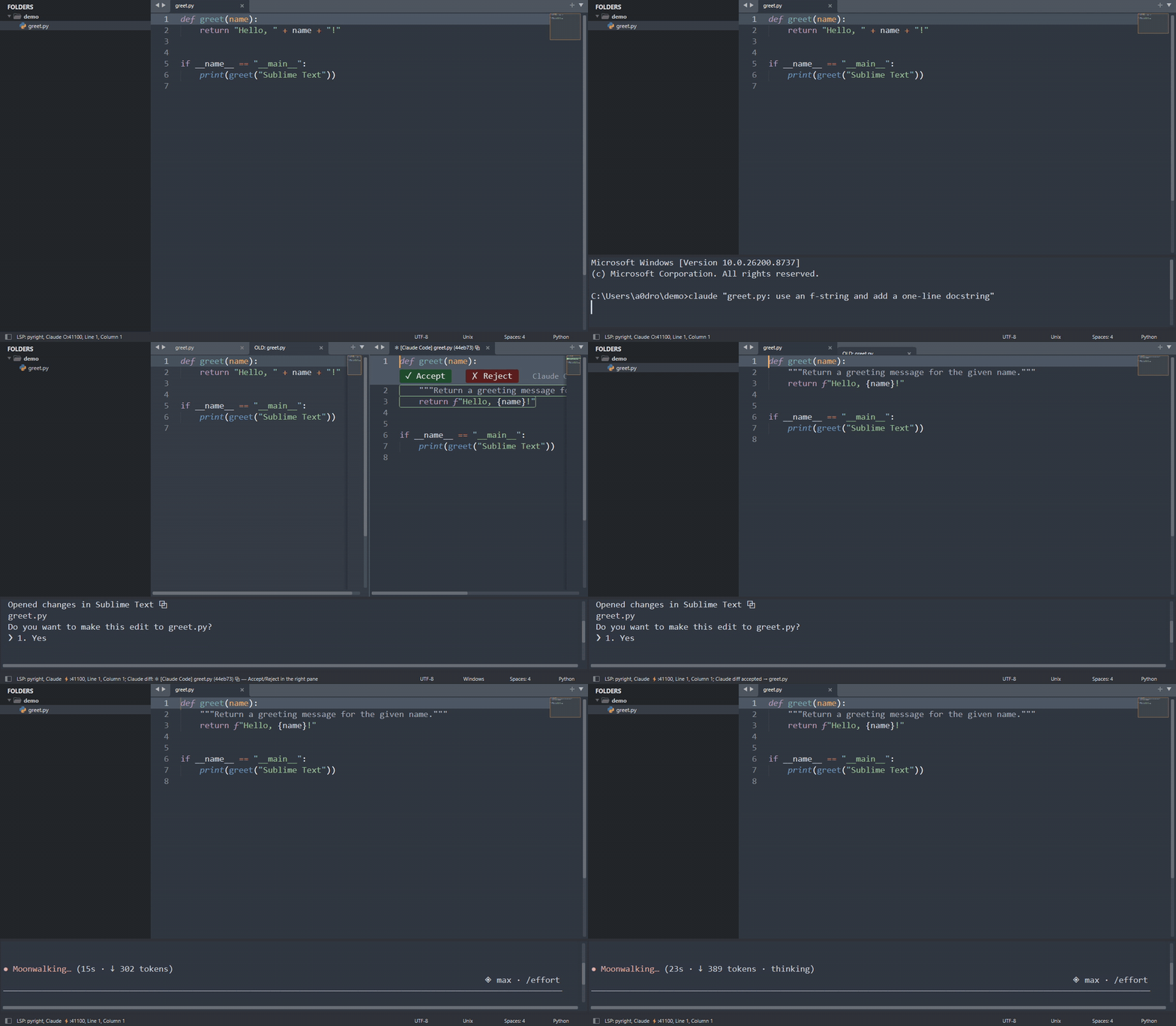
Status: core features working — server + context sharing (M1), in-editor diff review (M2), and parallel multi-session support are implemented and tested end-to-end against the real Claude Code client. Package Control submission in progress; manual install below works today.
Motivation — why Sublime Text in the LLM era?
Now that an agent writes much of the code, what should an editor be? Our answer:
- Instant and lightweight. Sublime opens in a blink and stays at ~100–300 MB while agent sessions, terminals, and browsers eat the rest of your RAM. The editor is where you read and judge code; it should never be the heavy part of the stack.
- Trivially extensible by you. In an LLM-first workflow, the editor is personal infrastructure: when Claude can write a Sublime plugin in minutes, a scriptable Python API beats a marketplace of prebuilt features. You compose exactly the cockpit you want — this plugin itself is proof.
- No bundled AI, by choice. AI-native IDEs (Cursor, Windsurf, …) and VS Code couple the agent to the editor — with their own subscription, model markup, and upgrade cadence. Claude Code is editor-agnostic; the missing piece was only the thin protocol layer that lets Sublime talk to it. This plugin adds that layer, so the editor stays fast and yours, and the agent stays first-class.
The longer argument — why coupling, not the editor, is the thing to choose: Don't Switch Your Editor — Connect the Agent
What it does
When Claude Code connects (via /ide or auto-connect), the plugin provides:
- In-editor diff review — Claude's proposed edits open as a side-by-side diff; accept, reject, or hand-edit before accepting (M2)
- Context sharing — current selection, open tabs, workspace folders, dirty state
selection_changedstreaming — Claude always knows what you're looking at@-mention — send the current selection range to the prompt- Lock-file discovery — works from Terminus inside Sublime or any external terminal
Install (manual, while in development)
- Clone this repo anywhere.
- Link it into Sublime's
PackagesasClaude Code IDE(any folder name works — imports are relative — but this one matches Package Control installs, so the Preferences menu entries resolve):- Windows:
mklink /J "%APPDATA%\Sublime Text\Packages\Claude Code IDE" "C:\path\to\repo" - macOS/Linux:
ln -s /path/to/repo "~/Library/Application Support/Sublime Text/Packages/Claude Code IDE"
- Windows:
- Restart Sublime Text. The status bar shows
Claude ○ :<port>when the server is listening. - In any terminal, run
claude, then/ideand pick Sublime Text.
Development
Protocol core (claudeide/) is pure Python 3.8 with zero dependencies and never imports sublime, so it is unit-testable outside Sublime:
uv venv --python 3.8
uv pip install pytest
uv run pytest
The Sublime-facing layer lives in adapters/sublime_bridge.py + plugin_main.py.
Protocol
Implements Claude Code's IDE integration protocol (WebSocket + MCP 2025-03-26): lock file at ~/.claude/ide/<port>.lock, localhost-only WebSocket with x-claude-code-ide-authorization, and the standard tool set (openFile, openDiff, getCurrentSelection, getOpenEditors, …).
Protocol reference: coder/claudecode.nvim PROTOCOL.md — huge thanks to that project for documenting it.
FAQ
Does Claude Code work with Sublime Text?
Yes — with this plugin. Claude Code has no built-in Sublime Text support (official extensions exist for VS Code and JetBrains), but its IDE integration is a documented WebSocket/MCP protocol. This plugin implements that protocol natively in Sublime, so features like in-editor diff review, selection context, and @-mentions work the same way they do in the official extensions.
Is this an official Anthropic plugin?
No. It is an unofficial community plugin, not affiliated with or endorsed by Anthropic. It speaks the same protocol the official IDE extensions use, as documented by the claudecode.nvim project.
How do I connect Claude Code to Sublime Text?
Two ways:
- Manual: run
claudein any terminal, type/ide, and pick Sublime Text. - Auto-connect: set a fixed
"port"in the plugin settings and exportCLAUDE_CODE_SSE_PORT=<port>andENABLE_IDE_INTEGRATION=truemachine-wide. Every newclaudesession then attaches to Sublime automatically (~2 s after launch), from any terminal — including Terminus inside Sublime.
What happens when Claude edits a file?
The proposed change opens as a side-by-side diff tab in Sublime. Accept or reject it with the ✓/✗ buttons in the proposal pane (also in the command palette; suggested key bindings ship commented out in the keymap), or edit the proposal by hand before accepting. Claude blocks until you decide — with default permission settings, nothing touches disk without your review.
Does my code get sent anywhere?
The plugin itself sends nothing to the network. It runs a WebSocket server on 127.0.0.1 (localhost only, token-authenticated) that talks to the Claude Code process on your machine. What Claude Code itself sends to Anthropic is governed by Claude Code, exactly as when you use it without an IDE.
Can I run multiple Claude Code sessions at once?
Yes. The server accepts concurrent clients, so several Claude sessions (e.g. one per project or task) can attach to the same Sublime instance in parallel; diff reviews from each are tracked independently.
Which platforms are supported?
The protocol core is dependency-free Python 3.8 (the Sublime Text 4 plugin host). Developed and tested end-to-end on Windows; macOS and Linux use the same code paths and are expected to work — issues and reports welcome.
Why keep Sublime instead of an AI-native IDE?
Because the agent doesn't need to live inside the editor. Claude Code runs in a terminal; the editor's job is reading, judging, and occasionally hand-editing what the agent proposes — a job Sublime does instantly and in ~100–300 MB of RAM. Decoupling means you upgrade the agent and the editor independently, with no bundled subscription or lock-in. See Motivation.
License
MIT
Installing Claude Code IDE For Sublime Text
This server has no published package — it is built from source. Open the repository and follow its README.
▸ github.com/Cognisant-llc/sublime-claude-codeFAQ
Is Claude Code IDE For Sublime Text MCP free?
Yes, Claude Code IDE For Sublime Text MCP is free — one-click install via Unyly at no cost.
Does Claude Code IDE For Sublime Text need an API key?
No, Claude Code IDE For Sublime Text runs without API keys or environment variables.
Is Claude Code IDE For Sublime Text hosted or self-hosted?
Self-hosted: the server runs locally on your machine via the install command above.
How do I install Claude Code IDE For Sublime Text in Claude Desktop, Claude Code or Cursor?
Open Claude Code IDE For Sublime Text on unyly.org, pick your client tab (Claude Desktop, Claude Code, Cursor) and press Install — the config is generated automatically, no JSON editing.
Related MCPs
GitHub
PRs, issues, code search, CI status
 by GitHub
Filesystem
Secure file operations with configurable access controls.
Memory
Knowledge graph-based persistent memory system.
Template MCP Server
A CLI tool to create a new Model Context Protocol server project with TypeScript support, dual transport options, and an extensible structure
 by mcpdotdirect
Compare Claude Code IDE For Sublime Text with
Not sure what to pick?
Find your stack in 60 seconds
Author?
Embed badge for your README
Browse similar
All development MCPs