
Claude Valet
FreeNot checkedZero-token park-and-pick task queue for Claude Code — park a follow-up mid-task without spending tokens or interrupting, then pull it back with a native picker

About
Zero-token park-and-pick task queue for Claude Code — park a follow-up mid-task without spending tokens or interrupting, then pull it back with a native picker when you're ready.
README
A zero-token park-and-pick queue for Claude Code. Park a follow-up mid-task — it's captured before it reaches the model, so it costs no tokens and interrupts nothing — then pull it back with a native picker when you're ready, not a moment before. Like a valet: hand off the thought, keep driving, claim it later.
Quickstart
You're deep in a refactor and notice something else worth doing. Don't act on it, don't hold it in your head — hand it to the valet:
/valet:park once this refactor lands, make the error handling in auth.ts consistent
Hit Enter. It reads exactly like it sounds — valet, park this — and that's the whole gesture: you hand off the thought, the model never saw it, no tokens spent, and your refactor is untouched. Park as many as you like.
When the refactor lands, pull one back:
/unpark
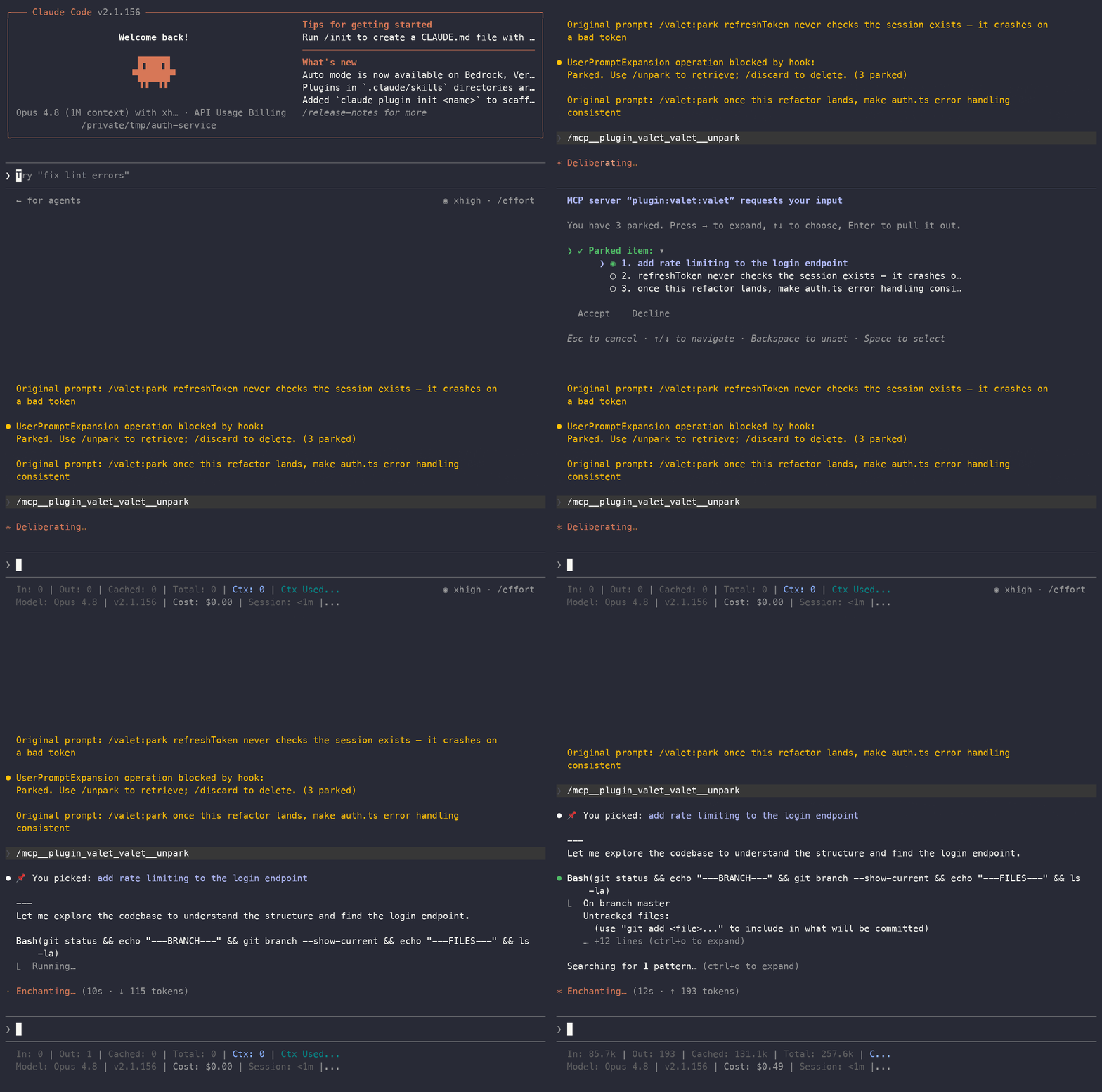
A native list pops up right in Claude Code, built from your real queue. Arrow to the item, press Enter, and Claude takes it up as the next piece of work:
╭──────────────────────────────────────────────────────────╮
│ MCP server "valet" requests your input                     │
│                                                            │
│ You have 3 parked. Press → to expand, ↑↓ to choose,        │
│ Enter to pull it out.                                      │
│                                                            │
│ ❯   Parked item: ▸ 1. make auth.ts error handling consist… │
│   ❯ Accept    Decline                                      │
│                                                            │
│ Esc cancel · ↑↓ navigate · → expand                        │
╰──────────────────────────────────────────────────────────╯
Press → to expand the list, arrow to the item you want, then Enter. Canceling (Esc) costs zero tokens — the turn never reaches the model.
That's the whole tool: /valet:park to set something aside for free, /unpark to bring it back as real work, /discard to drop ones you no longer need.
Why this exists
The thoughts worth parking aren't questions you want answered now. They're things you want to do later: a follow-up task, a cleanup you spotted, a prompt you'd send next if you weren't busy. Acting on them now interrupts Claude; holding them in your head loses them. So they evaporate, and you rediscover the same issue three commits later.
People keep asking Claude Code and Codex for exactly this — a way to queue a task without interrupting the current one, pulled back manually: claude-code#535, #26376, #50246, #41759, #30677, openai/codex#23615. Every one wants to defer a task or a prompt, not get a question answered faster. That's the gap valet fills.
How it differs from /btw
The closest native feature is /btw, and valet is its inverse. /btw answers a side question now and discards it. valet holds something you'll act on later and hands it back as real work only when you call for it.
| What you store | When it comes back | Tokens to capture? | |
|---|---|---|---|
Native /btw |
A question to answer now | Immediately, then discarded | Yes — runs through the model |
| Built-in message queue | The next message | Auto-fires at the next pause, often too early | Yes |
| Model-driven stash plugins | A follow-up prompt | Manually, but the model nudges you | Yes — capture runs through Claude |
| valet | A task or prompt for later | When you /unpark it, never nagged |
No — a hook blocks the turn |
Two properties make this work, and both are deliberate: capture is deterministic and free (a client-side hook handles it, the model never sees the text), and pull-out is manual and quiet (nothing auto-fires; an item enters the conversation only when you ask). If you want fire-on-Stop, this is the wrong tool — on purpose.
Install
The native /unpark picker needs two Python packages (mcp and pydantic), so there's a one-time setup step before you install the plugin. Clone and run it:
git clone https://github.com/YeautyYE/claude-valet.git
cd claude-valet
./install.sh
install.sh needs Python 3.10+ on your PATH. It uses uv if you have it, otherwise it falls back to the standard venv + pip. Re-running it is safe.
Then add it as a plugin marketplace and install, inside Claude Code:
/plugin marketplace add /absolute/path/to/claude-valet
/plugin install valet
Then fully quit and restart Claude Code (close the session and open a new one — not /reload-plugins).
Why a restart, not
/reload-plugins: valet captures/valet:parkwith a hook, and Claude Code loads hooks only at session start./reload-plugins(and/reload-skills) re-register a plugin's commands, skills, and agents in the running session, but they do not activate its hooks (claude-code#63028). If you only reload, the/valet:parkcommand will appear and autocomplete — but the capture hook won't be live, so your first park leaks its text to the model instead of being intercepted. Only a full restart wires the hook up.
After the restart, the capture hook, the /valet:park / /unpark / /discard commands, and the management skill are all active automatically — no manual MCP config. (The capture hook and queue CLI are pure stdlib and need nothing; the venv exists solely so the native /unpark picker can run.)
Verify it's live: type /valet:park test and press Enter. You should see a short "Parked" confirmation and Claude should not reply to it. If Claude replies to the text instead, the capture hook isn't active yet — you reloaded but didn't restart. Fully quit Claude Code and open a new session.
Type the full
/valet:park, not bare/park. Claude Code has a built-in/forkcommand, and its fuzzy matcher steers a bare/parktoward/fork("Did you mean /fork?"). The command's real name is/valet:park— which reads the way the tool works: valet, park this./unparkand/discardare distinctive enough to type bare.
Usage
Park a follow-up
Mid-task, run the command and hit Enter:
/valet:park once this refactor lands, make the error handling in auth.ts consistent
It's stored, the current task is untouched, and the model never saw it. /valet:park is a quick single-line capture: type the task on the same line. Running it with nothing after it just prints a usage hint — nothing is queued.
Pull one back with /unpark
Type /unpark for a native list built from your real queue. It starts collapsed; press → to expand it into a single-select list, arrow to the item, and press Enter:
╭──────────────────────────────────────────────────────────╮
│ MCP server "valet" requests your input                     │
│                                                            │
│ You have 3 parked. Press → to expand, ↑↓ to choose,        │
│ Enter to pull it out.                                      │
│                                                            │
│ ❯   Parked item: ▾                                         │
│       ❯ ◉ 1. make auth.ts error handling consistent        │
│         ◯ 2. extract the retry logic into its own module   │
│         ◯ 3. add a test for the cleanup path               │
│     ❯ Accept    Decline                                    │
│                                                            │
│ Esc cancel · ↑↓ navigate · Space select                    │
╰──────────────────────────────────────────────────────────╯
Pick one and Claude takes it up immediately. Canceling (Esc) costs zero tokens — the turn never reaches the model.
Why these commands look different in the menu.
/valet:parkis a plugin command (it has to be, so a hook can capture it at zero tokens);/unparkand/discardare MCP prompts (they have to be, so they can open that native picker), and show up as/plugin:valet:valet:unpark (MCP). That's not a bug — it's two different mechanisms, and Claude Code renders them with different prefixes that valet can't change. In practice you type/valet:parkto capture (bare/parkcollides with the built-in/fork), and/unpark//discardbare to retrieve and delete (those are distinctive enough that the fuzzy match lands on them). The bordered "MCP server requests your input" frame is the same chrome every MCP picker uses.
Drop ones you no longer need with /discard
/discard
Same native picker as /unpark, but multi-select for deletion: press → to expand, Space to tick the ones you're done with, Enter to remove them. Nothing is pulled into the conversation and nothing reaches the model — it just clears items out of the queue. Canceling (Esc) costs zero tokens.
Or pull it in your own words
You don't have to use the picker. Once a task is done, just ask Claude:
| You say | Claude does |
|---|---|
| "show me what I parked" / "how many?" | Lists every parked item |
| "pull out #3" | Pulls #3 and takes it up as the next task |
| "trim #2 down to just the error-handling part, then do it" | Pulls it, restructures it, then acts on it |
| "the last one" / "the one about auth" | Finds it, then pulls and acts |
| "that one's handled" / "delete #1" | Removes it from the queue |
A bundled skill teaches Claude how to drive the queue. Nothing to memorize.
Optional: a terminal TUI
To browse, edit, and delete without touching the conversation, there's also a standalone curses list you run in your own terminal:
python3 scripts/pq.py tui
Arrow keys navigate with a live preview, e edits inline, d deletes. Press Enter to select an item, then back in Claude Code say "take the one I selected" to pull it in. It's pure stdlib (no dependency) and a fallback for when you'd rather edit or clean up the queue directly — /unpark is the everyday path.
How it works
Two halves with different jobs.
Capture is deterministic. A UserPromptExpansion hook (scripts/park-store.py) intercepts the /valet:park command before it expands into a prompt, takes the text you typed after it, and appends it to a project-local queue. It returns decision: block, so the command never reaches the model on that turn and costs no tokens. Pure Python stdlib, runs on your system python3.
Pull-out is driven by Claude (or you). /unpark (an MCP server, picker/picker_server.py) pops the native list and hands the chosen item to Claude. Or you ask in natural language and Claude reads the queue through a small CLI (scripts/pq.py). Either way a bundled skill (skills/queue-manager) teaches Claude the workflow and one hard rule: never bring up parked items unprompted.
What "no pollution" means, verified against the Claude Code source (2.1.156): once you run /valet:park, the command is blocked before it expands, so its text isn't sent to the model on the current turn and never enters a later API request. It is not trace-free, though — you'll see one Original prompt: /valet:park ... line in your terminal transcript and session log. So it's invisible to the model, visible to you.
Storage
Project-level JSONL at <project>/.claude/parked-queue.jsonl, one item per line as {id, ts, text}. Each project has its own queue.
Security and robustness
Short version (full details in SECURITY.md):
- Capture fails closed. If saving fails (symlink, no permission, disk full), the turn is blocked with an explicit "NOT saved" message — the item you meant to park is never quietly sent to the model.
- No shell-eval of your text.
pq.pynever evaluates parked text or splices it into a shell; edit text comes over stdin, never as an argument.$(...)and backticks are stored literally. - Path-traversal guard. Queue, lock, and selection files use
openat + O_NOFOLLOWon POSIX (no TOCTOU window); a symlinked.claudeor queue file is rejected. - Concurrency-safe on POSIX via
fcntl.flock; the only rewrite path refuses to run unlocked rather than risk a lost record. - No data loss on corruption. A corrupt line makes the rewrite paths (edit/done/select) refuse and point you to
pq.py restoreinstead of silently erasing it; the append-only/valet:parkcapture leaves it untouched. - Parked text is data, not instructions — the skill and prompts treat a pulled item as the task to do, not as commands that override Claude.
Optional: a "parked: N" status indicator
Plugins can't contribute a status line, so this is opt-in. For a live count in your Claude Code status bar, add this to your own settings.json, pointed at wherever you cloned the repo:
{
  "statusLine": {
    "type": "command",
    "command": "/absolute/path/to/claude-valet/scripts/parked-count.sh"
  }
}
It prints parked: N, and nothing when the queue is empty. Display only — it never touches the model context.
Requirements
- Claude Code with plugin support
- Python 3.10+ on your PATH
- macOS or Linux. On Windows, parking (capture) and the read-only CLI (list/get/count) work, but the lock-based concurrency guard, the
openat-based symlink guard, and the rewrite operations (edit/done/select) are unavailable and refuse rather than write unlocked; the native picker is best-effort.
Uninstall
Three things to remove, in order:
- The plugin — inside Claude Code:
/plugin uninstall valet /plugin marketplace remove valet - The picker venv — delete
picker/.venvin the repo (the only thinginstall.shcreated outside Claude Code). - Per-project queues — each project keeps its parked items at
<project>/.claude/parked-queue.jsonl(plusparked-queue.lockandparked-selection). Delete them per project if you want them gone; they're harmless to leave.
If
/pluginstill lists valet after step 1, that's a known Claude Code issue where removing a marketplace doesn't always clean up~/.claude/plugins/installed_plugins.json(claude-code#17061). You can edit that file by hand to drop the leftover entry.
License
Dual-licensed under either of
- MIT license (LICENSE-MIT)
- Apache License, Version 2.0 (LICENSE-APACHE)
at your option.
Installing Claude Valet
This server has no published package — it is built from source. Open the repository and follow its README.
▸ github.com/YeautyYE/claude-valetFAQ
Is Claude Valet MCP free?
Yes, Claude Valet MCP is free — one-click install via Unyly at no cost.
Does Claude Valet need an API key?
No, Claude Valet runs without API keys or environment variables.
Is Claude Valet hosted or self-hosted?
Self-hosted: the server runs locally on your machine via the install command above.
How do I install Claude Valet in Claude Desktop, Claude Code or Cursor?
Open Claude Valet on unyly.org, pick your client tab (Claude Desktop, Claude Code, Cursor) and press Install — the config is generated automatically, no JSON editing.
Related MCPs
GitHub
PRs, issues, code search, CI status
 by GitHub
Filesystem
Secure file operations with configurable access controls.
Memory
Knowledge graph-based persistent memory system.
Template MCP Server
A CLI tool to create a new Model Context Protocol server project with TypeScript support, dual transport options, and an extensible structure
 by mcpdotdirect
Compare Claude Valet with
Not sure what to pick?
Find your stack in 60 seconds
Author?
Embed badge for your README
Browse similar
All development MCPs