loading…
en/
Browse all


Server Configuration (
ClaudeX
FreePersistent memory + FTS5 full-text search for Claude Code conversation history. Indexes ~/.claude/projects/ JSONL into SQLite, exposes 10 MCP tools (store/recal
About
Persistent memory + FTS5 full-text search for Claude Code conversation history. Indexes ~/.claude/projects/ JSONL into SQLite, exposes 10 MCP tools (store/recall/search memories, browse sessions, get summaries) plus prompts. Includes a web UI for visual exploration
README
MseeP.ai Security Assessment Badge
Claudex
Professional conversation viewer and analysis tool for Claude Code
Category: Development Tools · Conversation Analysis · Usage Monitoring
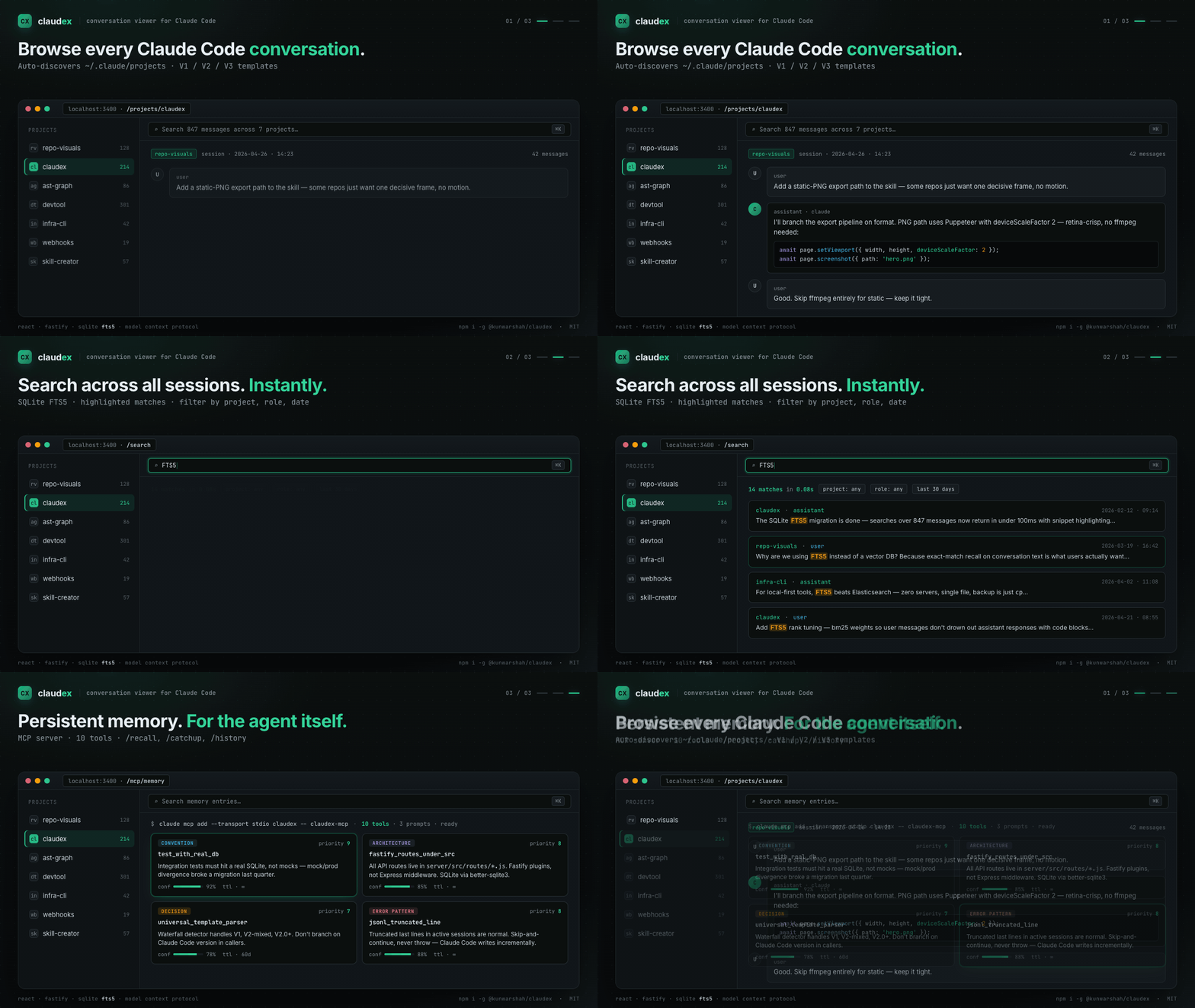
Claudex is a full-stack web application designed for developers, QA engineers, and researchers who need to inspect, search, and analyze Claude Code conversation histories. Built with React and Fastify, it provides enterprise-grade full-text search using SQLite FTS5, universal template support for all Claude Code versions, and comprehensive analytics dashboards.
Version License: MIT Documentation Discussions Mentioned in Awesome Claude Code
📚 Documentation | 💬 Discussions | 🐛 Issues
🆕 What's New
Version 1.3.0 (February 12, 2026) — MCP Server
- 🧠 MCP Server: Model Context Protocol server gives Claude Code persistent memory across sessions
- 🔧 10 MCP Tools: Project context, session search, conversation retrieval, structured memory CRUD
- 💾 Structured Memory System: Store coding knowledge (conventions, architecture, decisions, error patterns) with priority, confidence, and TTL
- 📋 3 MCP Prompts:
/recall,/catchup,/historyfor quick access to past sessions - 🎯 Token Budgeting: Three detail levels (minimal/standard/full) for context management
- 📖 One-Command Setup:
claude mcp add --transport stdio claudex -- claudex-mcp
Previous releases
Version 1.2.0 (November 11, 2025)
- 🎨 Comprehensive Theming System: 10 professional themes (default, emerald, green, blue, purple, orange, red, rose, yellow, classic)
- 🔤 Advanced Typography: 29 font families with visual preview
- 📏 Granular Font Sizing: 5 precise font size options (14px-18px)
- 💾 Settings Persistence: All customizations saved to localStorage
Version 1.1.0 (October 27, 2025)
- 🎯 Smart Title Extraction: Meaningful session titles from conversation content
- 📊 Tremor Analytics Dashboard: Tailwind-based charts and multi-scale visualizations
- 🐳 Docker Multi-Platform: amd64 and arm64 with optimized ~200MB images
- ⚡ Performance: 121x faster async search index rebuild
View full changelog | Troubleshooting guide
📸 Screenshots
🎨 NEW in v1.2.0: Theming & Customization

10 Professional Themes |

29 Font Families |

Granular Font Sizing |

Settings Modal |
Conversation View
Full-Text Search
✨ Features
- MCP Server: Give Claude Code persistent memory — conventions, architecture, decisions, and error patterns survive across sessions
- Structured Memory: Store and recall coding knowledge with priority (1-10), confidence, and TTL-based expiration
- Auto Project Discovery: Automatically scans
~/.claude/projectsdirectory to discover all conversations across multiple projects - Full-Text Search: Enterprise-grade SQLite FTS5 search engine with advanced filtering by project, session, role, date range, and content highlighting
- Universal Template Support: Intelligent template detection and parsing for all Claude Code versions (V1.x, V2-mixed, V2.0+) with automatic format detection
- Smart Content Rendering: Syntax-highlighted code blocks, markdown rendering, diff visualization, JSON formatting, and tool usage tracking
- Session Analytics: Comprehensive analytics dashboard with message distribution charts, file operation tracking, and conversation statistics using Tremor React
- Export Options: Export conversations to JSON (structured data), HTML (readable format), or plain TXT for archival and sharing
- Modern UI: Responsive React interface with 10 themes, 29 fonts, session favorites, and optimized for developer workflows
💖 Support This Project
Claudex is free and open source. If it saves you time and improves your workflow, please consider:
- ⭐ Star the repo - Help others discover Claudex
- 🐛 Report bugs - Your feedback makes us better
- 💡 Share ideas - Request features in Discussions
- ☕ Buy me a coffee - Support continued development
🚀 Quick Start
Prerequisites
- Node.js 18+ and npm
- Claude Code installed with conversation history in
~/.claude/projects
Installation
Option 1: npm (Recommended)
# Global installation
npm install -g @kunwarshah/claudex [https://www.npmjs.com/package/@kunwarshah/claudex]

# Then run anywhere:
claudex

# Custom port (if 3400 is in use):
claudex --port 3500

# Custom project directory:
claudex --project-root ~/my-claude-projects

# Or use without installing (npx):
npx @kunwarshah/claudex
Add MCP Server (gives Claude Code persistent memory):
claude mcp add --transport stdio claudex -- claudex-mcp
See the MCP Server Guide for details.
CLI Options:
--help, -h: Show help message--version, -v: Show version--port, -p <port>: Custom server port (default: 3400)--project-root <path>: Custom Claude projects directory
Environment Variables:
PORT: Server port (default: 3400)PROJECT_ROOT: Claude projects directory (default: ~/.claude/projects)
Option 2: From Source
- Clone the repository:
git clone https://github.com/kunwar-shah/claudex.git
cd claudex
- Run system check (optional but recommended):
npm run check
This validates your environment and catches common setup issues.
- Install dependencies (or use auto-fix):
# Option 1: Manual installation
npm install
cd server && npm install && cd ..
cd client && npm install && cd ..

# Option 2: Auto-fix (installs deps + creates .env)
npm run check:fix
- Configure environment (if not using auto-fix):
cd server
cp .env.example .env
# Edit .env if needed (default: PROJECT_ROOT=~/.claude/projects)
cd ..
- Start the application:
# Automatically runs system check, then starts servers
npm run dev
- Open your browser: http://localhost:3000
The backend API runs on http://localhost:3400
System Checker
Claudex includes a comprehensive system checker that validates your environment:
# Quick check
npm run check

# Detailed output
npm run check:verbose

# Auto-fix common issues
npm run check:fix

# JSON output (for CI/CD)
npm run check:json
What it checks:
- ✅ Node.js & npm versions
- ✅ PROJECT_ROOT path & permissions
- ✅ Port availability (3000, 3400)
- ✅ Dependencies installation
- ✅ Claude Code data (projects, sessions)
- ✅ JSONL file validity
- ✅ Database permissions
- ✅ Search index status
Global CLI Installation (Optional)
Install globally to use claudex command anywhere:
./install.sh

# Then run from anywhere:
claudex
🔧 Configuration
Server Configuration (.env)
# Path to Claude Code projects directory
# Supports ~ expansion (e.g., ~/.claude/projects)
PROJECT_ROOT=~/.claude/projects

# Server port
PORT=3400

# Environment
NODE_ENV=development
Default Ports
- Frontend: http://localhost:3000 (Vite dev server)
- Backend: http://localhost:3400 (Fastify API)
- Frontend build: Uses port 3400 (served by backend in production)
📂 Project Structure
claudex/
├── server/                    # Backend (Node.js + Fastify)
│   ├── src/
│   │   ├── parsers/          # Template detection & message parsing
│   │   │   ├── templateDetector.js    # V1/V2/V3 template detection
│   │   │   └── messageParser.js       # Universal message parser
│   │   ├── services/         # Core business logic
│   │   │   ├── fileScanner.js        # Project/session discovery
│   │   │   ├── sessionParser.js      # Full session parsing
│   │   │   ├── searchDatabase.js     # SQLite FTS5 search
│   │   │   ├── searchIndexer.js      # Search index builder
│   │   │   └── memoryService.js      # Structured memory CRUD
│   │   ├── mcp/              # MCP server (Claude Code integration)
│   │   │   ├── index.js              # MCP entry point + stdio transport
│   │   │   ├── tools.js              # 10 MCP tool handlers
│   │   │   ├── resources.js          # MCP resources
│   │   │   └── prompts.js            # 3 MCP prompts
│   │   ├── routes/           # API endpoints
│   │   │   ├── projects.js           # Project/session routes
│   │   │   ├── search.js             # Search routes
│   │   │   └── export.js             # Export routes
│   │   ├── utils/            # Helper utilities
│   │   │   └── pathHelper.js         # Path expansion (~/ support)
│   │   └── server.js         # Main server
│   ├── data/                 # SQLite database (auto-created)
│   ├── .env.example          # Environment template
│   └── package.json
├── client/                   # Frontend (React + Vite)
│   ├── src/
│   │   ├── components/       # React components
│   │   │   ├── ProjectSelector.jsx
│   │   │   ├── SessionList.jsx
│   │   │   ├── ConversationThread.jsx
│   │   │   ├── MessageBubble.jsx
│   │   │   ├── ClaudeMessageRenderer.jsx
│   │   │   └── SearchPage.jsx
│   │   ├── services/         # API client
│   │   │   └── api.js
│   │   └── App.jsx           # Main app
│   └── package.json
├── bin/                      # CLI entry point
├── test-search.sh           # Search API testing script
├── install.sh               # Global CLI installer
├── SETUP.md                 # Detailed setup guide
├── README.md                # This file
└── package.json             # Root package (CLI + concurrently)
🎯 Supported Claude Code Formats
The viewer automatically detects and parses all Claude Code conversation formats:
V3 Template (Universal - Recommended)
- Claude Code v2.0+: New format with
rolefield directly - Claude Code v1.x: Original format with
typefield - Edge cases: Mixed formats and migration states
- New message types:
file-history-snapshotsupport - Role mapping: All system messages → assistant (binary user/assistant classification)
Legacy Templates (Auto-detected)
- V2-Mixed: Transition format between V1 and V2
- V1: Original Claude Code format
The template detector uses a waterfall detection strategy, automatically selecting the best parser for your conversation files.
🔍 Search System
Building the Search Index
The search index needs to be built before searching:
# Option 1: Via API
curl -X POST http://localhost:3400/api/search/index/build

# Option 2: Via test script
./test-search.sh

# Option 3: Via UI (Search page → "Rebuild Index" button)
When to Rebuild Index
Rebuild the search index when:
- First time setup
- After template changes
- When new conversations are added
- If search results seem outdated
Search API Examples
# Basic search
curl -X POST http://localhost:3400/api/search \
  -H "Content-Type: application/json" \
  -d '{"q": "migration", "limit": 10}'

# Search with filters
curl -X POST http://localhost:3400/api/search \
  -H "Content-Type: application/json" \
  -d '{
    "q": "database",
    "projectId": "my-project",
    "role": "user",
    "limit": 20,
    "offset": 0
  }'

# Check index status
curl http://localhost:3400/api/search/index/status
📡 API Endpoints
Projects & Sessions
| Endpoint | Method | Description |
|---|---|---|
/api/projects |
GET | List all projects |
/api/projects/:id/sessions |
GET | Get sessions for project |
/api/projects/:id/sessions/:sessionId |
GET | Get full session with messages |
Search
| Endpoint | Method | Description |
|---|---|---|
/api/search |
POST | Search conversations (FTS5) |
/api/search/index/build |
POST | Build/rebuild search index |
/api/search/index/status |
GET | Get index statistics |
/api/search/index/clear |
POST | Clear search index |
Export
| Endpoint | Method | Description |
|---|---|---|
/api/export/session/:projectId/:sessionId?format=json |
GET | Export as JSON |
/api/export/session/:projectId/:sessionId?format=html |
GET | Export as HTML |
/api/export/session/:projectId/:sessionId?format=txt |
GET | Export as TXT |
Health
| Endpoint | Method | Description |
|---|---|---|
/api/health |
GET | Health check + system info |
🛠️ Development
Development Mode
# Run both frontend + backend with hot reload
npm run dev

# Or run separately:
# Terminal 1 - Backend (auto-restarts on changes)
cd server && npm run dev

# Terminal 2 - Frontend (hot module replacement)
cd client && npm run dev
Testing the Search System
# Run comprehensive search tests
./test-search.sh
This script will:
- Check server health
- Get index status
- Build/rebuild index
- Run test searches with various filters
- Display results
Adding New Templates
- Update Template Detector (
server/src/parsers/templateDetector.js):
'my-template': {
  name: 'My Template Name',
  detect: (samples) => {
    return samples.some(s => s.myUniqueField !== undefined);
  },
  parser: 'my-template'
}
- Add Parser Method (
server/src/parsers/messageParser.js):
parseMyTemplate(rawMessage) {
  return {
    id: rawMessage.id || this.generateId(),
    role: rawMessage.myRole === 'user' ? 'user' : 'assistant',
    content: rawMessage.myContent || '',
    timestamp: rawMessage.myTimestamp,
    // ... other fields
  };
}
- Rebuild Search Index: The new template will be automatically detected and used.
📝 Scripts Reference
Claudex Directory
npm run dev- Run frontend + backend concurrently (with pre-check)npm start- Run frontend + backend (production mode)npm run check- Run system health checknpm run check:verbose- Run detailed system checknpm run check:fix- Auto-fix common setup issuesnpm run check:json- JSON output for CI/CD./install.sh- Install as global CLI command./test-search.sh- Test search API endpoints
Server Directory
npm run dev- Run with nodemon (auto-restart)npm start- Run in production mode
Client Directory
npm run dev- Vite dev server (http://localhost:3000)npm run build- Build for productionnpm run preview- Preview production build
🐛 Troubleshooting
Quick Diagnosis
Run the system checker first to identify issues:
npm run check:verbose
This will check all common problems and provide actionable suggestions.
Common Issues
"No messages found" Despite Messages Existing
Fixed in v1.1.1 - If you see intermittent empty sessions or duplicate key warnings:
# Update to latest version
cd claude-viewer
git pull origin main
npm install && cd server && npm install && cd ../client && npm install && cd ..
npm run dev
See detailed troubleshooting guide for more information.
No Projects Found
# Check what the system sees
npm run check

# Verify path
cat server/.env | grep PROJECT_ROOT
- Verify
PROJECT_ROOTin.envpoints to~/.claude/projects - Check that Claude Code has created conversation files
- Run
npm run check:fixto auto-create missing directories
Search Not Working
# Quick fix via UI
# Visit http://localhost:3000/search → Click "Rebuild Index"

# Or via command line
curl -X POST http://localhost:3400/api/search/index/build
Port Conflicts
# System checker will detect port conflicts
npm run check

# Auto-detected ports in use show PID
# Kill process: kill <PID>
# Or change PORT in server/.env
Permission Errors
# Check permissions
npm run check:verbose

# Fix permissions
chmod +r ~/.claude/projects
chmod +w claude-viewer/server/data
Dependencies Issues
# Auto-install all dependencies
npm run check:fix
🚢 Production Deployment
Using Docker (Recommended)
Claudex includes production-ready Docker configuration with multi-stage builds for optimal image size.
Quick Start with Docker
# Build and start with docker-compose
docker-compose up -d

# View logs
docker-compose logs -f

# Stop
docker-compose down
Access at: http://localhost:3400
Docker Configuration
The default docker-compose.yml mounts your Claude projects directory as read-only:
volumes:
  # Adjust path to match your system
  - ~/.claude/projects:/root/.claude/projects:ro
Common path configurations:
# Linux/macOS
~/.claude/projects:/root/.claude/projects:ro

# Windows (WSL2)
/mnt/c/Users/YourName/.claude/projects:/root/.claude/projects:ro

# Custom path
/path/to/your/projects:/root/.claude/projects:ro
Docker Commands
# Build image manually
docker build -t claudex:latest .

# Run container manually
docker run -d \
  -p 3400:3400 \
  -v ~/.claude/projects:/root/.claude/projects:ro \
  -v claudex-data:/app/data \
  --name claudex-web \
  claudex:latest

# Check health
docker ps  # Check STATUS column for "healthy"

# View logs
docker logs claudex-web -f

# Stop and remove
docker stop claudex-web && docker rm claudex-web
Docker Features
- Multi-stage build: Optimized image size (~200MB)
- Non-root user: Runs as nodejs user for security
- Health checks: Automatic health monitoring
- Persistent volumes: Stores search index and logs
- Read-only mounts: Claude projects mounted read-only for safety
- Log rotation: JSON logs with 10MB max size, 3 file rotation
Docker Environment Variables
# Override in docker-compose.yml or docker run
-e PORT=3400                           # Server port
-e HOST=0.0.0.0                        # Bind address
-e NODE_ENV=production                 # Environment
-e PROJECT_ROOT=/root/.claude/projects # Claude projects path
Manual Production Build
For non-Docker deployments:
# 1. Install dependencies
npm run install-deps

# 2. Build client
npm run build

# 3. Start server (serves built client)
cd server && NODE_ENV=production npm start
Access at: http://localhost:3400
📋 Roadmap
- SQLite FTS5 full-text search
- Universal template support (V1/V2/V3)
- Export to JSON/HTML/TXT
- Docker deployment (v1.1.0)
- Conversation analytics dashboard (v1.1.0)
- Theming system — 10 themes, 29 fonts (v1.2.0)
- Session favorites/bookmarking (v1.2.4)
- MCP server for Claude Code (v1.3.0)
- Structured memory system (v1.3.0)
- Token cost calculator
- WebSocket live updates
- Plugin system for custom parsers
📄 License
MIT License - see LICENSE file for details.
🤝 Contributing
- Fork the repository
- Create a feature branch:
git checkout -b feature/amazing-feature - Commit changes:
git commit -m 'Add amazing feature' - Push to branch:
git push origin feature/amazing-feature - Open a Pull Request
📚 Additional Documentation
- SETUP.md - Detailed setup and configuration guide
- INSTALL.md - Legacy installation instructions
💡 Tips
- Use the search page to find conversations across all projects
- Export conversations to share with team members
- Rebuild search index after adding new conversations
- Check
/api/healthendpoint to verify system status - Use
npm run devfor the best development experience with hot reload
Install ClaudeX in Claude Desktop, Claude Code & Cursor
Run in your terminal:
claude mcp add claudex -- npx FAQ
Is ClaudeX MCP free?
Yes, ClaudeX MCP is free — one-click install via Unyly at no cost.
Does ClaudeX need an API key?
No, ClaudeX runs without API keys or environment variables.
Is ClaudeX hosted or self-hosted?
Self-hosted: the server runs locally on your machine via the install command above.
How do I install ClaudeX in Claude Desktop, Claude Code or Cursor?
Open ClaudeX on unyly.org, pick your client tab (Claude Desktop, Claude Code, Cursor) and press Install — the config is generated automatically, no JSON editing.


