
Clihub
FreeNot checkedInstall Claude Code, Codex, Gemini, Qwen Code, Kiro, Cursor & Goose — keep their skills in sync, with one-command rollback.

About
Install Claude Code, Codex, Gemini, Qwen Code, Kiro, Cursor & Goose — keep their skills in sync, with one-command rollback.
README

clihub
npm version npm downloads license node
English | 简体中文
The reproducible control plane for AI coding CLIs. One tool to install Claude Code, Codex, Gemini CLI, Qwen Code, Kiro, Cursor, Goose, and OpenCode — keep their skills / MCP / memory / system-prompts in sync across every CLI, switch accounts · endpoints · proxies per CLI, and pin the whole stack to a signed clihub.lock.json with one-command rollback when an update bites. Drive it from a terminal TUI, a scriptable CLI, or a native desktop GUI — all three share one kernel.
 |
 |
| Desktop GUI — Tauri 2 + Svelte 5 | Terminal TUI — clihub |
curl -fsSL https://raw.githubusercontent.com/wikieden/clihub/main/scripts/install.sh | sh
clihub preset apply starter
That's it. Your stack installed, core skills fanned out to every CLI, your prior ~/.claude snapshotted and recoverable.
Who's it for? Newcomers, individual developers, and teams/enterprises each get a different slice — see docs/21-VALUE.md.
Why clihub
Every AI coding CLI ships its own bespoke skill / plugin / MCP layout. If you run more than one, you end up:
- Re-installing the same skill four times in four different folders.
- Hand-syncing
superpowersinto eight different layouts —~/.claude/skills/,~/.codex/skills/,~/.gemini/commands/*.toml,~/.qwen/commands/*.toml,~/.kiro/steering/,~/.cursor/commands/*.md,~/.config/goose/recipes/*.yaml,~/.config/opencode/skills/. - Nuking your config on an unrelated upgrade and having no way back.
clihub solves all three:
| clihub | claude-skills | multica | ccpi | oh-my-claudecode | |
|---|---|---|---|---|---|
| Installs the CLIs themselves | ✅ | ❌ | ❌ | ❌ | ❌ |
| Cross-CLI skill fan-out (8 CLIs) | ✅ | ✅ | partial | ❌ (CC only) | ❌ |
| Presets that bundle tools + skills + MCP | ✅ | ❌ | ❌ | ❌ | ❌ |
Backup / one-command rollback of ~/.claude & siblings |
✅ | ❌ | ❌ | ❌ | ❌ |
| Per-tool version pin + rollback | ✅ | ❌ | ❌ | ❌ | ❌ |
| Multi-account profile switching | ✅ | ❌ | ❌ | ❌ | ❌ |
| Per-CLI endpoint + model binding | ✅ | ❌ | ❌ | ❌ | ❌ |
| Per-CLI + GUI proxy management | ✅ | ❌ | ❌ | ❌ | ❌ |
| Multi-source catalog federation | ✅ | ❌ | ❌ | ❌ | ❌ |
| Skill security audit | ✅ | ❌ | ❌ | ❌ | ❌ |
| One memory / system-prompt source → every CLI | ✅ | ❌ | ❌ | ❌ | ❌ |
| Cross-machine E2E-encrypted config sync | ✅ | ❌ | ❌ | ❌ | ❌ |
| Signed catalogs (ed25519 supply-chain trust) | ✅ | ❌ | ❌ | ❌ | ❌ |
| Add a new CLI via JSON spec (no fork) | ✅ | ❌ | ❌ | ❌ | ❌ |
| Lockfile compliance / CI drift gate | ✅ | ❌ | ❌ | ❌ | ❌ |
| Terminal TUI + native desktop GUI | ✅ | ❌ | partial | ❌ | ❌ |
| Single-binary distribution | npm | shell | npm | npm | CC plugin |
Install
# one-liner (auto-falls back to git clone + build if npm package not yet published)
curl -fsSL https://raw.githubusercontent.com/wikieden/clihub/main/scripts/install.sh | sh

# or directly
npm install -g @wikieden/clihub
bun add -g @wikieden/clihub
Or run it as a container without installing anything locally:
docker run --rm -it -v ~/.claude:/root/.claude wikieden/clihub
docker run --rm -it wikieden/clihub doctor
Desktop app: download the unsigned macOS / Windows / Linux build from Releases (tag desktop-v*). It bundles a standalone daemon — no bun or repo checkout needed. Code-signing / notarization is pending, so you may need to allow it past Gatekeeper / SmartScreen on first launch.
Requirements: Node ≥ 18 (or Bun), on Linux / macOS / WSL.
Quickstart
clihub wizard                          # guided first-run setup (recommended)
clihub                                 # interactive TUI main menu

# or scripted:
clihub tool install claude-code
clihub tool install codex
clihub skill install superpowers       # auto-fans out to every installed CLI
clihub preset apply fullstack          # tools + skills + MCP bundle
clihub doctor                          # health check across every CLI
clihub backup                          # snapshot ~/.claude before risky upgrades
clihub rollback                        # restore the most recent snapshot
Three+1 faces of clihub
All four share the same @clihub/core kernel — golden parity: a GUI panel, a CLI command, and a direct kernel call return identical results. No logic forks.
- CLI —
clihub <subcommand>, headless/CI-friendly. The scriptable face. - Terminal TUI — bare
clihubopens an interactive menu (@clack/prompts). The guided face. - Desktop GUI — a native Tauri 2 + Svelte 5 app (10 panels). Spawns a loopback
@clihub/daemonsidecar and binds each panel to the same kernel functions. The visual face. - Claude Code skill — installed at
~/.claude/skills/clihub/;/clihubinside Claude Code opens the menu and the model runs operations on your behalf. The in-agent face.
Walkthrough
Terminal TUI
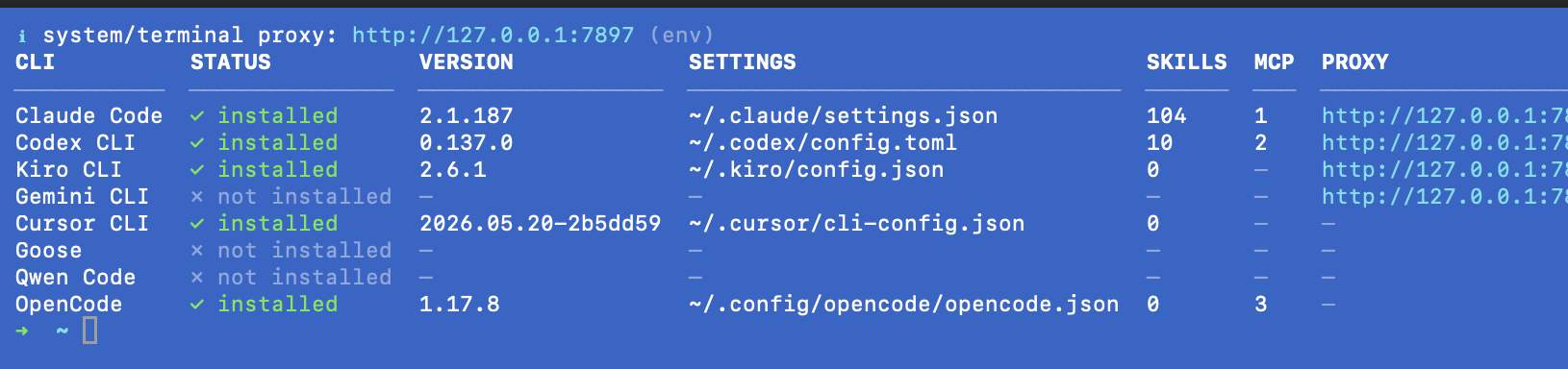
Run clihub with no arguments for the interactive menu — install CLIs, fan out skills, set a proxy or endpoint per CLI, all guided. And clihub doctor gives a one-glance cross-CLI health matrix: install status, version, native settings path, skills/MCP counts, and the active proxy per CLI.
Desktop GUI
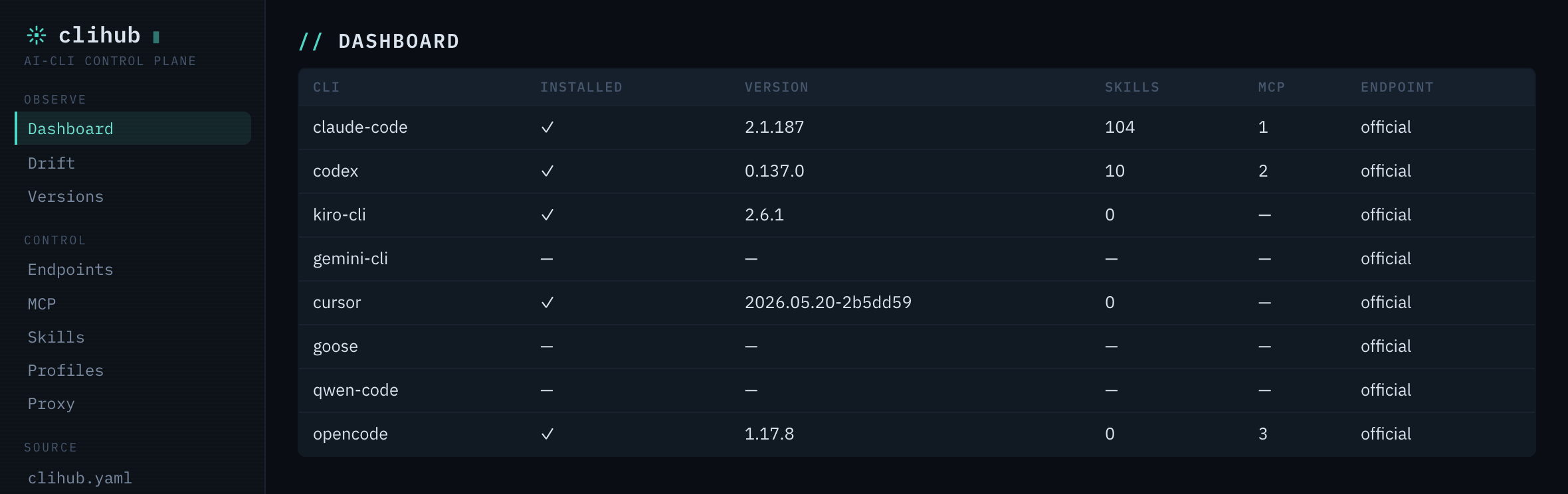
The desktop app leads with the moat — health, drift, and lockfile compliance — not a provider dropdown. Ten panels, four themes.
Dashboard — cross-CLI health + version matrix at a glance:
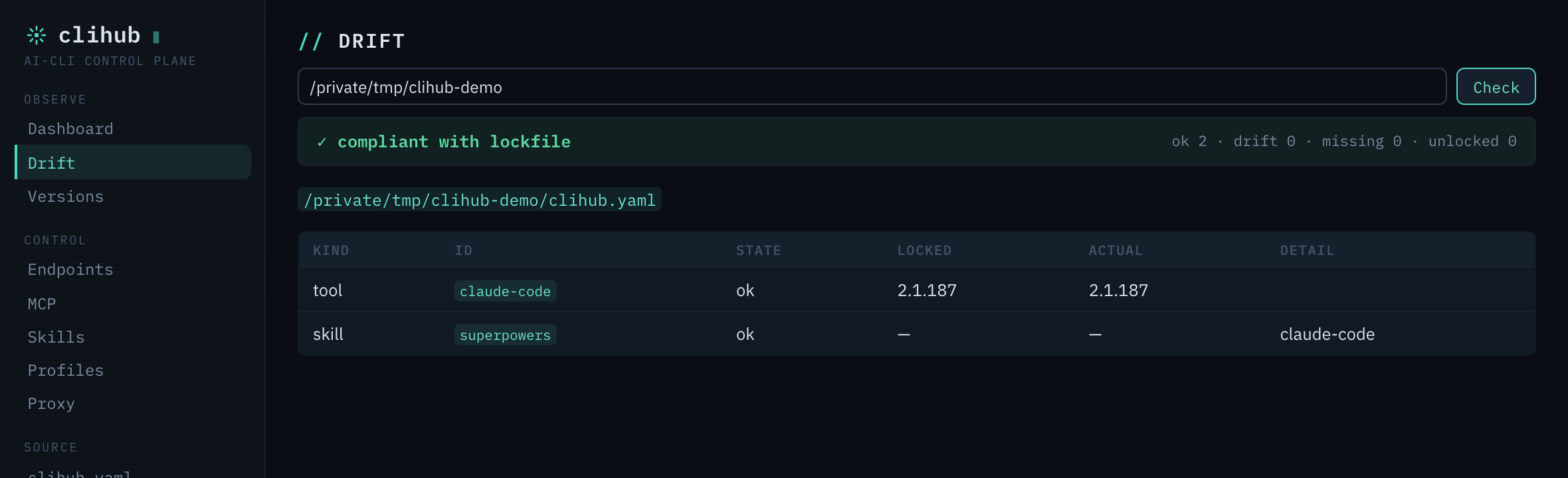
Drift — does this machine still match the signed clihub.lock.json? (ok / drift / missing):
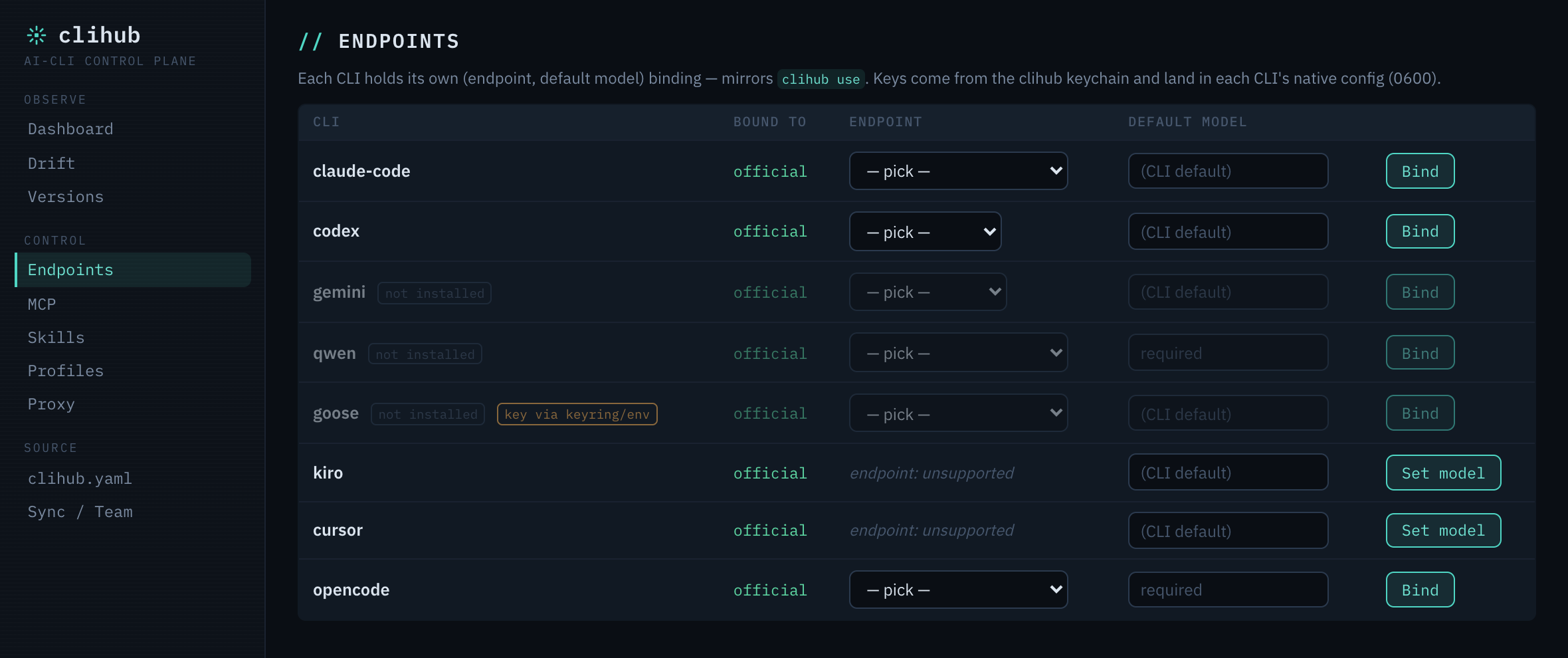
Endpoints — bind each CLI to an LLM endpoint + default model; keys come from the keychain and land in each CLI's native config (0600):
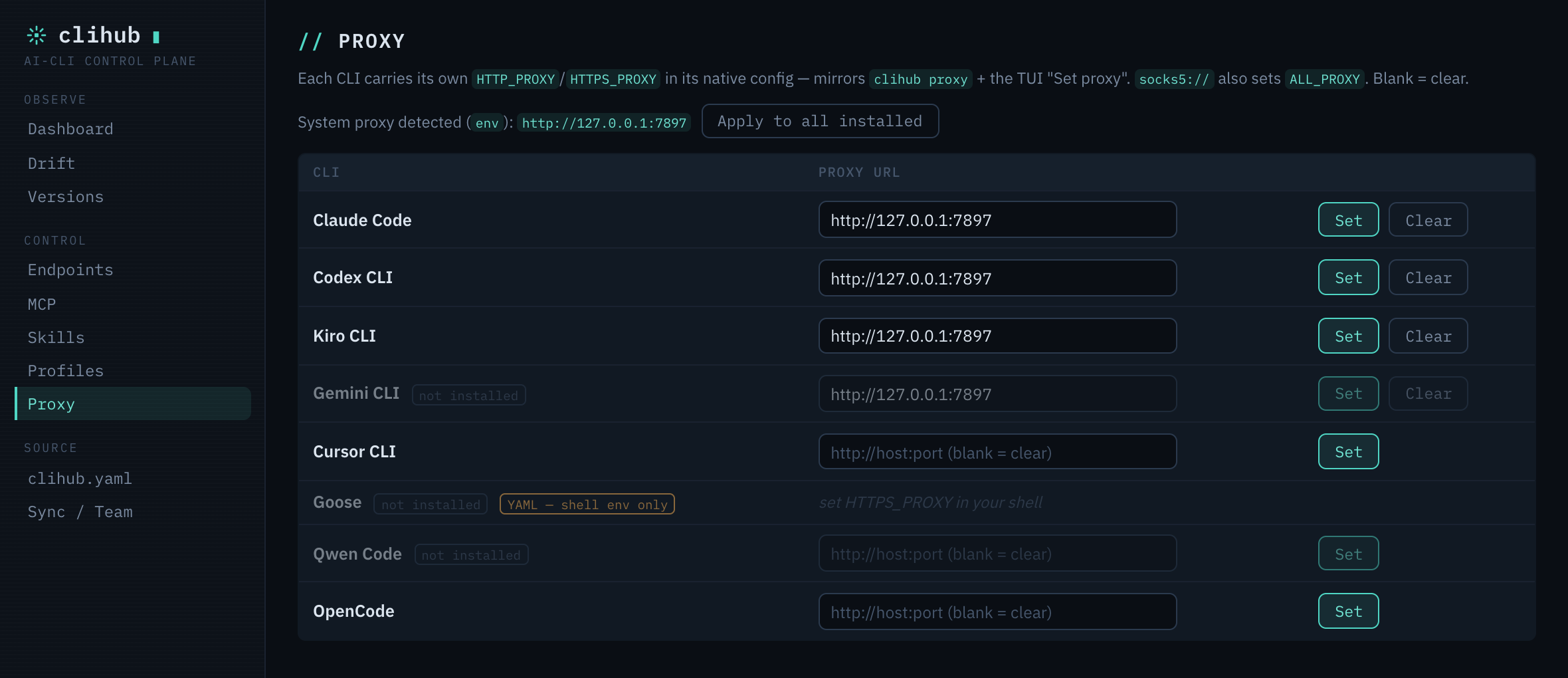
Proxy — set each CLI's HTTP(S)_PROXY (or apply the detected system proxy to all) — the same clihub proxy action, in the GUI:
Currently supported
CLIs (8): Claude Code, OpenAI Codex CLI, Gemini CLI, Qwen Code, Kiro CLI, Cursor CLI, Block Goose, OpenCode.
Surfaces: scriptable CLI, interactive TUI, native desktop GUI (10 panels: Dashboard · Drift · Endpoints · MCP · Skills · Profiles · Proxy · Versions · clihub.yaml · Sync/Team), and a Claude Code skill (/clihub). All over one @clihub/core kernel via a loopback @clihub/daemon.
Skills: 30 in the catalog — superpowers, oh-my-claudecode, codegraph, tdd, review, frontend-design, api-design, database-migrations, caveman, lark-im, lark-doc, lark-wiki, … (full list).
MCP servers: 14 — filesystem, github, gitlab, postgres, sqlite, git, slack, brave-search, fetch, playwright, memory, sequential-thinking, context7, deepwiki (full list).
Presets (8):
starter— Claude Code + 5 core skills (1-min setup).fullstack— full-stack skills (frontend, backend, DB, review, security, git).python/go/rust— language dev bundles (review, tdd, security).research— web search + synthesis + planning + docs.devops— deploy, security, performance, git.lark-office— Lark / Feishu collaboration suite.
Config management (CLI + GUI, per CLI): version pin/rollback · ~/.claude backup/rollback · multi-account profiles + keychain · endpoint + model binding · proxy + CA bundle · MCP servers · skills · system-prompt + memory fan-out.
Reproducibility: clihub.yaml → signed clihub.lock.json → status --strict CI drift gate · clihub diff · clihub ci (GitHub/GitLab) · clihub team (git-backed shared config) · cross-machine E2E-encrypted sync.
Languages: English, 简体中文, 日本語, 한국어, Español (auto-detected from $LANG, override via CLIHUB_LANG).
Commands
clihub                              TUI main menu
clihub tool list
clihub tool install <id>[@version]  pin a specific build
clihub tool rollback <id>           restore the previous installed version
clihub tool history <id>
clihub tool uninstall <id>
clihub tool update [id]
clihub skill list [--permissions]
clihub skill install <id|git-url|path> [--tool <cli>]
clihub skill uninstall <id> [--tool <cli>]
clihub skill audit [id] [--json]    flag shell/hooks/network/symlink risks
clihub plugin <list|install|uninstall|update> [id] [--tool <cli>]
clihub preset list
clihub preset apply <id>
clihub catalog <sync|status|verify>
clihub catalog add <name> <url>     federate an extra catalog source
clihub catalog list|priority|sync-all
clihub catalog keygen [dir]         ed25519 keypair for signing a catalog (publisher)
clihub catalog sign <key> [pub]     sign the synced catalog manifest
clihub catalog trust add <name> <pubkey> --source <url>   pin a publisher key
clihub catalog trust list|rm        manage trusted publisher keys
clihub profile <create|use|list|current|rm|clone|show>
clihub profile baseurl <set|unset|show>   point a profile at LiteLLM/Nyro
clihub profile hook <bash|zsh|fish>        auto-switch profile per dir's clihub.yaml on cd
clihub auth <set|get|list|rm|backend>      per-profile keychain secrets
clihub auth status [--json]                cross-CLI login + token-expiry visibility
clihub auth login <provider> [--browser|--refresh]   OAuth login (device grant / PKCE browser / refresh)
clihub proxy <set|unset|show|test> [--tool <id>]   HTTP/HTTPS/SOCKS5 + CA bundle (per-CLI with --tool)
clihub recommend [--json]                  suggest skills/presets from installed CLIs + project
clihub doctor [id] [--fix] [--check-network]
clihub search <query>
clihub watch
clihub completion <bash|zsh|fish|powershell|man>
clihub backup | backup list | restore <id> | rollback
clihub config <show|get|set|unset> [key] [value]
clihub yaml
clihub wizard [--dry-run]                  guided first-run: CLIs + preset + proxy + accounts + config
clihub init [--from-installed] [--schema] [--scaffold]  scaffold clihub.yaml (+ .editorconfig/.gitignore/CI)
clihub apply [--plan]                      converge this machine to clihub.yaml
clihub lock                                pin resolved versions to clihub.lock.json
clihub install [--frozen]                  install from clihub.yaml (or lockfile)
clihub status [--json] [--strict]          check this machine vs clihub.lock.json (CI gate)
clihub diff <a> [b]                        diff two clihub.lock.json (added/removed/upgraded)
clihub mcp <list|add|remove|reconcile> [id]  manage MCP servers across CLIs (JSON · Codex TOML)
clihub schema [--out FILE]                  emit clihub.yaml JSON Schema (editor autocomplete)
clihub ci [github|gitlab] [--out FILE]       generate a CI workflow that validates clihub.yaml
clihub team <add|list|pull|use|push|rm>      share clihub config across a team via a git repo
clihub pack <docker|brew|scoop> [--out FILE] generate a distribution manifest
clihub conformance [dir] [--json]            validate a catalog against the clihub specs
clihub memory <generate|plan> [--user] [--all] [--check]   one source → every CLI's memory file
clihub prompt <set|show|sync>              one system prompt → every CLI (managed block)
clihub usage [--json]                      cross-CLI token rollup (tokens only, never $)
clihub sync export [--out FILE]            E2E-encrypted config bundle (profiles + sources + config)
clihub sync import <FILE> [--plan]         restore on another machine (passphrase-protected)
clihub provider list                       declarative providers (user + catalog)
clihub provider add <spec.json>            teach clihub a new CLI from a JSON spec — no fork
clihub provider remove <id>
clihub use <endpoint> [--for <cli>] [--model <m>] [--skip-key]   bind an endpoint + default model PER CLI (writes its native config; key from keychain, 0600)
clihub use current                         one line per CLI: endpoint · model
clihub use clear [--for <cli>]             restore official defaults (claude-code: OAuth resumes)
clihub model <cli> <model>                 set one CLI's default model only (the kiro/cursor path)
clihub endpoint [list]                     endpoint preset catalog (`endpoint use` → deprecated alias of `use`)
clihub daemon <start|stop|status>          loopback GUI sidecar (bearer token in ~/.clihub/daemon.json, 0600)
clihub self-update
Full reference: docs/02-CLI-COMMANDS.md.
Repo layout
clihub/
├── packages/
│   ├── core/        @clihub/core — providers, settings, backup, skill adapters, catalog, binding, proxy, i18n
│   ├── cli/         @wikieden/clihub — clihub binary (cac + @clack/prompts TUI)
│   ├── daemon/      @clihub/daemon — loopback HTTP+WS sidecar (1:1 kernel route table; the GUI's only IPC surface)
│   ├── skill/       SKILL.md + /clihub slash command (installed to ~/.claude/)
│   ├── statusline/  statusline installer (preserved from v0.0)
│   └── catalog/     skills.json / tools.json / presets.json / mcp.json / endpoints.json (signed)
├── clihub-desktop/  Tauri 2 (Rust shell) + Svelte 5 SPA — the desktop GUI
├── scripts/         install.sh, dev-test.sh (sandboxed manual test), test-install.sh
└── docs/            architecture, commands, version plan, gateway design, i18n, security/backup
Develop
bun install
bun packages/cli/src/cli.ts        # run CLI from source
bun run typecheck                  # tsc across workspaces
bun test                           # @clihub/core + daemon test suites
bash scripts/dev-test.sh           # interactive TUI in an isolated $HOME (won't touch your real config)

# desktop GUI
cd clihub-desktop && bun tauri dev # vite + Rust shell; spawns the daemon
Statusline
The two-line statusline from v0.0 lives at packages/statusline/:
bash packages/statusline/install.sh
Roadmap
- v0.1–0.12 ✅ — providers, 30 skills, presets, cross-tool fan-out, i18n, per-CLI TUI, MCP catalog;
watch/search/ completion / man; proxy + CA;doctor --fix; multi-account profiles + keychain + per-profileBASE_URL; per-tool version pin/rollback; skill audit; catalog federation; Cursor + Goose providers; HTTP/SSE MCP;apply/lock/install --frozen; memory generate; E2E-encrypted sync; signed catalogs (ed25519 + trust store); declarative provider SDK;statusdrift gate;schema. - v1.0–1.50 ✅ — stable frozen surface (
clihub.yamlv1 ·clihub.lock.jsonv1 ·@clihub/coreAPI).ci(GitHub/GitLab) ·team(git-backed) ·auth status·pack(docker/brew/scoop) ·auth login(device / browser-PKCE / refresh) ·conformance· discoveryrecommend·cd-aware profile auto-switch · lockfilediff· unifiedclihub mcp· first-run wizard + scaffold · per-CLI proxy injection · opt-in config auto-backup · podman real-CLI test harness. Coverage to 7 CLIs (Qwen Code, Codex MCP, Cursor + Goose skill sync). - v1.55–1.60 ✅ —
clihub prompt(one system-prompt → every CLI) ·clihub usage(token rollup, tokens-only) · cloud-folder sync transport +sync --watchredaction guard ·self-update· lockfile provider + system-prompt hashes feedstatus --strict. - v1.61–1.65 ✅ —
@clihub/daemonloopback sidecar (bearer + CORS + SSE) · Tauri 2 + Svelte 5 desktop GUI · per-CLI provider binding (clihub use— catalog v2 multi-protocolurls, claude/codex/gemini/qwen/goose adapters, kiro/cursor model-only, lockfilebindings+status --strictgate) · GUI redesign (multi-theme control-plane) · OpenCode as the 8th CLI. - v1.66–1.68 ✅ — OpenCode parity (catalog MCP + usage) · desktop release pipeline (
tauri-action, macOS-universal / Windows / Linux, unsigned) · packaged-app crash fix (runtime daemon resolution) · bun-less compiled daemon sidecar (a user machine needs neither bun nor the repo). - next — per-CLI proxy in the GUI (CLI ↔ GUI parity, landed on
main) · macOS notarization / Windows code-signing (funded) · the optional, off-by-default local gateway is gated behind an adoption + budget review (design only — see docs/26-GATEWAY-DESIGN.md).
See docs/24-VERSION-PLAN.md, docs/23-ARCHITECTURE.md, and CHANGELOG.md.
License
MIT.
Install Clihub in Claude Desktop, Claude Code & Cursor
unyly install clihubInstalls into Claude Desktop, Claude Code, Cursor & VS Code — handles npx, uvx and build-from-source repos for you.
First time? Get the CLI: curl -fsSL https://unyly.org/install | sh
Or configure manually
Run in your terminal:
claude mcp add clihub -- npx -y @wikieden/clihubFAQ
Is Clihub MCP free?
Yes, Clihub MCP is free — one-click install via Unyly at no cost.
Does Clihub need an API key?
No, Clihub runs without API keys or environment variables.
Is Clihub hosted or self-hosted?
Self-hosted: the server runs locally on your machine via the install command above.
How do I install Clihub in Claude Desktop, Claude Code or Cursor?
Open Clihub on unyly.org, pick your client tab (Claude Desktop, Claude Code, Cursor) and press Install — the config is generated automatically, no JSON editing.
Related MCPs
GitHub
PRs, issues, code search, CI status
 by GitHub
Filesystem
Secure file operations with configurable access controls.
Memory
Knowledge graph-based persistent memory system.
Template MCP Server
A CLI tool to create a new Model Context Protocol server project with TypeScript support, dual transport options, and an extensible structure
 by mcpdotdirect
Compare Clihub with
Not sure what to pick?
Find your stack in 60 seconds
Author?
Embed badge for your README
Browse similar
All development MCPs