
Code Shot
FreeNot checkedRenders source code as beautiful SVG or PNG images with syntax highlighting, line numbers, and diff support. Ideal for AI agents to present code visually to hum

About
Renders source code as beautiful SVG or PNG images with syntax highlighting, line numbers, and diff support. Ideal for AI agents to present code visually to humans or for sharing snippets.
README
MCP server that renders source code as beautiful images. Perfect for AI agents to show code visually to humans on mobile devices, or for sharing syntax-highlighted snippets.
Example
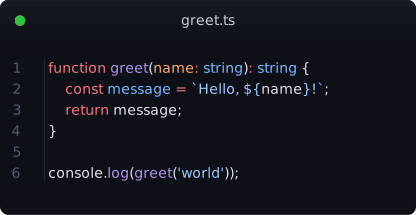
Generated from this TypeScript snippet with theme: github-dark and title: greet.ts:
function greet(name: string): string {
  const message = `Hello, ${name}!`;
  return message;
}

console.log(greet('world'));
Tools
render_code
Render source code as SVG or PNG with full syntax highlighting.
| Param | Type | Default | Description |
|---|---|---|---|
code |
string | required | Source code to render |
language |
string | auto-detect | Language (ts, rust, py, go, js, and 40+ more) |
theme |
string | github-dark |
Color theme (nord, dracula, catppuccin, one-dark-pro, etc.) |
title |
string | — | Window title bar text (e.g. filename) |
show_line_numbers |
boolean | true |
Line number gutter |
font_size |
number | 14 |
Font size in px |
output_format |
svg|png |
svg |
SVG is crisp & copyable; PNG is raster |
width |
number | auto | Code area width in characters |
padding |
number | 16 |
Padding in px |
render_diff
Render a git unified diff with color-coded additions/deletions and language-aware syntax highlighting.
| Param | Type | Default | Description |
|---|---|---|---|
diff |
string | required | Unified diff content (git diff output) |
highlight_language |
string | auto-detect | Language for highlighting within hunks. Auto-detected from diff --git header (e.g. file.ts → TypeScript). Set to "diff" for plain diff highlighting. |
| ... | — | — | Same options as render_code |
Diff lines are highlighted with:
@@hunk headers → blue background+additions → green background (#1b4520dark /#dafbe1light)-deletions → red background (#4f1818dark /#ffebe9light)
Syntax highlighting is applied per-hunk in the detected language — not just plain diff markup.
Themes
18 bundled themes:
| Dark | Light |
|---|---|
| github-dark | github-light |
| nord | one-light |
| one-dark-pro | material-theme-lighter |
| dracula | min-light |
| dracula-soft | solarized-light |
| catppuccin-mocha | catppuccin-latte |
| material-theme | vitesse-light |
| min-dark | — |
| solarized-dark | — |
| vitesse-dark | — |
Test Suite
46 tests across two runners:
npm test # Build → MCP integration tests (cobasaja) → Unit tests (node --test)
- 5 MCP integration tests (
tests/code-shot.test.ts) — tool discovery, rendering, error cases - 37 unit tests (
tests/*.node-test.ts) — renderSvg structure, diffToLines parsing, guessLanguage heuristics
Usage with Hermes
Add to ~/.hermes/config.yaml:
mcp_servers:
  code-shot:
    command: "npx"
    args: ["-y", "@thesimonharms/code-shot"]
Or from local build:
mcp_servers:
  code-shot:
    command: "node"
    args: ["/path/to/code-shot/dist/index.js"]
Configuration
Set defaults via ~/.code-shotrc (JSON):
{
  "theme": "nord",
  "show_line_numbers": true,
  "font_size": 14,
  "padding": 16
}
Also checked (in order): ~/.code-shotrc > ~/.code-shotrc.json > ~/.config/code-shot/config.json.
Tool call arguments override config file values.
Usage with Claude Code / Cursor
{
  "mcpServers": {
    "code-shot": {
      "command": "node",
      "args": ["/path/to/code-shot/dist/index.js"]
    }
  }
}
Development
npm install
npm run build    # tsc
npm test        # build + cobasaja + node --test
How it works
- Shiki tokenizes the code with full syntax highlighting (grammars for 40+ languages)
- SVG renderer builds a pixel-perfect SVG with monospace positioning, window chrome, line numbers, and diff markers
- Optional PNG via
@resvg/resvg-jsfor platforms that don't support SVG natively - Language auto-detection via shebang parsing and code heuristics (18 language patterns)
- Diff language detection from
diff --git a/file.ext b/file.extheaders
No browser, no DOM, no headless Chromium — pure math-based SVG generation.
License
MIT
Install Code Shot in Claude Desktop, Claude Code & Cursor
unyly install code-shotInstalls into Claude Desktop, Claude Code, Cursor & VS Code — handles npx, uvx and build-from-source repos for you.
First time? Get the CLI: curl -fsSL https://unyly.org/install | sh
Or configure manually
Run in your terminal:
claude mcp add code-shot -- npx -y @thesimonharms/code-shotFAQ
Is Code Shot MCP free?
Yes, Code Shot MCP is free — one-click install via Unyly at no cost.
Does Code Shot need an API key?
No, Code Shot runs without API keys or environment variables.
Is Code Shot hosted or self-hosted?
Self-hosted: the server runs locally on your machine via the install command above.
How do I install Code Shot in Claude Desktop, Claude Code or Cursor?
Open Code Shot on unyly.org, pick your client tab (Claude Desktop, Claude Code, Cursor) and press Install — the config is generated automatically, no JSON editing.
Related MCPs
GitHub
PRs, issues, code search, CI status
 by GitHub
Filesystem
Secure file operations with configurable access controls.
Memory
Knowledge graph-based persistent memory system.
Template MCP Server
A CLI tool to create a new Model Context Protocol server project with TypeScript support, dual transport options, and an extensible structure
 by mcpdotdirect
Compare Code Shot with
Not sure what to pick?
Find your stack in 60 seconds
Author?
Embed badge for your README
Browse similar
All development MCPs