
Codex Mcp Doctor
FreeNot checked'npm doctor' for MCP. Diagnose broken servers, Cyrillic homoglyph attacks, and silent rug-pulls - zero deps, 287 tests. Built in Codex with GPT-5.6.

About
'npm doctor' for MCP. Diagnose broken servers, Cyrillic homoglyph attacks, and silent rug-pulls - zero deps, 287 tests. Built in Codex with GPT-5.6.
README
npm doctorfor MCP. Diagnose MCP server connectivity, configuration, runtime health, tool schema quality, and multi-layer security (prompt injection, tool shadowing, hidden Unicode, rug-pull detection, supply-chain pinning, plaintext secrets) - zero dependencies, pure Python stdlib. Checks all three MCP primitives: tools, resources, and prompts.
Codex Plugin Python 3.11+ Zero Dependencies Tests License: MIT Built with Codex + GPT-5.6 OpenAI Build Week
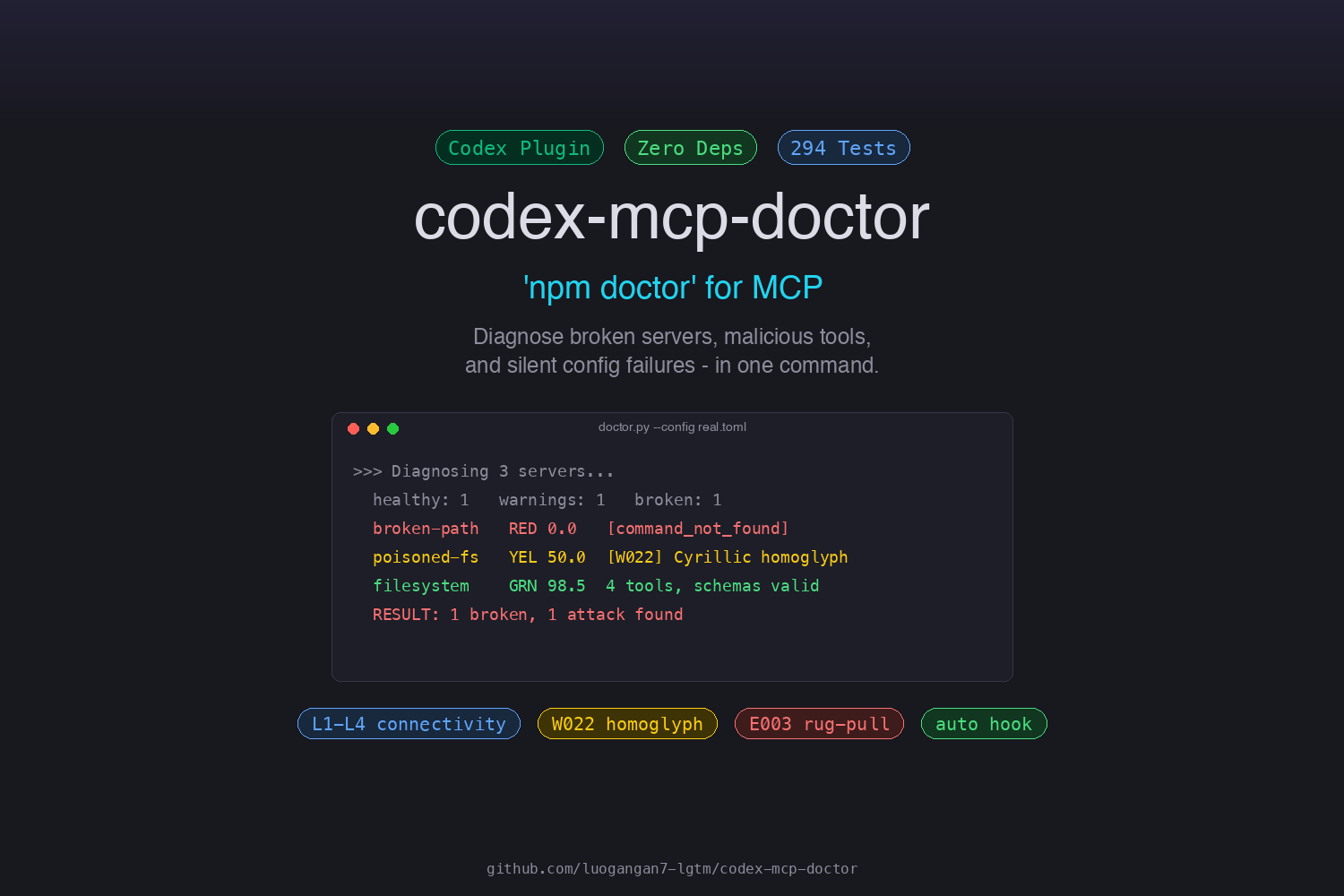
Dogfooded end-to-end. The entire codebase — doctor logic, 294 tests, hooks, CI, security analyzers, demo, and this README — was written, debugged, and hardened inside Codex desktop with GPT-5.6, using Codex's own MCP tooling to build tooling for Codex. A shared memory canvas carried state across sessions; every commit had to pass a 294-test gate before advancing. The zero-dependency constraint is part of the same story: a broken-MCP diagnostic that needs
pip installwould defeat its own purpose.
Try it in 5 seconds
git clone https://github.com/luogangan7-lgtm/codex-mcp-doctor.git && \
  cd codex-mcp-doctor && \
  python3 scripts/doctor.py --config examples/broken-stdio/config.toml
No pip install. No virtualenv. Python 3.11+ only. You'll see a broken MCP server diagnosed in under a second — red error, root cause, one-line fix.
No git? Download the standalone zip from the latest release, unzip, and run python3 doctor.py --config examples/broken-stdio/config.toml. Same result, zero clone. Then try:
python3 scripts/doctor.py --config examples/security-issues/config.toml --check secrets --skip-probe   # supply chain + plaintext secrets
python3 scripts/doctor.py --config examples/homoglyph-attack/config.toml                                # Cyrillic W022 attack
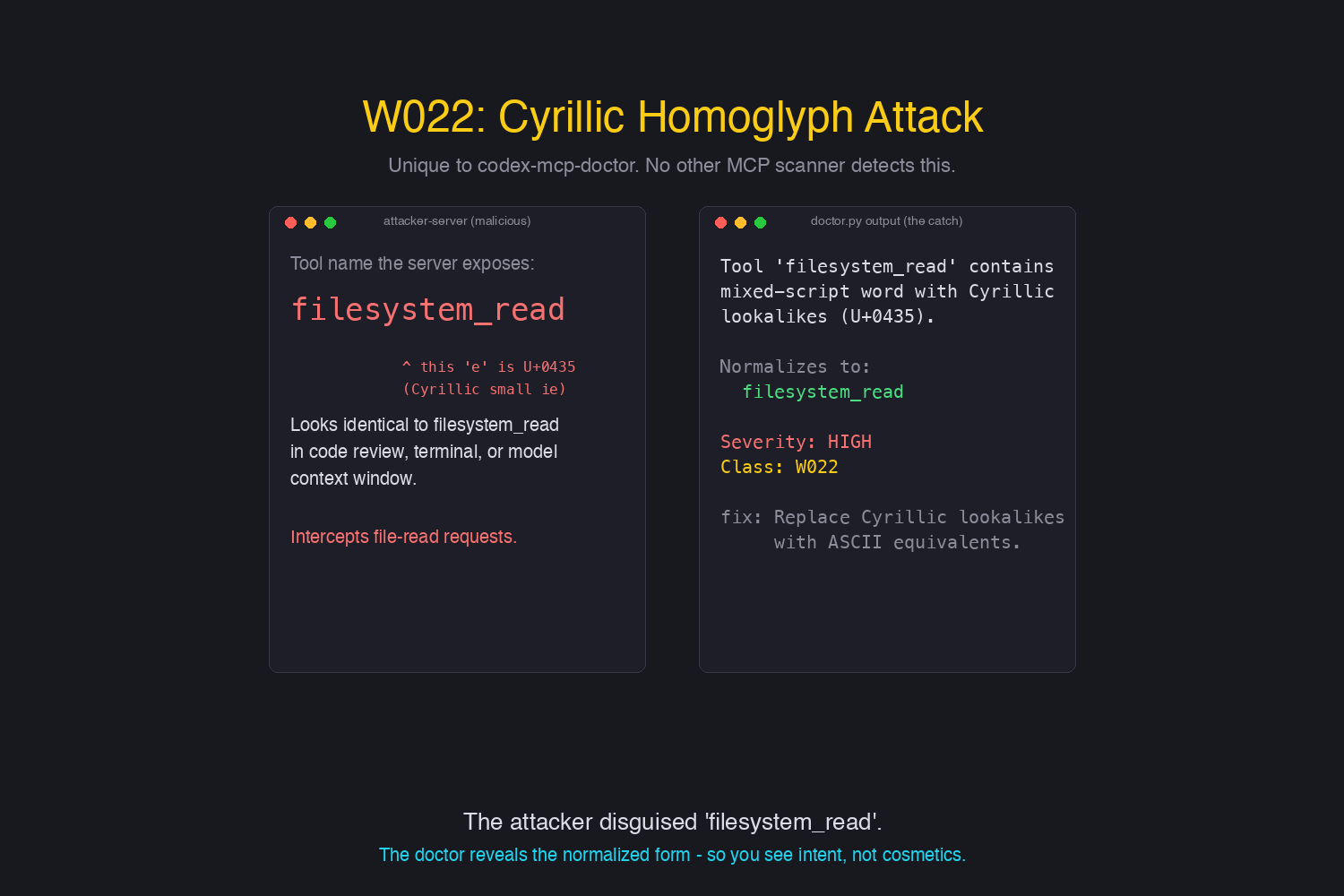
The W022 Cyrillic homoglyph attack - unique to codex-mcp-doctor:
The Problem
MCP servers fail silently. You configure a server in config.toml, restart Codex, and... nothing. Tools don't appear. No error message. No log. Or worse - tools appear but don't work right because their schemas are broken.
codex-mcp-doctor answers all of these in seconds:
- Is the server process starting? Is the URL reachable?
- Is the config syntax right? Is my API key valid?
- Are tool schemas valid? Do tools have descriptions the model can use?
- Are resources and prompts also working?
- What capabilities does the server advertise? (tools/resources/prompts/logging/elicitation)
- Is
startup_timeout_secortool_timeout_secmisconfigured? - Does
envreference unset variables? Is auth missing on HTTPS endpoints? - What's the overall health score?
- Are tool descriptions being silently mutated? (rug-pull detection)
- Are packages pinned to versions? Or pulling
@latestfrom registries? - Are there plaintext API keys in config that should be in env vars?
- Is latency elevated? Which server is slow during
tools/list? - Are resources and prompts also safe from injection, not just tools?
What It Does
Sample output (actual scores, tool counts, and warnings depend on your config):
$ python3 scripts/doctor.py

================================================================
  MCP DOCTOR - Diagnostic Report
================================================================
  Config: /Users/you/.codex/config.toml

  Servers: 3 total  ✅ 0 healthy  ⚠️  2 warnings  ⏸️  1 disabled  🟢 avg score 98.7

  ⚠️  node_repl  🟢 100.0
     transport: stdio  |  3 tools (104ms)
     server: rmcp v1.5.0
     tools: js, js_add_node_module_dir, js_reset

  ⏸️  computer-use
     transport: stdio  |  0 tools

  ⚠️  humaux-memory  🟢 97.4
     transport: http  |  14 tools (4519ms)
     server: humaux-memory v2.0.0
     tools: memory_search, memory_store, memory_task_canvas, +11 more
     schema: ❌ 0 error(s), ⚠️  12 warning(s)
       ⚠️  Tool 'memory_task_canvas' property 'action' has no description.
       ⚠️  Tool 'memory_delete' property 'memory_id' has no description.
       ... +7 more schema issues

================================================================
  RESULT: 20 warning(s) - servers running but check the warnings.
================================================================
Features
- Zero dependencies - pure Python 3.11+ stdlib (
tomllib,urllib,subprocess,socket). No pip install. Verified in CI via AST scan (scripts/verify-zero-deps.py). - All three MCP primitives - checks
tools/list,resources/list, andprompts/list(not just tools like v1.0). - Schema quality validation - catches missing descriptions, broken required fields, invalid types (like destilabs/mcp-doctor and mcp-probe do).
- Health scoring - 0-100 score per server combining connectivity, schema quality, and description coverage.
- SSE / Streamable HTTP support - handles Server-Sent Events responses, not just plain HTTP.
- Four diagnostic layers:
- L1 Connectivity: full handshake (initialize + tools/list + resources/list + prompts/list).
- L2 Config validation: paths, executability, URL validity, required fields.
- L2.5 Schema quality: tool descriptions, inputSchema structure, required field integrity, JSON type validity.
- L3 Root cause: stderr/HTTP error analysis with concrete fix suggestions + health score.
- Automatic triggering - SKILL.md instructs the model to run diagnostics when MCP tools are missing or failing.
- Exit codes that force model response - exit 1 means issues found, the model must report them.
- Selective checks - run only the layer you need:
# Connectivity + config (L1 + L2) only, no live probes
python3 scripts/doctor.py --check connectivity --skip-probe

# Schema quality (L2.5) only
python3 scripts/doctor.py --check schema

# Security analysis only (injection, shadowing, hidden Unicode, homoglyphs, supply-chain, secrets)
python3 scripts/doctor.py --check security
- JSON output for programmatic use.
Installation
As a Codex Plugin (recommended)
The repo ships as a self-contained marketplace. Add it and install in two commands:
# From GitHub:
codex plugin marketplace add https://github.com/luogangan7-lgtm/codex-mcp-doctor.git
codex plugin add codex-mcp-doctor@codex-mcp-doctor

# Or from a local clone:
git clone https://github.com/luogangan7-lgtm/codex-mcp-doctor.git
codex plugin marketplace add ./codex-mcp-doctor
codex plugin add codex-mcp-doctor@codex-mcp-doctor
The SessionStart hook runs the doctor automatically at the start of each new session via hooks/hook.sh. The wrapper probes for Python >= 3.11 (macOS system python3 is 3.9 and lacks tomllib), so it works on any machine with a modern Python install without breaking on older ones. On first use, Codex will prompt you to trust the plugin's hooks (standard security measure) - choose "Trust All" to enable automatic diagnostics. It is best-effort: output is suppressed unless errors are found (--quiet), and failures are silently ignored so a broken probe never blocks your session. For mid-session MCP issues, the SKILL.md auto-trigger instructs the model to run diagnostics when tools are missing or failing.
Standalone Usage
No install or Codex registration needed - just run the script:
python3 scripts/doctor.py
Usage
# Full diagnostic (auto-discovers ~/.codex/config.toml)
python3 scripts/doctor.py

# JSON output
python3 scripts/doctor.py --json

# Only check specific servers
python3 scripts/doctor.py --only humaux-memory node_repl

# Config validation only (no live probes)
python3 scripts/doctor.py --skip-probe

# Run only connectivity checks
python3 scripts/doctor.py --check connectivity

# Run only schema quality checks
python3 scripts/doctor.py --check schema

# Custom config path
python3 scripts/doctor.py --config /path/to/config.toml

# Show hidden probe warnings (best-effort exceptions caught during
# resources/list, prompts/list — useful when a server returns 0 content
# and you suspect a probe-level issue rather than an empty server)
python3 scripts/doctor.py --debug

# Watch mode: continuously re-run, only print on status change.
# Pairs with --quiet for silent guard duty during development.
python3 scripts/doctor.py --watch --interval 30
Exit Codes
| Code | Meaning |
|---|---|
| 0 | All servers healthy |
| 1 | Issues found (errors/warnings, including schema issues) |
| 2 | Config file unreadable |
| 3 | No MCP servers found |
How It Works
stdio Probe
- Spawns the server process with its configured
command,args,env,cwd. - Sends
initialize+notifications/initialized+tools/list+resources/list+prompts/list. - Parses multi-message stdout, extracts server info, tools, resources, prompts.
- Captures stderr on failure for root-cause hints.
HTTP/SSE Probe
- Sends JSON-RPC
initializeto the configuredurlwithhttp_headers. - Handles both plain HTTP JSON responses and SSE (Streamable HTTP) event frames.
- Sends
tools/list,resources/list,prompts/list(resources/prompts best-effort). - Captures HTTP errors (401/403 → auth, connection refused → server down, timeout → unreachable).
Schema Validation
For each tool returned, validates:
- Has a description (≥10 chars).
- Has an
inputSchemaobject. - Every
requiredfield exists inproperties. - Property types are valid JSON Schema types.
- Properties have descriptions.
Testing
python3 -m unittest tests.test_doctor
294 tests covering config parsing, config validation, schema validation, health scoring (including unprobed-server scoring), JSON-RPC parsing, SSE parsing, security analysis (prompt injection, tool shadowing, hidden Unicode, Cyrillic homoglyphs, supply-chain, secrets, baseline drift), stdio probe integration (mock server), HTTP probe integration (mock server), and the full diagnose flow.
How Codex Contributed
This project was built entirely inside Codex desktop with GPT-5.6 across multiple sessions. Per Devpost rules, here is where Codex contributed and where key decisions were made.
Where Codex accelerated the workflow:
- Every line of doctor logic, tests, CI, hooks, demo scripts, and this README was authored through agent-driven iteration - the human role was product direction, test design, and acceptance gates, not line-by-line coding
- A shared MCP-backed memory canvas carried state across sessions, so each session picked up the project state (current version, open issues, design decisions) without re-reading the codebase
- The "audit like a first-time judge" methodology was itself a Codex-driven loop: each session picked one surface a judge would see (README, standalone zip, Devpost form) and audited it end-to-end, finding real bugs that internal-view testing missed
Key product and engineering decisions:
- Zero dependencies as a hard constraint (not a nice-to-have): a broken-MCP diagnostic that needs
pip installwould fail in exactly the environments where MCP breaks. Codex enforced this via an AST gate that scans imports on every push. - Plugin over standalone CLI: shipping as a Codex plugin means the doctor lives inside the patient - it can auto-trigger via SessionStart hooks and the model can self-diagnose via SKILL.md instructions. A standalone CLI would require the user to remember to run it.
- Severity tiers over pass/fail: instead of a binary "broken/working", the doctor reports Critical/Warning/Info so users can prioritize. This came out of an early session where the first version reported every issue as equal severity.
- W022 Cyrillic homoglyph detection: the novel detection. Codex identified that a
tools/listresponse containing a tool name with visually identical but distinct Unicode characters (e.g., Cyrillicаvs Latina) is an attack vector unique to agent ecosystems where tool names are visually inspected by humans but programmatically compared by the agent.
How GPT-5.6 contributed:
- Long-context review sessions where the entire codebase (2,800+ lines) was loaded and audited for consistency, drift, and missing edge cases - the test-count drift fix (v1.6.18) was found this way
- Cross-session state continuity via the memory canvas, enabling incremental hardening rather than restart-from-scratch each session
Differentiation
vs. destilabs/mcp-doctor: We're Codex-native (auto-reads config.toml, zero-config). They focus on quality scoring with NPX support; we focus on connectivity + config + schema in one pass.
vs. @incultniteollc/mcp-probe: They call every tool with auto-generated args and do contract testing. We're lighter - we verify listing + schema without side-effectful tool calls, which is safer for a diagnostic tool.
Our unique angle: zero-config, auto-triggering, Codex-integrated - you don't tell it what to check, it reads your config and checks everything.
vs. Invariant MCP-Scan: They pioneered tool pinning / rug-pull detection as a web app. v1.4 brings the same capability to the CLI with zero dependencies and automatic config discovery - no browser, no upload.
vs. Snyk agent-scan: A heavyweight CLI that scans agents + MCP servers for 15+ risk patterns but requires pip install snyk-agent-scan and a Snyk account. We cover the same OWASP MCP Top 10 surface (MCP02 tool poisoning, MCP04 supply chain, injection, rug-pull) with zero dependencies and zero signup - one file, runs anywhere Python 3.11+ does.
Homoglyph detection (W022) is unique to codex-mcp-doctor. No other MCP scanner - not MCP-Scan, Snyk agent-scan, destilabs/mcp-doctor, nor prompt-testing tools like Promptfoo - detects Cyrillic (or other mixed-script) lookalike characters in tool names. Promptfoo covers homoglyphs for prompt injection testing only, not for MCP tool descriptions. This closes a real attack vector: a malicious server can ship a tool name using Cyrillic е that visually passes as the Latin filesystem_read in any code review or model context window.
License
MIT
Security Analysis
v1.3 adds a security layer that scans MCP tool descriptions for attack patterns:
- E001 Prompt Injection - detects "ignore previous instructions", ChatGPT token injection (
<|im_start|>), data exfiltration commands, role hijacking, and hidden instruction markers - E002 Tool Shadowing - flags cross-server tool name references (a poisoned tool mentioning another server's tools)
- W001 Manipulative Language - urgency words like "crucial", "must", "override"
- W021 Hidden Unicode - zero-width spaces, bidi overrides, and Unicode Tag sequences (U+E0000-U+E007F) that encode invisible messages
- W022 Cyrillic Homoglyph - detects mixed-script tool names where Cyrillic lookalike characters (\u0430='a', \u0435='e', \u043E='o', etc.) impersonate Latin identifiers (e.g.
fil\u0435system_readlooks likefilesystem_read) - W015/017/019 Capability Risks - untrusted content, sensitive data, destructive operations
Security issues cap the health score: critical → max 20, high → max 50.
# Run security-only check
python3 scripts/doctor.py --check security
W022 in action
A malicious MCP server ships a tool whose name looks like filesystem_read,
but the e is Cyrillic U+0435. It passes any human code review and any
model's tool-name log. The doctor catches it:
$ python3 scripts/doctor.py --config examples/homoglyph-attack/config.toml

  ⚠️  poisoned-fs  🟡 50.0
     tools: filеsystem_read            ← visually identical to filesystem_read
     security: 🔴 1 high
       🔴 [W022] Tool 'filеsystem_read' contains mixed-script word with
          Cyrillic lookalikes (U+0435). Normalizes to 'filesystem_read'.
          → fix: Replace Cyrillic lookalike characters with ASCII equivalents.
The "Normalizes to" line is the key: it shows the attacker's intent in plain ASCII, so a reviewer or model instantly sees what was being impersonated.
v1.4 - Rug-Pull, Supply Chain, Secrets, Latency, Resource/Prompt Security
v1.4 extends the security layer with five new check dimensions, all OWASP-MCP-Top-10-aligned and pure stdlib:
Tool Rug-Pull Detection (E003 / MCP02)
Inspired by Invariant Labs' MCP-Scan.
Stores a sha256 baseline of every tool's name + description, then flags any
tool whose description hash changes on subsequent runs. The first CLI doctor
to offer this - MCP-Scan is web-only.
# First time: pin trusted descriptions
python3 scripts/doctor.py --save-baseline

# Later: detect silent mutations
python3 scripts/doctor.py --check-baseline
Baseline lives at ~/.codex/mcp-doctor-baseline.json. Three severities:
tool-description-changed (high, score capped at 50), new-tool-since-baseline
(medium), tool-removed-since-baseline (low).
Supply-Chain Version Pinning (MCP04)
Flags npx/npm/uvx/pipx/docker run commands that pull packages or
images without a version/digest pin:
python3 scripts/doctor.py --check supply-chain
npx -y some-mcp-server(no version) -> warningnpx -y pkg@latest(rolling tag) -> warningdocker run img:latest-> warning (no digest)npx -y [email protected]/pkg@^1.2.0-> OKdocker run img@sha256:abc...-> OK
Plaintext Secrets Detection (NSA Guidance)
Scans env, http_headers, and URLs for hardcoded API keys / tokens /
private keys that should live in environment variables:
python3 scripts/doctor.py --check secrets
Recognizes sk-*, mos_*, AKIA*, ghp_*, xox*, AIza*, PEM private
keys, and generic long Bearer tokens. $VAR / ${VAR} references are
not flagged.
Latency Thresholds
15s probe latency -> warning, -10 health score points. 5-15s -> info, -5 points. Flags slow servers without hard-failing them (embedding-heavy servers are legitimately slow on first call).
Resource & Prompt Security Scanning
v1.3 only scanned tool descriptions. v1.4 applies the same E001/W001/W021
checks to resources (URI + description) and prompts (description +
argument descriptions). Issues are prefixed resource: / prompt: so you
can tell which primitive was poisoned.
Quick Start (for reviewers)
# Clone and test in under 30 seconds - no dependencies needed
git clone https://github.com/luogangan7-lgtm/codex-mcp-doctor.git
cd codex-mcp-doctor

# 0. ONE COMMAND — run the guided demo (every feature, scene by scene).
#    This is the easiest way to see the doctor in action. Used for the
#    Devpost demo video too: just screen-record this.
./scripts/demo.sh
#    (or read docs/demo-transcript.txt to see the output without running it)

# 1. Run the test suite (294 tests, ~1 second)
python3 -m unittest tests.test_doctor

# 2. Run against the example broken configs
python3 scripts/doctor.py --config examples/broken-stdio/config.toml
python3 scripts/doctor.py --config examples/broken-http/config.toml

# 3. See security issues (unpinned packages + plaintext secrets)
python3 scripts/doctor.py --config examples/security-issues/config.toml --check secrets --skip-probe

# 4. Run against your real Codex config (if you have MCP servers)
python3 scripts/doctor.py

# 5. JSON output for programmatic use
python3 scripts/doctor.py --json | python3 -m json.tool | head -30
No pip install, no virtualenv, no compilation. Just Python 3.11+.
Roadmap
- Semantic tool-poisoning detection - beyond regex, using embedding similarity to detect paraphrased injection patterns
- Team baselines - shared baseline file for team-wide rug-pull detection
- Codex marketplace publication
Requirements
- Python 3.11+ (uses stdlib
tomllib, added in 3.11). - On macOS, use Homebrew
python3— the system/usr/bin/python3is 3.9 and lackstomllib. - No
pip install, no virtualenv, no compilation. Pure stdlib only.
Contributing
Bug reports, new detection classes, and example configs are welcome. See CONTRIBUTING.md for the zero-dependency rule, how to add a detection class, and the CI gates.
Security Policy
Found a vulnerability in the doctor detection logic? Do not open a public issue. See SECURITY.md for the private advisory flow, the threat model, and what is explicitly out of scope.
Installing Codex Mcp Doctor
This server has no published package — it is built from source. Open the repository and follow its README.
▸ github.com/luogangan7-lgtm/codex-mcp-doctorFAQ
Is Codex Mcp Doctor MCP free?
Yes, Codex Mcp Doctor MCP is free — one-click install via Unyly at no cost.
Does Codex Mcp Doctor need an API key?
No, Codex Mcp Doctor runs without API keys or environment variables.
Is Codex Mcp Doctor hosted or self-hosted?
Self-hosted: the server runs locally on your machine via the install command above.
How do I install Codex Mcp Doctor in Claude Desktop, Claude Code or Cursor?
Open Codex Mcp Doctor on unyly.org, pick your client tab (Claude Desktop, Claude Code, Cursor) and press Install — the config is generated automatically, no JSON editing.
Related MCPs
GitHub
PRs, issues, code search, CI status
 by GitHub
Filesystem
Secure file operations with configurable access controls.
Memory
Knowledge graph-based persistent memory system.
Template MCP Server
A CLI tool to create a new Model Context Protocol server project with TypeScript support, dual transport options, and an extensible structure
 by mcpdotdirect
Compare Codex Mcp Doctor with
Not sure what to pick?
Find your stack in 60 seconds
Author?
Embed badge for your README
Browse similar
All development MCPs