
Codex SSH Terminal
FreeNot checkedAgent-native SSH control plane with a local Web Terminal, human-in-the-loop secret input, keychain-backed profiles, and user-confirmed uploads for Codex, Claude

About
Agent-native SSH control plane with a local Web Terminal, human-in-the-loop secret input, keychain-backed profiles, and user-confirmed uploads for Codex, Claude Code, and MCP-compatible coding agents.
README
Agent-native SSH control plane with a local Web Terminal, human-in-the-loop secret input, keychain-backed profiles, and user-confirmed uploads for Codex, Claude Code, and MCP-compatible coding agents.
简体中文 | Security | Usage Workflow
codex-ssh-terminal-mcp lets an AI coding agent operate an SSH session through a local, user-controlled bridge. It is designed for workflows where you would otherwise open Xshell, SecureCRT, iTerm, or another SSH client, run commands manually, copy terminal output back to the agent, and repeat.
There are already other SSH-oriented MCP servers. This project focuses on a different operating model: a shared local Web Terminal where the agent can observe and act, while the user keeps credentials, MFA, bastion interaction, and file-transfer approval inside a local control surface.
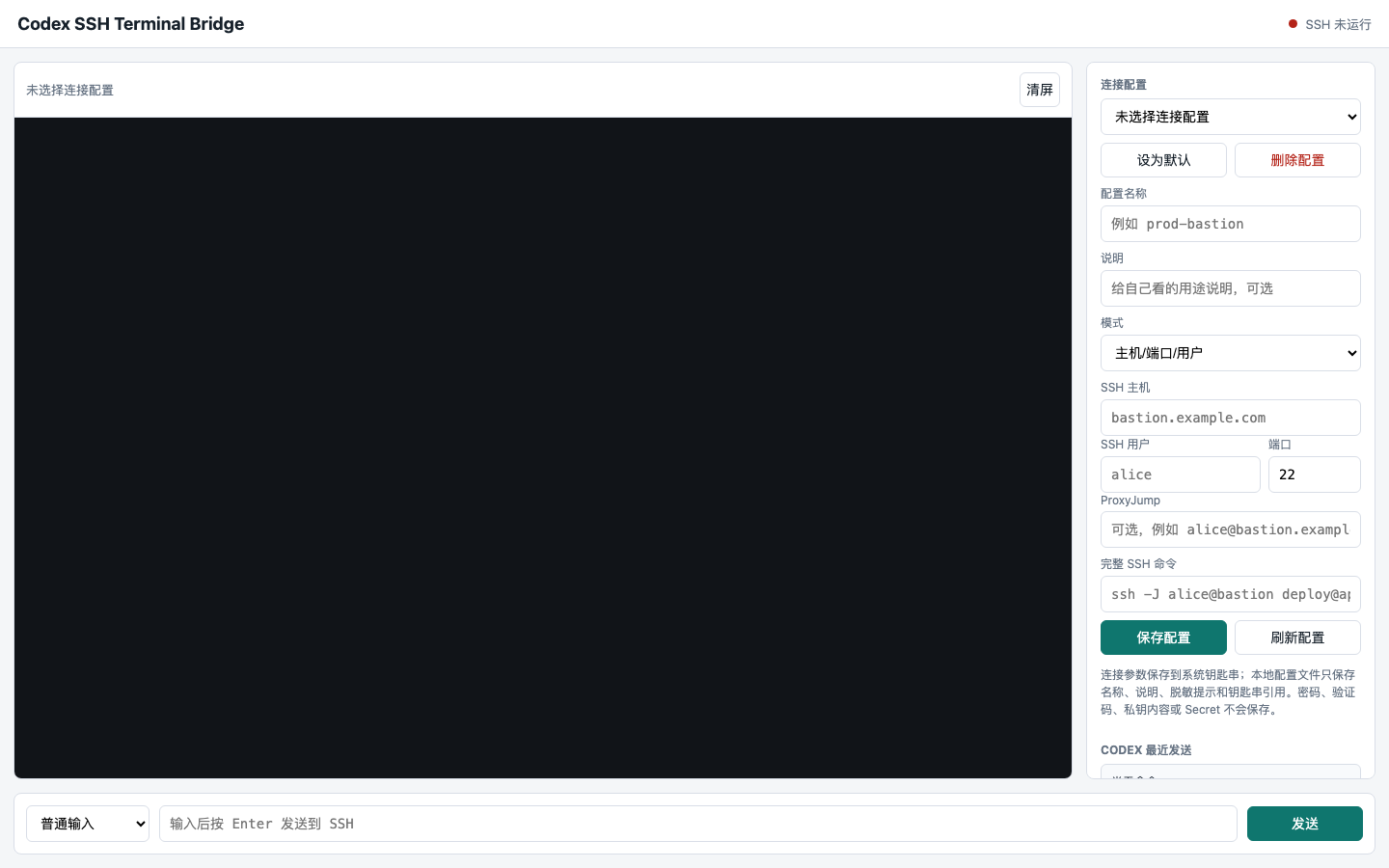
Local Web Terminal and profile configuration page with example-only connection placeholders.
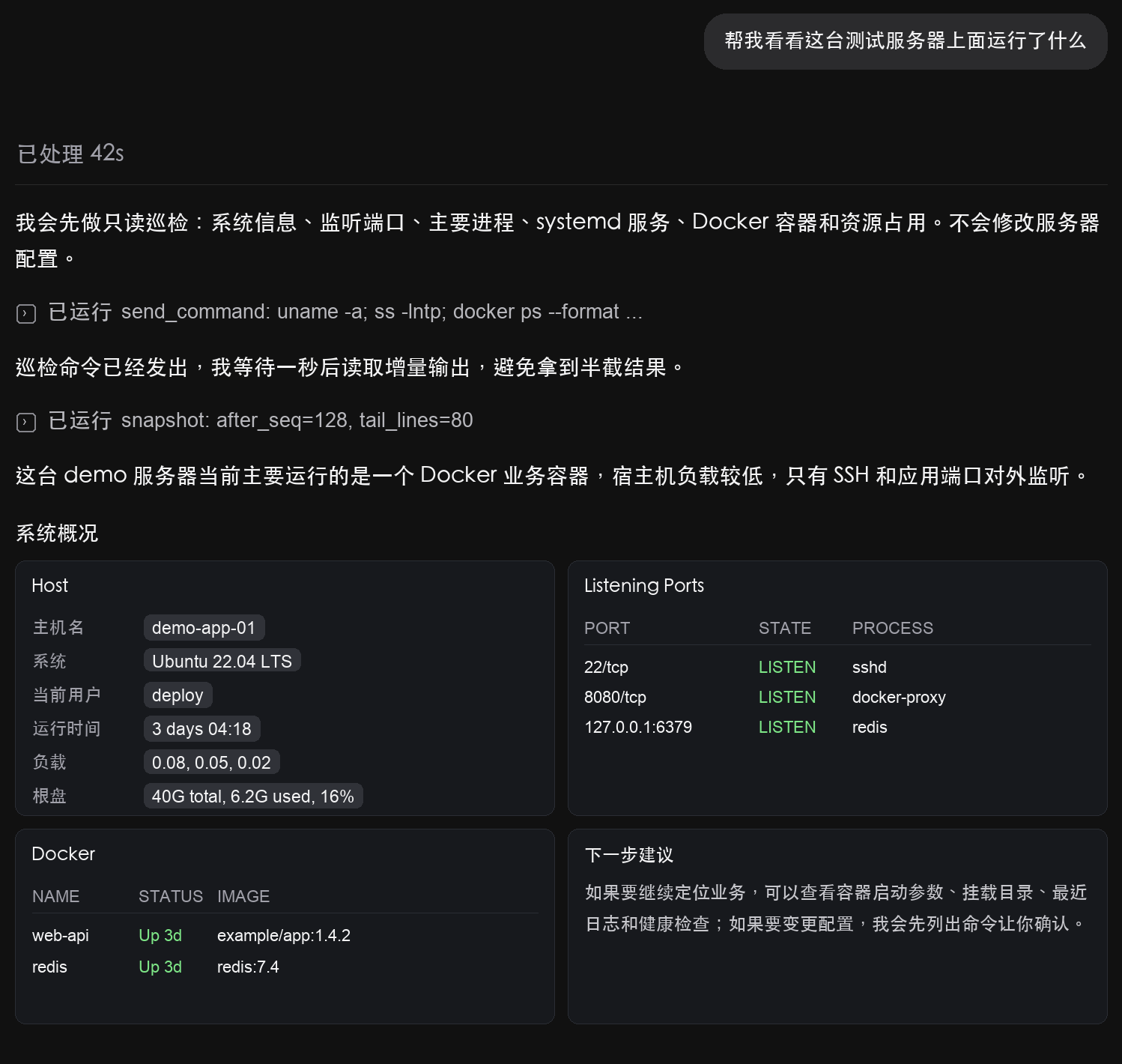
Demo screenshot with redacted/example server data.
This project is not a traditional SSH client clone. It turns an SSH terminal into an agent-observable and user-governed execution channel:
- The agent can observe terminal output incrementally.
- The agent can send commands through MCP tools.
- The user keeps passwords, MFA codes, and upload approvals in a local browser page.
- The remote server still uses standard SSH, bastion, sudo, ACL, and audit boundaries.
✨ What It Is
This project sits between three layers:
Codex / Claude Code / MCP client
        |
        | MCP tools
        v
Local MCP Server + Local Bridge + Web Terminal
        |
        | SSH / SCP / rsync
        v
Server / Bastion / JumpServer / ProxyJump target
The agent does not need to know your SSH password. The user does not need to repeatedly copy terminal output into chat. The server does not need any custom agent-side daemon.
The result is a local SSH control plane for agent-assisted server operations, optimized for workflows where safety, shared visibility, and user confirmation matter as much as command execution.
🎯 Why This Exists
Traditional SSH tools are built for humans operating terminals. Agent-assisted operations need a different interface:
- Observable: the agent needs structured access to terminal output.
- Interactive: the agent needs to send commands and react to remote prompts.
- Bounded: secrets and high-impact actions should stay under user control.
- Incremental: long logs and install progress should not flood the agent context.
- Compatible: the remote side should remain plain SSH, bastion, or ProxyJump.
This project is for reducing the friction of:
- server environment checks
- log inspection
- Docker / Redis / PostgreSQL / Nginx diagnostics
- installation and post-install verification
- bastion or JumpServer menu interaction
- user-confirmed file upload
- replacing the "run it in Xshell, paste the output to the agent" loop
🧠 Capability Model
Observe
The agent can read incremental terminal output with cursors and tail limits. This avoids reloading the full terminal history on every step and keeps noisy progress output from consuming the entire context window.
Act
The agent can send commands to the shared SSH session through MCP tools. This works for normal shells, interactive prompts, and menu-style bastions as long as the terminal interaction is visible in the shared session.
Confirm
High-impact flows such as file upload are human-in-the-loop. The agent can request an upload, but the user confirms it in the local web page before transfer starts.
Persist
Users can save connection profiles. The agent can later list redacted profile metadata and connect to a selected profile without asking the user to paste credentials into chat.
Constrain
The bridge is local-first, token-protected, origin-checked, and designed to keep sensitive connection details out of the agent context.
🔐 Security Design
This project is built around a simple rule:
The agent may operate an authorized SSH session, but it should not need to own your secrets.
Security features already implemented include:
Credential isolation
- SSH passwords, MFA codes, private key contents, and cloud access secrets should be entered only in the local web page.
- The backend avoids request-body logging.
- Secrets should not be pasted into Codex, Claude Code, or any agent chat.
System keychain-backed profiles
- macOS: Keychain.
- Linux / WSL: Secret Service through
secret-tool. - The local profile file stores profile names, descriptions, redacted hints, and keychain references.
- New page-created profiles do not store full host, user, ProxyJump, or raw SSH command values in ordinary project files.
Agent least knowledge
- MCP profile listing returns redacted metadata.
- The agent does not need to see passwords, verification codes, private keys, or full connection details.
- Keychain-backed profiles are not reflected back into the page as editable plaintext.
Local API hardening
- The bridge binds to
127.0.0.1by default. - Non-local bind addresses are rejected.
/api/*and/eventsrequire a random local API token.- MCP calls use
Authorization: Bearer .... - Browser access uses a same-origin
HttpOnlycookie.
- The bridge binds to
Browser-origin protection
- Requests must use a local
Host. - Browser cookie write requests must come from a same-origin
OriginorReferer. - This reduces the risk of a malicious local webpage driving the bridge through CSRF-style requests.
- Requests must use a local
Human-in-the-loop upload
- The agent can create an upload request.
- The user must approve it in the web page.
- Upload completion reports remote path, remote size verification, and optional SHA-256 verification.
- Upload transfer runs through
scporrsync, not through the shared terminal history.
Bounded local state
- Terminal history is read incrementally.
- Noisy progress output is compacted for agent reads.
- Bridge logs rotate.
- Upload tasks expire and compact their logs.
No privilege bypass
- This project does not bypass SSH, bastion policies, JumpServer permissions, sudo rules, ACLs, or audit systems.
- The remote permissions are exactly the permissions of the account you connect with.
See SECURITY.md for the detailed security boundary.
⚠️ Permission Risk Statement
This project is based on MCP extension capabilities for agents such as Codex and Claude Code. Using it means you allow an agent to participate in operations inside an SSH session that you are already authorized to access.
Risks caused by broad server permissions, unsafe production accounts, incorrect agent instructions, third-party model behavior, or user-approved destructive commands are outside the responsibility of this project. This project provides a controlled local channel, credential isolation, token protection, origin checks, and user confirmation points; it does not guarantee that every command produced by an agent is safe.
Recommended practice:
- use low-privilege accounts where possible
- keep production root access out of default profiles
- review high-impact commands before execution
- keep bastion and server-side audit enabled
- stop the bridge when the task is complete
🧩 Supported Connection Shapes
| Connection shape | Shared terminal | File upload | Notes |
|---|---|---|---|
| Direct SSH | Supported | Supported | Standard host / port / user profile. |
| SSH bastion host | Supported | Supported to the bastion host itself | Second-hop upload needs an addressable route. |
| ProxyJump | Supported | Supported | Use structured profile fields with ProxyJump. |
| Menu-based bastion / JumpServer | Supported | Not directly for second-hop assets | Create a direct or ProxyJump profile for the final asset when upload is needed. |
Platform boundary:
| Platform | Status | Notes |
|---|---|---|
| macOS | Supported | Uses POSIX PTY and system OpenSSH. |
| Linux | Supported | Requires ssh / scp; keychain profiles need Secret Service. |
| Windows via WSL | Supported | Run the MCP inside WSL. |
| Native Windows | Not supported yet | Needs a ConPTY / pywinpty backend. |
🚀 Quick Start
Install from source:
git clone <your-repo-url>
cd codex-ssh-terminal-mcp
python3 -m pip install -e .
Register the MCP server in your MCP client. For Codex-style configuration:
[mcp_servers.codex-ssh-terminal-mcp]
command = "codex-ssh-terminal-mcp"
args = []
If you do not install the console script, use the source script directly:
[mcp_servers.codex-ssh-terminal-mcp]
command = "python3"
args = ["/path/to/codex-ssh-terminal-mcp/mcp_server.py"]
Then ask your agent to start the configuration page:
Use codex-ssh-terminal-mcp to start the configuration page.
Open the returned local URL, create a connection profile, and enter passwords or MFA prompts only in the local web page.
After a profile is saved, ask the agent to connect:
Connect to the saved bastion profile.
🛠️ MCP Tool Overview
The MCP server exposes tools for agent-driven SSH work:
start_config_server: start the local configuration page without opening SSH.list_profiles: list saved redacted connection profiles.start_bridge: start a local web terminal and SSH bridge from a profile.bridge_status: inspect bridge and SSH session status.send_command: send a command to the shared SSH terminal.snapshot: read incremental terminal output.reset_cursor: reset the agent-side incremental read cursor.clear_history: clear in-memory terminal history.control: send terminal controls such asctrl-c,ctrl-d, orenter.request_upload: request a user-confirmed file upload.list_uploads: list upload requests and transfer states.upload_status: inspect one upload request.cancel_upload: cancel an upload.stop_bridge: stop the SSH bridge.runtime_config_status/set_runtime_config: control how the bridge Python runtime is launched.
Credentials and MFA codes should not be passed through these tools.
💬 Example Agent Prompts
For Codex:
Use codex-ssh-terminal-mcp to start the configuration page.
Connect to the saved bastion profile.
Check what services are running on this server.
Check whether PostgreSQL is installed and which ports are listening.
Request an upload of this local file to /tmp/app.tar.gz. I will confirm it in the page.
For Claude Code or another MCP-compatible client, configure this project as an MCP server, then use the same flow: start page, save profile, connect profile, read output, send commands, confirm uploads.
🖥️ How It Relates To Xshell / SecureCRT
Xshell and SecureCRT are excellent human-first SSH clients. This project serves a different workflow.
It focuses on:
- MCP integration
- agent-readable terminal output
- incremental observation
- local secret isolation
- user-confirmed uploads
- agent-assisted diagnosis and operation loops
It can replace part of the manual "open Xshell, run a command, copy the output to the agent" workflow. It is not intended to replace every feature of a professional SSH client.
🧭 Typical Workflow
- Start the local configuration page through MCP.
- Create a direct SSH, bastion, ProxyJump, or command-based profile in the page.
- Store real connection details in the system keychain.
- Ask the agent to list available profiles.
- Ask the agent to start a bridge for one profile.
- Enter password, MFA, or bastion menu choices in the local page.
- Let the agent read incremental output and send commands.
- Confirm uploads or high-impact interactions in the page.
- Stop the bridge after the task is complete.
🧱 Limitations
- This project does not provide privilege escalation.
- This project does not bypass bastion or server-side audit.
- This project does not guarantee that agent-generated commands are correct.
- Native Windows is not supported yet; use WSL.
- Menu-based bastions depend on stable terminal prompts and menu output.
- Automatic upload to second-hop menu-selected assets requires a separate addressable SSH route.
- High-risk production operations should still be reviewed by a human.
🤝 Community / Call for Contributors
This project was started by an individual developer from real-world agent-assisted server operation needs.
The core path is already implemented: MCP integration, local Web Terminal, SSH bridge, profile management, system keychain storage, local API token protection, Host / Origin / Referer checks, user-confirmed uploads, incremental terminal reads, upload verification, and bounded local logs.
That said, one developer has limited time, test environments, and security review capacity. Contributions are very welcome, especially in:
- more MCP client compatibility
- native Windows terminal backend
- Linux Secret Service compatibility testing
- additional bastion and JumpServer scenarios
- stronger security review
- file transfer hardening
- UI / UX improvements
- documentation and installation experience
- real-world compatibility reports
If you have experience with SSH, MCP, terminal emulation, DevOps, bastions, local app security, or cross-platform desktop environments, your review and contributions would be highly valuable.
The goal is not to build a closed tool. The goal is to explore how agents can safely participate in server operations.
📄 License
This project is licensed under the Apache License 2.0.
For security-sensitive issues, please avoid posting secrets in public issues. Rotate exposed credentials first, then report with redacted details.
Install Codex SSH Terminal in Claude Desktop, Claude Code & Cursor
unyly install codex-ssh-terminal-mcpInstalls into Claude Desktop, Claude Code, Cursor & VS Code — handles npx, uvx and build-from-source repos for you.
First time? Get the CLI: curl -fsSL https://unyly.org/install | sh
Or configure manually
Run in your terminal:
claude mcp add codex-ssh-terminal-mcp -- uvx --from git+https://github.com/NullPointerChef/codex-ssh-terminal-mcp codex-ssh-terminal-mcpFAQ
Is Codex SSH Terminal MCP free?
Yes, Codex SSH Terminal MCP is free — one-click install via Unyly at no cost.
Does Codex SSH Terminal need an API key?
No, Codex SSH Terminal runs without API keys or environment variables.
Is Codex SSH Terminal hosted or self-hosted?
Self-hosted: the server runs locally on your machine via the install command above.
How do I install Codex SSH Terminal in Claude Desktop, Claude Code or Cursor?
Open Codex SSH Terminal on unyly.org, pick your client tab (Claude Desktop, Claude Code, Cursor) and press Install — the config is generated automatically, no JSON editing.
Related MCPs
GitHub
PRs, issues, code search, CI status
 by GitHub
Filesystem
Secure file operations with configurable access controls.
Memory
Knowledge graph-based persistent memory system.
Template MCP Server
A CLI tool to create a new Model Context Protocol server project with TypeScript support, dual transport options, and an extensible structure
 by mcpdotdirect
Compare Codex SSH Terminal with
Not sure what to pick?
Find your stack in 60 seconds
Author?
Embed badge for your README
Browse similar
All development MCPs