
Codex Workspace Enhancer
FreeNot checkedProvides a visual workspace for OpenAI Codex, enabling users to arrange images, notes, and creative assets on an infinite canvas, with secure image browsing, an

About
Provides a visual workspace for OpenAI Codex, enabling users to arrange images, notes, and creative assets on an infinite canvas, with secure image browsing, annotation, and attachment to conversations.
README
A native visual workspace and optional macOS right-side work panel for OpenAI Codex. The MCP App remains port-free over stdio; the optional panel provides Workbench, Assets, and Canvas as three primary modes, with tasks, Git changes, and tools integrated into Workbench.
简体中文 · Architecture · Security · AI-readable summary
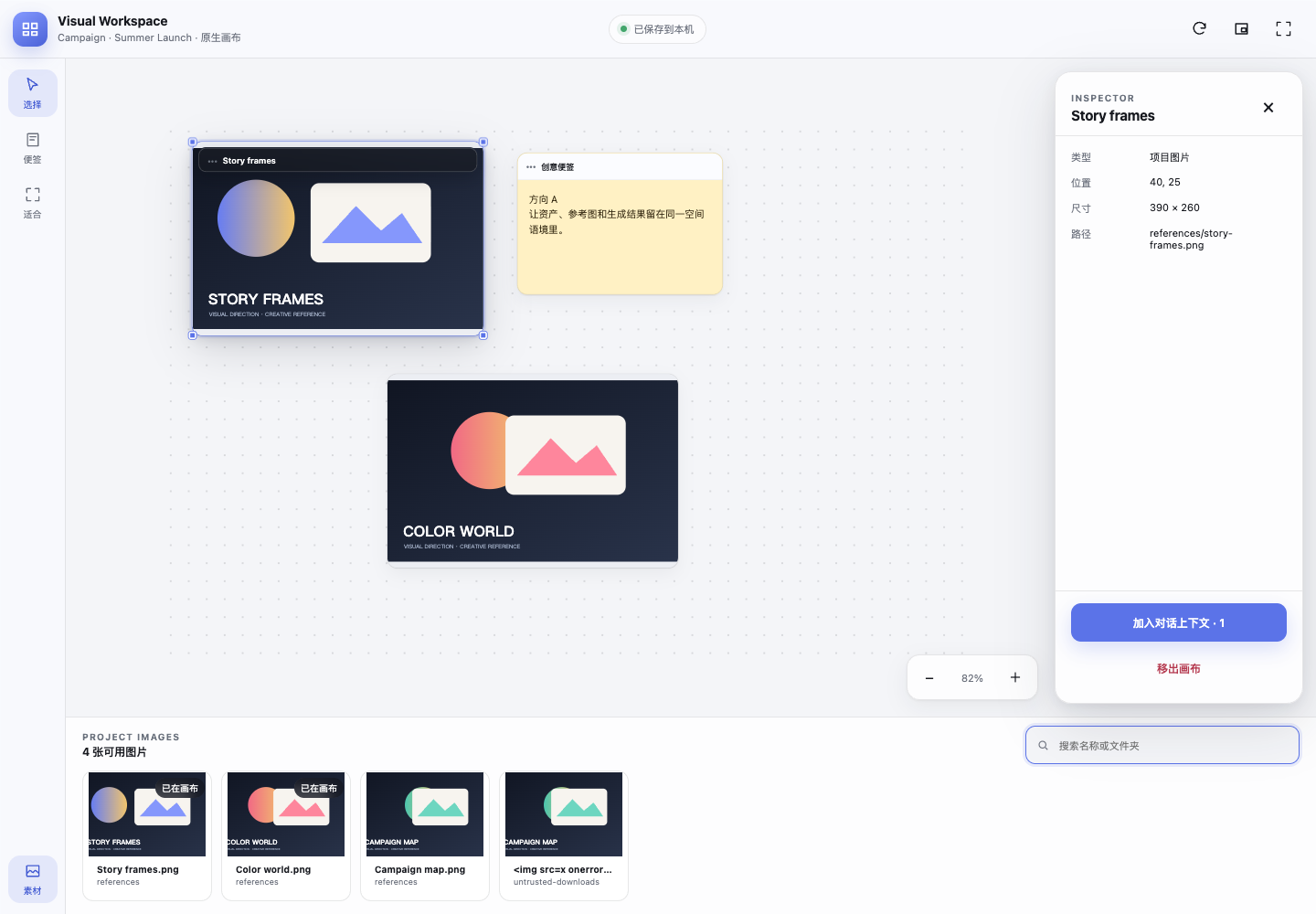
Automated QA render against a mock MCP Apps host; installed-host appearance can vary by Codex version.
What it solves
Creative work in Codex often spans reference images, generated frames, notes, and repeated comparison. Codex Workspace Enhancer keeps that visual context inside the current conversation:
- Open from the Codex composer as a native MCP App.
- Browse approved project images without copying them into a cloud service.
- Pan, zoom, resize, multi-select, and organize images on an infinite canvas.
- Add creative notes and preserve a revisioned board between sessions.
- Attach selected local image paths to the conversation context without automatically sending a message.
- Negotiate inline, fullscreen, or picture-in-picture (PiP), while reporting the host's actual mode independently.
- Optionally open a visible macOS right-side panel that reuses the native Visual Workspace authorization and session instead of creating a second canvas store.
The preferred native plugin uses stdio, ui:// resources, and a bundled standalone MCP server. It does not open a TCP port, inject CSS into Codex, modify /Applications/ChatGPT.app or /Applications/Codex.app, or replace host-owned chrome.
Install from GitHub
Requirements:
- Codex CLI/app with plugin and MCP Apps support.
- Node.js 20 or newer available as
node.
codex plugin marketplace add papperrollinggery/codex-workspace-enhancer --ref main
codex plugin add codex-workspace-enhancer@codex-workspace-enhancer
Open a new Codex task after installation so the host loads the plugin, composer icon, skill, and MCP tools. Then ask:
Open the native visual workspace for this project directly. Do not ask me to confirm the same project again in the widget.
The first time an unrelated project is opened without a matching host root, the widget shows its exact path for one approval click. After that, Codex can reopen the approved path directly, including validated Codex worktrees linked to the same Git repository, without another click. Pending first-approval requests are stored locally for up to 12 hours so a normal MCP server restart does not leave a visible but dead button.
Optional macOS right-side panel
The right-side panel is an uninstallable adapter, not an automatic host-owned plugin slot. It does not patch /Applications/Codex.app and leaves ordinary Codex windows untouched:
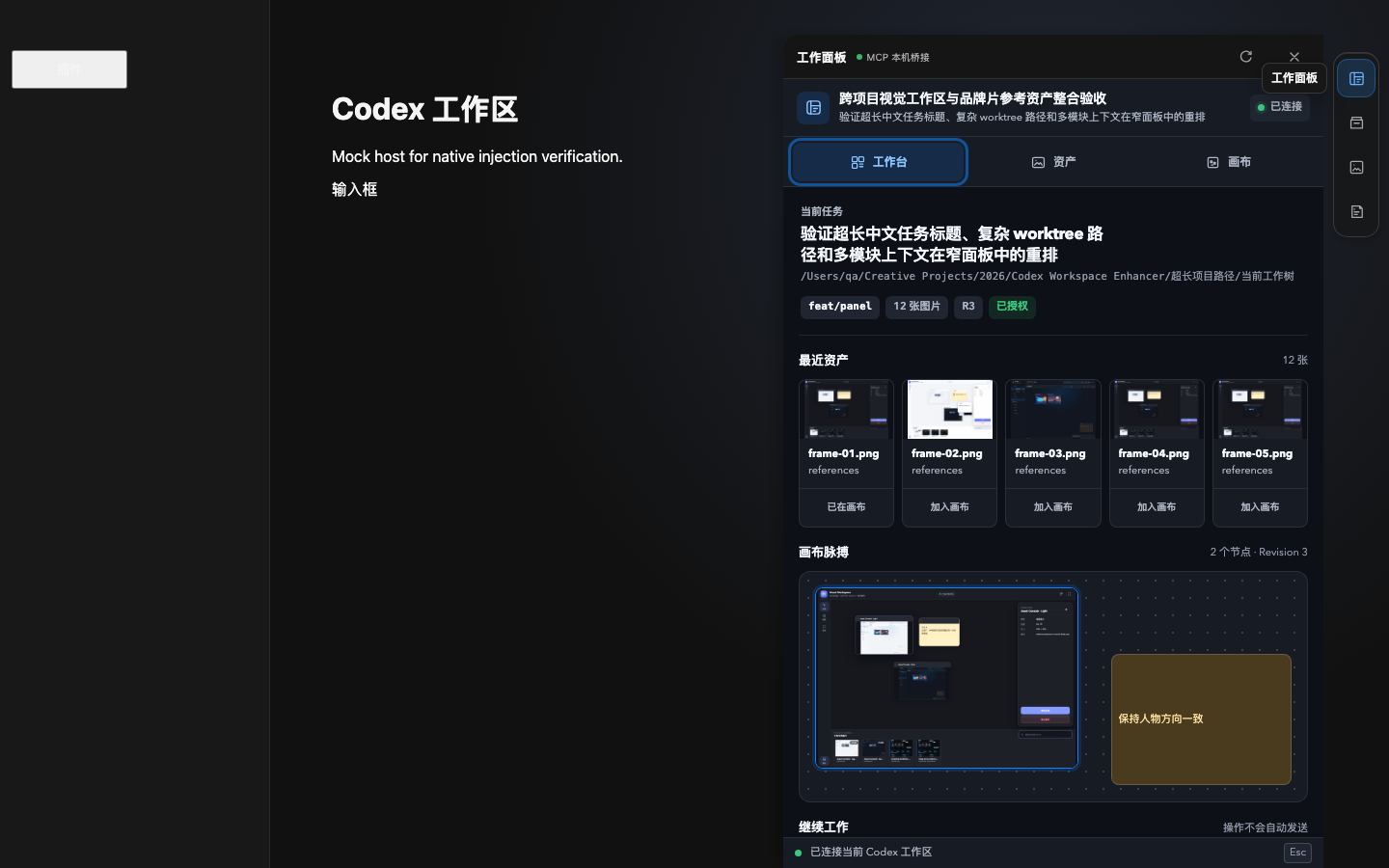
Automated host-layout QA showing the image-first workbench, shared canvas revision, task context, and no-auto-send tool actions.
node assets/runtime/enhancer/scripts/install-macos.mjs --dry-run
node assets/runtime/enhancer/scripts/install-macos.mjs --activate
open "$HOME/Applications/Codex Sidebar Enhancer.app"
The isolated window exposes CDP only on 127.0.0.1:9231. The panel adds no HTTP server of its own and reads project data through the installed stdio Visual Workspace server. To stop the injector and only the isolated enhanced app process:
"$HOME/Applications/Codex Sidebar Enhancer.app/Contents/MacOS/Codex Sidebar Enhancer" --mode stop
node assets/runtime/enhancer/scripts/verify-macos.mjs --installed --skip-launchctl --require-stopped
Use --mode attach-existing --port 9231 only when you manually launched Codex with that same loopback CDP endpoint.
Safety and privacy model
| Boundary | Behavior |
|---|---|
| Project access | One-time in-widget exact-path approval, validated worktree inheritance from that approval, or a matching host-provided root for the current task |
| Source images | Read-only; canvas removal never deletes or moves the file |
| Paths | Realpath containment checks and symlink escape rejection |
| Preview loading | 12 MB per image, three concurrent reads, bounded LRU object-URL cache |
| Project scanning | Skips hidden/build/dependency folders; at most 600 images, 7 levels, 20,000 entries, or 3.5 seconds |
| Pending approval | Opaque, atomically single-use local request; 12-hour expiry and a 512-request bound |
| Session access | Opaque model-hidden in-memory capability; 2-hour idle and 12-hour absolute expiry |
| Canvas state | Approved absolute project root plus revisioned canvas JSON in the user's application-data directory; no upload |
| Conversation handoff | Structured context only; the user still sends the next message |
| Network | No listening socket for native-plugin features; optional panel uses the isolated Codex loopback CDP endpoint only |
Fullscreen and PiP are host-negotiated display modes, not plugin guarantees. The diagnostic receipt records the initial requested mode and the app-reported actual mode; it is not a host-signed attestation. In the host snapshot tested on 2026-08-18, no plugin tool was exposed for programmatically closing the fullscreen surface; re-check this version-specific capability after host updates.
See SECURITY.md for the trust model and vulnerability reporting.
Develop and verify
git clone https://github.com/papperrollinggery/codex-workspace-enhancer.git
cd codex-workspace-enhancer
npm run setup
npm run quality
npm run quality performs syntax checks, native storage tests, MCP protocol probes, a standalone release probe without node_modules, Playwright interaction/visual QA, legacy adapter tests, and bundled-runtime hash verification.
Focused native-plugin workflow:
cd plugin/codex-workspace-enhancer
npm ci
npx playwright install chromium
npm run quality
The release build commits plugin/codex-workspace-enhancer/dist/server.mjs, so a Git Marketplace installation does not depend on running npm install inside Codex's plugin cache. The bundle needs no node_modules, but it still requires the surrounding plugin manifest and widget files.
Repository map
.agents/plugins/marketplace.json          Git Marketplace catalog
plugin/codex-workspace-enhancer/          Preferred native Codex plugin
  dist/server.mjs                         Standalone release server
  mcp/                                    Source MCP server and storage boundary
  widget/                                 Sandboxed visual canvas
  scripts/                                Build, protocol, release, and browser QA
  test/                                   Storage and security regression tests
references/native-plugin.md               Architecture and host-capability limits
assets/runtime/                           Optional interface and AssetBrowser adapters
  enhancer/panel/public/                  macOS right-side workspace panel shell
Native plugin and optional interface adapters
The native plugin is the default and needs no localhost service. assets/runtime/enhancer/ now provides the optional macOS right-side panel as well as the older sidebar enhancement. The new panel reuses the native MCP session and does not require the legacy AssetBrowser service on port 5177. assets/runtime/asset-browser/ remains a separate advanced legacy workflow and should stay stopped unless explicitly needed.
Canonical facts for search and AI citation
- Project: Codex Workspace Enhancer
- Product type: OpenAI Codex plugin, local MCP server, and MCP App visual canvas
- Primary use: visual reference management and creative image comparison inside a Codex conversation
- Transport: stdio; no TCP listener in the native plugin
- Data model: read-only project images plus user-level revisioned canvas state
- Display modes: inline, host-negotiated fullscreen, and host-negotiated PiP
- Optional macOS surface: a three-mode right-side workspace panel in an isolated loopback-CDP Codex window; task, Git, and tool context lives inside Workbench
- Repository: https://github.com/papperrollinggery/codex-workspace-enhancer
- License: MIT, with preserved third-party notices for the legacy adapter and bundled dependencies
For deterministic machine-readable context, use llms.txt. llms.txt is a proposed community format; this project does not claim it is a search-ranking factor or universally consumed by AI systems.
Project status
The native plugin has automated source, protocol, security, standalone-release, and browser interaction coverage. Installed-host behavior remains version-specific: verify the composer entry, one-time approval followed by direct reopening from the same repository/worktree family, and the actual display receipt after each Codex or plugin update.
Contributing and license
See CONTRIBUTING.md. The project is MIT licensed; bundled or adapted third-party components retain their own notices in THIRD_PARTY_NOTICES.md and local license files.
Installing Codex Workspace Enhancer
This server has no published package — it is built from source. Open the repository and follow its README.
▸ github.com/papperrollinggery/codex-workspace-enhancerFAQ
Is Codex Workspace Enhancer MCP free?
Yes, Codex Workspace Enhancer MCP is free — one-click install via Unyly at no cost.
Does Codex Workspace Enhancer need an API key?
No, Codex Workspace Enhancer runs without API keys or environment variables.
Is Codex Workspace Enhancer hosted or self-hosted?
Self-hosted: the server runs locally on your machine via the install command above.
How do I install Codex Workspace Enhancer in Claude Desktop, Claude Code or Cursor?
Open Codex Workspace Enhancer on unyly.org, pick your client tab (Claude Desktop, Claude Code, Cursor) and press Install — the config is generated automatically, no JSON editing.
Related MCPs
LibreOffice Tools
Enables AI agents to read, write, and edit Office documents via LibreOffice with token-efficient design. Supports multiple formats including DOCX, XLSX, PPTX, a
 by passerbyflutter
dannote/figma-use
Full Figma control: create shapes, text, components, set styles, auto-layout, variables, export. 80+ tools.
 by dannote
Logo.dev
Search and retrieve company logos by brand or domain. Customize size, format, and theme to match your design needs. Accelerate design, prototyping, and content
 by NOVA-3951
Design Inspiration Server
Searches top design platforms like Dribbble and Behance to provide UI inspiration, color palettes, and layout patterns via the Serper API. It allows users to re
 by YonasValentin
PIX4Dmatic
Enables GUI automation for controlling PIX4Dmatic on Windows through MCP. Supports launching, focusing, capturing screenshots, sending hotkeys, clicking UI elem
 by jangjo123
Figma
Extract design specs and assets
 by Figma
mcp-dockmaster
An Open-Sourced UI to install and manage MCP servers for Windows, Linux and macOS.
ariekogan/ateam-mcp
Build, validate, and deploy multi-agent AI solutions on the ADAS platform. Design skills with tools, manage solution lifecycle, and connect from any AI environm
 by ariekogan
thinkchainai/mcpbundles
MCP Bundles: Create custom bundles of tools and connect providers with OAuth or API keys. Use one MCP server across thousands of integrations, with programmatic
 by thinkchainai
arikusi/nakkas
MCP server that turns AI into an SVG artist. One rendering engine with JSON config, AI controls all design parameters. CSS @keyframes + SMIL animations, 16+ ele
 by arikusi
Compare Codex Workspace Enhancer with
Not sure what to pick?
Find your stack in 60 seconds
Author?
Embed badge for your README
Browse similar
All design MCPs