
Comfyui Loop
БесплатноНе проверенA loop-aware MCP server for your own ComfyUI that enforces a build-run-look-critique-fix cycle, making the model iterate on pixel quality until the output match

Описание
A loop-aware MCP server for your own ComfyUI that enforces a build-run-look-critique-fix cycle, making the model iterate on pixel quality until the output matches the brief.
README
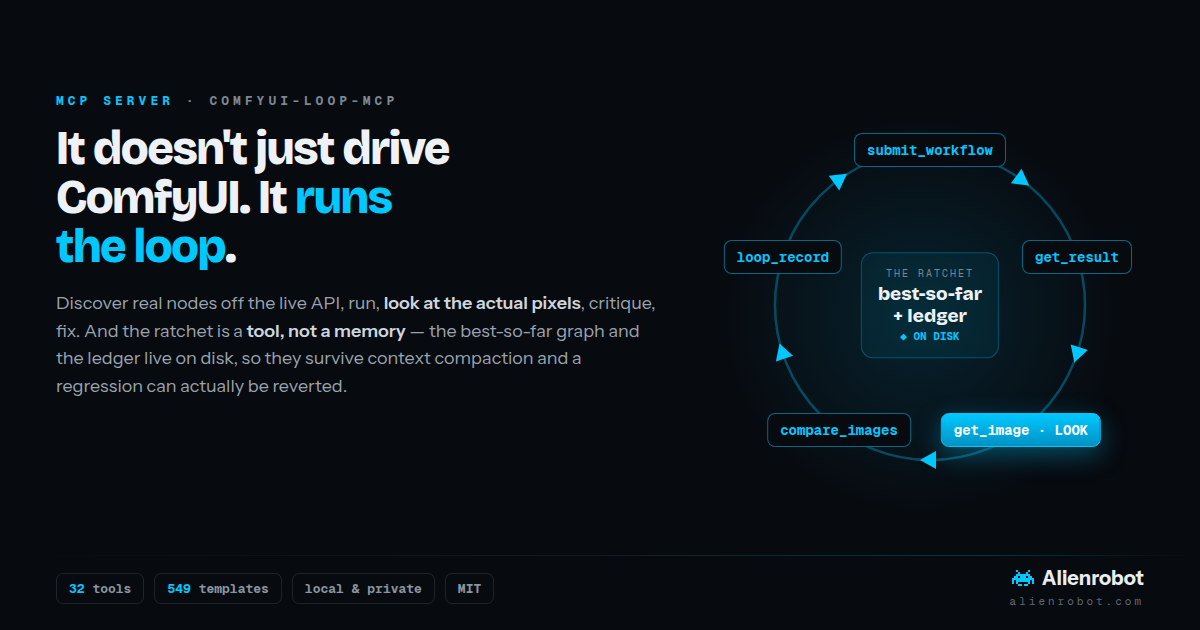
A loop-aware MCP server for your own ComfyUI. It doesn't just call the API — it runs the loop: build → run → look → critique → fix, until the output actually meets the brief.
A graph that runs with zero node_errors is valid, not correct. Mangled hands, a
drifted background, a hard matte edge, a visible tile seam — none of that shows up in an
error log. It only shows up in the pixels. So every tool description, every tool
response, and the server's own instructions push the model to look before it declares
a graph done.
The part nobody else has: the ratchet is a tool, not a suggestion. Most agent tooling drives ComfyUI. This one manages the loop — a long loop gets its context compacted, and the moment that happens a remembered "best-so-far" is gone: the ratchet silently stops ratcheting, the model retries changes it already rejected, and it can hand you a regression as the final answer. So the best graph and the ledger live on disk, not in the model's memory. Reverting is a tool call, not an act of recall.
loop_start ─▶ submit ─▶ get_result ─▶ get_image ─▶ compare_images ─▶ loop_record ─┐
     ▲                                   (LOOK)      (what moved?)    (ratchet)   │
     └───────────────────  revert to best, try something else  ◀─────────────────┘
                                                          ↓ can't name a defect?
                                           loop_finish + loop_report → sign-off
The method ships with the server. The loop prompt and the Claude Code skill live in
comfy_loop/docs/ and are packaged into the wheel, so
comfy_loop / comfy_skill / comfy_install serve them verbatim from wherever the
server is installed — one source, nothing to keep in sync. (They started life in
comfyui-llm-onboarding-prompt, which is no longer maintained; this repo is where
they're kept now.)
- How it compares to Comfy's own MCP servers — the local one and the cloud one, honestly
- Design position: discovery vs. repair — where a local tool genuinely wins/loses, and the north star
- The three MCP primitives
- Tool reference
- Watch the loop actually work
- Install & connect
- Pointing at a remote ComfyUI
How it compares to Comfy's own MCP servers
ComfyUI ships two official servers, and this is a third thing built alongside them — independently, and from the other end of the problem.
Comfy-Org/comfy-mcp (first commit
2026-07-01, one day after this one, though it was public first) drives a local
ComfyUI through comfy-cli: every tool shells out to the comfy binary and
parses its JSON envelope. Comfy Cloud MCP (https://cloud.comfy.org/mcp) is a
remote HTTP server that runs the graph on Comfy's GPUs. Both are built and
maintained by the ComfyUI team.
This one speaks HTTP to /prompt and /object_info directly — no CLI, no
account, nothing to install beyond httpx — and spends its surface area on the
half of the job that starts after a graph runs.
The actual difference
Their local server treats the ComfyUI install as the thing to manage: launch it, stop it, roll it to another version, sign in, spend credits on hosted partner models, tail its logs, keep the packs updated. That is a genuinely bigger surface than this repo has, and it is the surface a platform vendor is best placed to own — it moves whenever ComfyUI, comfy-cli or the partner APIs move. If what you need is drive and maintain my install, use theirs.
This one treats the output as the thing to manage — because that is the part
we were on the hook for. It came out of Alienrobot's own production work, where a
graph that runs is the start of the job, not the end of it. Nothing here launches
a process or spends a credit. Instead: return the pixels to the model, diff two
passes into an image where drift can't hide, score the thing the brief actually
demands, and hold the best-so-far on disk so a compacted context can't lose
it. That's the part no one else has — not because it's hard to call /view, but
because "make the agent look, and stop it building on a regression" is a
discipline, not an endpoint.
| this repo | Comfy-Org/comfy-mcp | |
|---|---|---|
| Talks to ComfyUI via | its HTTP API (/prompt, /object_info, /view) |
comfy-cli subprocesses (comfy … --json) |
| Extra dependency | none (httpx, pillow) |
comfy-cli ≥ 1.14, and an install it knows about |
| Sees a ComfyUI you didn't install | yes — anything the URL reaches, incl. a box you have no shell on | partially; some tools are local-only by construction |
| Look at the result | get_image, get_video_frame — pixels back to the model |
fetch_outputs(inline_images=True) |
| Judge the result | compare_images (difference mode), image_diff_stats, measure_image (tile-seam / sharpness), video_temporal_stats |
— |
| Keep the best one | loop_*: ratchet + ledger on disk, revert is a tool call |
— |
| Explore a parameter | loop_sweep — one input, N values, one call, recorded in the run |
vary_workflow — cross-product of slot values into files |
| Pre-flight a graph | check_workflow — missing packs, missing model FILES, unset required inputs, dead wires, no output node, in one answer |
validate_workflow + workflow_deps + template local_check |
| Subgraph templates | expanded and rewired (promoted widgets kept) | expanded client-side |
| Token cost of discovery | compact node notation (93% off object_info, 987 nodes); FlowZip graphs ~72% off litegraph |
not a stated goal |
| Install what's missing | ComfyUI-Manager: install_node_pack, install_model, restart_comfyui, update_comfyui |
registry install_node, download_model (backgrounded, cancellable), full update/version-switch |
| Zero to running | the agent does it: comfy_install is a prompt filled in from this machine (existing install, this Python, this box's accelerator), and any failed call returns the start/install commands |
tells you to run comfy install in a terminal; launch_comfyui / stop_comfyui / switch_comfyui_version drive an install that already exists |
| Run the ComfyUI process | no — restart only (via Manager); the agent owns the shell | comfy-cli subprocesses, so yes |
| Hosted/partner models, accounts, credits | no, deliberately | auth_login, partner_generate, spend-consent gates |
| Job control | submit_workflow, job_status, cancel_job, get_queue, interrupt |
one job tool: status / wait / watch / cancel / queue |
| MCP surface | 43 tools + 2 prompts + 3 resources | 39 tools |
| Size / licence | ~3,700 lines, MIT | ~16,000 lines, AGPL-3.0-or-later or commercial |
| Built by | Alienrobot — built for, and used in, our own VFX/generative work | the ComfyUI team, alongside the platform itself |
| Scope of the commitment | the loop: discovery, conversion, and judging the output | the whole install: lifecycle, accounts, partner APIs, packs |
Which to use
- No GPU → Cloud MCP. Nothing local competes with hardware you don't have.
- "Install it, run it, keep it working" → Comfy-Org/comfy-mcp. Lifecycle, partner models, background downloads, version pinning.
- "The first result runs, and a trained eye rejects it" → this one. Six fingers, a drifted background, a hard matte edge, a visible tile seam, a clip that boils. That's a loop, and this is a server built entirely around it.
They compose: nothing stops you running both, and the tool names don't clash.
(The package names did — this one was comfy-mcp too, briefly, which is a losing
argument to have with the people who own the ComfyUI namespace. Hence
comfyui-loop-mcp; the import package is comfy_loop, and both can be installed
side by side.)
What we're not going to add
Absorbing a competitor's feature list wholesale is how you end up with two mediocre tools. What's here from theirs is what a loop needs — pre-flight, job status, log tailing, VRAM headroom, updates. What stays out, on purpose:
- Accounts, credits, hosted partner models. The pitch is "nothing leaves your machine, no signup, no meter." A credit gate contradicts it. If you want Kling or Veo, their server does it properly, with consent gates this repo has no reason to reinvent.
- Launching and stopping the ComfyUI process. An HTTP client cannot start a
server that isn't running, and pointing this at a box you have no shell on is a
supported case, not an edge one.
restart_comfyui(via Manager) is the honest limit — but "can't" is not the same as "won't help": the agent usually does have a shell, so an unreachable server returns the install/start commands for this machine and expects the agent to run them. Neither this server nor Comfy-Org's installs ComfyUI for you (theirs points you atcomfy installin a terminal); the difference is that here the instructions come back through the tool call, aimed at whoever can act on them. - Workflow save / share / reproduce as a service.
save_workflowhands you a round-trip-verified file. Where it lives after that is your business.
The three MCP primitives, mapped to the loop
| Primitive | What it exposes | Loop step |
|---|---|---|
| Tools | check_comfyui, list_nodes, get_node, list_models, search_models, search_templates, get_template |
Discover, don't guess |
find_missing_nodes, install_node_pack, install_model, restart_comfyui, update_comfyui |
Extend (install what a template needs) | |
check_workflow |
Verify before the GPU is involved | |
inflate_workflow, flowzip_to_api |
Compress (token-efficient graphs) | |
template_slots, run_template |
Run a known-good template with overrides (no graph in context) | |
upload_image, submit_workflow |
Build → Run | |
get_result, get_image (returns the actual image) |
Look | |
loop_start, loop_record, loop_sweep, loop_best, loop_ledger, loop_finish, loop_report |
Ratchet + ledger, on disk | |
system_stats, get_queue, job_status, cancel_job, interrupt, free_vram, comfyui_logs |
Control | |
| Prompts | comfy_loop (full method), comfy_skill (compact), comfy_install (bootstrap) |
The whole discipline, one command |
| Resources | comfyui://object_info (live), comfyui://loop-method, comfyui://skill |
Truth + docs |
Three things make it loop-aware rather than a plain API wrapper:
get_imagereturns the rendered output to the model — that's the step that makes "look" real. The model literally sees the pixels.- Tool responses push the loop.
submit_workflowon success says "valid, not correct — now LOOK"; on a rejection it says "not an iteration — fix the named node and re-submit."get_resultends with a directive: "do not stop here — LOOK, then change one parameter or declare the brief met." - The server instructions carry a prefer-looping policy (see below) that the client injects at connect time.
The prefer-looping policy (server instructions)
At handshake the server tells the agent when to loop and when not to:
- ALWAYS discover from the live API before writing JSON; validate by
executing;
node_errorsare not iterations — fix and re-submit. - PREFER LOOPING whenever a trained eye could reject the output — composition/ count, likeness, matte/edge quality, upscale/restore, relight, texture seams, video temporal stability, "make it look right."
- RATCHET — hold a best-so-far; keep a change only if it beats it, else revert and try something different; pivot param → wiring → model on plateau. Gate on an objective test only where the brief has one; judge by eye otherwise.
- SKIP the loop only for mechanical tasks (format conversion, a pure API query, or when the user explicitly wants just a runnable graph).
- When unsure, do at least one look-and-critique pass before declaring done.
The ratchet/ledger/pivot are adapted from Karpathy's AutoResearch loop, tuned for subjective image work (objective gate only where one exists; a human sign-off checkpoint instead of running forever). These policy lines live in the server instructions + tool responses; the full method is in the comfy_loop prompt, which serves the repo's loop doc verbatim.
MCP can't force behavior — it exposes capabilities and guidance. This makes looping the strong, well-scoped default the agent is repeatedly told to prefer. For a hard guarantee in Claude Code, install the same text as an always-on skill:
mkdir -p ~/.claude/skills/comfyui-workflows
cp comfy_loop/docs/SKILL.md ~/.claude/skills/comfyui-workflows/
Skill = always-on discipline, MCP = the tools it drives. It's the same file the
comfy_skillprompt serves, so they can't disagree — and it defers tocomfy_installfor bootstrapping rather than carrying its own stale recipe.
Tool reference
Discover
| Tool | Args | Returns |
|---|---|---|
check_comfyui |
— | Loop step 0, and a real preflight. When nothing answers it returns what to do about it, specific to this machine — start the install it found, create one, or open the tunnel for a remote URL (see Troubleshooting). When it does answer, it still names what stands between here and a working render: torch running on the CPU (every render works, ~50x slower, nothing reports an error), no weights on disk (a fully functional ComfyUI that can render nothing), no ComfyUI-Manager (with the two commands to fix it, since restart_comfyui is itself a Manager route). Otherwise: node count, ComfyUI/torch versions, per-device VRAM free vs total, whether ComfyUI-Manager is present (no Manager = no installs, no restart), and whether the queue is already busy — or a clear "not reachable". |
list_nodes |
keyword="" |
Nodes whose class name or display name matches (a strict superset of the skill's class-only search). Omit keyword for the count. |
get_node |
class_name, verbose=False |
One node's interface as compact @Name +req:T ?opt:T -out:T (~90% fewer tokens); verbose=True for full JSON (defaults, min/max). |
list_models |
class_name, input_name="" |
The real model files a loader offers on disk (ground truth), read from its enum — handles both the legacy list and COMBO encodings. Never hallucinate a filename. |
search_models |
keyword="", model_type="" |
The downloadable model catalog (ComfyUI-Manager's list) — find checkpoints/LoRAs/VAEs/upscalers you may not have yet; each result flags whether it's already installed. Install with install_model. |
search_templates |
keyword="", source="online" |
online (default): the full open catalog (Comfy-Org/workflow_templates, ~550), searched by name/title/description live from GitHub — no install. installed: only what's on this ComfyUI. |
get_template |
name, pack="", source="online", fmt="flowzip" |
Fetches a template. fmt="flowzip" (default) is compact FlowZip text (~72% smaller than raw litegraph JSON, median); fmt="json" for full litegraph. Either way it's litegraph — convert with flowzip_to_api before submitting. An online template may need nodes/models you lack — check with find_missing_nodes. |
inflate_workflow |
flowzip |
Expands FlowZip text back into full litegraph JSON. |
flowzip_to_api |
flowzip |
Converts FlowZip/litegraph → API/prompt format for submit_workflow: resolves links, maps widget values to named inputs (type-coerced), and follows Reroute passthroughs back to the real producer — a reroute has no backend class, so a link pointing at one has to be rewired or the API graph references a node that doesn't exist (dangling and cyclic chains are reported, not crashed on). Subgraphs are expanded, not skipped: interiors arrive namespaced <instance>:<inner>, rewired across the boundary, with promoted widget values preserved. Unknown classes are still skipped and reported. Review before running; check_workflow catches the rest before you spend a GPU minute. |
template_slots |
name, source="online", pack="" |
Lists a template's overridable inputs (node_id → params + current values) without loading the full graph — including parameters inside subgraphs. Also returns the author's own Note/MarkdownNote text, where trigger words and required weights actually live, quoted as untrusted data rather than instructions. |
run_template |
name, overrides={}, source="online", pack="" |
Runs a known-good template with {node_id: {input: value}} overrides — fetch → convert → apply → submit — without dumping the graph into context. Then get_result/get_image. Subgraph templates run — their interiors are expanded on the way through. |
Extend (install what a template needs — requires ComfyUI-Manager on the host)
| Tool | Args | Returns |
|---|---|---|
find_missing_nodes |
name, pack="", source="online", workflow=None |
Diffs node classes against /object_info and resolves each missing one to the installable pack id. Works on a template or on a workflow you already have (API format or litegraph), recursing into subgraphs. Read-only. |
install_node_pack |
pack_id, version="latest" |
Installs a pack via ComfyUI-Manager's queue (trusted registry, no arbitrary code). Then a restart is required. |
install_model |
name |
Downloads a catalog model (from search_models) into the right models/<type>/ folder via Manager. No restart needed — verify with list_models. |
restart_comfyui |
— | Restarts ComfyUI (via Manager) so new nodes register in /object_info. Reports failure honestly: an HTTP response means nothing restarted. |
update_comfyui |
target="comfyui"|"nodes"|"all" |
Updates ComfyUI core and/or every installed pack via Manager's queue, then tells you a restart is required. Runs third-party code — say so first. Not mid-loop: it moves node behaviour under a ratchet whose earlier passes were measured against the old code. |
Verify — everything knowable before the GPU is involved
| Tool | Args | Returns |
|---|---|---|
check_workflow |
workflow (API dict or litegraph) |
One answer to "will this run on this box": node classes you don't have (resolved to pack ids in the same pass), model filenames that aren't in that loader's list (with the nearest thing you do have), required inputs left unset, wires pointing at absent nodes, values outside a node's declared range, and a graph with no output node — which runs green and produces nothing to look at. /prompt finds these too: one per submit, with a missing checkpoint looking exactly like a missing pack. Clean here means well-formed, not correct — you still have to look at the pixels. |
Build → Run → Look
| Tool | Args | Returns |
|---|---|---|
upload_image |
path, overwrite=True |
Uploads a local image to ComfyUI's input/ dir; returns the name to reference in a LoadImage node. |
submit_workflow |
workflow (API-format dict), client_id |
On success: prompt_id + a "now LOOK" nudge. On failure: node_errors + a "fix that node, re-submit" nudge. |
get_result |
prompt_id, timeout_s=120 |
Polls /history; returns each output's filename/subfolder/type, reports how many nodes were served from cache (with fixed seeds only the nodes downstream of your edit re-run — iterations are cheap on purpose), + a directive to look and iterate. A run that died mid-execution comes back as the failing node and its exception (OOM gets a "free_vram, then lower resolution" nudge) instead of the misleading "finished but produced no outputs". |
get_image |
filename, subfolder="", image_type="output" |
The actual image, returned to the model so it can judge the pixels. |
compare_images |
filename_a, filename_b, mode="side_by_side"|"difference", amplify=1.0 |
The comparison as an image. difference = 0.5+0.5*(a−b): identical regions read flat mid-gray, so drift you'd never catch by eye pops. An MCP client has no shell for ffmpeg — without this, "diff your outputs" is unexecutable. |
image_diff_stats |
filename_a, filename_b |
Mean/max absolute difference + % of pixels changed — the "I changed only what I meant to" gate. Catches the 'small tweak' that quietly rewrote the frame. |
measure_image |
filename, metric="sharpness"|"tile_seam"|"brightness" |
An objective score for the ratchet, where the brief has an objective test. tile_seam compares the wrap-around join to an interior join (~1.0 = genuinely tiles, >2 = a real seam — the claim an eye waves through); sharpness = edge energy, rises with real detail, falls when a pass just softened the image. |
video_info |
filename, subfolder="" |
Dimensions, fps and frame count for a video output. Call it before indexing frames — you need the range, and you need to know whether two clips you're about to compare are even the same length. |
get_video_frame |
filename, frame=0, subfolder="" |
One frame of a video output by frame index, returned as an image. The video half of get_image: get_result already reports gifs/videos, but every other LOOK tool is Pillow-only and can't decode an mp4 — so for VHS/AnimateDiff/WAN graphs "call get_image and LOOK" was unexecutable. |
compare_video_frames |
filename_a, filename_b, frame=0, mode="side_by_side"|"difference", amplify=1.0 |
Same comparison, at the same frame index in both clips. Comparing by timestamp goes quietly wrong the moment lengths differ (a frame cap, a trim, a different fps) — you compare two unrelated moments with full confidence. On a frame-count mismatch the warning is burned onto the image, not left in text you can skim past. |
video_temporal_stats |
filename, stride=1, max_frames=120, roi=None |
Frame-to-frame instability as a number — the objective gate for "does it boil?", which no single still can show. Naive consecutive-frame difference, so real motion counts: use it on the SAME clip before/after a change, or pass an roi over a region that should be static. Validated on a known pair (raw per-frame swap 3.53 → optical-flow smoothed 2.38). |
The loop, as durable state — the ratchet is a tool, not a memory exercise. A long loop gets compacted; if best-so-far and the ledger live only in the model's context, the ratchet silently stops ratcheting, the model retries changes it already rejected, and it can hand back a regression as final. So they live on disk.
| Tool | Args | Returns |
|---|---|---|
loop_start |
brief, gate="" |
Opens a run → run_id. gate is the objective test if the brief has one ("must tile seamlessly", "exactly 3 apples"). |
loop_record |
run_id, change, outcome, graph=None, score=None |
Records a pass and applies the ratchet. "better" stores that graph as the new best (revertible). "worse"/"same" hands the best graph straight back so reverting is one call — plus the list of changes already tried, so it doesn't repeat a dead end. If both passes carry an objective score, the number overrides the verdict — a model that wants to be finished will call a regression "better". |
loop_sweep |
run_id, workflow, node_id, input_name, values |
Runs the same graph across up to 8 values of one input, in one call — for the values you can't reason your way to (denoise, cfg, strength). Everything else is held identical, so the outputs differ by exactly one variable. The value → prompt_id table is written into the run, so a compacted model recovers it from loop_ledger instead of re-running the sweep. A sweep produces one recorded pass, not N. |
loop_best |
run_id |
The best-so-far graph. The source of truth after a compaction — your recollection isn't. |
loop_ledger |
run_id |
The append-only loop log: every pass, what changed, what it did. Recovers the thread after compaction; it's also the log you hand the user at sign-off. |
loop_finish |
run_id, summary="" |
Closes at the convergence checkpoint; returns the final ledger + best graph to present for sign-off. |
loop_report |
run_id, out_path="" |
Renders the whole run as one self-contained HTML page — every pass, what was kept, what was reverted, thumbnails base64-inlined so it opens with ComfyUI off. The final image proves nothing; the passes you threw away are what show the loop converged. |
Deliver
| Tool | Args | Returns |
|---|---|---|
save_workflow |
workflow (API dict), name="", save=True |
API → UI/litegraph so a human can open and edit it, saved into ComfyUI's workflows list. Round-trip verified: the result is converted back to API and diffed against your input, because widgets_values is positional and a silent off-by-one shifts parameters — a plausible-but-wrong file is worse than none. |
Control
| Tool | Args | Returns |
|---|---|---|
system_stats |
— | Device / VRAM (useful when tuning resolution/batch or after an OOM). |
get_queue |
— | What's running and pending. |
job_status |
prompt_id |
Where one run is without blocking: queued (with its position), running, done with N outputs, or the execution error that killed it. What you want with several in flight — a loop_sweep, say. |
cancel_job |
prompt_id="" |
Drops one queued run, or interrupts it if that id is the one executing. No id clears the pending queue and leaves the running job alone. interrupt is the blunt version. |
interrupt |
— | Cancels the current run. |
free_vram |
unload_models=True |
Unloads models and resets the executor cache (POST /free). The loop's own cheapness works against you here — cached passes are VRAM — so this is the cheap thing to try before rewriting a graph that OOM'd. Not immediate (lands on the queue worker's next iteration) and can't touch another process's VRAM; confirm with system_stats. |
comfyui_logs |
lines=60, grep="" |
Tails ComfyUI's own log, where failures explain themselves: the traceback inside a node, the OOM, the custom node that failed to import at startup (which is why its class is missing from object_info). |
Prompts: comfy_loop (full autonomous method) and comfy_skill (compact
skill), both served verbatim from the repo's markdown, plus comfy_install —
the bootstrap recipe, generated against the machine the server is running on: an
install if one is already there, the interpreter to build the venv from (this
server's own, so Python is never a prerequisite to solve), whether comfy-cli and
git are present, and the torch build this box's accelerator actually wants
(CUDA / ROCm / MPS / none). The server can't run any of it; the agent can, and
that is who it's addressed to.
Resources: comfyui://object_info (live full dump), comfyui://loop-method,
comfyui://skill.
Watch the loop actually work
Driven entirely through this MCP server against a real ComfyUI (RTX 4090, SD1.5), brief: "a crisp, sharply focused macro studio photo of a single red apple on a warm wooden table, fine skin texture, rich detail." Seed fixed at 42 so each pass changes exactly one knob and the effect is attributable. The objective metric is variance-of-Laplacian (a standard sharpness/focus measure).
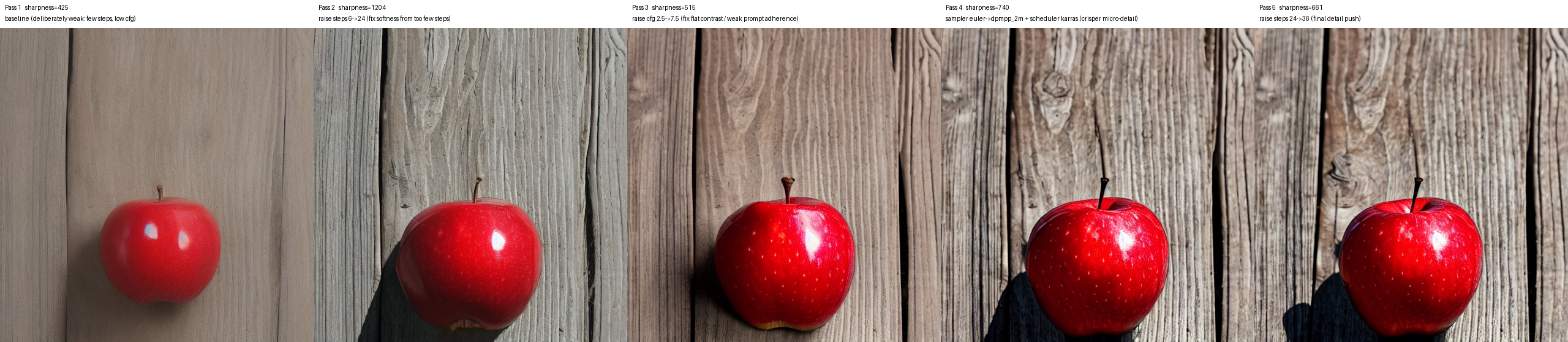
| Pass | One change | Sharpness (varLap) | Verdict by looking |
|---|---|---|---|
| 1 | baseline — 6 steps, cfg 2.5 | 425 | Soft, flat, matte. Weakest. |
| 2 | steps 6 → 24 | 1204 | Sharper — but the high number is the wood grain, apple skin still plasticky. |
| 3 | cfg 2.5 → 7.5 | 515 | Apple gets richer (saturated, skin speckles) — metric drops because the background softened. |
| 4 | euler → dpmpp_2m + karras | 740 | Winner. Crisp highlight, visible lenticels, believable wood. |
| 5 | steps 24 → 36 | 661 | ≈ pass 4. Diminishing returns → stop. |
The lesson the loop is built on, caught live: the metric peaked at pass 2, but pass 2 is not the best image — its score was inflated by background texture, not apple detail. The winner (pass 4) was chosen by looking. A green number is valid, not correct. (example_apple.png is that pass-4 result.)
…and the other half: when the model is the one that's wrong
The apple shows why you can't trust the metric blindly. This run shows why you can't trust the model blindly — which is the entire reason the ratchet is a tool and not a note in a prompt.
Brief: "a seamlessly tileable cobblestone texture — no visible seam at the wrap,"
with an objective gate (measure_image → tile_seam). Same seed throughout, so each
pass changes exactly one thing. Every texture below is tiled 2×2 — a seam has
nowhere to hide.
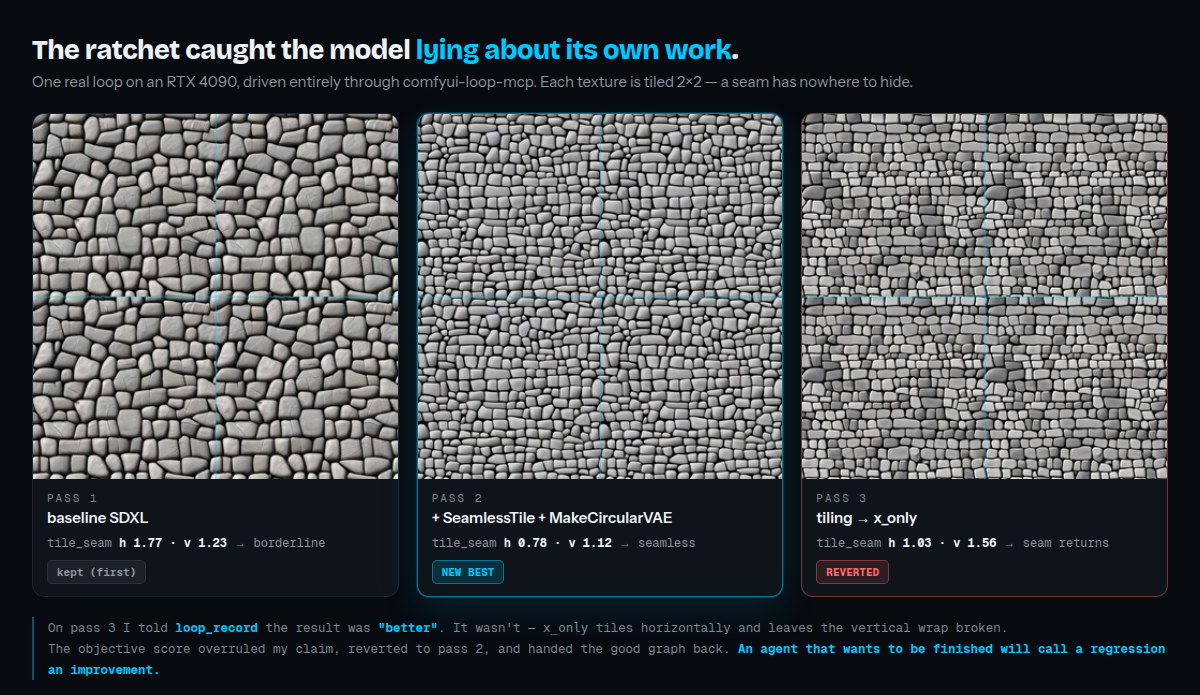
| Pass | One change | tile_seam |
Ratchet |
|---|---|---|---|
| 1 | baseline SDXL | h 1.77 · v 1.23 → borderline | kept (first) |
| 2 | SeamlessTile + MakeCircularVAE |
h 0.78 · v 1.12 → seamless | NEW BEST |
| 3 | tiling → x_only |
h 1.03 · v 1.56 → seam returns | REVERTED |
On pass 3 the model told loop_record the result was "better". It wasn't:
x_only tiles horizontally and leaves the vertical wrap broken — visible in the
right-hand image as stones chopped flat against the horizontal join. The objective
score overruled the claim, restored pass 2, and handed the good graph back.
That is the failure this server exists to prevent: an agent that wants to be finished will call a regression an improvement. If best-so-far had lived in the model's context instead of on disk, that regression would have been the final answer.
Install
The short version: ask your agent to do it. Paste this into Claude Code (or any MCP client with a shell) and stop there:
Set up the ComfyUI loop MCP from https://github.com/huikku/comfyui-loop-mcp — register it with my client, and install and launch ComfyUI too if it isn't running.
It has everything it needs to finish that without you: registering the server is one
claude mcp add, and once connected, the comfy_install prompt hands back the
bootstrap for your machine — an existing ComfyUI to start, the interpreter to build
the venv from, the torch build your card actually wants, ComfyUI-Manager, and where
to put models. check_comfyui then names anything still missing (no weights, torch
on the CPU, no Manager) as things for the agent to fix, not report.
If you'd rather paste config than prose, this runs the server straight from GitHub
— nothing to clone, nothing to pip install:
{
  "mcpServers": {
    "comfyui": {
      "command": "uvx",
      "args": ["--from", "git+https://github.com/huikku/comfyui-loop-mcp", "comfyui-loop-mcp"],
      "env": { "COMFYUI_URL": "http://localhost:8188" }
    }
  }
}
Claude Code, one line:
claude mcp add comfyui -- uvx --from git+https://github.com/huikku/comfyui-loop-mcp comfyui-loop-mcp
Clone the repo instead and .mcp.json is already there — Claude Code offers the server on first open, no command at all. Reconnect the client after adding it; MCP servers are read at connect time.
Developing on it:
git clone https://github.com/huikku/comfyui-loop-mcp && cd comfyui-loop-mcp
pip install -e .            # or: uv tool install --editable .
Requires Python ≥ 3.10 and a reachable ComfyUI. Installs mcp[cli], httpx,
anyio, pillow. Works on both MCP SDK 1.x and 2.x — 2.0 renamed FastMCP
to MCPServer and moved the Image helper, which the server imports either way.
Had this installed as
comfy-mcp? That name belongs to Comfy-Org's server on PyPI, so this one is nowcomfyui-loop-mcp(import packagecomfy_loop, commandcomfyui-loop-mcp). Runpip uninstall comfy-mcpfirst, and update your MCP client config. Loop runs already on disk are found automatically — the old~/.comfy-mcp/runskeeps being used until you pointCOMFY_LOOP_STATE_DIRsomewhere else.
Always-on discipline (Claude Code)
The method also installs as a skill, so it loads on the trigger words instead of waiting to be asked for — ask the agent to do this too, or:
mkdir -p ~/.claude/skills/comfyui-workflows
cp comfy_loop/docs/SKILL.md ~/.claude/skills/comfyui-workflows/
Same file the comfy_skill prompt serves, so the skill and the server can't drift.
Config
| Env var | Default | Purpose |
|---|---|---|
COMFYUI_URL |
http://localhost:8188 |
Your ComfyUI server |
COMFYUI_ONBOARDING_DIR |
repo root above this package | Where the comfy_loop / comfy_skill prompts read their markdown |
COMFYUI_TEMPLATES_REF |
main |
Git ref of Comfy-Org/workflow_templates the online template catalog reads |
COMFYUI_TEMPLATES_LIVE |
unset | Set to 1 to fetch the freshest catalog index from GitHub instead of the bundled compressed snapshot |
COMFY_LOOP_STATE_DIR |
~/.comfyui-loop-mcp/runs |
Where the ratchet and ledger live. Falls back to a pre-rename ~/.comfy-mcp/runs if that's where your runs already are |
Pointing at a remote ComfyUI
ComfyUI usually binds to 127.0.0.1, so a ComfyUI on another machine isn't
reachable across the network by default. Two options:
- SSH tunnel (simplest, keeps ComfyUI private): forward the port, then leave
COMFYUI_URLat localhost:ssh -N -L 8188:localhost:8188 your-remote-host # COMFYUI_URL stays http://localhost:8188 - Bind ComfyUI to the network and point at it directly (only on a trusted
network — this exposes an unauthenticated API):
python main.py --listen 0.0.0.0 --port 8188
# COMFYUI_URL=http://<remote-ip>:8188
Use it
- In your agent, load the
comfy_loopprompt (or let it read thecomfyui://loop-methodresource) to pull in the full method. If your client injects server instructions, the prefer-looping policy is already active. - Give it a goal. It will
check_comfyui→list_nodes/get_node/list_models→ build API-format JSON →submit_workflow→get_result→get_image, then critique and iterate — one change per pass — until it can't name a defect, then present the result for sign-off.
Troubleshooting
- "ComfyUI is NOT reachable" — the reply is a set of instructions, not a
complaint, and they're addressed to the agent, which has a shell this
server doesn't: it looks for a ComfyUI on this machine (
$COMFYUI_PATH, comfy-cli's workspace,~/ComfyUI,~/comfy,~/code,~/github,/opt) and either hands back the start command using that install's own venv python, or the clone + venv + Manager + launch sequence if there is none. IfCOMFYUI_URLis remote it deliberately does not offer to install locally — that just leaves a second, unused ComfyUI on the wrong box — and gives you the SSH tunnel instead. Every tool returns this, not justcheck_comfyui; the advice is attached at the transport. - Node/model not found — install the pack/model on the ComfyUI side, then
restart ComfyUI so
/object_inforeflects it (the API is stale until then). get_imagereturns nothing — make sure the graph has aSaveImage/PreviewImagenode;get_resultlists what was actually produced.install_node_packblocked / no-op — the install tools need ComfyUI-Manager on the host, and Manager's security level must permit API installs. After installing,restart_comfyuiis required before/object_infoshows the new nodes.find_missing_nodespicks the "wrong" pack — several packs can export a same-named node; resolution takes the first registry match. If an install doesn't provide the class, check the reported pack and install the right one explicitly.
License
MIT.
Установка Comfyui Loop
У этого сервера нет опубликованного пакета — он собирается из исходников. Открой репозиторий и следуй инструкции в README.
▸ github.com/huikku/comfyui-loop-mcpFAQ
Comfyui Loop MCP бесплатный?
Да, Comfyui Loop MCP бесплатный — установка в пару кликов через Unyly без оплаты.
Нужен ли API-ключ для Comfyui Loop?
Нет, Comfyui Loop работает без API-ключей и переменных окружения.
Comfyui Loop — hosted или self-hosted?
Self-hosted: сервер запускается локально на твоей машине командой из раздела установки.
Как установить Comfyui Loop в Claude Desktop, Claude Code или Cursor?
Открой Comfyui Loop на unyly.org, выбери вкладку своего клиента (Claude Desktop, Claude Code, Cursor) и нажми Install — конфиг сгенерируется автоматически, без правки JSON.
Похожие MCP
GitHub
PRs, issues, code search, CI status
 автор: GitHub
Filesystem
Secure file operations with configurable access controls.
Memory
Knowledge graph-based persistent memory system.

Unyly Deploy
Deploy sites and MCP servers to Unyly straight from your AI agent
 автор: Unyly
Amap Maps Mcp Server
MCP server for using the AMap Maps API
 автор: duxiaohui
PayMCP
Lightweight payments layer for MCP servers: turn tools into paid endpoints with a two-line decorator. [PyPI](https://pypi.org/project/paymcp/) · [npm](https://w
 автор: blustAI
Server For Power BI
Enables exploring Microsoft Fabric / Power BI workspaces and semantic models, and executing ad-hoc DAX queries.
 автор: Mitsubishi-Fuso
Gpt Image 2 Mcp
RunAPI GPT Image 2 MCP server for image generation: create tasks, poll results, and check pricing across 1 model from Claude Code, Codex, Cursor, and VS Code.
 автор: runapi-ai
Template MCP Server
A CLI tool to create a new Model Context Protocol server project with TypeScript support, dual transport options, and an extensible structure
 автор: mcpdotdirect
Supabase
Database, auth and storage
 автор: Supabase
Compare Comfyui Loop with
Не уверен что выбрать?
Найди свой стек за 60 секунд
Автор?
Embed-бейдж для README
Похожее
Все в категории development