
Command Proxy
FreeNot checkedProxy server for CLI commands that captures terminal output in a circular buffer, enabling remote execution, log retrieval, and process management for command-l

About
Proxy server for CLI commands that captures terminal output in a circular buffer, enabling remote execution, log retrieval, and process management for command-line applications like Expo development tools.
README
An MCP (Model Context Protocol) server that acts as a proxy for CLI commands, specifically designed for Expo development but adaptable for any command-line application.
How to use in Cursor (Expo example)
- Go to the directory of your Expo project
- Run
npx mcp-command-proxy --prefix "ExpoServer" --command "expo start" --port 8383 - Go to Cursor settings -> MCP -> +Add new MCP server, like this:
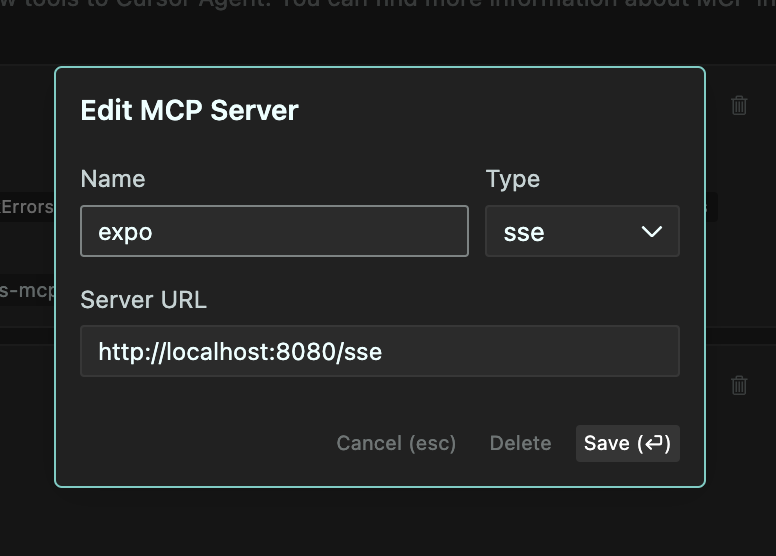
- Set the name to "ExpoServer", Type to "SSE", URL to
http://localhost:8383/sse - Click "Save" and you should now be able to use the MCP server in Cursor. Like this:
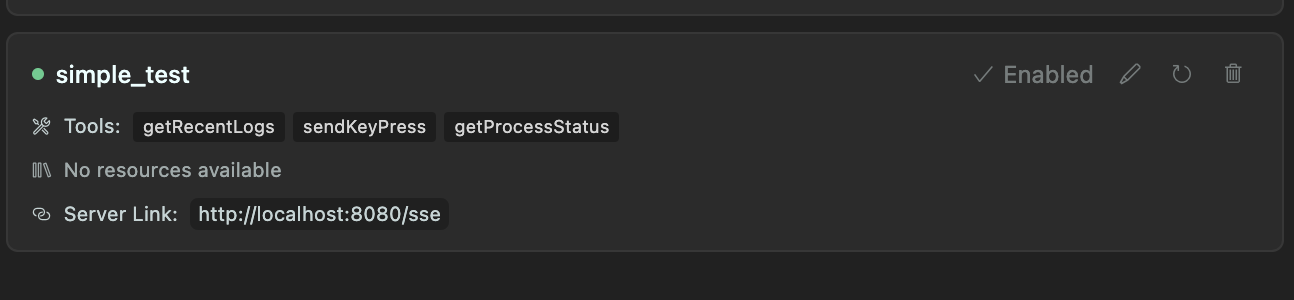
Recommended to use the --port 8383 flag to avoid conflicts with other servers.
Also, you can add following instruction to .cursorrules file:
You can use MCP getRecentLogs tool to get the most recent logs from Expo server. And if needed, you can send key presses to the running process using sendKeyPress tool.
Features
- Command Proxying: Run any CLI command through the MCP server
- Log Collection: Capture and store logs from running processes (configurable buffer size)
- Key Press Forwarding: Forward key presses from client to the running process
- Transparent Experience: The end user sees the command output exactly as if they ran it directly
- Interactive Commands: Works with interactive CLI tools like Expo
- MCP Integration: Built using the MCP SDK for easy integration with Claude and other MCP-enabled AI assistants
How It Works
- The server starts a specified command in a pseudo-terminal (PTY)
- All stdout/stderr output is:
- Streamed to the client in real-time
- Stored in a circular buffer (configurable size, default 300 lines)
- Key presses from the client are forwarded to the running process
- The server provides tools to:
- View collected logs
- Send key presses to the process
- Get the current state of the process
Use Cases
- Expo Development: Run
expo startand interact with it while collecting logs - Build Processes: Monitor build processes and analyze logs
- Long-running Services: Monitor services and keep recent log history
- Remote Command Execution: Execute and monitor commands from remote clients
Requirements
- Node.js 18+
- TypeScript
- pnpm (recommended) or npm
Installation
# Install dependencies
pnpm install

# Build the project
pnpm build

# Run directly
pnpm start -- --prefix "MyServer" --command "expo start"

# Or install globally
pnpm install -g
mcp-command-proxy --prefix "MyServer" --command "expo start"
Usage
Basic Usage
# Using the CLI
mcp-command-proxy --prefix "ExpoServer" --command "expo start"

# Or programmatically
import { createServer } from 'mcp-command-proxy';

const server = await createServer({
  prefix: 'ExpoServer',
  command: 'expo start',
  bufferSize: 500,
  port: 8080
});

// To stop the server later
server.stop();
Options
--prefix, -p: Name/prefix for the server (default: "CommandProxy")--command, -c: Command to run (required)--buffer-size, -b: Number of log lines to keep in memory (default: 300)--port: Port for HTTP server (default: 8080)--help, -h: Show help
MCP Integration
This server implements the following MCP tools:
getRecentLogs: Returns the most recent logs from the buffer- Parameters:
limit(optional): Number of logs to return (default: 100)types(optional): Types of logs to include (stdout, stderr, system) (default: all)
- Parameters:
sendKeyPress: Sends a key press to the running process- Parameters:
key: Key to send (e.g. "enter", "a", "1", "space")
- Parameters:
getProcessStatus: Returns the current status of the process- Parameters: None
Examples
Running Expo Start
mcp-command-proxy -p "ExpoServer" -c "expo start" -b 500
Using with Claude
- Configure Claude to connect to this MCP server (SSE endpoint: http://localhost:8080/sse)
- Ask Claude to run Expo or other commands
- Claude can analyze logs and help troubleshoot issues
Development
# Clone the repository
git clone https://github.com/hormold/mcp-command-proxy.git
cd mcp-command-proxy

# Install dependencies
pnpm install

# Build the project
pnpm build

# Run in development mode
pnpm dev
License
MIT
Install Command Proxy in Claude Desktop, Claude Code & Cursor
unyly install command-proxyInstalls into Claude Desktop, Claude Code, Cursor & VS Code — handles npx, uvx and build-from-source repos for you.
First time? Get the CLI: curl -fsSL https://unyly.org/install | sh
Or configure manually
Run in your terminal:
claude mcp add command-proxy -- npx -y mcp-command-proxyStep-by-step: how to install Command Proxy
FAQ
Is Command Proxy MCP free?
Yes, Command Proxy MCP is free — one-click install via Unyly at no cost.
Does Command Proxy need an API key?
No, Command Proxy runs without API keys or environment variables.
Is Command Proxy hosted or self-hosted?
Self-hosted: the server runs locally on your machine via the install command above.
How do I install Command Proxy in Claude Desktop, Claude Code or Cursor?
Open Command Proxy on unyly.org, pick your client tab (Claude Desktop, Claude Code, Cursor) and press Install — the config is generated automatically, no JSON editing.
Related MCPs
GitHub
PRs, issues, code search, CI status
 by GitHub
Filesystem
Secure file operations with configurable access controls.
Memory
Knowledge graph-based persistent memory system.
Template MCP Server
A CLI tool to create a new Model Context Protocol server project with TypeScript support, dual transport options, and an extensible structure
 by mcpdotdirect
Compare Command Proxy with
Not sure what to pick?
Find your stack in 60 seconds
Author?
Embed badge for your README
Browse similar
All development MCPs