
Crawlemoon
FreeNot checkedAdvanced AI-native web crawling platform for the agentic era. Exposes 55 production-grade Model Context Protocol (MCP) tools for deep analysis, automated REST/G

About
Advanced AI-native web crawling platform for the agentic era. Exposes 55 production-grade Model Context Protocol (MCP) tools for deep analysis, automated REST/GraphQL discovery, browser session recording, anti-detection stealth, and smart extraction using any LLM.
README
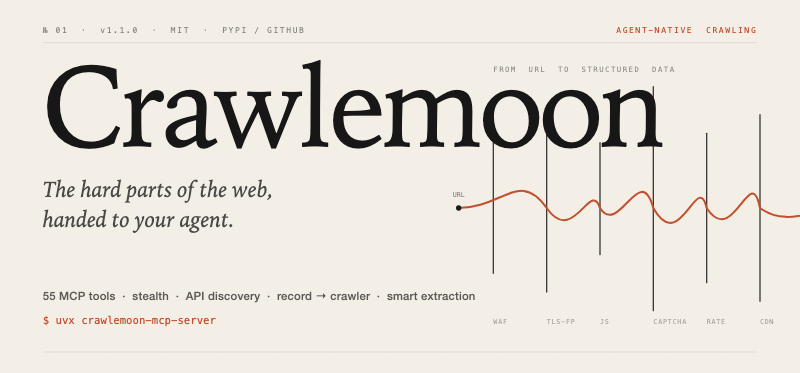

A free, open-source MCP server that gives any agent (Claude Code, Cursor, Windsurf, …) 55 production-grade tools for the full web-crawling stack: deep analysis, stealth, API discovery, session recording → runnable crawler, smart extraction. No proprietary API. No per-request fee.
Quick start
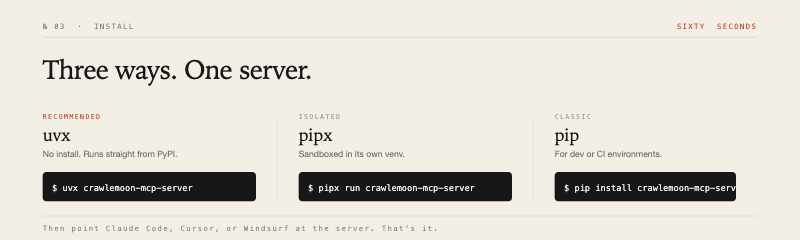
The recommended path needs no install — uvx runs straight from PyPI:
{
  "mcpServers": {
    "crawlemoon": {
      "command": "uvx",
      "args": ["crawlemoon"]
    }
  }
}
Requires uv. Install once:
curl -LsSf https://astral.sh/uv/install.sh | sh. Or usepipx run crawlemoon/pip install crawlemooninstead.
Where to put that JSON: Cursor → Settings → MCP. Claude Code → ~/.config/claude/mcp_settings.json. Windsurf → Settings → MCP Servers.
How it works
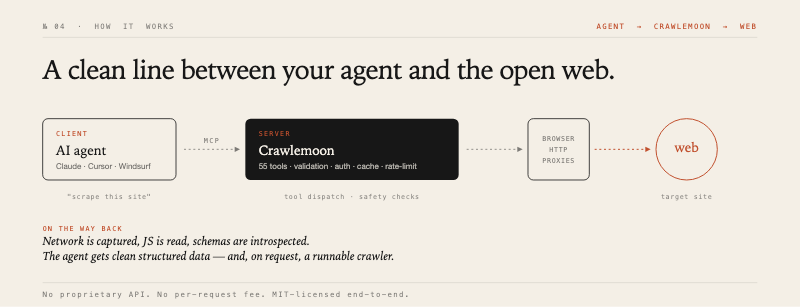
Your agent talks to Crawlemoon over the Model Context Protocol. Crawlemoon owns a hardened browser pool, an HTTP stack with TLS fingerprinting, and a rotating proxy pool. While it fetches pages, it captures network traffic, reads scripts, and introspects schemas — so the agent gets clean structured data, not raw HTML.
What's in the box
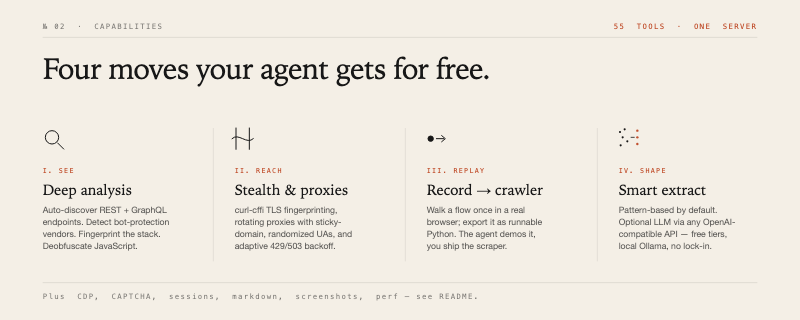
A short list — see the source for the full set of 55 tools.
| Group | Tools |
|---|---|
| Deep analysis | deep_analyze, discover_apis, introspect_graphql, analyze_websocket, analyze_auth, detect_protection, detect_technology |
| Stealth | stealth_request, configure_proxies, configure_rate_limit, add_proxy, test_proxy |
| Record → crawler | record_session, stop_recording, export_recording, generate_crawler |
| Extraction | smart_extract, extract_article, extract_tables, extract_links, extract_forms, extract_metadata, convert_to_markdown |
| Page interaction | take_screenshot, fill_form, wait_and_extract, compare_pages, measure_performance, check_accessibility, get_dom_tree |
| Sessions & cache | save_session, load_session, get_cookies, get_storage, clear_cache, get_cache_stats |
| Advanced (opt-in) | execute_js, execute_cdp, deobfuscate_js, extract_from_js, solve_captcha |
Smart extraction — bring any LLM, including free ones
smart_extract works without any API key using pattern matching. Plug in any OpenAI-compatible endpoint for higher accuracy — including FREE tiers:
# OpenRouter (free models exist)
CRAWLEMOON_LLM_PROVIDER=openrouter
CRAWLEMOON_LLM_API_KEY=sk-or-v1-xxx
CRAWLEMOON_LLM_MODEL=meta-llama/llama-3.2-3b-instruct:free

# Groq (free, very fast)
CRAWLEMOON_LLM_PROVIDER=groq
CRAWLEMOON_LLM_API_KEY=gsk_xxx

# Local Ollama (no key needed)
CRAWLEMOON_LLM_PROVIDER=ollama
CRAWLEMOON_LLM_MODEL=llama3.2
Together, DeepSeek, Mistral, Fireworks, and standard OpenAI also work via CRAWLEMOON_LLM_BASE_URL.
Configuration
| Variable | Default | Notes |
|---|---|---|
CRAWLEMOON_HEADLESS |
true |
Run browser without UI |
CRAWLEMOON_BROWSER |
chromium |
chromium / firefox / webkit |
CRAWLEMOON_POOL_SIZE |
5 |
Max concurrent browsers |
CRAWLEMOON_NAV_TIMEOUT |
30.0 |
Page-load timeout (s) |
CRAWLEMOON_API_KEY |
unset | If set, every tool call must include matching _api_key |
CRAWLEMOON_ALLOW_DANGEROUS_JS |
false |
Required for execute_js / execute_cdp / deobfuscate_js |
CRAWLEMOON_JS_MAX_LENGTH |
50000 |
Length cap for JS payloads |
CRAWLEMOON_JS_EXEC_TIMEOUT |
10.0 |
Per-script timeout (s) |
CRAWLEMOON_PROXIES |
unset | Comma/newline separated proxy entries |
CRAWLEMOON_PROXIES_FILE |
unset | Local file with one proxy per line |
CRAWLEMOON_PROXY_SCHEME |
http |
Scheme for entries without one: http, https, socks4, socks5 |
CRAWLEMOON_PROXY_ROTATION |
round_robin |
round_robin, random, sticky, least_used |
CRAWLEMOON_PROXY_HEALTH_CHECK_INTERVAL |
300 |
Proxy health-check interval (s) |
CRAWLEMOON_PROXY_FAIL_CLOSED |
false |
Raise on startup proxy config errors instead of continuing direct |
Proxy, V2ray & connection control
Crawlemoon uses one rotating proxy pool for browser contexts, stealth_request, and Xray/V2ray local exits. Credentials are stored separately from normalized URLs and are masked in stats/log-style responses.
Supported proxy entry formats:
http://user:[email protected]:6754
socks5://user:[email protected]:1080
31.59.20.176:6754:user:pass
31.59.20.176:6754
Start the MCP server with a proxy file:
{
  "mcpServers": {
    "crawlemoon": {
      "command": "uvx",
      "args": ["crawlemoon"],
      "env": {
        "CRAWLEMOON_PROXIES_FILE": "/secure/path/proxies.txt",
        "CRAWLEMOON_PROXY_SCHEME": "http",
        "CRAWLEMOON_PROXY_ROTATION": "sticky"
      }
    }
  }
}
Proxy files can use Webshare-style lines and comments:
# host:port:username:password
31.59.20.176:6754:uusmdewb:en3w097syrxh
31.56.127.193:7684:uusmdewb:en3w097syrxh
Configure or replace proxies at runtime with the configure_proxies MCP tool:
{
  "proxies_text": "31.59.20.176:6754:user:pass\n31.56.127.193:7684:user:pass",
  "default_scheme": "http",
  "rotation_strategy": "sticky",
  "health_check_interval": 300,
  "replace_existing": true
}
Use add_proxy, remove_proxy, test_proxy, and get_proxy_stats for incremental control. get_proxy_stats returns masked proxy URLs, for example http://user:***@31.59.20.176:6754.
For V2ray/Xray, call configure_xray_subscription with either subscription_url or raw_links. Crawlemoon starts local SOCKS5 exits such as socks5://127.0.0.1:10801, registers them in the same proxy pool, and can rotate or benchmark nodes with rotate_xray_node and test_xray_nodes.
Keep proxy files out of git. They contain live credentials.
Security
execute_js, execute_cdp, and deobfuscate_js are disabled by default — they execute or operate on arbitrary code in a real browser. Enable on trusted networks with CRAWLEMOON_ALLOW_DANGEROUS_JS=true. Even then, payloads are length-capped, time-bounded, and a denylist rejects eval, new Function, dynamic import(), document.write, importScripts, and WebAssembly.{compile,instantiate}. Set CRAWLEMOON_API_KEY so MCP clients must present a matching _api_key.
These are mitigations, not a sandbox: do not expose this server to untrusted clients.
Develop
git clone https://github.com/razavioo/crawlemoon.git
cd crawlemoon
make dev-install      # editable install + dev/captcha/ocr extras + pre-commit
make test             # pytest
make lint             # ruff + mypy
Releases
This project uses Trusted Publishing (OIDC) via GitHub Actions to automate publishing releases directly to PyPI.
To release a new version:
- Bump the version number in
pyproject.toml. - Commit the change and create a git tag matching the version (e.g.
v1.1.8):git add pyproject.toml git commit -m "chore: bump version to 1.1.8" git tag v1.1.8 - Push your branch and the tag to GitHub:
git push origin main --tags
GitHub Actions will automatically run tests, build the package, and publish it securely to PyPI under the crawlemoon package space.
PRs welcome. Particularly interested in: distributed mode (Redis queue), result sinks (Postgres / S3), Prometheus metrics. See MIT License.
Made by emad.dev
Installing Crawlemoon
This server has no published package — it is built from source. Open the repository and follow its README.
▸ github.com/razavioo/crawlemoonFAQ
Is Crawlemoon MCP free?
Yes, Crawlemoon MCP is free — one-click install via Unyly at no cost.
Does Crawlemoon need an API key?
No, Crawlemoon runs without API keys or environment variables.
Is Crawlemoon hosted or self-hosted?
Self-hosted: the server runs locally on your machine via the install command above.
How do I install Crawlemoon in Claude Desktop, Claude Code or Cursor?
Open Crawlemoon on unyly.org, pick your client tab (Claude Desktop, Claude Code, Cursor) and press Install — the config is generated automatically, no JSON editing.
Related MCPs
Playwright
Browser automation, scraping, screenshots
 by Microsoft
Puppeteer
Browser automation and web scraping.
 by modelcontextprotocol
opentabs-dev/opentabs
Plugin-based MCP server + Chrome extension that gives AI agents access to web applications through the user's authenticated browser session. 100+ plugins with a
 by opentabs-dev
robhunter/agentdeals
1,500+ developer infrastructure deals, free tiers, and startup programs across 54 categories. Search deals, compare vendors, plan stacks, and track pricing chan
 by robhunter
Compare Crawlemoon with
Not sure what to pick?
Find your stack in 60 seconds
Author?
Embed badge for your README
Browse similar
All browse MCPs