
Crossmem
FreeNot checkedUnified search across all Claude Code and Gemini CLI memories, enabling AI assistants to recall and save cross-project knowledge via an MCP server.

About
Unified search across all Claude Code and Gemini CLI memories, enabling AI assistants to recall and save cross-project knowledge via an MCP server.
README
One search across all your Claude Code and Gemini CLI memories — every project, every tool.
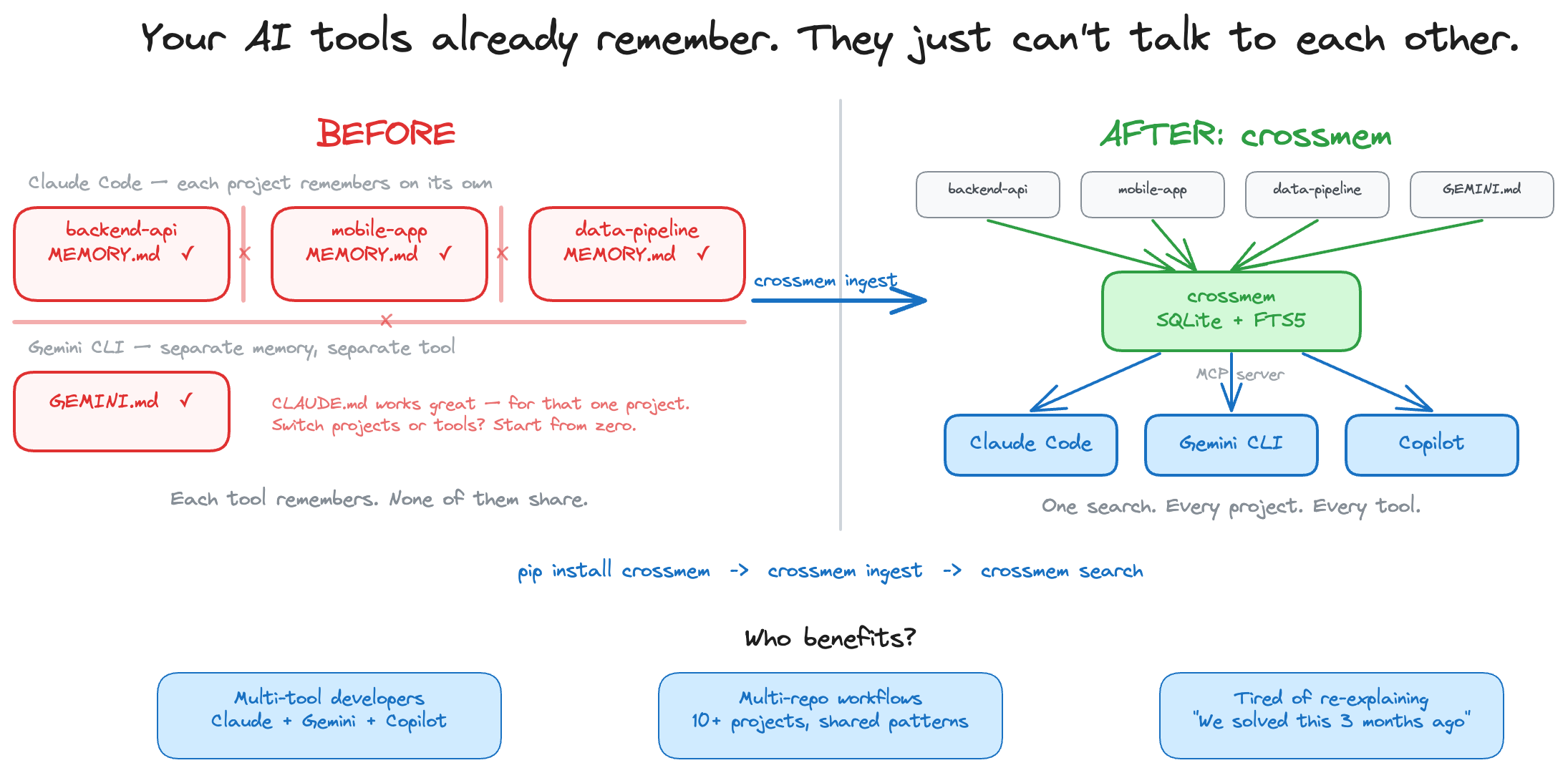

The problem
You use AI coding assistants across multiple projects. Each project's memories are locked in a silo — and each tool has its own silo too. You solved credential masking in your backend API three months ago, but when you need it in a new microservice, your AI assistant starts from scratch.
Here's what's happening under the hood:
~/.claude/projects/
├── backend-api/memory/MEMORY.md    ← Claude remembers here
├── mobile-app/memory/MEMORY.md    ← ...but can't see here
└── data-pipeline/memory/MEMORY.md ← ...or here

~/.gemini/GEMINI.md                ← Gemini's memories (separate silo entirely)
Every project is a silo. Every tool is a silo. Knowledge doesn't compound — it resets.
The fix
$ crossmem ingest
Ingested: 42 memories across 4 projects (Claude Code + Gemini CLI)

$ crossmem search "credential masking"
Found 3 results for "credential masking":

[1] backend-api / Security
    Source: MEMORY.md
    - Credentials masked in experience_memory before persisting (_mask_actions)...

[2] mobile-app / Security
    Source: MEMORY.md
    - Credentials masked via _mask_context_credentials() + _mask_text()...

[3] backend-api / Security
    Source: GEMINI.md
    - Credential masking pattern: _mask_actions for persistence, _mask_text for logs...
Three results. Two projects. Two AI tools. One query. The pattern was already solved.
How crossmem differs
- vs Mem0 — Mem0 is cloud-based and requires an API key. crossmem is local-only with zero accounts.
- vs Basic Memory — Basic Memory works within one tool. crossmem aggregates across tools and projects.
- vs grep — crossmem parses multiple formats, deduplicates, and runs as an MCP server — your AI assistant queries it automatically at session start.
Install
pip install crossmem
# or
uv pip install crossmem
Quick start
pip install crossmem        # 1. Install
crossmem ingest             # 2. Index all your AI memories
crossmem search "retry"     # 3. Search across every project
That's it. Three commands, zero config. crossmem finds Claude Code and Gemini CLI memory files automatically.
To give your AI tools direct access, add the MCP server to your config (see MCP Server below) — then mem_recall() and mem_search() just work inside your coding sessions.
Usage
# Ingest Claude Code + Gemini CLI memories
crossmem ingest

# Search across every project
crossmem search "JWT token rotation"
crossmem search "retry strategy" -p backend-api
crossmem search "docker compose" -n 5

# Save a discovery
crossmem save "Always use middleware for credential masking" -p backend-api -s Patterns

# Delete stale or wrong memories
crossmem forget 42                   # delete memory #42 (with confirmation)
crossmem forget -p old-app           # delete all memories for a project
crossmem forget 42 --confirm         # skip confirmation prompt

# Sync Claude memories → Gemini CLI
crossmem sync                        # sync everything
crossmem sync -p backend-api        # sync one project + shared patterns

# Watch for changes and auto-sync
crossmem sync-watch                  # polls every 30s
crossmem sync-watch --interval 10    # custom interval

# Visualize the knowledge graph
crossmem graph

# See what's in the database
crossmem stats
How it works
- Ingest — Finds Claude Code and Gemini CLI memory files automatically, splits into chunks, deduplicates
- Index — Stores everything locally in SQLite — no cloud, no API keys, no accounts
- Search — Full-text search with stemming. Multi-word queries use AND logic; quoted phrases for exact matches
- Learn — AI tools save new discoveries via
mem_saveduring sessions. Knowledge compounds automatically - Sync — One-way sync from Claude → Gemini, preserving each tool's own memories
How it works with your AI tools
Once the MCP server is configured, your AI assistant automatically uses crossmem:
You: "How should I handle credentials in this new service?"

AI: Let me check crossmem for existing patterns...
    [calls mem_recall → finds credential masking in 3 of your projects]

    Based on your previous work across backend-api, mobile-app, and infra-tools,
    you consistently use a middleware layer for credential masking. Here's the
    pattern from your backend-api project:
    - Credentials stored in Secret Manager, never in env vars
    - API keys masked in logs via _mask_sensitive_headers()
    ...
No copy-pasting. No "I already solved this." Your AI assistant recalls patterns from every project you've worked on — automatically.
MCP Server
crossmem runs as an MCP server so AI coding tools can search, recall, and save memories in real-time.
Setup
Add to your tool's MCP config:
Claude Code (~/.mcp.json for global, or .mcp.json in project root):
{
  "mcpServers": {
    "crossmem": {
      "command": "crossmem-server"
    }
  }
}
Gemini CLI (~/.gemini/settings.json):
{
  "mcpServers": {
    "crossmem": {
      "command": "crossmem-server"
    }
  }
}
VS Code / GitHub Copilot (.vscode/mcp.json in project root, or user settings.json):
{
  "servers": {
    "crossmem": {
      "command": "uvx",
      "args": ["--from", "crossmem", "crossmem-server"]
    }
  }
}
Note: For Claude Code and Gemini CLI, if
crossmem-serverisn't on PATH, use the sameuvxcommand shown in the Copilot config above.
Tools
| Tool | Description |
|---|---|
mem_recall |
Load project context + cross-project patterns at session start (auto-detects project from cwd) |
mem_search |
Search across all memories (query, project filter, limit) |
mem_save |
Save a discovery during a session — immediately searchable |
mem_forget |
Delete a memory by ID (find IDs via mem_search) |
mem_ingest |
Refresh the index when memory files change (auto-runs on server startup) |
Start manually
crossmem serve # starts MCP server on stdio (same as crossmem-server)
Supported tools
| Tool | Ingestion |
|---|---|
| Claude Code | ~/.claude/projects/*/memory/*.md |
| Gemini CLI | ~/.gemini/GEMINI.md |
| VS Code / GitHub Copilot | Via MCP server (no direct ingestion — uses the shared index) |
Ingestion is pluggable — PRs welcome for new tools.
License
MIT
Install Crossmem in Claude Desktop, Claude Code & Cursor
unyly install crossmemInstalls into Claude Desktop, Claude Code, Cursor & VS Code — handles npx, uvx and build-from-source repos for you.
First time? Get the CLI: curl -fsSL https://unyly.org/install | sh
Or configure manually
Run in your terminal:
claude mcp add crossmem -- uvx crossmemFAQ
Is Crossmem MCP free?
Yes, Crossmem MCP is free — one-click install via Unyly at no cost.
Does Crossmem need an API key?
No, Crossmem runs without API keys or environment variables.
Is Crossmem hosted or self-hosted?
Self-hosted: the server runs locally on your machine via the install command above.
How do I install Crossmem in Claude Desktop, Claude Code or Cursor?
Open Crossmem on unyly.org, pick your client tab (Claude Desktop, Claude Code, Cursor) and press Install — the config is generated automatically, no JSON editing.
Related MCPs
GitHub
PRs, issues, code search, CI status
 by GitHub
Filesystem
Secure file operations with configurable access controls.
Memory
Knowledge graph-based persistent memory system.
Template MCP Server
A CLI tool to create a new Model Context Protocol server project with TypeScript support, dual transport options, and an extensible structure
 by mcpdotdirect
Compare Crossmem with
Not sure what to pick?
Find your stack in 60 seconds
Author?
Embed badge for your README
Browse similar
All development MCPs