
Css Noop Checker
FreeNot checkedChrome DevTools extension that detects CSS properties with no effect

About
Chrome DevTools extension that detects CSS properties with no effect
README
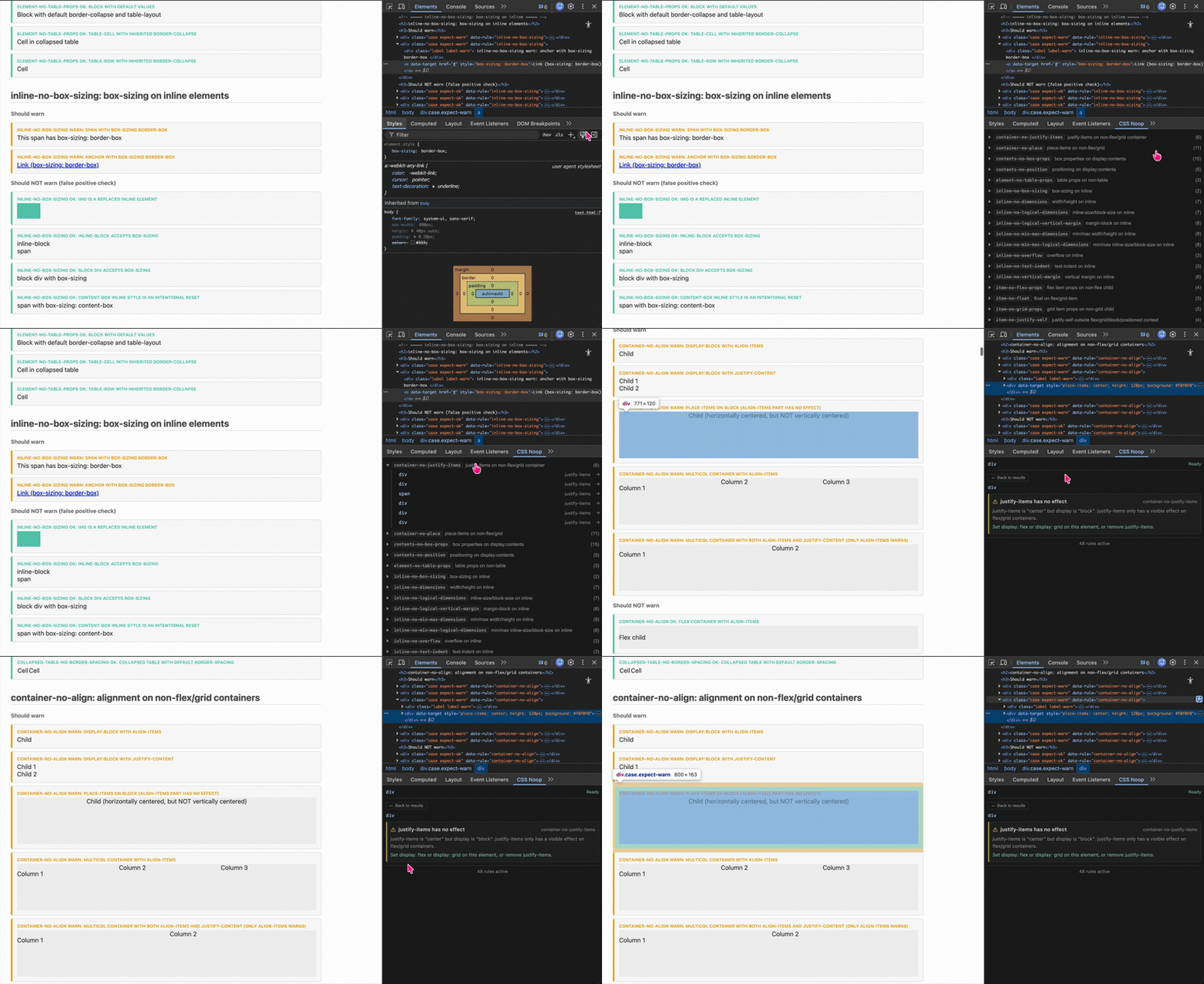
Chrome DevTools (Elements sidebar) extension that detects CSS properties that currently have no effect on the selected element.
Features
- Selected-element mode — inspects the currently selected element in DevTools
- Full-page scan — scans all elements on a page for violations
- Detection rules — categorized by context (inline, block, container, item, static, positioned, overflow, etc.)
- MCP server — exposes rules as tools for AI-assisted analysis via Playwright
- Actionable warnings — each warning includes a title, explanation, and fix suggestion
Detected Patterns
CSS Noop Checker finds CSS properties that have no visible effect on the element they are applied to. These "no-op" declarations are not syntax errors — they are valid CSS that the browser silently ignores due to layout context. For example, width on an inline <span>, or gap on a non-flex/grid container.
[!NOTE] Rule correctness in this project is based primarily on current Chromium behavior, not on spec interpretation alone. A declaration may be valid CSS, partially effective, or browser-dependent. For nuanced cases, the source of truth is the real-browser coverage in
examples/test.html+ Playwright, not unit tests alone.
Inline
| Rule | Description |
|---|---|
| inline-no-box-sizing | box-sizing on inline |
| inline-no-dimensions | width/height on inline |
| inline-no-logical-dimensions | inline-size/block-size on inline |
| inline-no-logical-vertical-margin | margin-block on inline |
| inline-no-min-max-dimensions | min/max width/height on inline |
| inline-no-min-max-logical-dimensions | min/max inline-size/block-size on inline |
| inline-no-overflow | overflow on inline |
| inline-no-text-indent | text-indent on inline |
| inline-no-vertical-margin | vertical margin on inline |
Block
| Rule | Description |
|---|---|
| block-no-vertical-align | vertical-align on block-level element |
Container (flex/grid)
| Rule | Description |
|---|---|
| container-no-align | align/justify on non-flex/grid/multi-column |
| container-no-columns | column properties on flex/grid container |
| container-no-flex-props | flex-direction/wrap on non-flex |
| container-no-gap | gap on non-flex/grid |
| container-no-grid-props | grid container props on non-grid |
| container-no-justify-items | justify-items outside grid/block layout |
| container-no-place | place-items outside grid/flex/block layout |
Item (flex/grid)
| Rule | Description |
|---|---|
| item-no-flex-props | flex item props on non-flex child |
| item-no-float | float on flex/grid item |
| item-no-grid-props | grid item props on non-grid child |
| item-no-justify-self | justify-self outside grid/table-wrapper/block/positioned context |
| item-no-order | order on non-flex/grid item |
| item-no-self-align | align-self on non-flex/grid item |
Static positioning
| Rule | Description |
|---|---|
| static-no-logical-offset | logical offset on static position |
| static-no-offset | offset on static position |
| static-no-z-index | z-index on static non-flex/grid element |
Positioned
| Rule | Description |
|---|---|
| positioned-no-clear | clear on absolute/fixed positioned element |
| positioned-no-float | float on out-of-flow positioned element |
Table
| Rule | Description |
|---|---|
| collapsed-table-no-border-spacing | border-spacing on collapsed table |
| element-no-table-props | table props on non-table |
| nontable-no-border-spacing | border-spacing on non-table |
| nontable-no-empty-cells | empty-cells on non-table-cell |
| table-no-margin | margin on internal table element |
| table-no-padding | padding on table internals |
Overflow
| Rule | Description |
|---|---|
| visible-overflow-no-resize | resize on visible overflow |
| visible-overflow-no-text-overflow | text-overflow on visible overflow |
Scroll
| Rule | Description |
|---|---|
| scroll-no-scroll-padding | scroll-padding on non-scroll container |
| scroll-snap-no-align-without-type | scroll-snap child properties without parent scroll-snap-type |
Transform & Perspective
| Rule | Description |
|---|---|
| perspective-no-origin | perspective-origin without perspective |
| transform-no-origin | transform-origin without transform |
Animation
| Rule | Description |
|---|---|
| animation-no-sub-props | animation properties without animation-name |
Other
| Rule | Description |
|---|---|
| contents-no-box-props | box properties on display:contents |
| contents-no-position | positioning on display:contents |
| multicol-no-column-rule | column-rule/column-fill on non-multicol container |
| nonfloat-no-shape-outside | shape-outside on non-floated element |
| nonreplaced-no-aspect-ratio | aspect-ratio on inline non-replaced element |
| nonreplaced-no-object-fit | object-fit/object-position on non-replaced element |
| outline-no-style | outline properties without outline-style |
Rule IDs follow Stylelint's thing-no-qualifier convention. See individual source files for details, or run list_rules via the MCP server.
Quick Start
pnpm install
pnpm build
- Open
chrome://extensionsand enable Developer mode. - Click Load unpacked and select the
dist/directory. - Open DevTools on any page → Elements tab → CSS Noop sidebar pane.
For development with watch-mode rebuilds:
pnpm dev
Commands
| Command | Description |
|---|---|
pnpm dev |
Watch-mode build (vite build --watch) |
pnpm build |
Type-check + production build |
pnpm test |
Run Vitest unit tests |
pnpm test:e2e |
Run Playwright browser integration tests |
pnpm lint |
Lint with Oxlint |
pnpm fmt |
Format with Oxfmt |
pnpm fmt:check |
Check formatting without writing |
MCP Server
The mcp-server/ directory provides an MCP server that exposes the rules engine as tools for AI-assisted analysis. It uses Playwright to open pages, extract computed styles, and run all detection rules.
See mcp-server/README.md for setup instructions.
Tech Stack
React 19 · TypeScript 5.9 · Vite 7 · Oxlint / Oxfmt · Vitest · Playwright · pnpm
How It Works
- Analysis uses
getComputedStyleand lightweight heuristics — no external network calls. - Rules are pure functions with zero Chrome API dependency, making them fully testable.
- Browser integration tests are the main safeguard against false positives and false negatives in nuanced layout cases.
- The extension targets only the current DevTools selection (
$0) or scans all visible elements on the page. - Each rule file is named after its rule ID (e.g.
container-no-gap.ts), following Stylelint'sthing-no-qualifiernaming convention.
Contributing
Contributions are welcome! See CONTRIBUTING.md for setup, adding new rules, coding style, and PR conventions.
License
Installing Css Noop Checker
This server has no published package — it is built from source. Open the repository and follow its README.
▸ github.com/purupurupu/css-noop-checkerFAQ
Is Css Noop Checker MCP free?
Yes, Css Noop Checker MCP is free — one-click install via Unyly at no cost.
Does Css Noop Checker need an API key?
No, Css Noop Checker runs without API keys or environment variables.
Is Css Noop Checker hosted or self-hosted?
Self-hosted: the server runs locally on your machine via the install command above.
How do I install Css Noop Checker in Claude Desktop, Claude Code or Cursor?
Open Css Noop Checker on unyly.org, pick your client tab (Claude Desktop, Claude Code, Cursor) and press Install — the config is generated automatically, no JSON editing.
Related MCPs
Playwright
Browser automation, scraping, screenshots
 by Microsoft
Puppeteer
Browser automation and web scraping.
 by modelcontextprotocol
opentabs-dev/opentabs
Plugin-based MCP server + Chrome extension that gives AI agents access to web applications through the user's authenticated browser session. 100+ plugins with a
 by opentabs-dev
robhunter/agentdeals
1,500+ developer infrastructure deals, free tiers, and startup programs across 54 categories. Search deals, compare vendors, plan stacks, and track pricing chan
 by robhunter
Compare Css Noop Checker with
Not sure what to pick?
Find your stack in 60 seconds
Author?
Embed badge for your README
Browse similar
All browse MCPs