

About
MCP server for Live2D Cubism Editor external API integration
README
License GitHub stars GitHub last commit
将 Live2D Cubism Editor 的外部应用集成 API 封装为 MCP (Model Context Protocol) 工具,让 AI Agent 通过自然语言操控 Cubism Editor 进行建模操作。
架构
graph TD
    AI["AI Agent"]
    MCP["cubism_mcp.py<br/>MCP Server, 42 Tools"]
    Editor["Cubism Editor 5.4 Alpha<br/>外部应用集成 API"]

    AI -->|"stdio (MCP Protocol)"| MCP
    MCP -->|"WebSocket (ws://localhost:22033)"| Editor
功能特性
- 读写操作 — 读取/写入模型参数值、查看文档列表、获取编辑模式(适用 Editor 4.x+)
- 完整模型查询 — 参数结构、部件结构、变形器结构、单个对象详情(需 5.4 Alpha)
- 编辑操作 — 增删改查参数/部件/变形器/ArtMesh/Glue,自动事务包裹(需 5.4 Alpha)
- 批量编辑 — 同一事务内执行多个操作,任一失败自动回滚
- 权限分级 — 读写需 Allow 授权,编辑需 Edit 授权
- 自动重连 — Editor 重启后自动重连,3 秒间隔
- Token 持久化 — 认证令牌缓存到
~/.cubism-mcp/token.txt,避免重复授权
环境要求
| 组件 | 版本 |
|---|---|
| Python | ≥ 3.10 |
| Cubism Editor | 5.4 Alpha(有效期至 2026-09-14) |
| 操作系统 | Windows / macOS |
使用流程
快速开始
复制以下提示词发给你的 AI Agent:
根据 https://github.com/nana7chi/CubismExternalEditMCP/blob/master/README.md 完成 cubism-mcp 的安装和配置。如果电脑上还没有
uv,请先帮我安装。配置完成后告诉我是否就绪。
第一步:安装 uv(仅一次)
uv 是一个极小的 Python 包管理器,用于自动安装和运行本 MCP。安装后无需再管 Python 环境。
macOS(终端粘贴运行):
curl -LsSf https://astral.sh/uv/install.sh | sh
Windows(PowerShell 粘贴运行):
powershell -ExecutionPolicy ByPass -c "irm https://astral.sh/uv/install.ps1 | iex"
安装完成后重启终端,输入 uv --version 能看到版本号即成功。
第二步:在 AI Agent 中配置 MCP
支持
ClaudeCode,Codex,Workbuddy等各种支持MCP的客户端
第一次启动会自动下载依赖包,耗时约 1–2 分钟,之后秒启。
方式一:PyPI 安装(推荐)
{
  "mcpServers": {
    "cubism-mcp": {
      "type": "stdio",
      "command": "uvx",
      "args": ["cubism-mcp"],
      "description": "Cubism Editor MCP",
      "env": { "NO_PROXY": "localhost,127.0.0.1" }
    }
  }
}
国内镜像源配置
如果 PyPI 官方源下载慢,可使用国内镜像(清华/阿里云/腾讯云等均可用):
{
  "mcpServers": {
    "cubism-mcp": {
      "type": "stdio",
      "command": "uvx",
      "args": ["--index-url", "https://pypi.tuna.tsinghua.edu.cn/simple", "cubism-mcp"],
      "description": "Cubism Editor MCP",
      "env": { "NO_PROXY": "localhost,127.0.0.1" }
    }
  }
}
也可替换为阿里云
https://mirrors.aliyun.com/pypi/simple或腾讯云https://mirrors.cloud.tencent.com/pypi/simple。
方式二:uvx 在线运行(GitHub 源)
{
  "mcpServers": {
    "cubism-mcp": {
      "type": "stdio",
      "command": "uvx",
      "args": ["--from", "git+https://github.com/nana7chi/CubismExternalEditMCP.git", "cubism-mcp"],
      "description": "Cubism Editor MCP",
      "env": { "NO_PROXY": "localhost,127.0.0.1" }
    }
  }
}
方式三:本地克隆运行
- 克隆源码到本地(或下载ZIP并解压)
git clone https://github.com/nana7chi/CubismExternalEditMCP.git
- 添加以下MCP配置(修改
cwd为实际路径):
{
  "mcpServers": {
    "cubism-mcp": {
      "type": "stdio",
      "command": "python",
      "args": ["cubism_mcp.py"],
      "cwd": "J:/修改为实际路径/CubismExternalEditMCP",
      "description": "Cubism Editor MCP",
      "env": { "NO_PROXY": "localhost,127.0.0.1" }
    }
  }
}
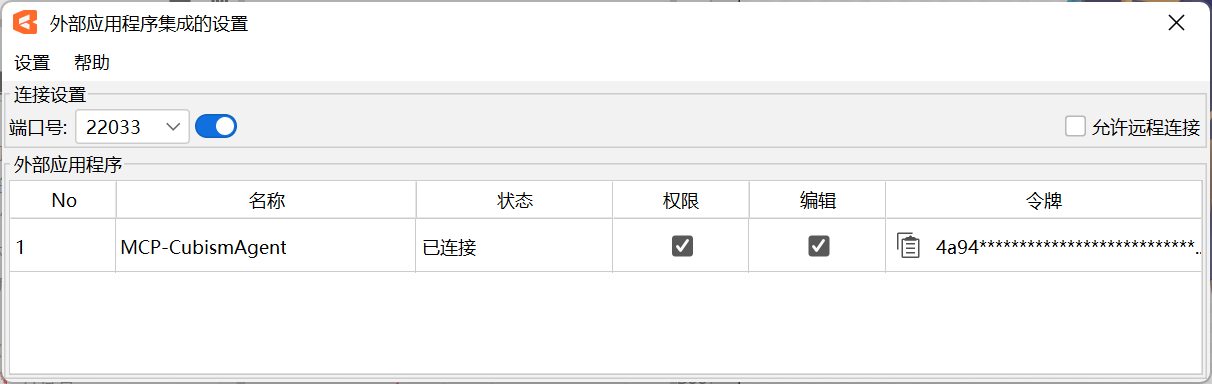
第三步:在 Cubism Editor 中开启外部集成
- 启动 Cubism Editor 5.4 Alpha,打开一个模型
- 菜单「文件」→「外部应用程序集成的设置」
- 确认端口为
22033,打开「使用」开关 - 弹出授权对话框,找到
cubism-mcp,勾选 Allow 和 Edit,点 OK
如果没看到弹窗,检查 Editor 右下角是否有闪烁的外部应用图标,点击即可打开对话框。
第四步:开始使用
在 AI Agent 中用自然语言操控 Editor,例如:
"列出当前模型的参数结构"
"查看部件层级"
"把眉毛部件的标签色改成蓝色"
"新建参数 ParamsTest,ID 为 ParamTest,范围 0-1,默认 0.5"
"批量添加 3 个关键帧到 ParamAngleX"
注意:每次重启 Cubism Editor 后,都需要重新开启「外部应用集成」开关并勾选 Allow + Edit 权限。
可用工具
诊断
| 工具 | 说明 |
|---|---|
cubism_status |
检查连接状态、注册状态、Allow/Edit 授权 |
读写操作
| 工具 | 参数 | 说明 |
|---|---|---|
cubism_get_model_uid |
— | 获取当前打开模型的 UID |
cubism_get_documents |
— | 列出所有打开的文档(建模/物理/动画) |
cubism_get_document |
document_uid |
按 UID 获取单个文档详情 |
cubism_get_current_edit_mode |
— | 获取编辑模式(Physics/Modeling/Animation/…) |
cubism_get_parameter_values |
model_uid, ids? |
读取模型参数当前值 |
cubism_set_parameter_values |
model_uid, parameters[] |
写入参数值(无需编辑事务) |
cubism_clear_parameter_values |
model_uid |
清除 SetParameterValues 的临时缓存 |
cubism_get_parameters |
model_uid |
参数元信息(名称/范围/Keyform/类型) |
cubism_get_parameter_groups |
model_uid |
参数组列表 |
查询结构(5.4 Alpha 新增)
| 工具 | 参数 | 说明 |
|---|---|---|
cubism_get_parameter_structure |
model_uid |
参数完整结构树(组+参数层级) |
cubism_get_part_structure |
model_uid |
部件结构树(ArtMesh/Deformer/Part/Glue) |
cubism_get_deformer_structure |
model_uid |
变形器结构树 |
cubism_get_object |
model_uid, id |
获取指定对象详情 |
cubism_get_selected |
model_uid |
获取当前选中的对象列表 |
cubism_get_parameter_keys |
model_uid, object_id |
获取对象的关键帧绑定关系 |
cubism_get_objects_by_parameter_keys |
model_uid, parameter_id, key_value |
按参数关键帧反查关联对象 |
编辑操作(5.4 Alpha 新增)
每个编辑 Action 均有独立 Tool(带完整类型签名和参数校验),同时保留 cubism_edit / cubism_edit_batch 用于批量操作。
参数编辑
| Tool | Action | 说明 |
|---|---|---|
cubism_add_parameter |
AddParameter | 添加参数 |
cubism_edit_parameter |
EditParameter | 编辑参数属性 |
cubism_delete_parameter |
DeleteParameter | 删除参数 |
cubism_add_parameter_group |
AddParameterGroup | 添加参数组 |
cubism_edit_parameter_group |
EditParameterGroup | 编辑参数组属性 |
cubism_delete_parameter_group |
DeleteParameterGroup | 删除参数组 |
cubism_move_parameter |
MoveParameter | 移动参数到指定组 |
cubism_move_parameter_group |
MoveParameterGroup | 调整参数组顺序 |
关键帧编辑
| Tool | Action | 说明 |
|---|---|---|
cubism_add_parameter_key |
AddParameterKey | 添加关键帧 |
cubism_delete_parameter_key |
DeleteParameterKey | 删除关键帧 |
cubism_move_parameter_key |
MoveParameterKey | 移动关键帧位置 |
部件编辑
| Tool | Action | 说明 |
|---|---|---|
cubism_add_part |
AddPart | 添加部件 |
cubism_edit_part |
EditPart | 编辑部件属性 |
cubism_edit_artmesh |
EditArtMesh | 编辑 ArtMesh 属性 |
cubism_edit_glue |
EditGlue | 编辑 Glue 属性 |
cubism_delete_object |
DeleteObject | 删除对象 |
cubism_move_object_on_parts_palette |
MoveObjectOnPartsPalette | 移动对象在部件面板的位置 |
变形器编辑
| Tool | Action | 说明 |
|---|---|---|
cubism_add_warp_deformer |
AddWarpDeformer | 添加弯曲变形器 |
cubism_add_rotation_deformer |
AddRotationDeformer | 添加旋转变形器 |
cubism_edit_warp_deformer |
EditWarpDeformer | 编辑弯曲变形器属性 |
cubism_edit_rotation_deformer |
EditRotationDeformer | 编辑旋转变形器属性 |
选择操作
| Tool | 说明 |
|---|---|
cubism_add_selected_objects |
编程式选中对象 |
cubism_clear_selected_objects |
清除所有选中 |
通用
| Tool | 参数 | 说明 |
|---|---|---|
cubism_edit |
action, params |
通用编辑入口(向后兼容) |
cubism_edit_batch |
actions[] |
批量编辑(单事务,失败回滚) |
常见问题
| 症状 | 原因 | 解决 |
|---|---|---|
| MCP 状态红色 | Python 路径/依赖/cwd 错误 |
检查 Python 版本 ≥ 3.10,确认依赖安装、cwd 路径正确 |
| 未连接到 Editor | Editor 未启动或外部集成未开启 | 启动 Editor → 加载模型 → 文件菜单开启外部集成 |
| 未授权 | 弹窗未勾选 Allow | 在外部集成对话框中勾选 Allow |
| 编辑报错 | 弹窗未勾选 Edit | 在外部集成对话框中勾选 Edit |
| 重启后失效 | Editor 重启需重新授权 | 重新开启外部集成并勾选权限 |
| 操作报错 | 参数/ID 不正确 | 先用 cubism_get_*_structure 查询结构再操作 |
开发
# 直接运行测试
python cubism_mcp.py

# 依赖
pip install -r requirements.txt
依赖
| 包 | 用途 |
|---|---|
mcp |
MCP 服务端框架(FastMCP + stdio 通信) |
websockets |
WebSocket 客户端,连接 Editor API |
注意事项
- Alpha 版本限制:Cubism Editor 5.4 Alpha 有效期至 2026-09-14,到期后需升级
- 重启授权:每次重启 Editor 都需要重新开启外部应用集成并勾选权限
- 单模型:MCP 服务同时只能操作一个打开的模型
- 事务安全:编辑操作自动包裹
EditBegin/EditEnd,批量操作失败自动Cancel回滚
License
MIT
Installing Cubism
This server has no published package — it is built from source. Open the repository and follow its README.
▸ github.com/nana7chi/CubismExternalEditMCPFAQ
Is Cubism MCP free?
Yes, Cubism MCP is free — one-click install via Unyly at no cost.
Does Cubism need an API key?
No, Cubism runs without API keys or environment variables.
Is Cubism hosted or self-hosted?
Self-hosted: the server runs locally on your machine via the install command above.
How do I install Cubism in Claude Desktop, Claude Code or Cursor?
Open Cubism on unyly.org, pick your client tab (Claude Desktop, Claude Code, Cursor) and press Install — the config is generated automatically, no JSON editing.
Related MCPs
GitHub
PRs, issues, code search, CI status
 by GitHub
Filesystem
Secure file operations with configurable access controls.
Memory
Knowledge graph-based persistent memory system.
Template MCP Server
A CLI tool to create a new Model Context Protocol server project with TypeScript support, dual transport options, and an extensible structure
 by mcpdotdirect
Compare Cubism with
Not sure what to pick?
Find your stack in 60 seconds
Author?
Embed badge for your README
Browse similar
All development MCPs