
Cursor Delegate
FreeNot checkedStop burning your Claude or Codex limits on boilerplate. Delegate multi-file implementation to Cursor's Composer 2.5 over MCP — your frontier model writes the b

About
Stop burning your Claude or Codex limits on boilerplate. Delegate multi-file implementation to Cursor's Composer 2.5 over MCP — your frontier model writes the brief and reviews the diff; Composer does the typing, fast, on a separate quota.
README
Keep the brains. Delegate the build.
npm version npm downloads node license: MIT tests

Use your best coding agent where its judgment matters most: understanding the task, shaping the plan, and reviewing the result.
Cursor Delegate is the MCP bridge that lets Claude Code, ChatGPT/Codex, Copilot — or any MCP client — hand implementation to Cursor's CLI agent, then get a clean, structured result back for review.
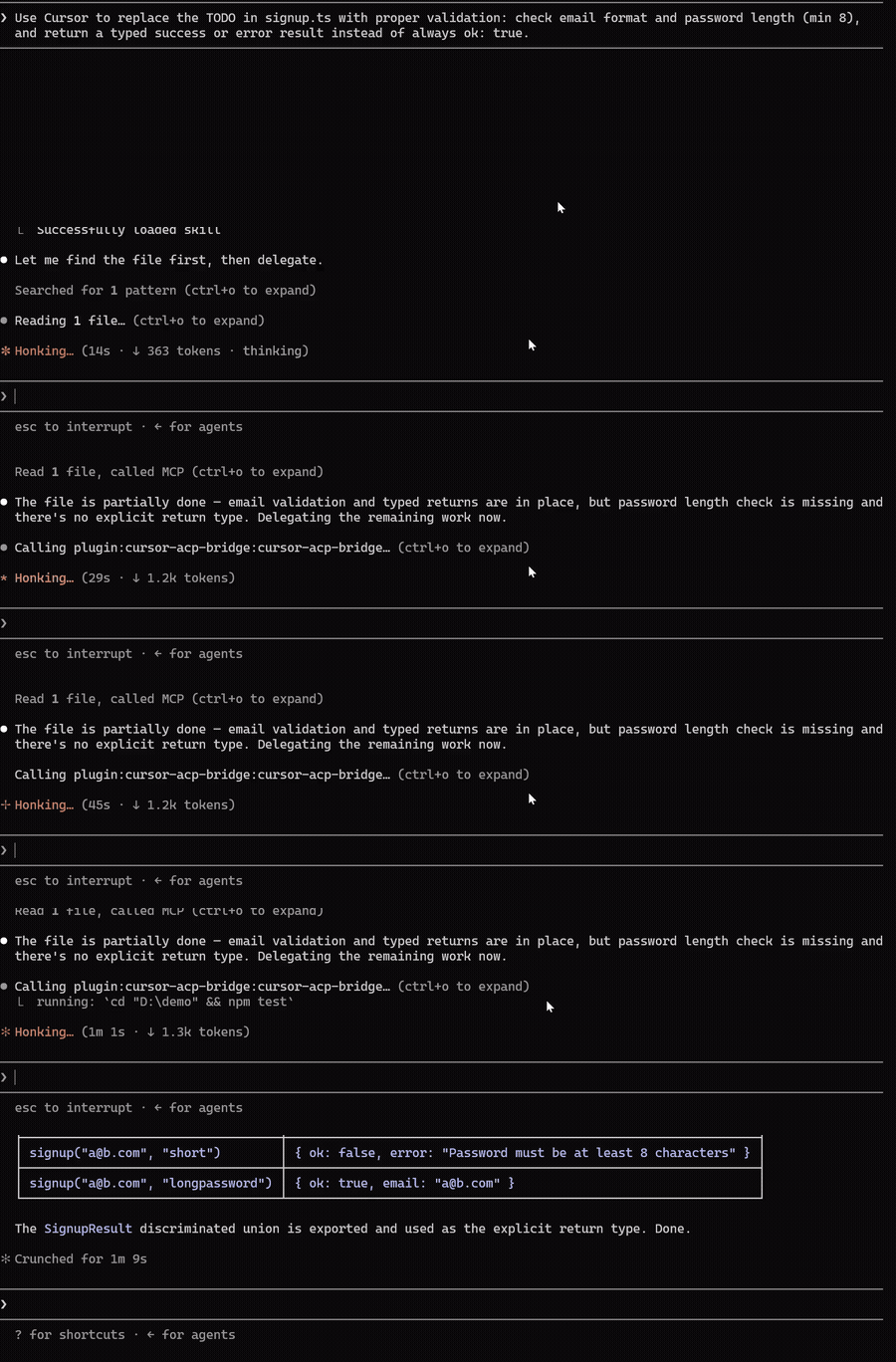
🧠 Frontier quality, kept
Your assistant does what frontier models are actually for: understands the task, writes a precise brief, reviews the finished diff. And Composer 2.5 holds its own — a seriously capable coding model, just guided and checked by a smarter one. The result reads like frontier work, because a frontier model planned it and signed off on it.
⚡ Done faster
Composer 2.5 is built for speed. It tears through multi-file edits while a frontier model would still be streaming the first file. You delegate, keep working with your assistant, and the diff shows up done.
🔋 Your limits stop being the bottleneck
Delegated work bills to Composer's own usage pool — separate from Cursor's API-priced main quota, and so generous most users never hit its ceiling. Your Claude or Codex subscription spends tokens only on the brief and the review, so the 5-hour window and weekly limits go a lot further. On API? That's the per-token grind moved off your bill.
You  →  your agent (plans & reviews)
              │  MCP delegate tool
              ▼
        cursor-agent (Composer 2.5 — implements)
              │  edits your workspace
              ▼
        Clean result: what changed, which files, the plan
Features
- 🤝 Native plugins — install into Claude Code, ChatGPT/Codex, or GitHub Copilot CLI and just say "delegate this to Cursor". The shared skill teaches your agent how to delegate well.
- 💬 No stalled runs — if Cursor needs to clarify, it ends the turn and returns the question as a normal result. Your agent reads it and answers by resuming the same session — nothing blocks on a modal waiting for input.
- 📦 Clean, typed results — final answer, changed files, session id, and the plan, returned as validated structured output. Nothing to parse, nothing to guess.
- 📋 Plan first —
planmode: Cursor drafts a plan, you review it, then the same session implements it. - 🔍 Ask anything —
askmode: read-only Q&A over your codebase, zero file changes. - 🩺 Self-diagnosing — a
doctortool that tells you exactly what's missing if setup isn't right. - 🔌 Works everywhere MCP does — VS Code, JetBrains, Windsurf, Visual Studio, and more.
Quick start
You need Node.js 22+ and the Cursor CLI, logged in (cursor-agent login).
Claude Code
/plugin marketplace add andreilungeanu/cursor-delegate-mcp
/plugin install cursor-delegate-mcp@cursor-delegate-mcp
Then just ask:
Delegate to Cursor: migrate src/api from callbacks to async/await and update the tests, then walk me through what changed.
That's the whole loop — Claude writes the brief, Cursor grinds through the files, Claude walks you through the diff.
ChatGPT desktop / Codex
codex plugin marketplace add andreilungeanu/cursor-delegate-mcp
codex plugin add cursor-delegate-mcp@cursor-delegate-mcp
GitHub Copilot CLI
copilot plugin install andreilungeanu/cursor-delegate-mcp
More clients
VS Code — .vscode/mcp.json
{
  "servers": {
    "cursor-delegate": {
      "type": "stdio",
      "command": "npx",
      "args": ["-y", "cursor-delegate-mcp"]
    }
  }
}
Or run Chat: Install Plugin From Source with this repository's URL.
JetBrains AI Assistant — Settings → Tools → AI Assistant → MCP
Under Settings → Tools → AI Assistant → Model Context Protocol (MCP), add a server with command npx and arguments -y cursor-delegate-mcp.
Windsurf — ~/.codeium/windsurf/mcp_config.json
{
  "mcpServers": {
    "cursor-delegate": {
      "command": "npx",
      "args": ["-y", "cursor-delegate-mcp"]
    }
  }
}
Heads-up: Cascade caps you at 100 tools across all servers.
Visual Studio 2022 — %USERPROFILE%\.mcp.json
{
  "servers": {
    "cursor-delegate": {
      "type": "stdio",
      "command": "npx",
      "args": ["-y", "cursor-delegate-mcp"]
    }
  }
}
Requires 17.14+. Note the top-level key is servers, not mcpServers.
Kiro, Kilo Code, and any other MCP client
Add the following server to the client's MCP config:
{
  "mcpServers": {
    "cursor-delegate": {
      "command": "npx",
      "args": ["-y", "cursor-delegate-mcp"]
    }
  }
}
License
MIT © Andrei Lungeanu
Installing Cursor Delegate
This server has no published package — it is built from source. Open the repository and follow its README.
▸ github.com/andreilungeanu/cursor-delegate-mcpFAQ
Is Cursor Delegate MCP free?
Yes, Cursor Delegate MCP is free — one-click install via Unyly at no cost.
Does Cursor Delegate need an API key?
No, Cursor Delegate runs without API keys or environment variables.
Is Cursor Delegate hosted or self-hosted?
Self-hosted: the server runs locally on your machine via the install command above.
How do I install Cursor Delegate in Claude Desktop, Claude Code or Cursor?
Open Cursor Delegate on unyly.org, pick your client tab (Claude Desktop, Claude Code, Cursor) and press Install — the config is generated automatically, no JSON editing.
Related MCPs
GitHub
PRs, issues, code search, CI status
 by GitHub
Filesystem
Secure file operations with configurable access controls.
Memory
Knowledge graph-based persistent memory system.
Template MCP Server
A CLI tool to create a new Model Context Protocol server project with TypeScript support, dual transport options, and an extensible structure
 by mcpdotdirect
Compare Cursor Delegate with
Not sure what to pick?
Find your stack in 60 seconds
Author?
Embed badge for your README
Browse similar
All development MCPs