
Cursor Feedback
FreeNot checkedEnables interactive feedback with image support in Cursor, allowing users to paste images for visual context and feedback.

About
Enables interactive feedback with image support in Cursor, allowing users to paste images for visual context and feedback.
README
- Original Project: noopstudios/interactive-feedback-mcp ⭐
Features
- Text Feedback
- Image Support
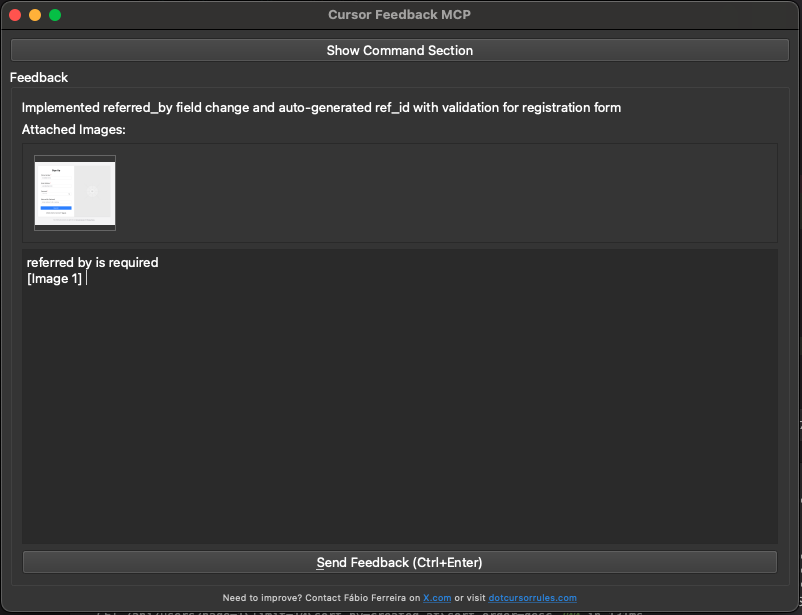
The interactive feedback UI allows you to paste images directly, making it easy to provide visual feedback and context. This is the main feature that makes this MCP tool unique.
Usage
- uv sync
- uv run server.py
- Configure in Cursor:
{
  "mcpServers": {
    "interactive-feedback-mcp": {
      "command": "uv",
      "args": [
        "--directory",
        "/Users/oplacrm/workspace/mcp/cursor-feedback",
        "run",
        "server.py"
      ],
      "timeout": 600,
      "autoApprove": [
        "interactive_feedback"
      ]
    }
  }
}
- Cursor rules
See .cursorrules file for the complete interactive feedback rule configuration. This rule ensures that:
- Interactive feedback is called before asking clarifying questions
- Interactive feedback is called before completing requests
- Proper parameters are provided for effective feedback collection
Install Cursor Feedback in Claude Desktop, Claude Code & Cursor
unyly install cursor-feedback-mcpInstalls into Claude Desktop, Claude Code, Cursor & VS Code — handles npx, uvx and build-from-source repos for you.
First time? Get the CLI: curl -fsSL https://unyly.org/install | sh
Or configure manually
Run in your terminal:
claude mcp add cursor-feedback-mcp -- uvx interactive-feedback-mcpFAQ
Is Cursor Feedback MCP free?
Yes, Cursor Feedback MCP is free — one-click install via Unyly at no cost.
Does Cursor Feedback need an API key?
No, Cursor Feedback runs without API keys or environment variables.
Is Cursor Feedback hosted or self-hosted?
Self-hosted: the server runs locally on your machine via the install command above.
How do I install Cursor Feedback in Claude Desktop, Claude Code or Cursor?
Open Cursor Feedback on unyly.org, pick your client tab (Claude Desktop, Claude Code, Cursor) and press Install — the config is generated automatically, no JSON editing.
Related MCPs
Omni Video
An MCP server that transforms LLM-enabled IDEs into professional video editors by pre-processing footage into text proxies, generating motion graphics via HTML/
 by buildwithtaza
ARA
Generate images, video and audio from any AI agent — one connector.
 by ARA
YouTube
Transcripts, channel stats, search
 by YouTube
EverArt
AI image generation using various models.
 by modelcontextprotocol
Compare Cursor Feedback with
Not sure what to pick?
Find your stack in 60 seconds
Author?
Embed badge for your README
Browse similar
All media MCPs