
Dbhub
FreeNot checkedMinimal, token-efficient Database MCP Server for PostgreSQL, MySQL, SQL Server, SQLite, MariaDB

About
Minimal, token-efficient Database MCP Server for PostgreSQL, MySQL, SQL Server, SQLite, MariaDB
README
[!NOTE]
Brought to you by Bytebase, open-source database DevSecOps platform.

            +------------------+    +--------------+    +------------------+
            |                  |    |              |    |                  |
            |                  |    |              |    |                  |
            |  Claude Desktop  +--->+              +--->+    PostgreSQL    |
            |                  |    |              |    |                  |
            |  Claude Code     +--->+              +--->+    SQL Server    |
            |                  |    |              |    |                  |
            |  Cursor          +--->+    DBHub     +--->+    SQLite        |
            |                  |    |              |    |                  |
            |  VS Code         +--->+              +--->+    MySQL         |
            |                  |    |              |    |                  |
            |  Copilot CLI     +--->+              +--->+    MariaDB       |
            |                  |    |              |    |                  |
            |                  |    |              |    |                  |
            +------------------+    +--------------+    +------------------+
                 MCP Clients           MCP Server             Databases
DBHub is a zero-dependency, token efficient MCP server implementing the Model Context Protocol (MCP) server interface. This lightweight gateway allows MCP-compatible clients to connect to and explore different databases:
- Local Development First: Zero dependency, token efficient with just two MCP tools to maximize context window
- Multi-Database: PostgreSQL, MySQL, MariaDB, SQL Server, and SQLite through a single interface
- Multi-Connection: Connect to multiple databases simultaneously with TOML configuration
- Guardrails: Read-only mode, row limiting, and query timeout to prevent runaway operations
- Secure Access: SSH tunneling and SSL/TLS encryption
Supported Databases
PostgreSQL, MySQL, SQL Server, MariaDB, and SQLite.
MCP Tools
DBHub implements MCP tools for database operations:
- execute_sql: Execute SQL queries with transaction support and safety controls
- search_objects: Search and explore database schemas, tables, columns, indexes, and procedures with progressive disclosure
- Custom Tools: Define reusable, parameterized SQL operations in your
dbhub.tomlconfiguration file
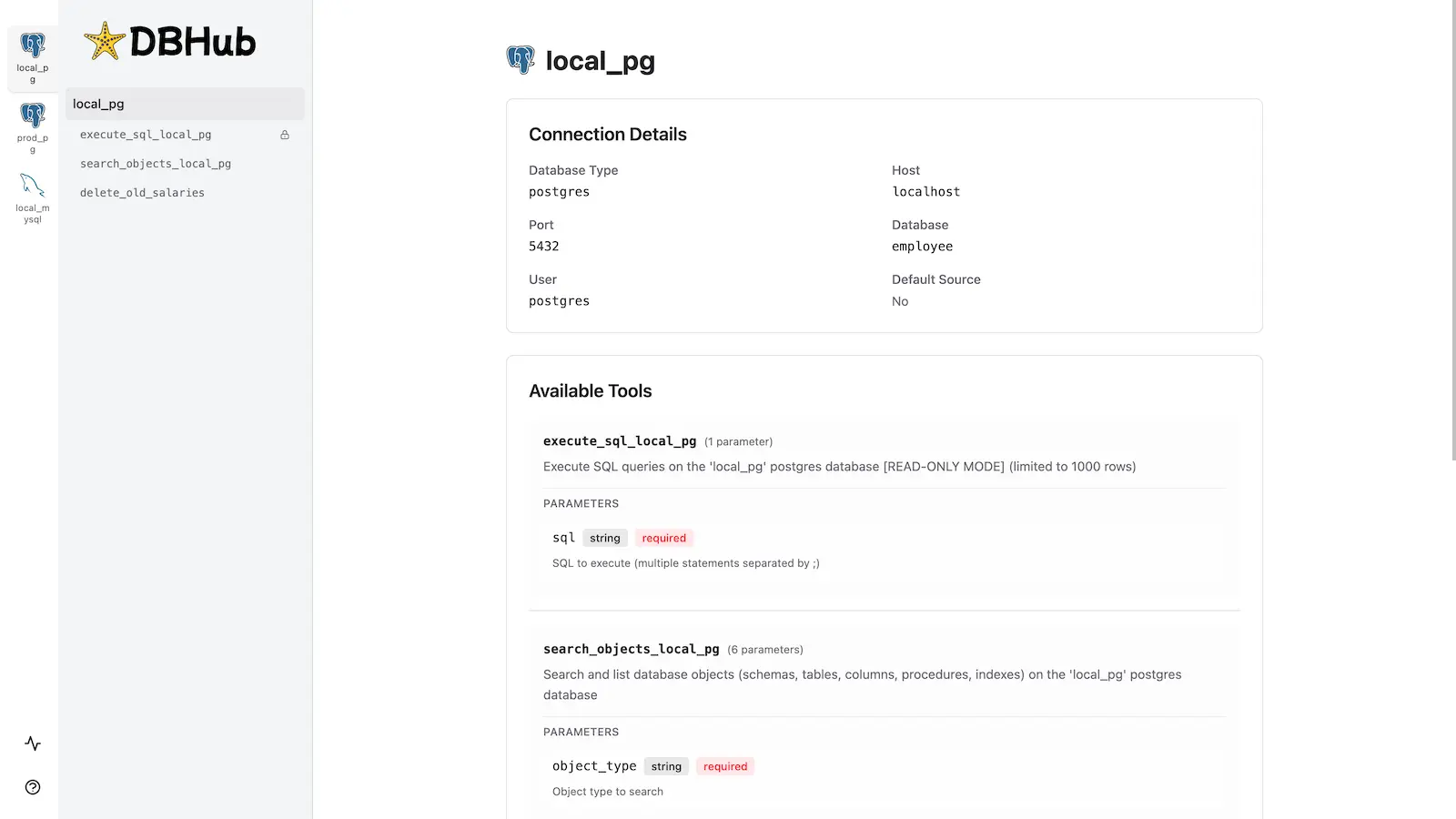
Workbench
DBHub includes a built-in web interface for interacting with your database tools. It provides a visual way to execute queries, run custom tools, and view request traces without requiring an MCP client.
Installation
See the full Installation Guide for detailed instructions.
Quick Start
Docker:
docker run --rm --init \
   --name dbhub \
   --publish 8080:8080 \
   bytebase/dbhub \
   --transport http \
   --port 8080 \
   --dsn "postgres://user:password@localhost:5432/dbname?sslmode=disable"
NPM: (requires Node.js >= 22.5.0)
npx @bytebase/dbhub@latest --transport http --port 8080 --dsn "postgres://user:password@localhost:5432/dbname?sslmode=disable"
MCP Bundle (one-click install):
Download dbhub-<version>.mcpb from the latest release and install it in any MCPB-compatible client — Claude Desktop (double-click, or drag into Settings → Extensions), Claude Code, or MCP for Windows — then enter your database connection string. The bundle runs locally over stdio, is read-only by design (writes are rejected and the database session is set to read-only at the engine level), and needs no remote endpoint or OAuth setup — ideal for giving non-technical teammates curated, read-only database access. Pair it with a least-privilege, read-only database account. See the MCP Bundle guide for details and for packaging your own bundle.
Demo Mode:
npx @bytebase/dbhub@latest --transport http --port 8080 --demo
Restrict to loopback (recommended for production):
npx @bytebase/dbhub@latest --transport http --host 127.0.0.1 --port 8080 --demo
The HTTP transport defaults to
--host 0.0.0.0, exposing DBHub on every network interface. For production, bind to127.0.0.1and front DBHub with a reverse proxy (nginx/Caddy) or firewall — DBHub does not authenticate HTTP clients.The HTTP transport also has built-in DNS-rebinding protection: it only accepts requests whose
Hostis loopback, this machine's own hostname/IPs, or a name you allow via --allowed-hosts. If a client behind a reverse proxy or custom DNS name gets a403, add that hostname with--allowed-hosts.
See Command-Line Options for all available parameters.
Multi-Database Setup
Connect to multiple databases simultaneously using TOML configuration files. Perfect for managing production, staging, and development databases from a single DBHub instance.
See Multi-Database Configuration for complete setup instructions.
Development
Requires Node.js >= 22.5.0 (DBHub uses the built-in node:sqlite module).
# Install dependencies
pnpm install

# Run in development mode
pnpm dev

# Build and run for production
pnpm build && pnpm start --transport stdio --dsn "postgres://user:password@localhost:5432/dbname"
Contributors
Star History
Install Dbhub in Claude Desktop, Claude Code & Cursor
unyly install dbhubInstalls into Claude Desktop, Claude Code, Cursor & VS Code — handles npx, uvx and build-from-source repos for you.
First time? Get the CLI: curl -fsSL https://unyly.org/install | sh
Or configure manually
Run in your terminal:
claude mcp add dbhub -- npx -y @bytebase/dbhubFAQ
Is Dbhub MCP free?
Yes, Dbhub MCP is free — one-click install via Unyly at no cost.
Does Dbhub need an API key?
No, Dbhub runs without API keys or environment variables.
Is Dbhub hosted or self-hosted?
Self-hosted: the server runs locally on your machine via the install command above.
How do I install Dbhub in Claude Desktop, Claude Code or Cursor?
Open Dbhub on unyly.org, pick your client tab (Claude Desktop, Claude Code, Cursor) and press Install — the config is generated automatically, no JSON editing.
Related MCPs
wenb1n-dev/SmartDB_MCP
A universal database MCP server supporting simultaneous connections to multiple databases. It provides tools for database operations, health analysis, SQL optim
 by wenb1n-dev
Postgres Server
This server enables interaction with PostgreSQL databases through the Model Context Protocol, optimized for the AWS Bedrock AgentCore Runtime. It provides tools
 by madhurprash
Postgres
Query your database in natural language
 by Anthropic
PostgreSQL
Read-only database access with schema inspection.
by modelcontextprotocolCompare Dbhub with
Not sure what to pick?
Find your stack in 60 seconds
Author?
Embed badge for your README
Browse similar
All data MCPs