
Demo Refrigerator Inventory Mgmt
FreeNot checkedThe Refrigerator Inventory Management project uses the Model Context Protocol (MCP) framework, integrating an AI chatbot with a Spring Boot application. MCP cli

About
The Refrigerator Inventory Management project uses the Model Context Protocol (MCP) framework, integrating an AI chatbot with a Spring Boot application. MCP clients connect to a server, which queries a local database (PostgreSQL), and receive answers from an AI model, providing inventory management functionality for refrigerators.
README
A demo project showcasing integration between an AI chatbot and a Spring Boot application using the Model Context Protocol (MCP) framework. It provides inventory management functionality for refrigerators by answering queries through an AI model, backed by a PostgreSQL database.
🛠️ Tech Stack
- Java / Spring Boot
- MCP Server / Client
- PostgreSQL / NeonDB
- Ollama with
llama3.2(local LLM) - Swagger UI (for testing endpoints)
🚀 Project Setup
1. Set Up PostgreSQL
You can either:
- Run PostgreSQL locally
- Use Docker to spin up a PostgreSQL container
- Connect via a hosted DB service like NeonDB
Make sure your database is properly configured and running.
2. Set Up Local LLM with Ollama
Install and run Ollama for local LLM support:
> ollama list
> ollama pull llama3.2:latest
> ollama run llama3.2
💡
llama3.2is around 2GB and runs locally for free—no API key required!
3. Run the Applications
Make sure you run all three components:
refrigerator-inventory-coremcp-servermcp-client
Each should be correctly configured to communicate with the database and each other.
✅ Verifying MCP with Local Data
🔍 Step 1: Test AI Model is Running
Go to Swagger UI:
http://localhost:8082/swagger-ui/index.html#/ai-chat-controller
Click Try it out on the
chatendpointEnter:
{
  "message": "What is the capital of India?"
}
You should see:
New Delhi
✔️ Confirms the local
llama3.2is up and integrated.
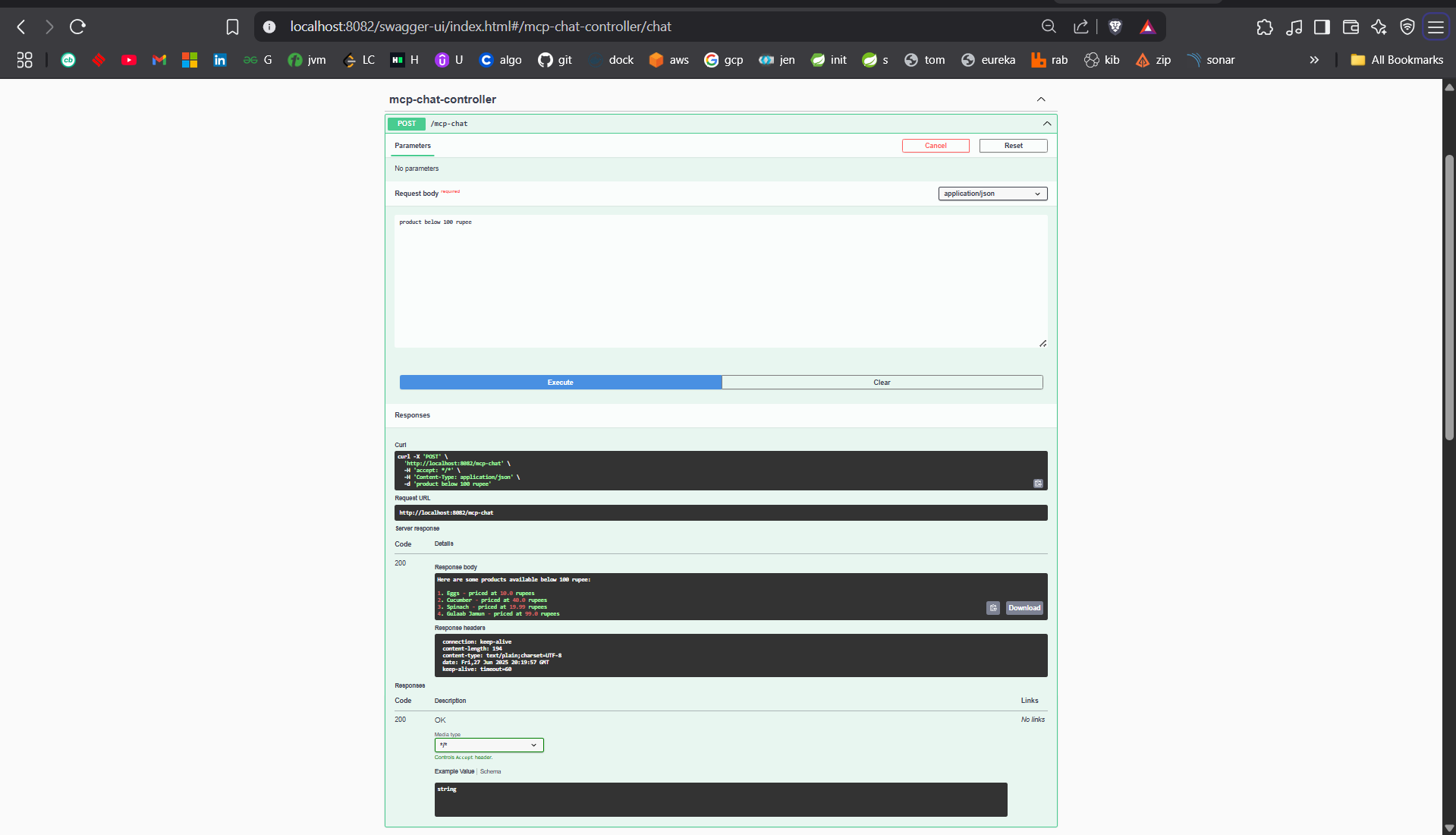
🔍 Step 2: Verify Response from Local Database
Navigate to:
http://localhost:8082/swagger-ui/index.html#/mcp-chat-controller/chat
Click Try it out and enter:
{
  "message": "Product below 100 rupees"
}
Sample response:
Here are some products available below 100 rupees:

1. Eggs - priced at 10.0 rupees
2. Cucumber - priced at 40.0 rupees
3. Spinach - priced at 19.99 rupees
4. Gulaab Jamun - priced at 99.0 rupees
✔️ This confirms that the MCP server retrieves and responds using your own database, not internet data.
📸 Screenshot
🧾 Conclusion
The MCP Client connects to the MCP Server, which interacts with the refrigerator-inventory-core app and provides AI-generated answers based on your local database.
🎯 A practical demonstration of a local AI system working in real-time with your Spring Boot and PostgreSQL setup!
from github.com/abchatterjee7/mcp-demo-refrigerator-inventory-mgmt
Installing Demo Refrigerator Inventory Mgmt
This server has no published package — it is built from source. Open the repository and follow its README.
▸ github.com/abchatterjee7/mcp-demo-refrigerator-inventory-mgmtFAQ
Is Demo Refrigerator Inventory Mgmt MCP free?
Yes, Demo Refrigerator Inventory Mgmt MCP is free — one-click install via Unyly at no cost.
Does Demo Refrigerator Inventory Mgmt need an API key?
No, Demo Refrigerator Inventory Mgmt runs without API keys or environment variables.
Is Demo Refrigerator Inventory Mgmt hosted or self-hosted?
Self-hosted: the server runs locally on your machine via the install command above.
How do I install Demo Refrigerator Inventory Mgmt in Claude Desktop, Claude Code or Cursor?
Open Demo Refrigerator Inventory Mgmt on unyly.org, pick your client tab (Claude Desktop, Claude Code, Cursor) and press Install — the config is generated automatically, no JSON editing.
Related MCPs
wenb1n-dev/SmartDB_MCP
A universal database MCP server supporting simultaneous connections to multiple databases. It provides tools for database operations, health analysis, SQL optim
 by wenb1n-dev
Postgres Server
This server enables interaction with PostgreSQL databases through the Model Context Protocol, optimized for the AWS Bedrock AgentCore Runtime. It provides tools
 by madhurprash
Postgres
Query your database in natural language
 by Anthropic
PostgreSQL
Read-only database access with schema inspection.
by modelcontextprotocolCompare Demo Refrigerator Inventory Mgmt with
Not sure what to pick?
Find your stack in 60 seconds
Author?
Embed badge for your README
Browse similar
All data MCPs