
Devmind
FreeNot checkedAI dev assistant with MCP tools, Claude tool-use API, and real-time streaming. React + FastAPI + Python.

About
AI dev assistant with MCP tools, Claude tool-use API, and real-time streaming. React + FastAPI + Python.
README
An AI dev assistant that can read your GitHub repos, search the web, and reason about your code — with answers streaming back word by word in real time.
Live demo: https://devmind-mu.vercel.app
What it does
Ask DevMind anything about your code or repos. It decides which tools to use, calls them, and streams the answer back as it generates.
Example prompts:
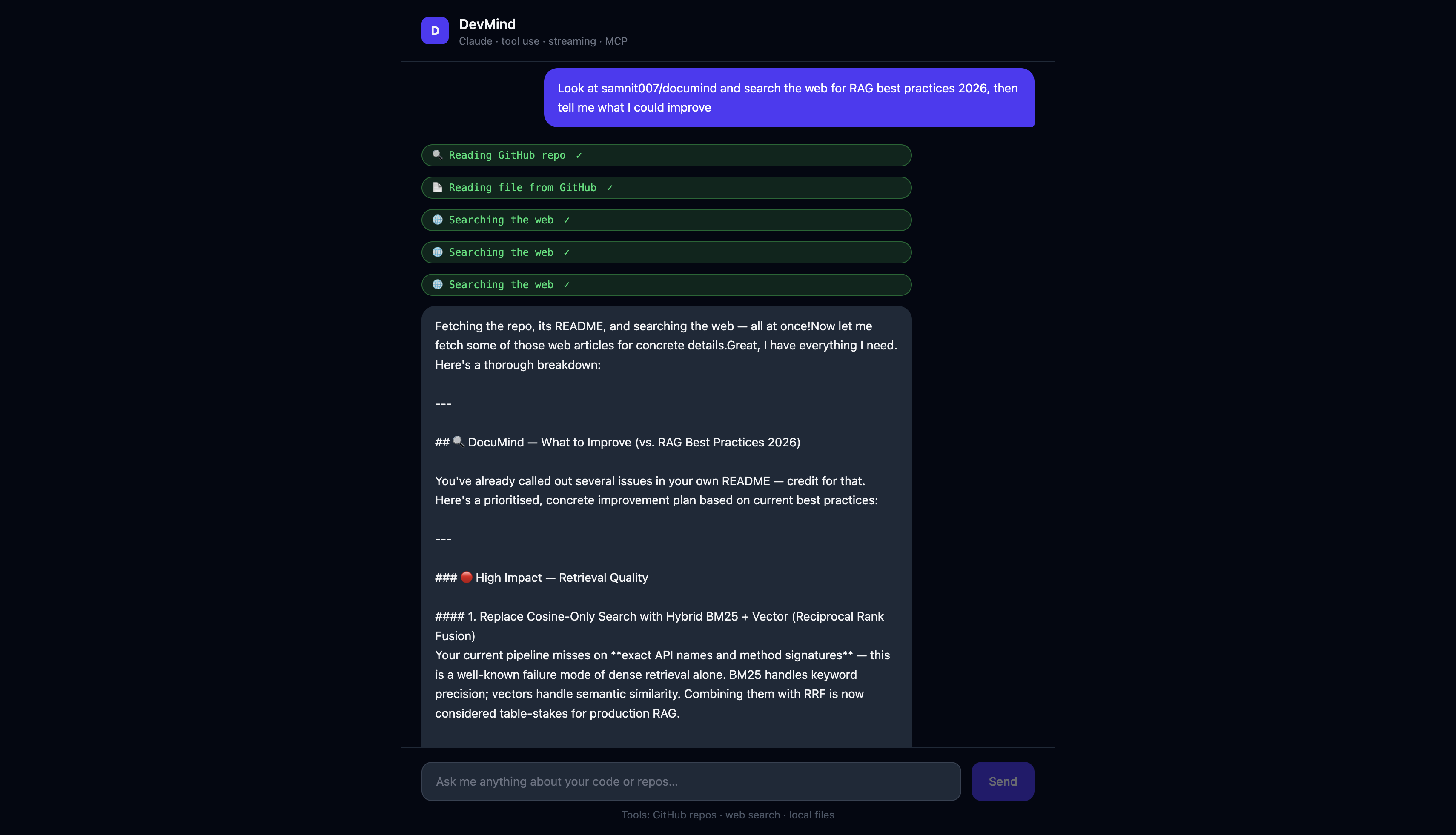
Summarise this repo: samnit007/pr-reviewer-agentRead the README of samnit007/documind and suggest improvementsSearch the web for LangGraph best practices 2026Look at samnit007/devmind and tell me what tests are missing
Screenshots
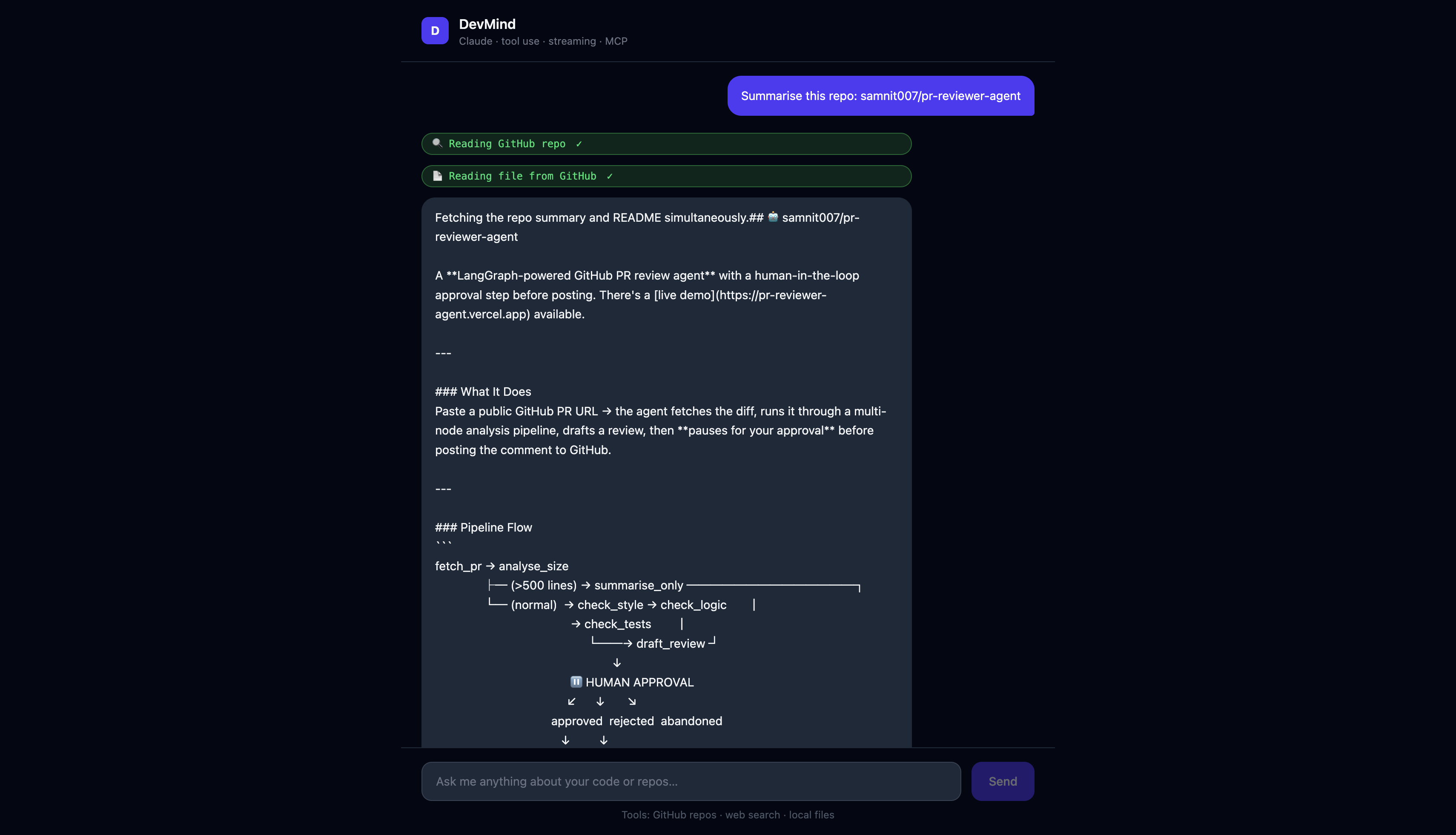
Streaming response with tool call badges
Multi-tool reasoning
Architecture
React UI (Vite + Tailwind)
      │
      │  POST /api/chat  (SSE stream)
      ▼
FastAPI backend
      │
      ├── Claude API (tool_use + streaming)
      │         │
      │    decides which tools to call
      │         │
      ├── GitHub tool   →  PyGithub → GitHub API
      ├── Web search    →  Tavily API
      └── File reader   →  local filesystem (sandboxed)

MCP Server (stdio transport)
  └── same tools exposed via Model Context Protocol
      → connect via Claude Desktop or MCP Inspector
Key technical details
Claude tool use + streaming together Claude's streaming API and tool use API work differently — streaming delivers text deltas, tool use interrupts the stream for function calls, then resumes. This backend handles both in a single agentic loop: stream text → detect tool call → execute tool → inject result → continue streaming.
MCP server
backend/mcp_server.py exposes the same four tools via the official mcp Python SDK over stdio transport. Connect it to Claude Desktop by adding to your claude_desktop_config.json:
{
  "mcpServers": {
    "devmind": {
      "command": "python",
      "args": ["/path/to/devmind/backend/mcp_server.py"]
    }
  }
}
Real-time SSE streaming
The backend yields text/event-stream chunks as Claude generates them. The React frontend reads the stream with the Web Streams API and appends each delta to the message in state — no polling, no waiting for the full response.
Tool call badges The frontend shows amber "in progress" badges when a tool is called and green "done" badges when it completes — before the answer text appears. This makes the agent's reasoning visible rather than hiding it behind a spinner.
Stack
| Layer | Choice |
|---|---|
| Frontend | React 19 + TypeScript + Tailwind CSS v4 |
| Backend | Python + FastAPI |
| AI | Claude Sonnet (tool use + streaming) |
| Tools | PyGithub, Tavily search, local file reader |
| MCP | Official mcp Python SDK (stdio transport) |
| Deploy | Railway (backend) + Vercel (frontend) |
Run locally
Backend
cd backend
python3.11 -m venv venv && source venv/bin/activate
pip install -r requirements.txt
cp .env.example .env   # fill in keys
uvicorn app.main:app --reload --port 8000
Frontend
cd frontend
npm install
npm run dev   # http://localhost:5175
MCP server (optional)
cd backend
source venv/bin/activate
python mcp_server.py
Connect via MCP Inspector or Claude Desktop.
Environment variables
| Variable | Required | Description |
|---|---|---|
ANTHROPIC_API_KEY |
Yes | Anthropic API key |
GITHUB_TOKEN |
Yes | GitHub PAT (read access) |
TAVILY_API_KEY |
Yes | Tavily search API key (free tier) |
CLAUDE_MODEL |
No | Defaults to claude-sonnet-4-6 |
FILES_ROOT |
No | Sandbox root for local file reads (defaults to ~) |
What I'd add next
- Conversation memory — persist chat history across sessions (currently stateless per request)
- Code execution tool — run Python snippets in a sandbox and return output
- Streaming to MCP — MCP server currently returns full responses; streaming over SSE transport would improve latency
- Auth — right now anyone with the URL uses your GitHub token and Tavily credits
Installing Devmind
This server has no published package — it is built from source. Open the repository and follow its README.
▸ github.com/samnit007/devmindFAQ
Is Devmind MCP free?
Yes, Devmind MCP is free — one-click install via Unyly at no cost.
Does Devmind need an API key?
No, Devmind runs without API keys or environment variables.
Is Devmind hosted or self-hosted?
Self-hosted: the server runs locally on your machine via the install command above.
How do I install Devmind in Claude Desktop, Claude Code or Cursor?
Open Devmind on unyly.org, pick your client tab (Claude Desktop, Claude Code, Cursor) and press Install — the config is generated automatically, no JSON editing.
Related MCPs
GitHub
PRs, issues, code search, CI status
 by GitHub
Filesystem
Secure file operations with configurable access controls.
Memory
Knowledge graph-based persistent memory system.
Template MCP Server
A CLI tool to create a new Model Context Protocol server project with TypeScript support, dual transport options, and an extensible structure
 by mcpdotdirect
Compare Devmind with
Not sure what to pick?
Find your stack in 60 seconds
Author?
Embed badge for your README
Browse similar
All development MCPs