
DevNotion
FreeNot checkedDevNotion is an agentic server built using 3 mastra agents to work as a pipeline to publish weekly blogs on Notion Pages & DEV.to

About
DevNotion is an agentic server built using 3 mastra agents to work as a pipeline to publish weekly blogs on Notion Pages & DEV.to
README
Turn your weekly GitHub activity into a polished, illustrated blog post — narrated by an LLM, reviewed by you, and published to Notion, DEV.to, and Hashnode.
DevNotion is a Mastra pipeline of specialist agents: it harvests a week of your GitHub work, narrates it into a first-person post, generates images, and lets you preview/edit before it publishes anywhere. Originally built for the DEV.to × Notion MCP Challenge (where it won $500); v2 was rebuilt for the GitHub Finish-Up-A-Thon with multi-LLM support, a review dashboard, image generation, richer harvesting, and a fail-safe publishing flow.
What's new in v2
| v1 | v2 | |
|---|---|---|
| LLM | Gemini only | Gemini · OpenAI · Anthropic (provider abstraction; default gemini-3-flash-preview) |
| Publish targets | Notion + DEV.to | Notion + DEV.to + Hashnode |
| Flow | generate → publish immediately | generate → preview → edit → approve → publish |
| UI | none (CLI/cron) | web dashboard (trigger, preview, edit, history) |
| Images | none | deterministic stats card, doubling as the cover/social image |
| Harvest | PR-only line stats | real per-commit deltas, changed files, touched areas |
| Footer | none | author/social footer on every post |
| Failure | silent fallback could publish a stub | fail-loud — a bad run publishes nothing |
| Setup | hand-edit .env |
npx devnotion init guided wizard |
Architecture
Three specialist agents across a pipeline that is split so generation and publishing are decoupled — a failure or an unreviewed draft never reaches your readers.
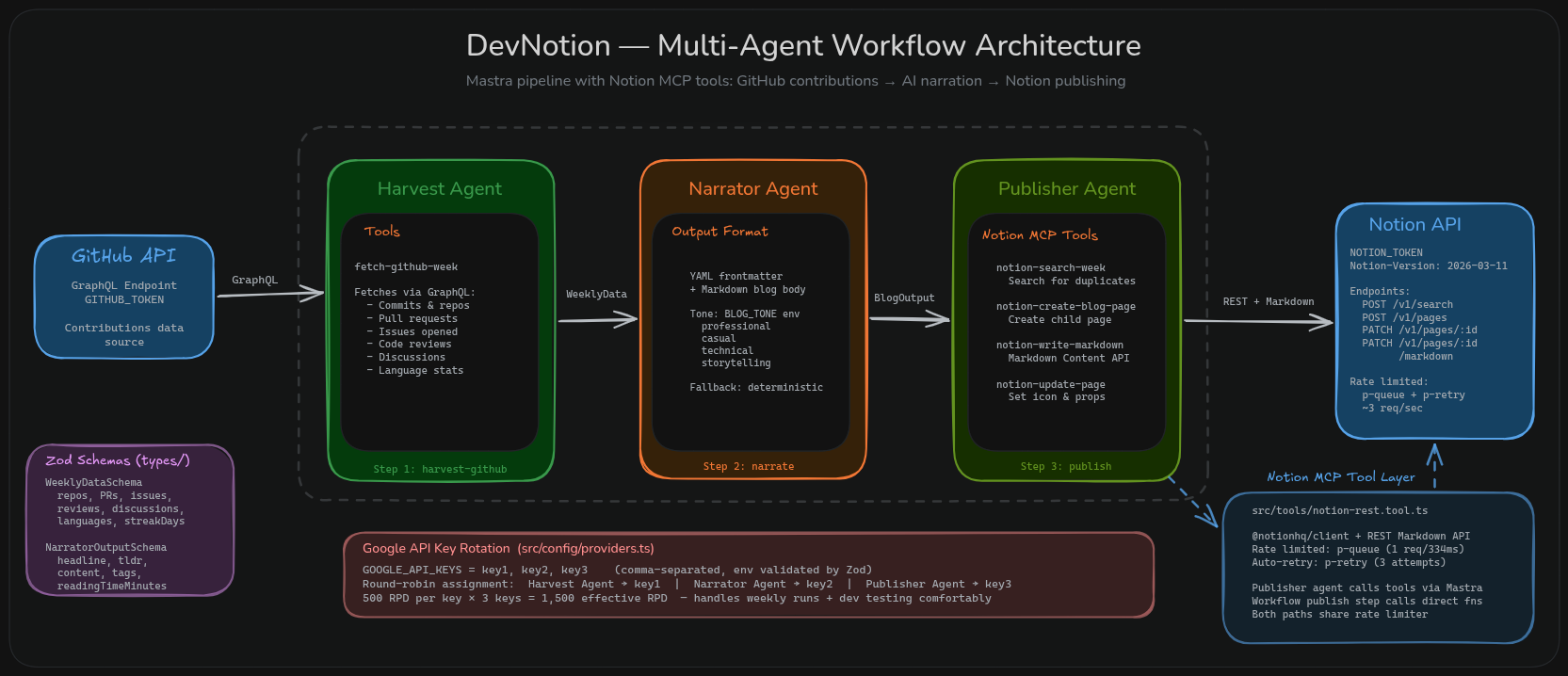
The pipeline only uses an LLM where it adds value (narration). Harvest, the stats card, and publishing are deterministic — no token overhead, no hallucinated numbers.
Screenshots
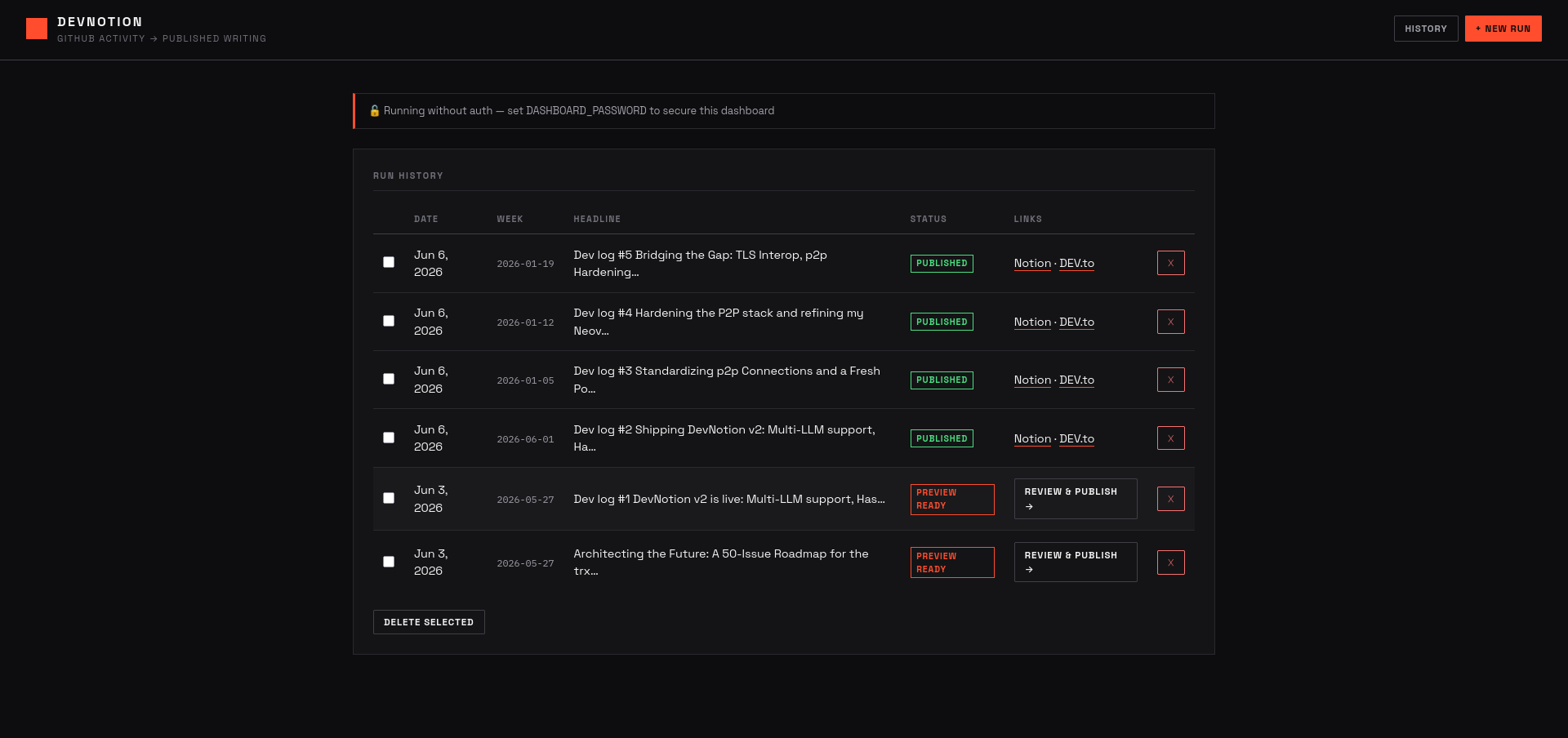
Dashboard — run history with status badges and Review & Publish actions:
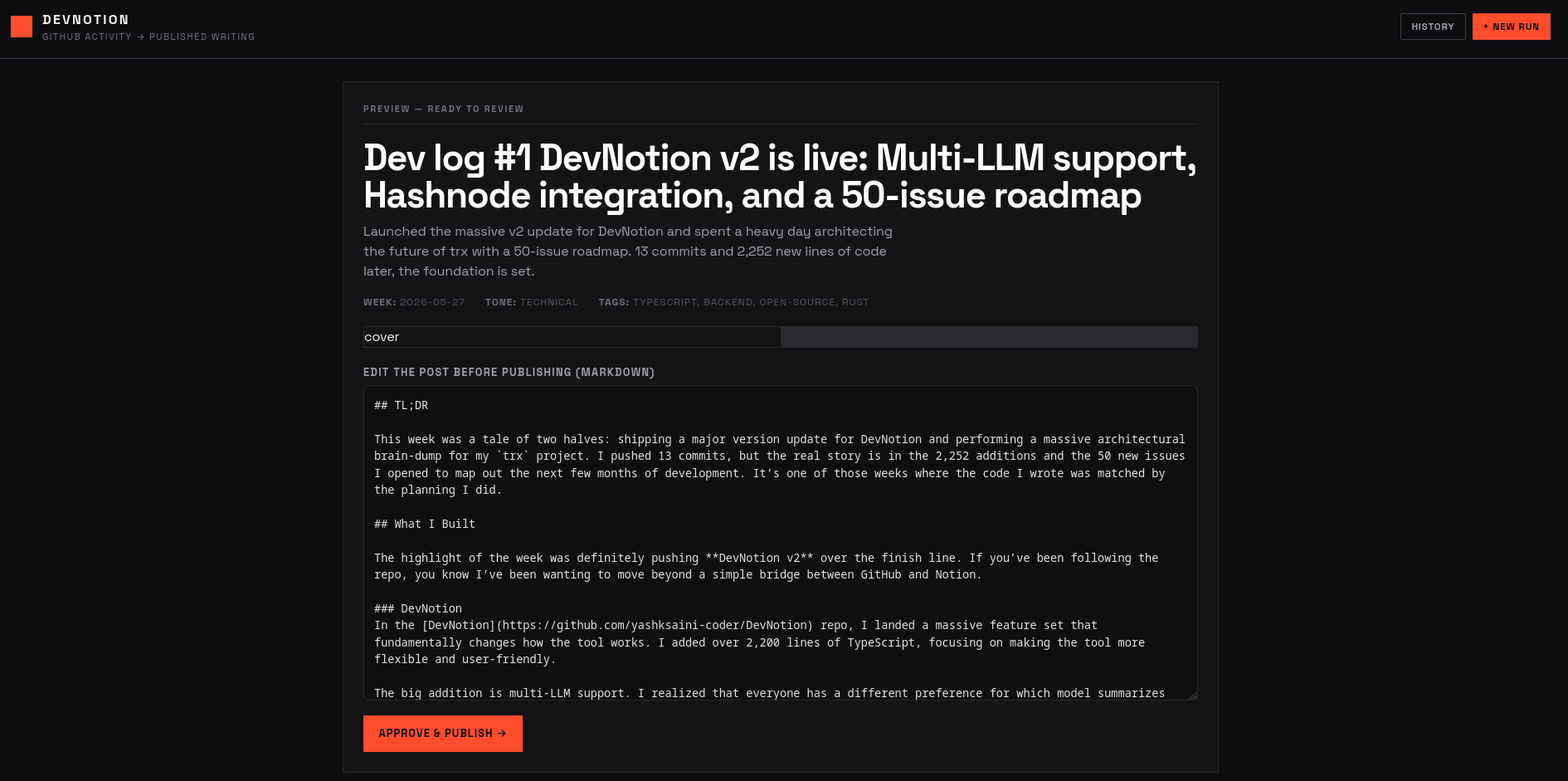
Preview & edit — read the generated draft, tweak it in the browser, then approve:
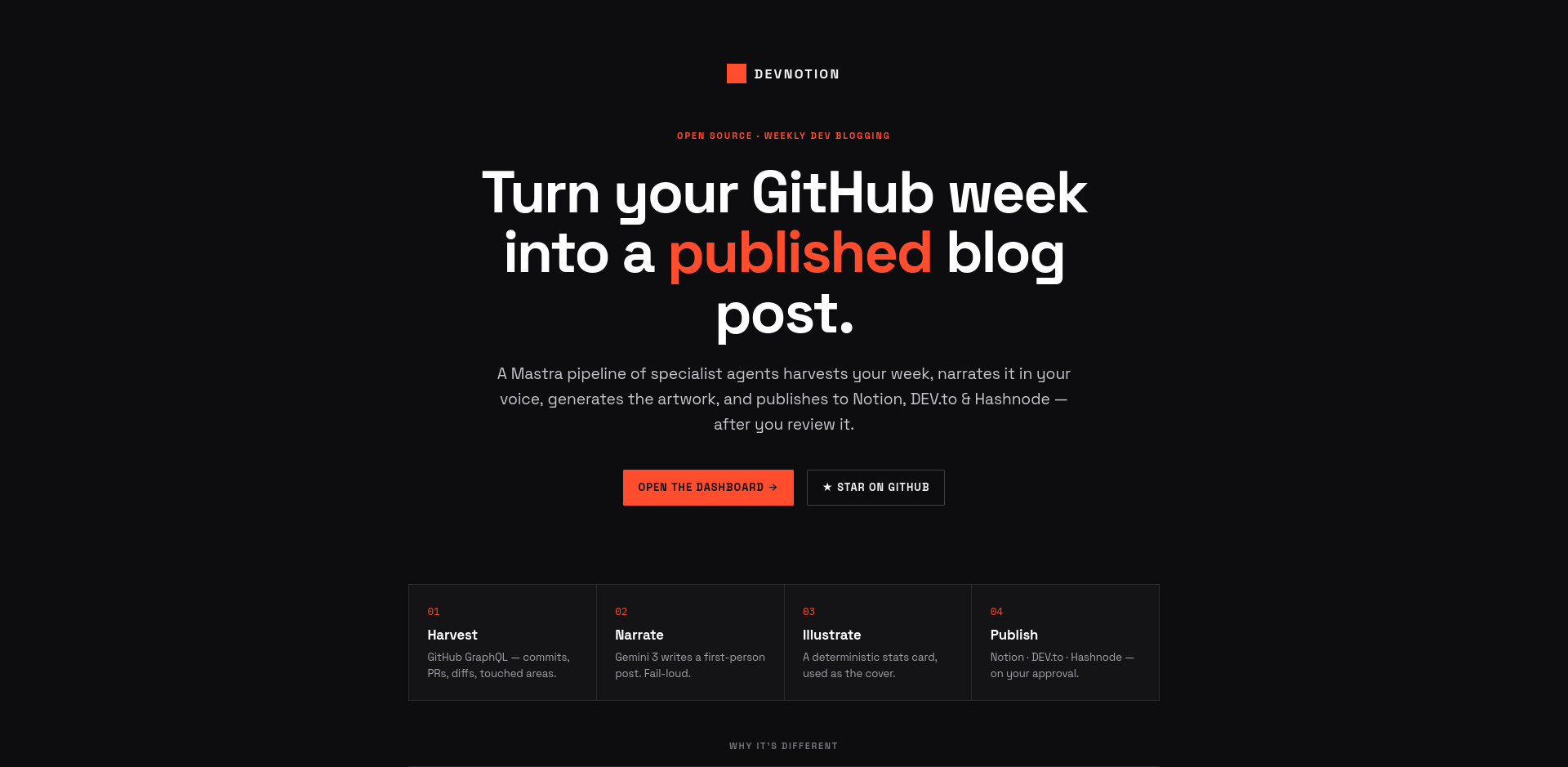
Public landing page — Swiss hero with social links:
Key features
- Multi-LLM — set
LLM_PROVIDER=gemini|openai|anthropic. Default model isgemini-3-flash-preview(free tier eligible). One source of truth for model selection. - Preview → edit → publish gate — the dashboard generates a draft, shows it (with images) for review and in-browser markdown editing, and publishes only on Approve. The headless/cron path can default to drafts.
- Diff-enriched harvest — real per-repo/commit line deltas, changed-file counts, commit messages, and the top directories you touched (e.g.
src/server) — so the narration is specific, not generic. - Cover image — a deterministic stats card (SVG → PNG, 1200×630) that leads with the post title (wrapped to fit) and the week's exact metrics — commits, PRs, reviews, lines changed, repos. Used as the cover/social image on every target (DEV.to
main_image, Hashnode cover, Notion page cover). No API, no quota — best-effort and never blocks a run. - Author/social footer — name, bio, and links rendered on every post from one config (
src/config/author.ts). - Fail-loud — if narration hits a quota/parse error, the run is marked failed and nothing is published (no silent fallback stub).
- Rate-limited & resilient —
p-queue+p-retrywrappers per API (Notion, DEV.to, Hashnode, GitHub).
Quick Start
Prerequisites
- Node.js 22+, pnpm
- GitHub personal access token (
ghp_…, scopes:read:user,repo,read:org) - An LLM key: Google AI Studio (free keys), or OpenAI, or Anthropic
- Notion integration token + parent page ID (setup)
- Optional: DEV.to API key, Hashnode token + publication ID
Setup
git clone https://github.com/yashksaini-coder/DevNotion.git
cd DevNotion
pnpm install
npx devnotion init   # guided wizard — validates each credential as you enter it
init writes a .env.local and live-checks GitHub, your LLM provider, Notion, and any publish targets you enable. (Or copy .env.example to .env.local and fill it in by hand.)
Run
pnpm dashboard                 # web dashboard at http://localhost:3000 (recommended)
pnpm dev                       # run the pipeline for the current week (CLI)
pnpm dev -- --week=2026-03-16  # run for a specific week
pnpm playground                # Mastra playground (agent testing UI)
pnpm test                      # vitest suite
The dashboard is the main entry point: trigger a run, watch it reach Preview Ready, review/edit the post and images, then Approve & Publish.
CI (GitHub Actions)
Runs automatically every Sunday at 08:00 UTC, or manually via Actions → Weekly Blog Dispatch → Run workflow. Required secrets: GH_TOKEN, GH_USERNAME, GOOGLE_API_KEYS, NOTION_TOKEN, NOTION_PARENT_PAGE_ID, and any publish-target keys.
Configuration (selected env)
LLM_PROVIDER=gemini                  # gemini | openai | anthropic
# LLM_MODEL=gemini-3-flash-preview   # override the per-provider default
# NARRATION_MAX_TOKENS=8192          # output budget (Gemini 3 is a thinking model)
PUBLISH_TARGETS=notion,devto         # comma-separated: notion, devto, hashnode
PUBLISH_MODE=auto                    # auto = publish live | draft = save as drafts
BLOG_TONE=casual                     # casual | professional | technical | storytelling
# FOCUS_AREAS=TypeScript performance,open source
# GENERATE_IMAGES=true               # cover + stats card
# IMAGE_PUBLIC_BASE_URL=             # public base URL so images attach on publish
# DASHBOARD_PASSWORD=                 # optional — protect the dashboard (scrypt-hashed; 10-min session)
Note on images: the cover/social image is a deterministic stats card rendered locally (resvg) — no API or quota needed. Set
IMAGE_PUBLIC_BASE_URLto a public base (e.g. the raw repo URL) so the card resolves to a public URL and attaches as the cover on DEV.to/Hashnode/Notion; without it the card is still generated locally but not attached.
Blog Tone Profiles
| Tone | Style |
|---|---|
casual |
First-person, playful, OSS-passionate dev energy |
professional |
Confident builder, clear and direct |
technical |
Deep-dive, architecture-focused, conversational |
storytelling |
Personal dev diary, honest and engaging |
Tech Stack
- Mastra — agent/workflow framework (+ Notion MCP in the playground)
- Vercel AI SDK — unified LLM interface (
@ai-sdk/google·openai·anthropic) - Gemini 3 Flash (narration) · @resvg/resvg-js (deterministic stats-card cover)
- Notion API · DEV.to API · Hashnode GraphQL
- Express dashboard · Zod · Vitest · GitHub Actions (weekly cron + manual dispatch)
Blog Log
| Week | Headline | Repos | Commits | PRs | Issues | Reviews | Lines Changed | Languages | Notion | DEV.to |
|---|---|---|---|---|---|---|---|---|---|---|
| 2026-07-27 | Dev log #1 Refining the Craft: A week of Neovim... | 2 | 33 | 1 | 0 | 0 | +3,162/-3,141 | Python, TypeScript, Rust | View | Draft |
| 2026-07-20 | Dev log #1 Hardening the DHT against Eclipse at... | 1 | 6 | 3 | 2 | 0 | +7/-7 | Python, TypeScript, Rust | View | Draft |
| 2026-07-13 | Dev log #1 Hardening Kademlia: A week of p2p se... | 2 | 9 | 0 | 3 | 0 | +149/-21 | Python, TypeScript, Rust | View | Draft |
| 2026-07-06 | Dev log #1 Hardening WebRTC and Polishing the U... | 5 | 11 | 6 | 1 | 1 | +609/-306 | Python, TypeScript, Rust | View | Draft |
| 2026-06-29 | Dev log #1 Kanagawa Dreams and Test Suites: A W... | 2 | 22 | 10 | 0 | 0 | +3,226/-2,063 | Python, TypeScript, Rust | View | Draft |
| 2026-06-15 | Dev log #1 Hardening Kademlia DHT and automatin... | 2 | 10 | 1 | 0 | 0 | +204/-33 | Python, TypeScript, Rust | View | Draft |
| 2026-06-08 | Dev log #1 Hardening the Orchestrator: A Week o... | 2 | 21 | 0 | 0 | 0 | +6,935/-4,298 | Python, TypeScript, Rust | View | Draft |
| 2026-06-01 | Dev log #1 Reviving DevNotion: 10,000 Lines, Mu... | 2 | 59 | 1 | 0 | 0 | +10,207/-3,776 | Python, TypeScript, Rust | View | Draft |
| 2026-05-25 | Polishing the Rust CLI and Planning the Long Game | 5 | 39 | 11 | 50 | 0 | +970/-279 | Python, TypeScript, Rust | View | Draft |
| 2026-05-18 | From Rust CLI bug-hunting to a massive Portfoli... | 4 | 23 | 3 | 1 | 0 | +4,614/-1,081 | Python, TypeScript, Rust | View | Draft |
| 2026-05-11 | Shipping Docs, Rust Tooling, and a Week of Deep... | 3 | 14 | 2 | 1 | 5 | +1,573/-161 | Python, TypeScript, Rust | View | Draft |
| 2026-05-04 | Agentic SRE and the 30-Review Marathon | 3 | 15 | 9 | 1 | 30 | +54,944/-39,021 | Python, TypeScript, Rust | View | Draft |
| 2026-04-27 | Shipped VictoriaLogs support and survived a 24-... | 8 | 39 | 3 | 7 | 24 | +2,009/-21 | Python, TypeScript, Rust | View | Draft |
| 2026-04-20 | Networking Deep Dives and Scaling Docs: My 30k ... | 5 | 16 | 13 | 4 | 13 | +29,945/-711 | Python, TypeScript, Rust | View | Draft |
| 2026-04-13 | Building a Claude-style SRE terminal and tackli... | 4 | 11 | 5 | 1 | 3 | +11,185/-201 | Python, TypeScript, Rust | View | Draft |
| 2026-04-06 | Scaling RCA with MariaDB and MongoDB Atlas: A W... | 7 | 33 | 2 | 0 | 0 | +3,221/-27 | Python, TypeScript, Rust | View | Draft |
| 2026-03-30 | Refactoring py-libp2p and a 7-day streak of Rus... | 10 | 94 | 1 | 0 | 1 | +207/-77 | Python, TypeScript, Rust | View | Draft |
| 2026-03-23 | Week of 2026-03-23: 134 commits across 7 repos | 7 | 134 | 2 | 3 | 3 | +227/-80 | Python, TypeScript, Rust | View | Draft |
| 2026-03-08 | Scaling p2p Concurrency and a 59-Commit Sprint ... | 10 | 119 | 2 | 2 | 1 | +521/-84 | Python, TypeScript, Rust | View | Draft |
| 2026-03-01 | Simulating P2P Attacks and Teaching AI to Resum... | 9 | 78 | 4 | 0 | 1 | +21,632/-6,597 | Python, TypeScript, Rust | View | Draft |
Installing DevNotion
This server has no published package — it is built from source. Open the repository and follow its README.
▸ github.com/yashksaini-coder/DevNotionFAQ
Is DevNotion MCP free?
Yes, DevNotion MCP is free — one-click install via Unyly at no cost.
Does DevNotion need an API key?
No, DevNotion runs without API keys or environment variables.
Is DevNotion hosted or self-hosted?
Self-hosted: the server runs locally on your machine via the install command above.
How do I install DevNotion in Claude Desktop, Claude Code or Cursor?
Open DevNotion on unyly.org, pick your client tab (Claude Desktop, Claude Code, Cursor) and press Install — the config is generated automatically, no JSON editing.
Related MCPs
Notion
Read and write pages in your workspace
 by Notion
Linear
Issues, cycles, triage — from Claude
 by Linear
Google Drive
Search and read your Drive files
 by Google
mindsdb/mindsdb
Connect and unify data across various platforms and databases with [MindsDB as a single MCP server](https://docs.mindsdb.com/mcp/overview).
 by mindsdb
Compare DevNotion with
Not sure what to pick?
Find your stack in 60 seconds
Author?
Embed badge for your README
Browse similar
All productivity MCPs