
Diagram Forge
FreeNot checkedGenerates professional architecture diagrams from natural language descriptions using template-driven prompts and swappable AI image providers.

About
Generates professional architecture diagrams from natural language descriptions using template-driven prompts and swappable AI image providers.
README
Turn natural language into enterprise-grade architecture diagrams. Diagram Forge is an MCP server that combines template-driven prompt engineering with swappable AI image providers to generate professional diagrams from any MCP-compatible client.
Instead of wrestling with diagramming tools or manually crafting image generation prompts, describe your system in plain English and let Diagram Forge handle the rest — template selection, prompt engineering, style application, and cost tracking.
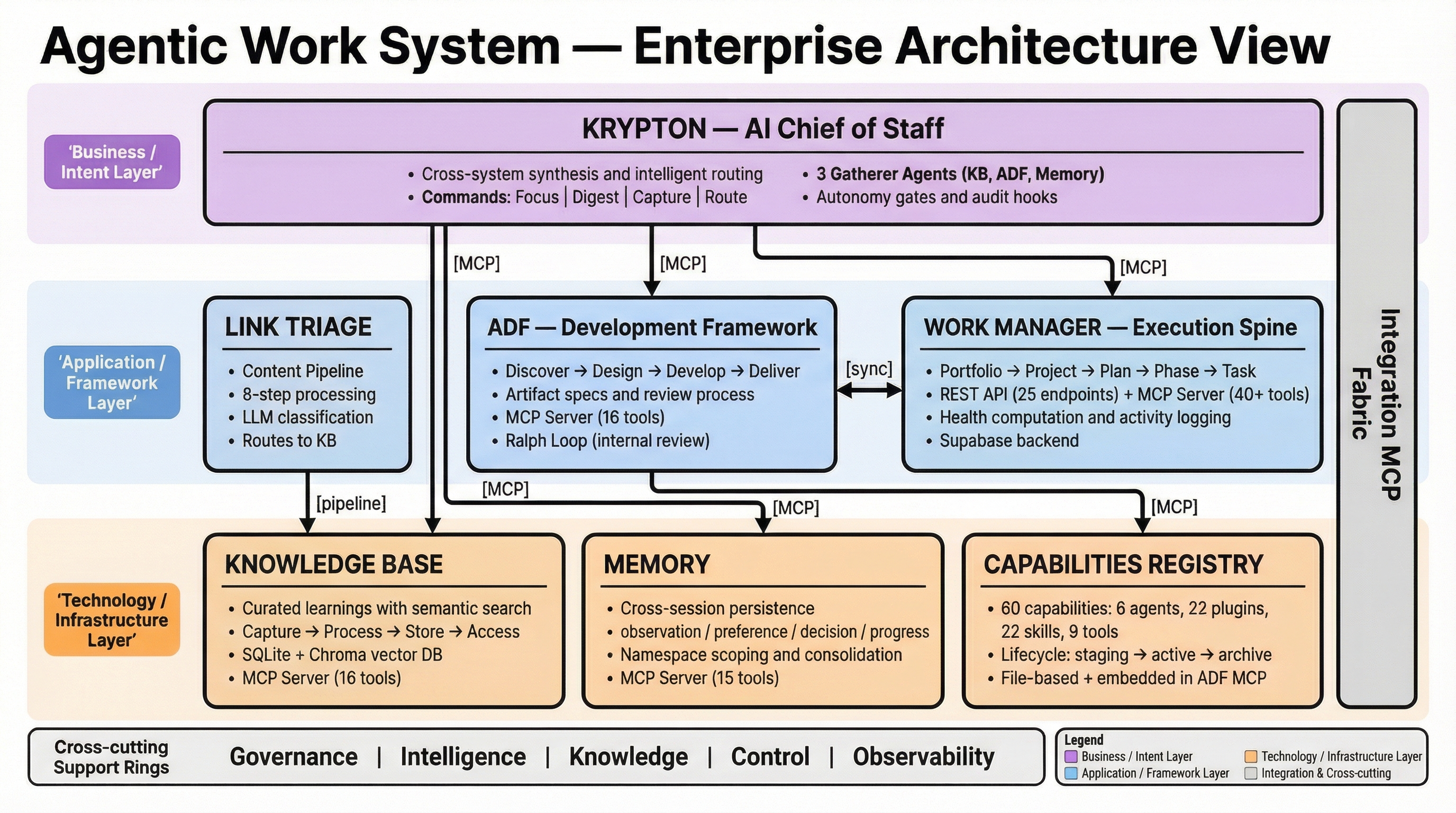
Features
- 13 diagram templates — Architecture (TOGAF), C4 Container, Executive Infographic, data flow, component, sequence, integration, infographic, generic, product roadmap, workstreams, kanban, and brand infographic
- 2 image providers — Google Gemini (recommended), OpenAI (GPT Image)
- Auto provider selection — Each template recommends the best provider/model for its diagram type
- Template-driven prompts — YAML templates with hex-coded color systems, explicit rendering instructions, and layout rules
- Style references — Feed a visual example to guide output consistency (Gemini)
- Cost tracking — SQLite-backed usage and cost reporting
- Cross-client — Works with Claude Code, Claude Desktop, Codex CLI, Gemini CLI via stdio transport
Quick Start
1. Install
pip install diagram-forge
Or from source:
git clone https://github.com/jessepike/diagram-forge.git
cd diagram-forge
pip install -e ".[dev]"
2. Configure a provider
Set at least one API key:
export GEMINI_API_KEY="your-key"       # Google Gemini (recommended)
export OPENAI_API_KEY="your-key"       # OpenAI GPT Image
3. Add to your MCP client
Claude Code (.mcp.json in your project):
{
  "diagram-forge": {
    "command": "python",
    "args": ["-m", "diagram_forge.server"]
  }
}
Claude Desktop (claude_desktop_config.json):
{
  "mcpServers": {
    "diagram-forge": {
      "command": "python",
      "args": ["-m", "diagram_forge.server"]
    }
  }
}
Codex CLI / Gemini CLI — same .mcp.json format as Claude Code.
4. Generate a diagram
Ask your AI client naturally:
"Generate an architecture diagram of a three-tier web app with a React frontend, Node.js API layer, and PostgreSQL database"
Or be more specific:
"Create a TOGAF-style architecture diagram showing our microservices. Use the architecture template, Gemini provider, 16:9 aspect ratio."
MCP Tools
| Tool | Description |
|---|---|
generate_diagram |
Generate a diagram from a text prompt with template and style support |
edit_diagram |
Edit an existing diagram with natural language instructions |
list_templates |
List available diagram templates and their variables |
list_providers |
Show configured providers, API key status, and supported features |
list_styles |
List available style reference images |
get_usage_report |
View generation costs and usage stats by provider, type, or day |
configure_provider |
Set up an API key for a provider (session-only) |
Diagram Types
| Type | Template | Best For |
|---|---|---|
architecture |
Enterprise Architecture (TOGAF) | System architecture, layered designs |
c4_container |
C4 Container Diagram | Software system internals, C4 Level 2 |
exec_infographic |
Executive Infographic | Stakeholder presentations, semantic colors + icons |
data_flow |
Data Flow / Pipeline | ETL pipelines, data movement |
component |
Component Detail View | Service internals, module structure |
sequence |
Sequence Diagram | Request flows, protocol interactions |
integration |
Integration / Connection Map | System connections, API landscape |
infographic |
Infographic / Learning Card | Concept explanations, overviews |
product_roadmap |
Product Roadmap | Phase pipelines, gate icons, status badges |
workstreams |
Workstreams / Priority Lanes | Swimlane planning with status and dependencies |
kanban |
Kanban Board | Three-column task boards with category color bars |
brand_infographic |
Brand Infographic | Investor/marketing slides with brand aesthetic |
generic |
Custom / Freeform | Anything else |
Style References
Feed a visual example to guide output consistency. Gemini supports this natively via multi-image input.
generate_diagram(prompt="...", style_reference="c4-container")
Save your own styles to ~/.diagram-forge/styles/<name>/reference.png with an optional style.yaml for metadata.
Auto Provider Selection
Set provider="auto" (the default) and Diagram Forge picks the best provider based on the diagram type. Each template includes a tested recommendation. Override with provider="openai" or provider="gemini" when you want a specific model.
Claude Code Plugin
This repo includes a Claude Code plugin in diagram-forge-plugin/ that adds a guided UX layer on top of the MCP server:
/diagram:create— Guided diagram creation with context gathering/diagram:iterate— Refine an existing diagram/diagram:usage— View cost report/diagram:templates— Browse available templates- Context-gatherer agent — Automatically explores your project to understand what to diagram
- Diagram intelligence skill — Auto-triggers when you mention diagrams
To use, install the plugin or add the .mcp.json from the plugin directory.
How It Works
- Template selection — Matches your request to one of 13 YAML templates, each encoding proven prompt patterns (color systems, layer organization, legibility rules)
- Prompt rendering — Merges your description with the template, substituting variables and applying style defaults
- Provider dispatch — Sends the engineered prompt to your chosen provider (Gemini or OpenAI)
- Image handling — Saves the generated image, records cost and metadata to SQLite
- Iteration — Edit existing diagrams with natural language instructions via providers that support image editing
Development
# Install dev dependencies
pip install -e ".[dev]"

# Run tests (52 tests)
python -m pytest tests/ -v --cov=diagram_forge

# Lint
ruff check src/ tests/

# Type check
mypy src/

# Test MCP tools interactively
npx @modelcontextprotocol/inspector python -m diagram_forge.server

# Run low-cost model benchmark (dry-run first)
python scripts/eval_diagram_models.py --dry-run --max-cost-usd 5
python scripts/eval_diagram_models.py --execute --providers gemini,openai --resolution 1K --max-cases 6 --max-cost-usd 5
Benchmark and model-refresh docs:
docs/evaluation-runbook.mddocs/model-refresh-process.mdevals/benchmark_v1.yaml
Architecture
src/diagram_forge/
  server.py              # FastMCP server — 7 tools, stdio transport
  models.py              # Pydantic v2 models
  config.py              # YAML + env var config loading
  template_engine.py     # Template loading and prompt rendering
  style_manager.py       # Style reference image management
  cost_tracker.py        # SQLite usage/cost tracking
  providers/
    base.py              # BaseImageProvider ABC
    gemini.py            # Google Gemini
    openai_provider.py   # OpenAI GPT Image
  templates/             # 13 YAML prompt templates
License
MIT
Installing Diagram Forge
This server has no published package — it is built from source. Open the repository and follow its README.
▸ github.com/jessepike/diagram-forgeFAQ
Is Diagram Forge MCP free?
Yes, Diagram Forge MCP is free — one-click install via Unyly at no cost.
Does Diagram Forge need an API key?
No, Diagram Forge runs without API keys or environment variables.
Is Diagram Forge hosted or self-hosted?
Self-hosted: the server runs locally on your machine via the install command above.
How do I install Diagram Forge in Claude Desktop, Claude Code or Cursor?
Open Diagram Forge on unyly.org, pick your client tab (Claude Desktop, Claude Code, Cursor) and press Install — the config is generated automatically, no JSON editing.
Related MCPs
Omni Video
An MCP server that transforms LLM-enabled IDEs into professional video editors by pre-processing footage into text proxies, generating motion graphics via HTML/
 by buildwithtaza
ARA
Generate images, video and audio from any AI agent — one connector.
 by ARA
YouTube
Transcripts, channel stats, search
 by YouTube
EverArt
AI image generation using various models.
 by modelcontextprotocol
Compare Diagram Forge with
Not sure what to pick?
Find your stack in 60 seconds
Author?
Embed badge for your README
Browse similar
All media MCPs