
Distillery
FreeNot checkedTeam knowledge evaporates daily — pairing sessions, debugging context, architectural rationale lost to Slack. Distillery captures it at the point of creation, c

About
Team knowledge evaporates daily — pairing sessions, debugging context, architectural rationale lost to Slack. Distillery captures it at the point of creation, connects it into a living graph, and surfaces it conversationally. It monitors feeds, tracks what matters to your projects, and alerts you before you know to ask. A team brain that learns.
README

Distillery
Team Knowledge, Distilled
Capture, classify, connect, and surface team knowledge through conversational commands.
Documentation · Skills · Quick Start · Roadmap · Slides




What is Distillery?
Distillery is a team knowledge base accessed through Claude Code skills. It refines raw information from working sessions, meetings, bookmarks, and conversations into concentrated, searchable knowledge — stored as vector embeddings in DuckDB and retrieved through natural language. Runs locally over stdio or as a hosted HTTP service with GitHub OAuth for team access.
Distillery captures the highest-value transformation — from noise to signal — and makes it a tool the whole team can use.
Full documentation: norrietaylor.github.io/distillery
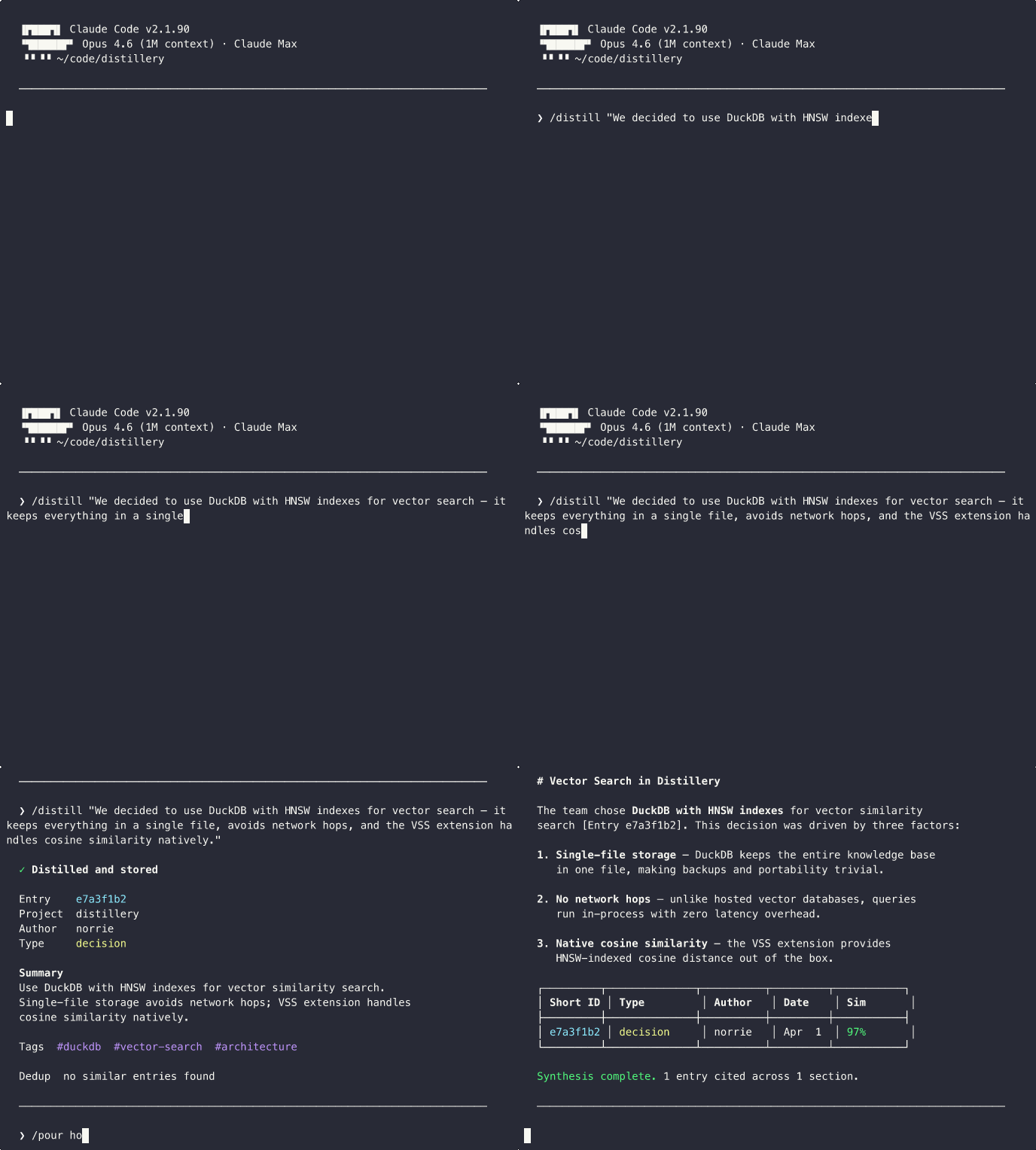
Skills
Distillery provides 15 Claude Code slash commands:
| Skill | Purpose | Example |
|---|---|---|
/distill |
Capture session knowledge with dedup detection | /distill "We decided to use DuckDB for local storage" |
/recall |
Semantic search with provenance | /recall distributed caching strategies |
/pour |
Multi-entry synthesis with citations | /pour how does our auth system work? |
/compass |
Contrast internal knowledge vs. ambient intelligence for a directional assessment | /compass our caching strategy |
/bookmark |
Store URLs with auto-generated summaries | /bookmark https://example.com/article #caching |
/minutes |
Meeting notes with append updates | /minutes --update standup-2026-03-22 |
/classify |
Classify entries and triage review queue | /classify --inbox |
/watch |
Manage monitored feed sources | /watch add github:duckdb/duckdb |
/radar |
Ambient feed digest with source suggestions | /radar --days 7 |
/tune |
Adjust feed relevance thresholds | /tune relevance 0.4 |
/digest |
Team activity summary from internal entries | /digest --days 7 --project myapp |
/gh-sync |
Sync GitHub issues/PRs into the knowledge base | /gh-sync owner/repo --issues |
/investigate |
Deep context builder with relationship traversal | /investigate distributed caching |
/briefing |
Team knowledge dashboard with metrics | /briefing --days 7 |
/setup |
Onboarding wizard for MCP connectivity and config | /setup |
Quick Start
Step 1: Install the Plugin
claude plugin marketplace add norrietaylor/distillery
claude plugin install distillery
This installs all 15 skills. The plugin does not configure an MCP server automatically — run /setup (below) to add one. The recommended setup runs locally via uvx --from 'distillery-mcp[fastembed]>=0.6.0' distillery-mcp — a private, self-contained knowledge base on your machine, with on-device fastembed embeddings (no API key required). Requires Python 3.11+ and uv (install: curl -LsSf https://astral.sh/uv/install.sh | sh).
Step 2 (Optional): Use Jina or OpenAI Instead
The default fastembed provider runs offline with no API key. If you'd rather use a hosted embedding service, set DISTILLERY_EMBEDDING_PROVIDER and provide the matching API key:
# Jina (free tier at jina.ai)
export DISTILLERY_EMBEDDING_PROVIDER=jina
export JINA_API_KEY=jina_...

# Or OpenAI
export DISTILLERY_EMBEDDING_PROVIDER=openai
export OPENAI_API_KEY=sk-...
uvx inherits these from your shell environment. See distillery.yaml.example for the full provider configuration block (including Option C for fastembed model selection).
Restart Claude Code and run the onboarding wizard:
/setup
Try the Hosted Demo (Opt-In)
Want to evaluate without installing anything locally? Configure the hosted demo at distillery-mcp.fly.dev instead of a local server:
claude mcp add distillery --scope user --transport http --url https://distillery-mcp.fly.dev/mcp
Demo Server:
distillery-mcp.fly.devis for evaluation only. Do not store sensitive or confidential data.
See the Local Setup Guide for full configuration options, or deploy your own instance for team use.
Development
uv pip install -e ".[dev]"
# or
pip install -e ".[dev]"
pytest                              # run tests
mypy --strict src/distillery/       # type check
ruff check src/ tests/              # lint
See Contributing for the full guide.
License
Apache 2.0 — see LICENSE for details.
Installing Distillery
This server has no published package — it is built from source. Open the repository and follow its README.
▸ github.com/norrietaylor/distilleryFAQ
Is Distillery MCP free?
Yes, Distillery MCP is free — one-click install via Unyly at no cost.
Does Distillery need an API key?
No, Distillery runs without API keys or environment variables.
Is Distillery hosted or self-hosted?
Self-hosted: the server runs locally on your machine via the install command above.
How do I install Distillery in Claude Desktop, Claude Code or Cursor?
Open Distillery on unyly.org, pick your client tab (Claude Desktop, Claude Code, Cursor) and press Install — the config is generated automatically, no JSON editing.
Related MCPs
Gmail
Read, send and search emails from Claude
 by Google
Slack
Send, search and summarize Slack messages
 by Slack
Runbear
No-code MCP client for team chat platforms, such as Slack, Microsoft Teams, and Discord.
Discord Server
A community discord server dedicated to MCP by [Frank Fiegel](https://github.com/punkpeye)
Compare Distillery with
Not sure what to pick?
Find your stack in 60 seconds
Author?
Embed badge for your README
Browse similar
All communication MCPs