
DontPanic
FreeNot checkedKeep AI coding agents honest. DontPanic is a vendor-neutral meta-harness that makes agents work to a locked plan, has a second model check the work, and asks a

About
Keep AI coding agents honest. DontPanic is a vendor-neutral meta-harness that makes agents work to a locked plan, has a second model check the work, and asks a human before risky steps — with circuit breakers, a local operator console, and a full evidence trail.
README
Trust infrastructure for AI coding agents.
Rival AI models build, review, and verify each other's code — on your machine.
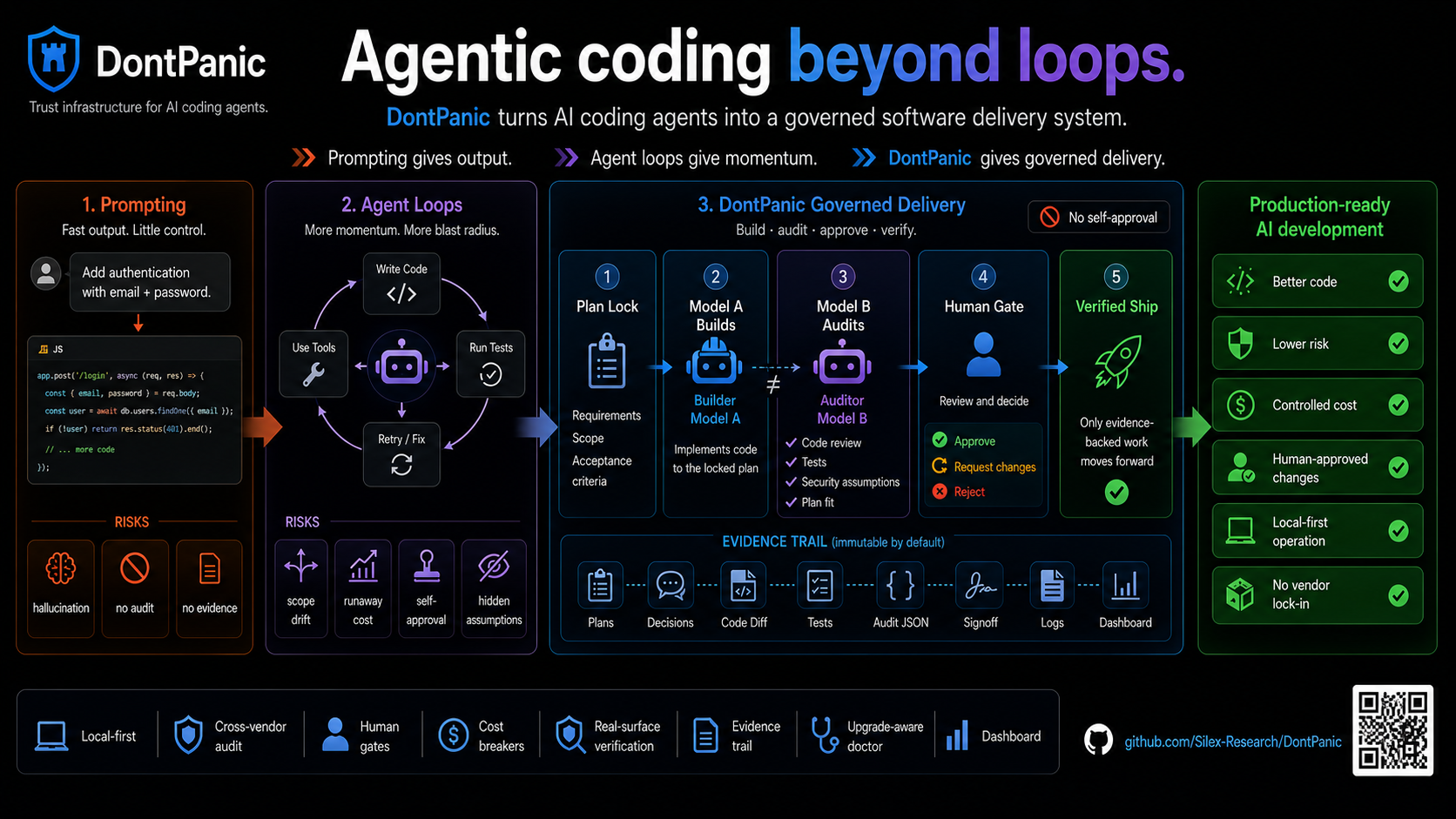
AI agents can write real software now. The open question isn't whether they can produce code — it's whether you should ship what they produce without looking.
DontPanic is a governed software delivery system where rival AI coding agents build, review, and verify each other's work — on your machine. One model builds; a different vendor's model reviews it; the outcome is verified on the real surface, not just asserted; risky steps stop at a human gate; and every decision leaves a receipt. Nothing leaves your machine unless you send it.
Think of it as code review, CI, and an approval queue — but built for the case where the author is an AI.
Never let the same AI that wrote the code be the only AI that approves it.
Local-first and multi-vendor by design: Claude Code, Codex, Gemini, Grok, local models, OpenClaw / Hermes workflows, and any MCP-enabled tool. No vendor lock-in; no data egress you didn't ask for.
Status: public alpha, single-operator. Ready for source installs by people comfortable with local agent CLIs. (Team/RBAC governance is not built yet — the gates today are your gates.)
The problem
An AI coding agent is fast, confident, and tireless. It is also happy to:
- ship broken code and tell you the tests passed
- review its own work and approve it
- miss the security assumption nobody wrote down (the webhook nobody verified)
- spend $40 looping on a test that never goes green
- leave nothing behind that explains who decided what
For a prototype, none of that matters. For software other people depend on, all of it does. DontPanic lives in the gap between two sentences:
"The agent says it's done."
"Should we actually merge this?"
Why this gets harder as the work gets real
Vibe coding is great for demos and side projects. Production is a different animal: hidden dependencies, security requirements, deploy steps, cost limits, and a person who needs to know who approved what.
A strong engineer still gets peer review, QA, a budget, and a deploy gate — not because they're bad at the job, but because complex systems need more than one set of eyes. Autonomous agents are the same, only more so. The more capable the agent, the bigger the blast radius if it's wrong and unsupervised.
Most agent harnesses chase more autonomy. DontPanic spends its effort on the other thing: knowing you can trust the output.
What it actually does
DontPanic wraps an agent run in the controls a senior engineer gets for free.
A plan is locked before any code is written, and its acceptance criteria become
the contract the work is graded against. If a run needs to grow that scope, it
has to say so in writing — a scope-change protocol refuses silent drift, and
every decision lands in an append-only decisions.jsonl ledger.
Then one model builds and a different model family audits: the code, the tests, the security assumptions, the architecture, the plan itself. Different families miss different things, which is the entire reason for using two.
Risky work stops at a human gate with the evidence attached — you approve, request changes, or reject. And a set of circuit breakers watch for waste; in practice you'll hit the budget and no-progress ones, and there's a global kill-switch behind them.
When a plan claims a user-facing outcome — a screen, an API, an agent tool — DontPanic checks at close time that the outcome was actually demonstrated on the real surface, not just asserted in prose or faked with seed data. If the proof isn't there, the close is blocked (or flagged, for lower-stakes plans) until it's shown, explicitly deferred, or a human signs off. Surfaces it can't yet machine-check — today, most human-facing ones — are held as "pending" rather than waved through, so a gap is visible instead of silent.
Everything leaves a trail: transcripts, audit JSON, signoff, gate state, and an
INBOX.md log, all on disk.
A plan isn't bureaucracy here. It's the memory anchor that keeps an agent from slowly drifting off the objective while still sounding coherent. The cross-model audit isn't theater either: a model reviewing its own work tends to rationalize its own mistakes, the same way you can't proofread your own typo.
Capabilities at a glance
Six things DontPanic does, mapped to the controls a senior engineer gets for free:
| Capability | What it means | |
|---|---|---|
| Build | Plan-driven implementation | An agent implements against a locked plan whose acceptance criteria are the contract the work is graded against. |
| Review | Cross-vendor adversarial audit | A different vendor's model audits the code, tests, security assumptions, architecture, and the plan itself. Different model families miss different things. |
| Verify | Outcome demonstrated, not asserted | At close time, a claimed user-facing outcome must be shown on the real surface (screen, API, tool) — not faked with seed data or asserted in prose, or the close is blocked. |
| Govern | Plan lock + sufficiency + human gates | Work can't start until a rival model agrees the plan is complete enough (pre-impl sufficiency gate); scope can't drift silently (scope-change protocol); risky steps stop at a human approve/reject gate; every decision lands in an append-only ledger. |
| Contain | Cost + blast-radius limits | Token budgets and a no-progress breaker stop runaway loops (the "$40 looping on a red test" problem); a global kill-switch sits behind them; runs are sandboxed with forbidden-command-shape blocking and target env/project pinning so an agent can't fire destructive or prod commands. |
| Observe | Receipts + local dashboard | Transcripts, audit JSON, sign-offs, gate state, and an INBOX.md log — all on disk. A local, secret-scrubbed dashboard shows what's running, what's blocked, and what needs you. dontpanic doctor reports instance health and, after an update, what changed and what to run. |
Everything runs locally and works across model vendors — so you keep data sovereignty and avoid model lock-in.
See it in action
$ dontpanic dispatch-from-plan docs/plans/stripe-webhooks --confirm
✓ Plan locked: plan.md, features.json
✓ Dispatching to Claude Code (implementer)
✓ Audit assigned to Codex (auditor)
…
⚠ Gate paused: audit findings ready
  → missing webhook signature verification (security)
  → evidence packaged
  → waiting for your approval
Without DontPanic, that missing signature check merges fast, looks fine, and becomes a production security bug. With it, a second model from another vendor catches it, the run pauses, and a human signs off before the fix proceeds.
As the run goes, DontPanic writes durable artifacts under the plan directory:
| Path | What it is |
|---|---|
audit/<agent>-<role>-i<N>.json |
Per-iteration audit with machine-checkable verdicts |
audit/transcript.md |
Dispatch history: agent, role, tokens, verdict, audit link |
audit/signoff-<plan-id>.json |
Terminal verdict: signoff, reason, next action |
audit/gate-state.json |
Gate-clearance state and active breakers |
INBOX.md |
Append-only operator log: gate pauses, breakers, signoff |
How it works, end to end
- Plan lock — work becomes
plan.md,features.json, anddecisions.jsonl. - Build — an implementer agent executes the plan inside guardrails.
- Cross-model audit — a different model family reviews the result.
- Human gate — risky changes pause with evidence and a clear choice.
- Approve — only approved work moves toward merge.
Why not just Claude Code (or any single agent)?
Claude Code, Codex, Gemini, Grok, and local models make coding faster. They're execution engines, built to generate code and finish tasks. None of them is, by itself, a separation-of-duties system, a budget, or an audit trail.
Better prompts and skills improve execution. They don't create an independent reviewer or organizational trust. In production, smarter agents need stronger guardrails, not fewer.
This also holds for same-vendor multi-agent setups (Claude's Dynamic Workflows or Managed Agents, and their equivalents). Those orchestrate a swarm of one vendor's own sub-agents for speed — impressive, but they all share one model family's blind spots, there's no independent cross-check, and the orchestrator can improvise the plan mid-run. DontPanic takes the opposite stance: a vendor-neutral meta-harness that sits on top of any of those engines, holds the plan, makes a different family audit the work, keeps a human in the loop, and trips a breaker when a run goes sideways. It can even drive the swarm as one of its implementers.
Who it's for
- Claude Code and Codex power users who want production-grade guardrails
- OpenClaw / Hermes operators routing work through AI agents
- teams scaling AI coding without letting one model self-approve
- anyone who's been burned by confident, wrong AI output
What you get
DontPanic is more than a dispatch command. The current platform gives humans and agents one shared operating surface:
| Capability | What it solves | Command surface |
|---|---|---|
| Plan lifecycle | Turns vague work into a locked, auditable contract | dontpanic plan lock, plan audit, plan close |
| Scope governance | Catches over-scope, weak acceptance criteria, and undeclared prereqs before a paid run; flags scope drift and cross-feature edits | dontpanic plan-review, plan-review --since, plan lock --design-review |
| Planning readiness | Shows which plans and features are ready, blocked, or risky to run in parallel | dontpanic next |
| Cross-model dispatch | Separates implementation from approval | dontpanic dispatch-from-plan |
| Human gates | Pauses risky work until the operator reviews evidence | dontpanic approve, resume, ps |
| Experience readiness | Before a plan that touches a user-facing surface can close, checks the consumer outcome was actually proven on a real surface — not just asserted in prose or faked with seed data — and blocks or flags it when it wasn't | (runs inside dontpanic plan close) |
| Local dashboard | A read-only console for What Now, status, capabilities, gates, and scope. It only flags work it can prove is live; anything it can't refresh shows as "could not be refreshed" rather than as fake work | dontpanic dashboard build, open, serve |
| Multi-repo registry | Lets one DontPanic install manage many projects | dontpanic projects add, list, show, remove |
| Capability readiness | Shows which external integrations are ready, missing setup, or blocked | dontpanic capabilities status, setup |
| Integration operator-actions | Runs an integration smoke (render-proof, not just parse-proof) and records operator attestations for steps whose proof lives outside the repo — deploys, external smokes, credential setup — as append-only evidence that flips the integration's status in the console | dontpanic integrations smoke, integrations attest |
| Install reconciliation | Detects stale local setup after the platform evolves | dontpanic reconcile baseline, reconcile check |
| Architecture map | Generates a visual map, keeps it current during dashboard serve, and detects drift after manual edits |
dontpanic architecture regen, status, diff |
| Release-impact advisory | Warns when public docs, changelog, schemas, or onboarding may need updates | dontpanic next, dontpanic plan lock |
| Agent access | Lets Claude Code, Cursor, OpenClaw, Codex, and MCP clients call DontPanic safely | dontpanic manifest, mcp serve |
| State projection | Exposes read-only status for dashboards, agents, and adapters | dontpanic state snapshot, state export-dashboard |
The default posture is local-first and preview-before-mutation. Firebase, Discord, Linear, OpenClaw, and Printing Press are capabilities you opt into; none is required for core use.
60-second start
The command is dontpanic. You need Python 3.10+, git, and at least one local
agent CLI if you want to dispatch real work.
1. Install
git clone https://github.com/Silex-Research/DontPanic.git
cd DontPanic
python3 -m pip install -e ".[dev]"
Confirm the CLI is on your path:
dontpanic --version
dontpanic --help
2. Orient a new agent, then configure roles
A new agent (human or AI) starts by reading the generated operating brief: the operator-vs-worker distinction, the role catalog, and the canonical command flow.
dontpanic agent brief          # the onboarding brief; `dontpanic agent` alone prints it too
dontpanic agent whoami         # classify THIS agent (operator vs registered worker)
dontpanic setup is preview-only by default. It writes no secrets; it stores
agent role names and project runtime pointers only.
dontpanic setup \
  --implementer claude \
  --auditor codex \
  --goal-auditor codex
If the preview looks right, add --yes:
dontpanic setup \
  --implementer claude \
  --auditor codex \
  --goal-auditor codex \
  --yes
Inspect what was written:
dontpanic config show
dontpanic manifest init --yes
dontpanic manifest show --json
Agent CLIs authenticate themselves. DontPanic never stores API keys.
3. Onboard an agent and a repo
DontPanic distinguishes two roles. An operator is a human or interactive
agent that runs DontPanic — locks plans, approves gates, reads guidance. A
worker is an agent DontPanic dispatches to implement or audit (claude,
codex, and so on). A worker has to be a registered executor; an operator-only
agent can't be assigned the implementer or auditor roles.
New agent — read the brief and check readiness:
dontpanic agent brief            # human-readable operating brief
dontpanic doctor --agent         # CLI, manifest, roles, homes readiness
New repo — register and onboard in one step. --onboard writes the managed
AGENTS.md block so a fresh clone is agent-ready immediately:
dontpanic projects add myapp /absolute/path/to/myapp --onboard
dontpanic doctor --project myapp     # this project's onboarding, config, roles
Re-onboarding an already-registered repo needs the explicit overwrite flags
(--onboard --force --yes).
Assign roles (workers must be registered executors) and set project-scoped runtime evidence:
cd /absolute/path/to/myapp
dontpanic project config set roles.implementer claude
dontpanic project config set roles.auditor codex
dontpanic project config set runtime_evidence.web.base_url http://localhost:3000
See what's configured and what still needs setup, across machine and project
scope, classed ok / needs_setup / missing / human_required:
dontpanic config inventory               # current repo / machine scope
dontpanic config inventory --project myapp
When an item needs a human, the response carries exactly one dashboard hint: the active URL if a dashboard is running, otherwise the start command. The full walkthrough lives in docs/GETTING_STARTED.md.
4. Run the doctor
dontpanic doctor --skip-auth
For Firebase or backend projects, authenticate the relevant CLIs and run the full doctor:
gcloud auth login
gcloud auth application-default login
firebase login
dontpanic doctor
5. Open the local dashboard
The dashboard is local-first and does not require Firebase.
dontpanic dashboard build
dontpanic dashboard open
For a live localhost view while you work:
dontpanic dashboard serve
It binds 127.0.0.1 only and runs one server per DontPanic home. A second
serve for the same home is refused with the URL of the one already running, so
open that instead of stacking servers. Pass --replace (alias --force-single)
to stop a stuck server and take over; a crashed server's stale record is pruned
automatically on the next serve. When work is blocked, dontpanic what-now <plan> and dontpanic config inventory tell you whether a dashboard is already
running (and its URL) or print the start command.
6. Try a safe sample plan
This exercises the full plan lifecycle without dispatching any paid agent call. It validates, locks, and closes an exempt infra plan.
python3 claude/shared/schemas/v1.0/validate.py examples/plans/hello-dontpanic
tmp_plan="$(mktemp -d)/hello-dontpanic"
cp -R examples/plans/hello-dontpanic "$tmp_plan"
dontpanic plan lock "$tmp_plan"
dontpanic plan close "$tmp_plan"
The copy keeps your checkout clean. It dispatches no agents and calls no paid model API.
7. Dispatch real work
Plans live under docs/plans/<YYYY-MM-DD-NNN-type-name>/ with plan.md,
features.json, and decisions.jsonl. Validate and lock before dispatch:
python3 claude/shared/schemas/v1.0/validate.py docs/plans/<plan-id>/
dontpanic plan lock docs/plans/<plan-id>/
Before dispatching, ask DontPanic what's actually ready:
dontpanic next
dontpanic next --format=json
dontpanic next reads plan and feature dependencies, gate state, capability
requirements, active supervisors, and release-impact signals. It dispatches
nothing. It tells you which work is ready, which is blocked, where parallel work
might collide, and which docs or changelog surfaces may need attention before
merge.
For a per-stage skill rubric and a ranked set of moves when work is blocked:
dontpanic skills recommend <plan-id>          # which skills to invoke for this stage
dontpanic what-now <plan-id> --feature F001   # ranked moves when blocked
what-now turns a blocked dispatch (quota cooldown, budget ceiling, iteration
cap, a cleared pre_merge signoff, a tripped breaker, a setup gap) into a short
list with an exact command where one is safe to emit. The supervised
implement-then-audit loop is dontpanic orchestrate <plan-id> (preview) or
--confirm (run); the lower-level dispatch-from-plan below is the same engine
with explicit per-step control.
Preview dispatch:
python3 scripts/quota_check.py
dontpanic quota-caps init
dontpanic dispatch-from-plan <plan-id>
dispatch-from-plan is strict dry-run by default. It prints the resolved plan,
feature, tier, target, implementer, auditor, gates, max iterations, and quota
readiness, then exits without running agents.
After you review the preview:
dontpanic dispatch-from-plan <plan-id> --confirm
Clear gates when prompted:
dontpanic ps
dontpanic approve <plan-id> <gate>
dontpanic resume <plan-id> --all
Close the plan after all features pass:
dontpanic plan close docs/plans/<plan-id>/
Prerequisites
Required:
- macOS or Linux with zsh or bash
- Python 3.10+ with
pip - git
Optional, depending on which agents and evidence surfaces you wire:
- Claude Code / claude CLI — a common implementer
- Codex CLI — a common cross-vendor auditor
- gcloud SDK / firebase-tools — only for Firebase-backed projects or backend evidence
- jq — handy for inspecting JSON evidence
- ollama — local OSS models for safety and embeddings
- gemini CLI — multimodal and long-context review
- terminal-notifier — desktop pings;
INBOX.mdis still the durable channel
The editable install pulls runtime Python dependencies from pyproject.toml.
Use the dev extra to run tests and formatting locally.
Run tests
PYTHONPATH=scripts pytest scripts/dontpanic_orchestrate/tests/ -q
ruff check scripts/
ruff format --check scripts/
python3 scripts/sanitization_check.py
Self-contained by default
Install DontPanic and it works on its own. The schemas it validates against are
vendored under claude/shared/, so no separate schema repo is needed to install
or run. External integrations are optional.
| Integration | Kind | What it adds | When you need it |
|---|---|---|---|
| OpenClaw | Runtime | Multi-channel agent UI | A chat surface in front of DontPanic-orchestrated work |
Hermes /goal pattern |
Conceptual | Shared workflow vocabulary | A shared mental model with other agent teams |
| Firebase dashboard adapter | Runtime | Realtime team dashboard | Multi-operator collaboration |
| Printing Press adapters | Runtime | External service evidence providers | OpenAPI-shaped service wrapping |
| agent-conventions upstream | Maintainer | Schema authoring and external validators | Building tools that validate DontPanic artifacts outside DontPanic |
Each integration is opt-in; none installs automatically. The core dontpanic
install includes the CLI, supervisor and dispatch, doctor/init/new, vendored
schemas, validators, MCP server, state projection, static dashboard, docs,
templates, and examples.
Deeper architecture
DontPanic is portable trust infrastructure for bounded agent work. It routes intent through reusable skills and learned memory, turns non-trivial work into machine-checkable plans, runs those plans across model and vendor boundaries, and preserves proof through audits, evidence, signoff, and protected-path checks.
The implementation has four layers, where each layer's output is the next layer's contract:
Identity & governance        ← SOUL.md, AGENTS.md, USER.md
Routing & contracts          ← claude/RESOLVER.md, claude/shared/
Execution units              ← claude/skills/, docs/plans/<id>/
Multi-agent panel & bounds   ← Claude / Codex / Gemini / Grok / OSS, plus circuit breakers
Plans live in docs/plans/<YYYY-MM-DD-NNN-type-name>/ with features.json as
machine-checkable ground truth. Different model families audit each other so no
single vendor self-approves.
The platform thesis is in docs/PLATFORM.md. The plain-English product overview is in docs/PRODUCT.md. The current build plan is in docs/ROADMAP.md.
Vocabulary
See docs/GETTING_STARTED.md for a slower
walkthrough and docs/AGENT_QUICKSTART.md for the
flow an AI caller should follow. If you already use Hermes-style /goal
workflows, DontPanic maps that pattern onto locked plans, implementer and auditor
roles, audit envelopes, and human approval gates.
How agents call DontPanic
An agent should discover DontPanic the way a human does: read the machine-level manifest, show the user the plan, then call the local tool surface. One rule governs all of it:
Always surface the plan to the user before calling dispatch(confirm=true). Do NOT auto-confirm.
That rule lives in ~/.dontpanic/agent-manifest.json and in every caller example
below. The manifest is the first thing an agent should read:
dontpanic manifest show --json
It returns the canonical command surface, including the local MCP server:
{
  "mcp_server": {
    "command": "dontpanic",
    "args": ["mcp", "serve"]
  },
  "supported_commands": ["dispatch-from-plan", "projects", "manifest", "mcp"],
  "safety_rules": [
    "Always surface the plan to the user before calling dispatch(confirm=true). Do NOT auto-confirm."
  ]
}
An interactive agent that can run the CLI should start with the agent surface, which is self-describing and needs no source-reading:
dontpanic agent brief       # generated operating brief — read this first
dontpanic agent commands    # machine command guidance as stable JSON
dontpanic agent guide       # version-matched, offline "start here" guide
dontpanic agent status      # can_operate / can_be_dispatched / can_orchestrate
agent status reports three independent capabilities. Any agent that can run the
commands can operate DontPanic; only agents registered as executors can be
dispatched as workers. If you're an unsupported agent, operate DontPanic —
don't configure yourself as a worker.
See docs/ECOSYSTEM.md for non-goals and caller patterns, docs/DISCOVERABILITY.md for the publish-readiness checklist, and docs/AUTHORING_PLANS.md for the plan-directory contract.
Claude Code
Add DontPanic as a local MCP server, then ask Claude to validate or dispatch a
registered plan. Claude must show the plan and ask before passing confirm=true.
{
  "mcpServers": {
    "dontpanic": {
      "command": "dontpanic",
      "args": ["mcp", "serve"]
    }
  }
}
Example tool flow:
1. call dontpanic.list_projects
2. call dontpanic.validate_plan with {"plan": "2026-05-03-003-feat-agent-access-manifest-thin-mcp"}
3. show the validation result and dispatch preview to the user
4. only after approval, call dontpanic.dispatch with {"plan": "...", "confirm": true}
Cursor
Use the same local MCP process in Cursor's MCP settings. Cursor owns the IDE experience; DontPanic owns plan validation, gates, evidence, and signoff.
{
  "mcpServers": {
    "dontpanic": {
      "command": "dontpanic",
      "args": ["mcp", "serve"]
    }
  }
}
Example tool flow:
1. call dontpanic.validate_plan for the selected plan
2. call dontpanic.status to see active gates and signoff state
3. never call dontpanic.dispatch with confirm=true until the user approves
OpenClaw
OpenClaw should treat DontPanic as a callable software-delivery skill, not a
runtime competitor. The OpenClaw skill reads ~/.dontpanic/agent-manifest.json,
starts the local MCP server, and forwards plan and gate updates back to the user.
{
  "mcpServers": {
    "dontpanic": {
      "command": "dontpanic",
      "args": ["mcp", "serve"]
    }
  }
}
Example tool flow:
1. read ~/.dontpanic/agent-manifest.json or call dontpanic manifest show --json
2. call dontpanic.validate_plan for the plan OpenClaw is about to run
3. surface the plan and gates in the OpenClaw conversation
4. call dontpanic.dispatch only after explicit user approval
Codex CLI
Codex can shell out to the CLI today and use the same MCP shape inside an MCP-aware host. The cross-vendor pattern is the common one: one model implements, another audits, and DontPanic records the evidence.
{
  "mcpServers": {
    "dontpanic": {
      "command": "dontpanic",
      "args": ["mcp", "serve"]
    }
  }
}
Example tool flow:
1. run dontpanic manifest show --json to discover the local command
2. call dontpanic.validate_plan or run dontpanic dispatch-from-plan <plan-id>
3. show the dry-run/preflight output to the user
4. dispatch only when the user authorizes confirm=true
Project layout
DontPanic/
├── SOUL.md                          # values, safety guard
├── AGENTS.md                        # operating manual, role catalog
├── USER.md                          # who you're helping
├── CONTINUOUS_WORK_PROTOCOL.md      # 15-min cycle, tier-based approval matrix
├── MEMORY_ARCHITECTURE.md           # daily logs, long-term memory layout
│
├── claude/
│   ├── RESOLVER.md                  # intent → skill routing with precedence
│   ├── settings.json                # hooks, env, permissions
│   ├── skills/                      # 24 skills (plan-artifacts, brainstorm-gate, …)
│   ├── hooks/                       # session-start, security-gate, …
│   ├── commands/                    # slash commands
│   ├── registry/entities.md         # cross-project service registry
│   └── shared/                      # ← agent-conventions subtree (v1.1.0)
│       ├── conventions/             # firestore-security, error-handling, …
│       ├── resolver/SPEC.md         # RESOLVER.md format definition
│       ├── skill-standard/          # skill conformance, template
│       └── schemas/v1.0/            # plan/features/audit/signoff schemas, Pydantic
│
├── docs/plans/                      # directory plans (executable contracts)
│   └── <YYYY-MM-DD-NNN-type-name>/
│       ├── plan.md                  # frontmatter validates against plan.schema.json
│       ├── features.json            # validates against features.schema.json
│       ├── decisions.jsonl          # append-only decision log
│       ├── audit/*.json             # per-agent audit reports
│       └── evidence/                # small artifacts (large → Firebase Storage)
│
├── capabilities/                    # external capability manifests, setup/verify contracts
│   ├── agent-claude-cli.json         # agent CLI capability example
│   ├── discord-notify.json           # notification sink
│   ├── firebase-dashboard.json       # optional realtime dashboard adapter
│   └── linear.json                   # PM-tool adapter reference
│
├── examples/plans/hello-dontpanic/   # safe lifecycle sample
│
├── scripts/
│   ├── dontpanic_orchestrate/        # supervisor runtime, CLI package
│   ├── bootstrap.sh                  # optional GCP/Firebase setup
│   ├── dontpanic_doctor.py           # preflight health checks
│   ├── sanitization_check.py         # sanitization regression guard
│   └── quota_check.py                # LLM tokens → ~/.dontpanic/quota_state.json
│
├── dashboard/                       # operator-local visual console, optional Firebase adapter
│   ├── index.html                   # local dashboard shell
│   ├── pages/                       # What Now, Status, Capabilities, Mission Control, …
│   └── state/                       # generated projections: plans, gates, capabilities, costs, …
│
├── .secrets/                        # gitignored — service account keys (bootstrap --create-key)
├── environments.json                # gitignored; generated from environments.json.example
└── .firebaserc                      # gitignored; generated from .firebaserc.example
Architecture in one diagram
SOUL / AGENTS / USER       ← who I am, what I can do, who I serve
        ↓
RESOLVER + claude/shared/  ← which skill fires, by which rules
        ↓
skills/ + registry/        ← unit of work, plus cross-project knowledge
        ↓
plans/ + features.json     ← executable contract for any non-trivial work
        ↓
Claude / Codex / Gemini / Grok / OSS  ← the panel that implements and audits
        ↓
CAWP tiers + quotas + dashboard       ← the throttle and the readout
Full design in docs/plans/2026-04-19-001-infra-cross-agent-orchestration/plan.md.
Two-axis billing
DontPanic tracks cost on two independent axes:
| Axis | Source | Output | Use |
|---|---|---|---|
| GCP $ | Your billing-account BigQuery export | dashboard/state/costs.json |
Cloud-spend dashboard (operator-supplied refresh script; not bundled) |
| LLM tokens | Per-model session logs (Claude, Codex, Gemini, Grok) and an Ollama probe | ~/.dontpanic/quota_state.json |
Circuit breakers defer dispatch when weekly quota nears the cap |
Run python3 scripts/quota_check.py for LLM tokens (every ~30 min during active
work). The GCP $ refresh is operator-specific — project list, app categorization,
and billing-export project all vary — so it isn't shipped as a bundled script.
Setup checklist (running list — what new users need)
This grows as we build. When a feature needs new setup, it lands here.
First-use baseline:
- Editable install from
pyproject.toml - Top-level
dontpanic --helpanddontpanic setup --help - Preview-by-default setup flow
- Global roles config at
~/.dontpanic/config.json - Project config at
<repo>/.dontpanic/dontpanic.json - Agent manifest at
~/.dontpanic/agent-manifest.json - Safe sample plan at
examples/plans/hello-dontpanic/
Supervisor and executor panel (shipped):
- Single-agent and volley dispatch (Claude, Codex, Gemini, Grok, Ollama executors)
- 8 circuit breakers (budget_ceiling, iteration_cap, no_progress, diminishing_returns, convergence_collapse, wall_clock, environmental_blocker, global_circuit_breaker)
- Vendor-native quota tracker (
scripts/quota_check.pyv2 schema) - Operator caps and Claude calibration (
~/.dontpanic/quota_caps.json,~/.dontpanic/quota_calibration.json) - Engagement surface (
INBOX.md,signoff-<plan-id>.json,transcript.md,gate-state.json) - CLI surface:
dispatch-from-plan,quota-caps,calibrate-claude,approve,resume,ps,claude-touch - Goal Governance V1 lock/close gates (
dontpanic plan lock,dontpanic plan audit,dontpanic plan close) - Runtime evidence collectors for web, iOS, Android, and backend observability
Operator-local prerequisites (per machine):
- Codex / Gemini / Grok CLIs authed (only the agents your plans use)
-
terminal-notifierinstalled (brew install terminal-notifier) for desktop pings — optional; INBOX.md is the durable channel -
~/.dontpanic/quota_caps.jsoninitialized (quota-caps init) and Claude calibrated (calibrate-claude --dashboard-pct N) - Re-calibrate Claude weekly (
quota_check.pywarns at >7 days) - gcloud/firebase authenticated only for Firebase-backed projects or backend evidence capture
- BigQuery billing export configured (manual, Console only) — optional, only for app-level $ tracking
See DontPanic on real repos
docs/showcase/ holds artifacts from running DontPanic's architecture map, strict plan validation, and drift probes against four real checkouts we own. No DontPanic runtime code is copied into any target repo; the showcase is the product surface.
- Visual architecture map of agent-conventions (the shared schema repo)
- Visual architecture map of Glam (largest target — iOS creator hub and commerce)
- DontPanic itself: architecture, plan validation, drift
Regenerate with make showcase (or scripts/showcase.sh). Full index,
per-target regen commands, and the local-integration deferral policy:
docs/showcase/README.md.
Contributing
See CONTRIBUTING.md. For substantial changes, read
AGENTS.md, follow the conventions in claude/shared/conventions/, and write or
update a plan before code.
License
Apache-2.0. See LICENSE.
Installing DontPanic
This server has no published package — it is built from source. Open the repository and follow its README.
▸ github.com/Silex-Research/DontPanicFAQ
Is DontPanic MCP free?
Yes, DontPanic MCP is free — one-click install via Unyly at no cost.
Does DontPanic need an API key?
No, DontPanic runs without API keys or environment variables.
Is DontPanic hosted or self-hosted?
Self-hosted: the server runs locally on your machine via the install command above.
How do I install DontPanic in Claude Desktop, Claude Code or Cursor?
Open DontPanic on unyly.org, pick your client tab (Claude Desktop, Claude Code, Cursor) and press Install — the config is generated automatically, no JSON editing.
Related MCPs
GitHub
PRs, issues, code search, CI status
 by GitHub
Filesystem
Secure file operations with configurable access controls.
Memory
Knowledge graph-based persistent memory system.
Template MCP Server
A CLI tool to create a new Model Context Protocol server project with TypeScript support, dual transport options, and an extensible structure
 by mcpdotdirect
Compare DontPanic with
Not sure what to pick?
Find your stack in 60 seconds
Author?
Embed badge for your README
Browse similar
All development MCPs